1. Introduction
This manual provides comprehensive instructions for the SKMEI 1728 Al-Harameen Prayer Times Clock. This digital watch is designed to assist users with daily prayer routines by displaying accurate prayer times, Qibla direction, and both Hijri and Gregorian calendar dates. It also includes features such as multiple alarms, language selection, and a Quran reading bookmark function.

Figure 1.1: Front view of the SKMEI 1728 Al-Harameen Prayer Times Clock, displaying time and date.
2. Setup
2.1 Initial Power-On and Battery
The SKMEI 1728 clock comes with a CR2032 battery pre-installed. Upon first use, the display should activate automatically. If the display is dim or unresponsive, the battery may need to be checked or replaced.
2.2 Setting Time and Date
- Press and hold the MODE button to enter the settings menu.
- Use the ADJUST button to navigate through time, date (Gregorian/Hijri), and year settings.
- Use the SET button to change the values for each field.
- Press MODE again to confirm and exit the setting mode.
2.3 City Selection for Prayer Times
The clock requires city selection to calculate accurate prayer times. Cities are pre-programmed and listed alphabetically with corresponding codes for ease of adjustment.
- Access the prayer time settings (refer to the specific button sequence in your quick start guide, typically involving the MODE or a dedicated PRAYER button).
- Navigate to the city selection option.
- Browse the list of pre-programmed cities by country and city name.
- Select your desired city using the SET or ADJUST buttons.
- Confirm your selection to update prayer times automatically.
2.4 Language Selection
The clock supports both Arabic and English display languages.
- Enter the system settings menu.
- Locate the 'Language' option.
- Toggle between 'Arabic' and 'English' using the SET button.
- Confirm your choice to apply the language setting.
3. Operating Instructions
3.1 Time Display (12/24 Hour Format)
The clock can display time in either 12-hour (AM/PM) or 24-hour format. This setting can typically be toggled within the general time settings.
3.2 Prayer Times and Azan Alarm
Once your city is set, the clock will automatically display the correct prayer times and adjust daily. An alarm for each prayer will sound automatically according to the calculated time.

Figure 3.1: The SKMEI 1728 watch displaying prayer times, illustrating its primary function.
3.3 Qibla Direction Identification
The watch features an electronic compass to identify the Qibla direction. This function is accessible with a dedicated button press or through a menu option.
- Press the QIBLA button or navigate to the Qibla function in the menu.
- Hold the watch level and allow the compass to calibrate.
- An arrow on the display will indicate the direction of Makkah (Qibla).

Figure 3.2: The watch display showing the Qibla direction indicator.
3.4 Daily Alarm
A regular daily alarm can be set to ring at a specific time. This alarm can also be configured to activate only on working days.
- Enter the alarm settings menu.
- Set the desired alarm time.
- Choose whether the alarm should be daily or on specific days (e.g., working days only).
- Activate the alarm.
3.5 Calendar Display
The watch displays both Hijri and Gregorian calendar dates, including the days of the week. This information is typically visible on the main display or accessible through a dedicated calendar mode.
3.6 Quran Reading Function
The Quran reading function allows you to save the number of the Ayah and Surah you are currently reading, acting as a digital bookmark.
- Access the Quran reading function (refer to your quick start guide for button sequence).
- Input the current Surah and Ayah number.
- The watch will save this position for future reference.
3.7 Backlight
The watch features a clear backlight for improved visibility in low-light conditions. Activate the backlight by pressing the designated LIGHT button.
4. Maintenance
4.1 General Care
- Clean the watch regularly with a soft, dry cloth.
- Avoid exposing the watch to extreme temperatures or direct sunlight for prolonged periods.
- Store the watch in a cool, dry place when not in use.
4.2 Water Resistance
The SKMEI 1728 is designed to be water-resistant. However, it is crucial to not press any buttons while the watch is submerged in water to prevent water ingress and damage to the internal components.

Figure 4.1: The watch demonstrating its water-resistant capability.
4.3 Battery Replacement
The watch uses one CR2032 battery. When the display becomes dim or functions become erratic, it is likely time to replace the battery. It is recommended to have battery replacement performed by a qualified technician to ensure proper sealing and water resistance.
5. Troubleshooting
- Display is dim or blank: Check the battery. Replace the CR2032 battery if necessary.
- Prayer times are incorrect: Ensure the correct city and country are selected in the settings. Verify the time and date settings are accurate.
- Qibla direction is inaccurate: Ensure the watch is held level during calibration. Avoid strong magnetic fields that may interfere with the compass.
- Buttons are unresponsive: Ensure the watch is not in a locked mode. If submerged, ensure no buttons were pressed underwater. Allow the watch to dry completely if it was exposed to water.
- General malfunction: Try performing a soft reset (refer to your quick start guide for specific instructions, usually involves holding multiple buttons). If issues persist, contact customer support.
6. Specifications
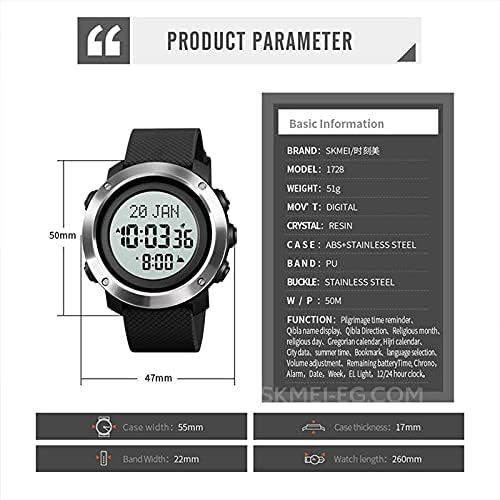
Figure 6.1: Diagram illustrating the dimensions and basic parameters of the SKMEI 1728 watch.
| Feature | Detail |
|---|---|
| Brand | SKMEI |
| Model Number | 1728 |
| Movement Type | Digital |
| Case Material | ABS + Stainless Steel |
| Band Material Type | Rubber (PU) |
| Clasp Type | Buckle |
| Dial Diameter | 55mm |
| Case Thickness | 17mm |
| Band Width | 22mm |
| Band Length | 260mm |
| Product Dimensions | 27 x 2.2 x 1.7 cm |
| Weight | 51 g |
| Water Resistance | 50M (Note: Do not press buttons underwater) |
| Battery Type | 1 x CR2032 (included) |
7. Warranty and Support
For warranty information and customer support, please refer to the documentation provided with your purchase or contact the retailer/manufacturer directly. Ensure you retain your proof of purchase for any warranty claims.


