
1. Introduction
Thank you for purchasing the Tronsmart Element Mega Bluetooth Speaker. This manual provides detailed instructions on how to set up, operate, and maintain your speaker to ensure optimal performance and longevity. Please read this manual carefully before using the product and keep it for future reference.
2. Product Overview
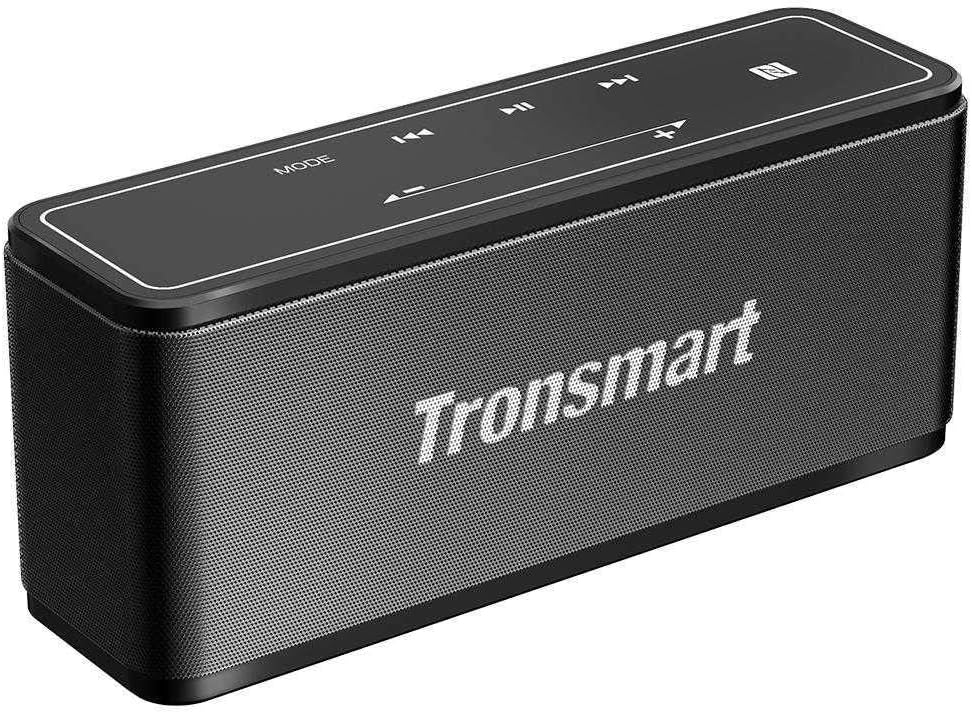
Image Description: A black Tronsmart Element Mega Bluetooth Speaker shown from a slightly elevated angle. The top panel features touch-sensitive controls for 'MODE', volume down (-), previous track (◀◀), play/pause (▶▶), next track (▶▶), volume up (+), and an NFC icon. The front grille displays the 'Tronsmart' logo in white. The speaker has a rectangular shape with rounded edges.
Package Contents:
- Tronsmart Element Mega Bluetooth Speaker
- USB Charging Cable
- AUX Cable
- User Manual
Controls and Ports:
- Power Button: On/Off
- Mode Button: Switch between Bluetooth, AUX, and other modes.
- Volume Buttons (+/-): Adjust volume.
- Track Skip Buttons (◀◀/▶▶): Skip to previous/next track.
- Play/Pause Button (▶▶): Play or pause audio.
- USB-C Charging Port: For charging the speaker.
- AUX-in Port: For wired audio connection.
3. Features
- Brand: Tronsmart
- Shape: Rectangular
- Color: Black
- Port Type: Wireless
- Number of Pieces: 1
- Speaker Type: Bluetooth Speakers
- Product Weight: 662.3 grams
- Connectivity Technology: Wireless
- Compatible with: Smartphones
- Model Number: MEGA-BK
4. Specifications
| Specification | Detail |
|---|---|
| Brand Name | Tronsmart |
| Item Model Number | MEGA-BK |
| ASIN | B098TVNFG6 |
| Color | Black |
| Item Weight | 662.3 grams |
| Package Dimensions | 23 x 8.4 x 7.2 cm |
| Connectivity Technology | Wireless |
| Maximum Speaker Output Power | 30 Watts |
| Audio Output Mode | Stereo |
| Mounting Type | Tabletop |
| Speaker Type | Portable Bluetooth Speaker |
| Special Features | Wireless, Bluetooth |
| Compatible Devices | Smartphone |
| Date First Available | July 7, 2021 |
5. Setup
5.1 Charging the Speaker
- Connect the USB charging cable to the speaker's USB-C port.
- Connect the other end of the USB cable to a compatible USB power adapter (not included) or a computer's USB port.
- The charging indicator light will illuminate. It will turn off or change color once fully charged.
- A full charge typically takes approximately 3-4 hours.
5.2 Powering On/Off
- To Power On: Press and hold the Power button for 2-3 seconds until you hear an audible prompt or see the indicator light turn on.
- To Power Off: Press and hold the Power button for 2-3 seconds until you hear an audible prompt or see the indicator light turn off.
5.3 Bluetooth Pairing
- Ensure the speaker is powered on and in Bluetooth mode (the Bluetooth indicator light will be blinking). If not, press the 'MODE' button to switch to Bluetooth mode.
- Enable Bluetooth on your smartphone or other device.
- Search for available Bluetooth devices and select "Tronsmart Element Mega" from the list.
- Once paired, the Bluetooth indicator light will become solid, and you will hear a confirmation sound.
- The speaker will automatically reconnect to the last paired device when powered on, if the device's Bluetooth is active and within range.
5.4 Connecting via AUX Cable
- Connect one end of the 3.5mm AUX cable to the speaker's AUX-in port.
- Connect the other end of the AUX cable to the audio output jack of your device (e.g., smartphone, MP3 player).
- The speaker will automatically switch to AUX mode, or you may need to press the 'MODE' button to select AUX mode.
6. Operating Instructions
6.1 Music Playback
- Play/Pause: Press the Play/Pause button once.
- Volume Up: Press the '+' button.
- Volume Down: Press the '-' button.
- Next Track: Press the '▶▶' button once.
- Previous Track: Press the '◀◀' button once.
6.2 Mode Switching
- Press the 'MODE' button to cycle through available modes (e.g., Bluetooth, AUX).
6.3 Hands-Free Calling (if applicable)
- Answer Call: Press the Play/Pause button once when an incoming call is received.
- End Call: Press the Play/Pause button once during a call.
- Reject Call: Press and hold the Play/Pause button for 2 seconds when an incoming call is received.
7. Maintenance
- Cleaning: Use a soft, dry cloth to clean the speaker. Do not use abrasive cleaners or solvents.
- Storage: Store the speaker in a cool, dry place away from direct sunlight and extreme temperatures.
- Battery Care: To prolong battery life, fully charge the speaker before first use and at least once every three months if not used regularly. Avoid completely draining the battery.
- Water Resistance: This speaker is not waterproof. Avoid exposure to water or excessive moisture.
8. Troubleshooting
| Problem | Possible Solution |
|---|---|
| Speaker does not power on. | Ensure the battery is charged. Connect to a power source and try again. |
| Cannot pair with Bluetooth device. | Ensure the speaker is in Bluetooth pairing mode. Turn off and on Bluetooth on your device. Forget the speaker from your device's Bluetooth list and try pairing again. Move speaker closer to the device. |
| No sound from speaker. | Check volume levels on both the speaker and your connected device. Ensure the correct input mode (Bluetooth/AUX) is selected. Check AUX cable connection if applicable. |
| Poor sound quality. | Move the speaker closer to the Bluetooth device to avoid interference. Try a different audio source or file. |
| Speaker not charging. | Ensure the charging cable is securely connected. Try a different USB port or power adapter. |
9. Warranty and Support
Tronsmart products are designed to provide reliable performance. For warranty information, please refer to the warranty card included with your product or visit the official Tronsmart website. If you encounter any issues not covered in this manual, please contact Tronsmart customer support for assistance.
Website: www.tronsmart.com
Email: Refer to Tronsmart's official website for support contact details.


