
VGR V-700
VGR V-700 Professional 4-in-1 Epilator and Shaver User Manual
Model: V-700
1. Introduction
Thank you for choosing the VGR V-700 Professional 4-in-1 Epilator and Shaver. This device is designed for efficient hair removal and skin care, offering versatility with its interchangeable heads. Please read this manual carefully before first use to ensure safe and optimal operation. Keep this manual for future reference.
2. Product Overview
The VGR V-700 is a multi-functional personal care device featuring a main unit and four interchangeable heads for various grooming needs. It includes an epilator head, a facial epilator head, a shaver head, and a callus remover head.

Image 2.1: The VGR V-700 main unit with the epilator head attached, showcasing its ergonomic design and power button.
Included Components:
- Main Device Unit
- Epilator Head (for body)
- Facial Epilator Head
- Shaver Head
- Callus Remover Head
- Cleaning Brush
- Storage Bag
- Charging Adapter
- USB Cable

Image 2.2: Packaging illustration detailing the main unit, various interchangeable heads (epilator, facial epilator, shaver, callus remover), cleaning brush, charging adapter, and USB cable.
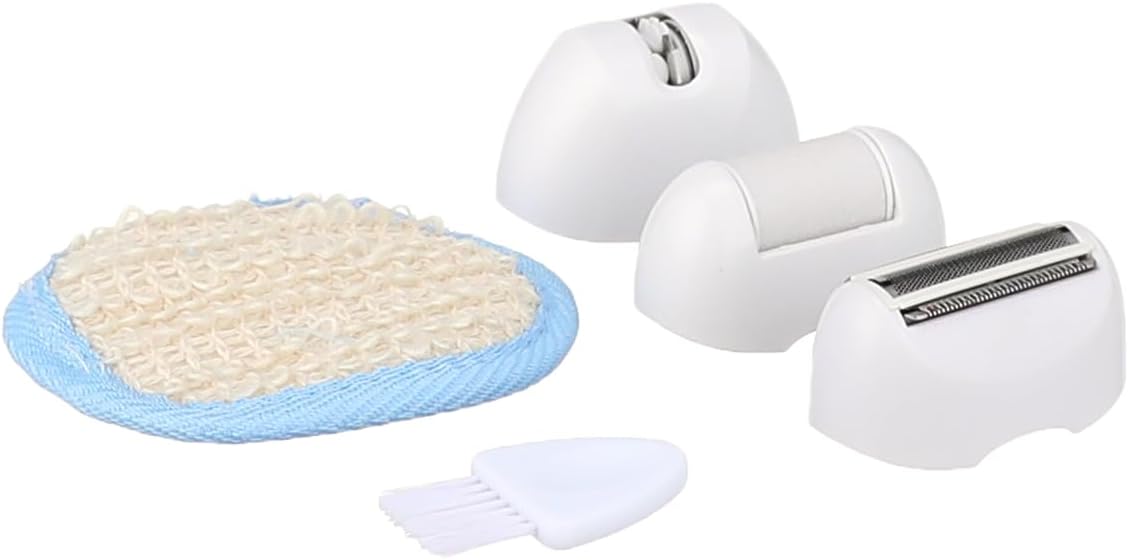
Image 2.3: A close-up view of the VGR V-700 accessories, specifically showing the callus remover head, shaver head, and a small cleaning brush.
3. Safety Information
WARNING: This device is NOT water resistant. Do not use it in the shower or bath, and do not submerge it in water. Clean the device and heads with the provided brush or a dry cloth only. Any contact with water can cause electric shock or damage the device.
- Keep the device out of reach of children.
- Do not use the device on irritated, infected, or broken skin. Consult a doctor if you have any skin conditions.
- Ensure the device is fully charged before use to maintain optimal performance.
- Do not attempt to repair or disassemble the device yourself. Contact qualified service personnel for repairs.
- Use only the original charging adapter and USB cable provided with the device.
- Unplug the device from the power source immediately after charging is complete.
4. Charging the Device
Before first use, or when the device's power is low, fully charge the VGR V-700.
- Connect the USB cable to the charging port on the main device unit.
- Plug the other end of the USB cable into the provided charging adapter, and then into a power outlet.
- The charging indicator light will illuminate, indicating that the device is charging.
- A full charge takes approximately 8 hours.
- Once fully charged, the device provides approximately 50 minutes of operating time.
- Unplug the device from the power source once charging is complete.
5. Assembly and Head Attachment
The VGR V-700 features interchangeable heads for different functions.
- Attaching a Head: Align the desired head with the main device unit. Gently push the head onto the unit until you hear a click, indicating it is securely fastened.
- Detaching a Head: Hold the main device unit firmly. Press the release button (if present, typically on the side or back of the head) and gently pull the head upwards to remove it.
Always ensure the device is turned off before attaching or detaching any heads.
6. Operating Instructions
The VGR V-700 offers two speed settings for customized use.
- Power On/Off: Press the power button located on the front of the device to turn it on or off.
- Speed Settings: The device has two speed settings. Press the power button once for the first speed, and again for the second speed. Press a third time to turn the device off.
6.1. Using the Epilator Head (Body)
For effective hair removal on the body:
- Ensure your skin is clean and dry.
- Hold the device at a 90-degree angle to your skin.
- Move the epilator slowly against the direction of hair growth.
- Do not press too hard; let the epilator do the work.
6.2. Using the Facial Epilator Head
For targeting smaller areas and fine facial hair:
- Cleanse your face thoroughly before use.
- Gently stretch the skin with one hand.
- Move the facial epilator head in small, circular motions or against the direction of hair growth.
- Avoid using on sensitive or irritated areas.
6.3. Using the Shaver Head
For quick and easy hair trimming or shaving:
- Attach the shaver head to the main unit.
- Hold the device flat against your skin.
- Move the shaver in long, even strokes over the desired area.
6.4. Using the Callus Remover Head
For removing rough, dry skin and calluses from feet:
- Ensure feet are clean and dry.
- Gently glide the callus remover head over the hardened skin.
- Do not apply excessive pressure or stay in one area for too long to avoid irritation.
- Stop if you experience any discomfort.
7. Maintenance and Cleaning
Regular cleaning ensures optimal performance and hygiene of your device.
- Turn Off and Detach: Always turn off the device and detach the head before cleaning.
- Cleaning Heads: Use the provided cleaning brush to remove any trapped hairs or skin particles from the epilator, shaver, and callus remover heads. Brush gently.
- Main Unit: Wipe the main unit with a dry, soft cloth. Do not use water or any liquid cleaners.
- Storage: Store the device and its accessories in the provided storage bag in a cool, dry place, away from direct sunlight and moisture.
8. Troubleshooting
If you encounter any issues with your VGR V-700, please refer to the following common problems and solutions:
- Device not turning on:
- Ensure the device is fully charged. Refer to Section 4: Charging the Device.
- Check if the power button is pressed correctly.
- Poor hair removal performance:
- Ensure the head is clean and free of debris. Refer to Section 7: Maintenance and Cleaning.
- Make sure the head is correctly attached.
- Use the appropriate speed setting for your hair type and area.
- Ensure the device is held at the correct angle and moved against hair growth (for epilation).
- Device stops during use:
- The battery might be low. Recharge the device.
- The head might be clogged. Clean it thoroughly.
If the problem persists after trying these solutions, please contact customer support.
9. Specifications
| Model Number | V-700 |
| Brand | VGR |
| Power Source | Battery Powered |
| Number of Speed Settings | 2 |
| Charging Time | Approximately 8 hours |
| Operating Time | Approximately 50 minutes |
| Water Resistance Level | NOT Water Resistant |
| Product Dimensions | 20 x 20 x 20 cm |
| Item Weight | 1 Kilogram |
| Included Components | Main Unit, Epilator Head, Facial Epilator Head, Shaver Head, Callus Remover Head, Cleaning Brush, Storage Bag, Charging Adapter, USB Cable |
10. Warranty and Support
For warranty information and customer support, please refer to the warranty card included with your product or contact the retailer from whom you purchased the device. Keep your proof of purchase for any warranty claims.
Related documentsV-700


Ask a question about this manual
Ask about setup, troubleshooting, compatibility, parts, safety, or missing instructions. Manuals+ will review the question and use this page’s manual context to help answer it.