
PINDOWS PDS-603
PINDOWS PDS-603 Men's Digital Analog Dual Display Sport Watch Instruction Manual
Model: PDS-603
1. Product Overview
The PINDOWS PDS-603 is a versatile digital analog dual display sport watch designed for men and teenagers. It combines robust construction with multiple functions suitable for daily wear and various sports activities.
1.1 Key Features
- Multi-Function: Includes 3 alarm groups, 50M water resistance, single-color backlight, dual time zone, countdown timer, stopwatch, calendar week display, and 12/24 hour format.
- Durability & Quality: Features 2 batteries, imported Japanese movement, and battery drive for precise timekeeping and long battery life. IP vacuum plating material and 304 stainless steel buckle provide strong texture, anti-oxidation properties, and resistance to discoloration or yellowing over time.
- High Brightness & Comfort: High-brightness backlight design and highly transparent acrylic mirror dial window ensure clear readability. The case and strap are made of high-quality rubber and resin for comfortable wear.
- Sport & Daily Use: Fashionable dial design and sporty aesthetic make the watch easily recognizable. Suitable for various occasions including running, swimming, mountaineering, cross-country skiing, holidays, school, travel, and parties.
1.2 Package Contents
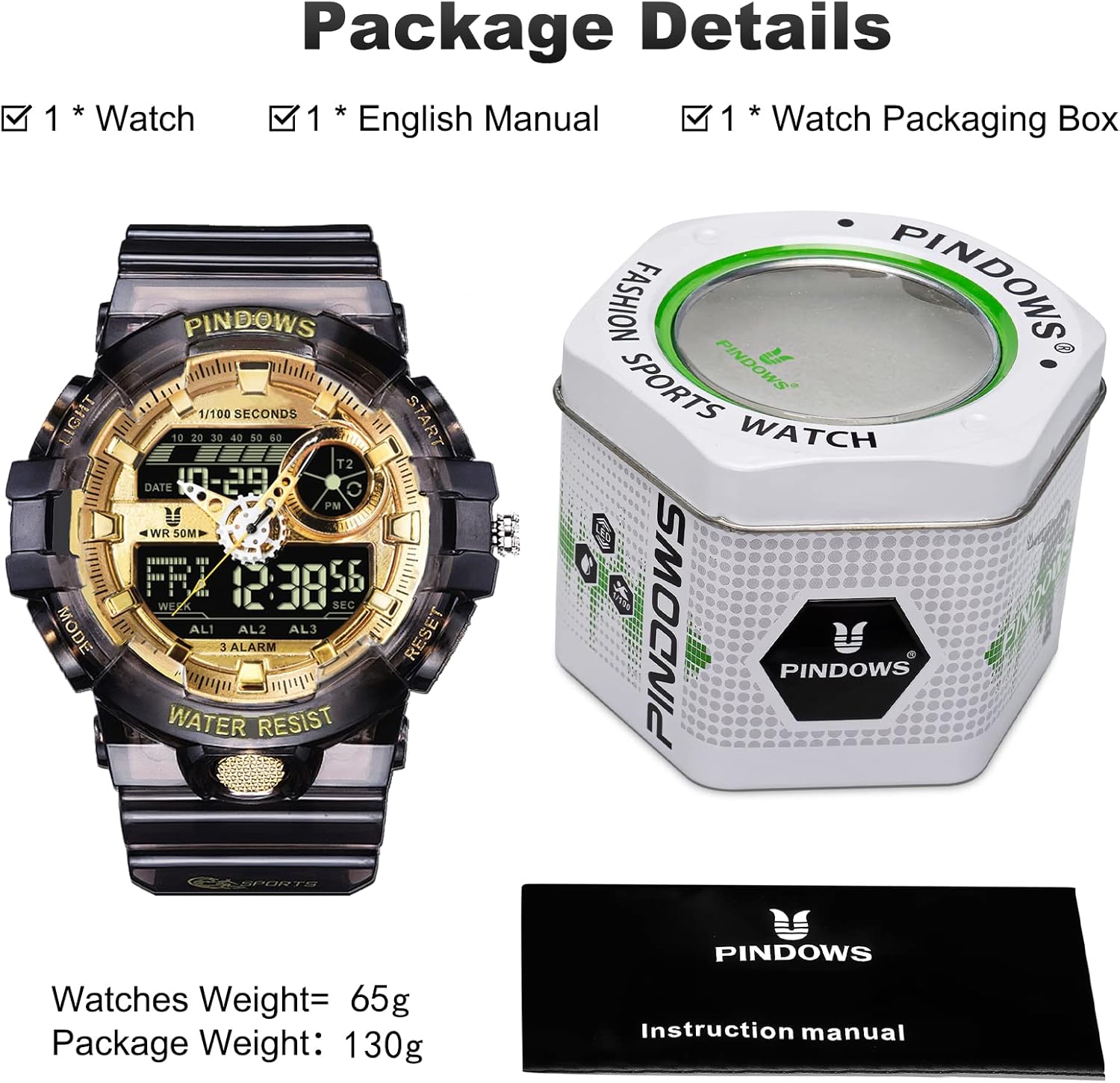
Image: PINDOWS PDS-603 watch, watch box, and instruction manual.
- 1x PINDOWS PDS-603 Wristwatch
- 1x Watch Box
- 1x Instruction Manual (available in English, German, French, Italian, Spanish)
1.3 Important Notes
- Avoid exposing the watch to strong sunlight or fire to prevent damage.
- Do not press any buttons underwater or wear the watch during a hot shower to prevent water mist from entering.
- If not used for an extended period, you may remove the pointer palette to conserve battery life.
2. Initial Setup
2.1 Button Identification

Image: Diagram illustrating the watch's buttons and their corresponding functions (Light, Mode, Reset, Start/Pause, Rotating Crown, Adjustment Button).
- LIGHT Button: Activates the backlight.
- MODE Button: Cycles through different modes (Time, Alarm, Stopwatch, Countdown, Dual Time).
- RESET Button: Used for resetting values or confirming settings.
- START/PAUSE Button: Used to start/pause functions like stopwatch or countdown.
- ROTATING CROWN: Used for setting analog time.
- ADJUSTMENT Button: Used for adjusting settings in various modes.
2.2 Setting Analog Time
- Pull out the Rotating Crown located on the right side of the watch.
- Rotate the crown to adjust the analog hands to the desired time.
- Push the Rotating Crown back in to set the time.
2.3 Setting Digital Time and Date
- Press the MODE Button repeatedly until you reach the Time Setting mode (usually indicated by flashing digits).
- Use the RESET Button to select the digit or setting you wish to adjust (e.g., seconds, hours, minutes, month, date, day of week).
- Use the ADJUSTMENT Button to change the value of the selected digit.
- Continue pressing RESET and ADJUSTMENT until all desired settings are configured.
- Press the MODE Button to exit the Time Setting mode.
3. Operating Instructions
3.1 Mode Selection
Press the MODE Button to cycle through the following functions:
- Time Display (main screen)
- Alarm Setting
- Stopwatch
- Countdown Timer
- Dual Time
3.2 Using the Backlight

Image: The PINDOWS PDS-603 watch displaying its green LED backlight in a dark environment.
Press the LIGHT Button (top left) to illuminate the digital display for a few seconds, allowing for visibility in low-light conditions.
3.3 Alarm Function
The watch supports 3 independent alarm groups (AL1, AL2, AL3).
- Press the MODE Button until you reach the Alarm Setting mode.
- Use the RESET Button to select the alarm group (AL1, AL2, or AL3) and the hour/minute digits.
- Use the ADJUSTMENT Button to set the desired alarm time.
- Press MODE to confirm and exit.
- To activate/deactivate an alarm, navigate to the alarm mode and use the START/PAUSE Button to toggle it on or off.
3.4 Stopwatch Function
- Press the MODE Button until you reach the Stopwatch mode.
- Press the START/PAUSE Button to start the stopwatch.
- Press START/PAUSE Button again to pause the stopwatch.
- Press the RESET Button to reset the stopwatch to zero.
3.5 Countdown Timer Function
- Press the MODE Button until you reach the Countdown Timer mode.
- Use the RESET Button to select the hour/minute/second digits.
- Use the ADJUSTMENT Button to set the desired countdown time.
- Press the START/PAUSE Button to start the countdown.
- The alarm will sound when the countdown reaches zero.
- Press START/PAUSE Button to pause, and RESET Button to reset.
3.6 Dual Time Function
This function allows you to display a second time zone.
- Press the MODE Button until you reach the Dual Time mode.
- Use the RESET Button to select the hour/minute digits.
- Use the ADJUSTMENT Button to set the second time zone.
- Press MODE to confirm and exit.
4. Maintenance and Care
4.1 Water Resistance
The watch is rated for 50M water resistance, making it suitable for swimming and showering. However, it is crucial to observe the following:
- Do not press any buttons underwater. Pressing buttons underwater can compromise the watch's water seal.
- Avoid hot showers or saunas. Hot water and steam can cause internal fogging and damage the watch's seals.
4.2 Cleaning
Wipe the watch regularly with a soft, dry cloth. For stubborn dirt, a slightly damp cloth can be used, followed by immediate drying.
4.3 Battery Conservation
If the watch will not be used for an extended period, you may remove the pointer palette (if applicable and accessible) to conserve battery life. Consult a professional if unsure.
4.4 Environmental Considerations
Avoid exposing the watch to extreme temperatures, strong magnetic fields, or direct impact, as these can affect its accuracy and longevity.
5. Troubleshooting
5.1 Common Issues and Solutions
- Watch not displaying time/functions: Check battery status. If the display is blank or dim, the batteries may need replacement.
- Analog hands not moving: Ensure the rotating crown is fully pushed in. If the issue persists, the battery for the analog movement might be depleted.
- Buttons unresponsive: Ensure the watch is not wet. If it is, dry it thoroughly. If the issue continues, there might be an internal malfunction.
- Fogging inside the dial: This usually indicates a breach in water resistance. Avoid further water exposure and seek professional inspection.
5.2 Contacting Support
If you encounter any issues that cannot be resolved with the above steps, or if you have questions regarding product usage or settings, please contact PINDOWS customer support for assistance. Refer to the Warranty & Support section for contact details.
6. Specifications

Image: Detailed view of the watch's stainless steel back, showing model number PDS-603 and water resistance rating.
| Feature | Detail |
|---|---|
| Model Number | PDS-603 |
| Manufacturer | PINDOWS |
| Target Audience | Men, Teenagers |
| Weight | 66 grams |
| Case Diameter | 5.3 cm (2.09 inches) |
| Dial Case Thickness | 1.8 cm (0.71 inches) |
| Band Length | 17-25 cm (6.7-9.8 inches) |
| Band Width | 2.2 cm (0.86 inches) |
| Band Material | Resin |
| Case Material | IP Vacuum Plating and Resin |
| Back Cover Material | 304 Stainless Steel |
| Buckle Material | 304 Stainless Steel Plating |
| Dial Window Material | Highly Transparent Acrylic Mirror |
| Water Resistance | 50M |
| Batteries | 2 CR2 batteries required |
7. Warranty and Support
7.1 Warranty Information
PINDOWS offers a one-year refund service for this product. Please retain your proof of purchase for warranty claims.
7.2 Customer Support
For any product-related inquiries, technical assistance, or to request updated electronic manuals in German, French, Italian, or Spanish, please contact PINDOWS customer support. Contact details can typically be found on the product packaging or the official PINDOWS website. We are committed to providing a satisfactory solution for our customers.
Related documentsPDS-603

Ask a question about this manual
Ask about setup, troubleshooting, compatibility, parts, safety, or missing instructions. Manuals+ will review the question and use this page’s manual context to help answer it.