
HADEN HDI4510
Haden HDI4510 Integrated Built-In Dishwasher User Manual
Model: HDI4510
Introduction
This user manual provides comprehensive instructions for the installation, operation, maintenance, and troubleshooting of your Haden HDI4510 Integrated Built-In Dishwasher. Please read this manual carefully before using the appliance to ensure safe and efficient operation. Keep this manual for future reference.
Safety Information
Always follow basic safety precautions when using electrical appliances to reduce the risk of fire, electric shock, and injury to persons. This appliance is intended for household use only.
- Ensure the dishwasher is properly grounded.
- Do not operate the dishwasher if it has a damaged power cord or plug.
- Keep children away from the dishwasher, especially when it is operating.
- Only use detergents and rinse aids specifically designed for dishwashers.
- Do not touch the heating element during or immediately after use.
Product Overview
The Haden HDI4510 is a 45cm integrated built-in dishwasher designed for efficient cleaning of everyday dishware and glassware. It features a 10 place setting capacity and a user-friendly touch panel control.
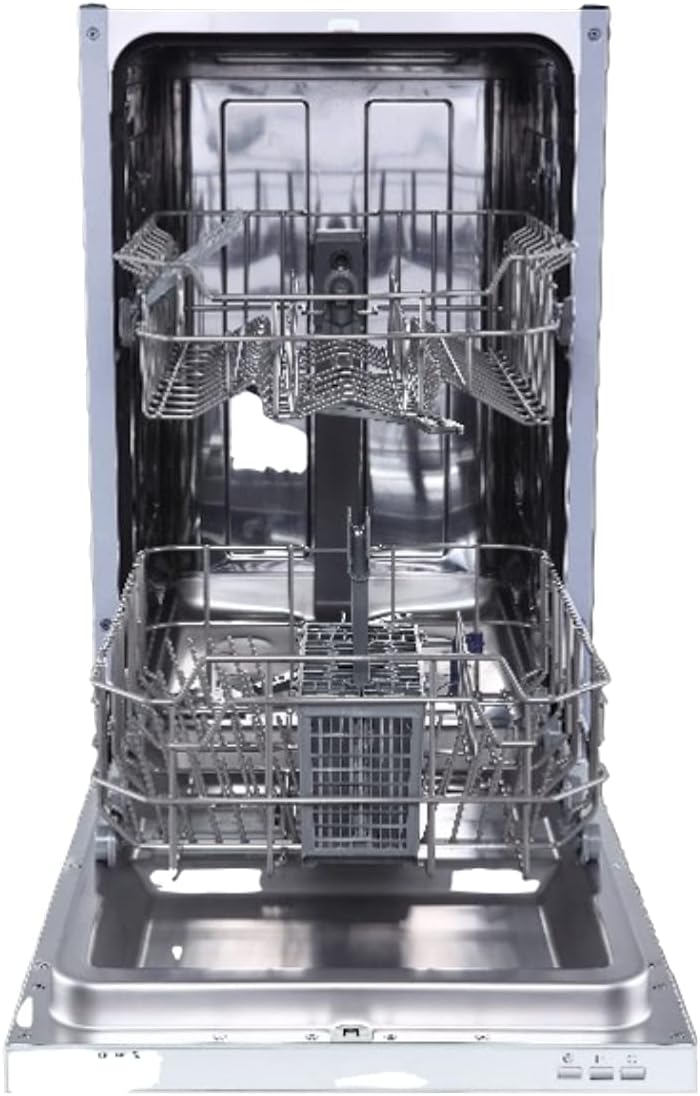
Figure 1: Interior view of the Haden HDI4510 dishwasher, displaying the upper and lower racks for loading dishes. The design allows for efficient placement of various items.

Figure 2: Front view of the Haden HDI4510 integrated dishwasher with its outer panel open, illustrating its design for seamless integration into kitchen cabinetry. This view highlights the mounting points for the custom cabinet door.
Setup and Installation
The Haden HDI4510 is a built-in model and requires professional installation. Ensure all electrical and plumbing connections comply with local codes and regulations.
Pre-Installation Checks:
- Verify power supply: 120 Volts.
- Confirm dimensions for cabinet opening: Approximately 44.8 cm (D) x 55 cm (W) x 81.5 cm (H).
- Ensure water inlet and drain connections are accessible.
Installation Steps (Summary):
- Position the dishwasher in the designated cabinet opening.
- Connect the water inlet hose to a hot water supply.
- Connect the drain hose to the sink drain or a dedicated drain pipe.
- Connect the power cord to a grounded electrical outlet.
- Secure the dishwasher to the cabinet using the provided mounting brackets.
- Install the custom cabinet door panel onto the dishwasher door.
Note: For detailed installation instructions, refer to the separate installation guide provided with your appliance or consult a qualified technician.
Operating Instructions
Loading the Dishwasher:
- Scrape off large food particles from dishes.
- Place larger items in the lower rack and smaller items, glasses, and cups in the upper rack.
- Ensure items do not block the spray arms.
- Load cutlery into the cutlery basket with handles down for forks and spoons, and handles up for knives.
Adding Detergent and Rinse Aid:
- Fill the detergent dispenser with the recommended amount of dishwasher detergent.
- Check the rinse aid dispenser and refill if necessary. Rinse aid helps with drying and prevents spots.
Selecting a Wash Cycle:
The HDI4510 features a Touch Panel control. Press the power button to turn on the appliance. Use the program selection buttons to choose the desired wash cycle. A "Rapid" cycle option is available for quicker washes.
Starting a Cycle:
Close the dishwasher door firmly. Press the Start/Pause button to begin the selected cycle. The dishwasher will automatically pop the door open at the end of the cycle to assist with drying.
Maintenance
Regular maintenance ensures optimal performance and longevity of your dishwasher.
Cleaning the Filters:
- Locate the filter assembly at the bottom of the dishwasher tub.
- Twist and remove the coarse filter, fine filter, and microfilter.
- Rinse all filter components under running water to remove food particles. Use a soft brush if necessary.
- Reassemble the filters and place them back into the dishwasher, ensuring they are securely locked.
- Frequency: Clean filters regularly, ideally after every few washes, or when you notice reduced cleaning performance.
Cleaning the Spray Arms:
- Periodically check the spray arm nozzles for blockages.
- Remove the spray arms and clear any debris from the nozzles using a toothpick or small brush.
- Rinse thoroughly and reattach.
Exterior and Interior Cleaning:
- Wipe the exterior of the dishwasher with a damp cloth. Do not use abrasive cleaners.
- Clean the interior of the dishwasher periodically by running an empty cycle with a dishwasher cleaner.
Troubleshooting
Before contacting service, review the following common issues and their solutions.
| Problem | Possible Cause | Solution |
|---|---|---|
| Dishwasher does not start | Power cord not plugged in; Door not closed properly; Fuse blown/circuit breaker tripped. | Ensure power cord is securely plugged in; Close door firmly until it latches; Check household fuse/reset circuit breaker. |
| Dishes are not clean | Improper loading; Clogged spray arms; Insufficient detergent; Clogged filters. | Reload dishes correctly; Clean spray arm nozzles; Add more detergent; Clean filter assembly. |
| Dishes are wet after cycle | No rinse aid; Rinse aid dispenser empty; Cycle not complete. | Refill rinse aid dispenser; Ensure cycle has fully completed and door has popped open for drying. |
| Unusual noise | Items hitting spray arms; Foreign object in pump. | Rearrange dishes; Inspect pump area for obstructions (refer to service manual if needed). |
Specifications
| Feature | Detail |
|---|---|
| Model Name | HDI4510 |
| Brand | HADEN |
| Installation Type | Built-In |
| Standard Capacity Cycle | 10 Place Settings |
| Product Dimensions (D x W x H) | 44.8 x 55 x 81.5 cm |
| Item Weight | 30 Kilograms |
| Voltage | 120 Volts |
| Cycle Options | Rapid |
| Controls Type | Push Button (Touch Panel) |
| Special Features | Touch Panel, Waterproof |
| Noise Level | 49 dB |
| Efficiency Rating | E |
| Included Components | Dishwasher |
Warranty and Support
Specific warranty details for the Haden HDI4510 dishwasher are typically provided with the product packaging or can be obtained from your retailer at the time of purchase. Please retain your proof of purchase for warranty claims.
For technical support, service, or to inquire about replacement parts, please contact Haden customer service or your authorized service provider. Contact information is usually available on the Haden official website or in the documentation accompanying your appliance.
Related documentsHDI4510


Ask a question about this manual
Ask about setup, troubleshooting, compatibility, parts, safety, or missing instructions. Manuals+ will review the question and use this page’s manual context to help answer it.