1. Introduction
This manual provides instructions for the farbrothersonline Universal Steering Wheel Lock, Model EF043|145. This mechanical anti-theft device is designed to secure your vehicle's steering wheel, acting as a visible deterrent against theft. It is easy to use and installs in seconds.
2. Product Features
- Universal mechanical anti-theft device.
- Easy to use: insert and lock without requiring keys for initial engagement.
- Mounts on the steering wheel in seconds, preventing rotation.
- Provides a strong visual and mechanical deterrent.
- Equipped with a high-quality lock mechanism.
- All contact parts are covered with soft plastic to prevent scratches to the steering wheel and dashboard.
- Distinctive yellow and black color for high visibility.
3. Product Overview
The farbrothersonline Universal Steering Wheel Lock consists of a main locking bar and a key mechanism. It is designed to be highly visible and robust.

Figure 3.1: The farbrothersonline Universal Steering Wheel Lock, shown with its accompanying keys.

Figure 3.2: A close-up view of the main locking mechanism and keyhole.
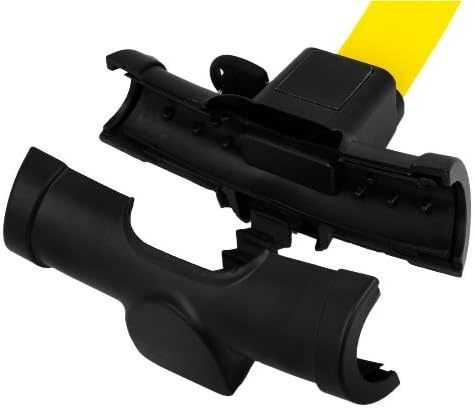
Figure 3.3: The two main components of the steering wheel lock, illustrating how they separate for installation.
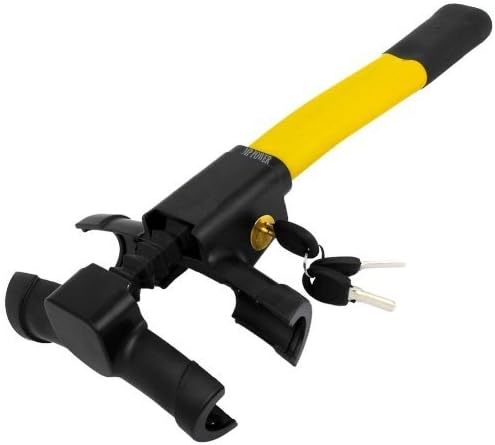
Figure 3.4: The steering wheel lock in its open position, prepared for attachment to the steering wheel.
4. Setup and Installation
- Prepare the Lock: Ensure the lock is in the unlocked position. If it is locked, use one of the provided keys to unlock it.
- Position on Steering Wheel: Place the open ends of the lock around the steering wheel rim. Ensure the soft plastic coverings are in contact with the steering wheel to prevent damage.
- Engage the Lock: Push the two parts of the lock together until they click into place. The lock is designed to engage and secure itself without needing the key at this stage.
- Verify Security: Gently attempt to turn the steering wheel. The lock should prevent the steering wheel from rotating, indicating proper installation.
5. Operation
To use the steering wheel lock:
- To Lock: With the lock in the open position, place it over the steering wheel and push the two ends together until it clicks. The lock will automatically engage.
- To Unlock: Insert the key into the keyhole and turn it to release the locking mechanism. Pull the two ends apart to remove the lock from the steering wheel.
6. Maintenance
To ensure the longevity and proper function of your steering wheel lock:
- Cleaning: Wipe the lock periodically with a soft, damp cloth to remove dust and grime. Avoid harsh chemicals that may damage the plastic or paint.
- Lubrication: If the key mechanism becomes stiff, apply a small amount of graphite lubricant to the keyhole. Do not use oil-based lubricants.
- Inspect Plastic Covers: Regularly check the soft plastic coverings on the contact points for wear or damage. These protect your steering wheel and dashboard from scratches. Replace the unit if these covers are significantly damaged.
- Key Care: Keep your keys safe and avoid bending or damaging them. It is advisable to keep a spare key in a secure location separate from your vehicle.
7. Troubleshooting
- Lock is difficult to engage: Ensure the steering wheel is straight and the lock is properly aligned. Check for any obstructions.
- Key is difficult to turn: Apply graphite lubricant to the keyhole. Ensure the key is fully inserted and not bent. Do not force the key.
- Lock feels loose on the steering wheel: Re-engage the lock, ensuring it clicks firmly into place. If it remains loose, the lock may not be compatible with your steering wheel's thickness, or there might be an issue with the locking mechanism.
8. Specifications
| Attribute | Detail |
|---|---|
| Brand | farbrothersonline |
| Model Number | EF043|145 |
| Style | Steering Wheel Lock |
| Quantity of Items | 1 |
| Number of Pieces | 1 |
| Color | Yellow-Black |
9. Warranty and Support
For any questions, concerns, or support regarding your farbrothersonline Universal Steering Wheel Lock, please contact the manufacturer or seller directly through your purchase platform. Please refer to your purchase documentation for specific warranty terms, as this information is not available in this manual.


