
Zokop BY-70PF
Contents
Zokop BY-70PF Commercial Ice Machine User Manual
Model: BY-70PF
Important Safety Instructions
Read all instructions before using this appliance. Failure to follow these instructions may result in electric shock, fire, or serious injury.
- Ensure the power supply matches the specifications of the ice machine (120V/60Hz).
- Do not operate the machine with a damaged cord or plug.
- Keep ventilation openings clear of obstruction.
- Do not store explosive substances such as aerosol cans with a flammable propellant in this appliance.
- This appliance is intended for commercial use.
- Always unplug the machine before cleaning or maintenance.
Product Overview
The Zokop BY-70PF Commercial Ice Machine is designed for high-volume ice production in commercial settings. It features a stainless steel construction for durability and a transparent cover for easy monitoring. This machine produces clear, hard cube-shaped ice.

Image: Front view of the Zokop BY-70PF Commercial Ice Machine, showing the stainless steel exterior, control panel, and transparent lid.

Image: Side view of the Zokop BY-70PF Commercial Ice Machine with dimensions labeled: 36cm/14.2inch (width), 43cm/16.9inch (depth), and 76cm/30inch (height).
Package Contents:
- 1 x Ice Maker Unit
- 1 x Water Filter
- 1 x Drainage Pipe
- 1 x Ice Shovel
- 1 x Small Accessory Bag
- 1 x User Manual (this document)
Setup and Installation
Proper installation is crucial for the optimal performance and longevity of your ice machine.
Location Requirements:
- Place the ice machine on a flat, stable surface.
- Ensure adequate ventilation around the unit. Maintain at least 5 inches (12.7 cm) of space from walls or other objects.
- Avoid direct sunlight or heat sources.
- Room temperature should be between 50-100°F (10-38°C).
- Ambient humidity should be ≤90%.
Water Connection:
The ice machine requires a continuous water supply and a drainage point.
- Connect the provided water filter to the water inlet.
- Connect the water supply line to the filter and the machine's water inlet.
- Connect the drainage pipe to the machine's drain outlet and route it to a suitable drain. Ensure the drainage pipe has a downward slope for proper water flow.

Image: Step-by-step illustration of connecting the water inlet and filter to the back of the ice machine.
Electrical Connection:
Plug the machine into a grounded 120V/60Hz electrical outlet. Do not use extension cords or adapters.
Operating Instructions
First Use:
- After installation, wait at least 2 hours before plugging in the unit to allow the refrigerant to settle.
- Clean the interior of the ice bin and water tank before first use (refer to Maintenance section).
- Plug in the machine.
Ice Production:
The machine features automatic operation. Once powered on and connected to water, it will begin the ice-making cycle.
- Ice Making Cycle: Approximately 11-18 minutes per batch.
- Ice Shape: Cube, 0.9" x 0.9" x 0.9".
- Ice Thickness Adjustment: The thickness of the ice cubes can be adjusted via the control panel. Refer to the control panel diagram for specific buttons (usually '+' and '-' buttons).
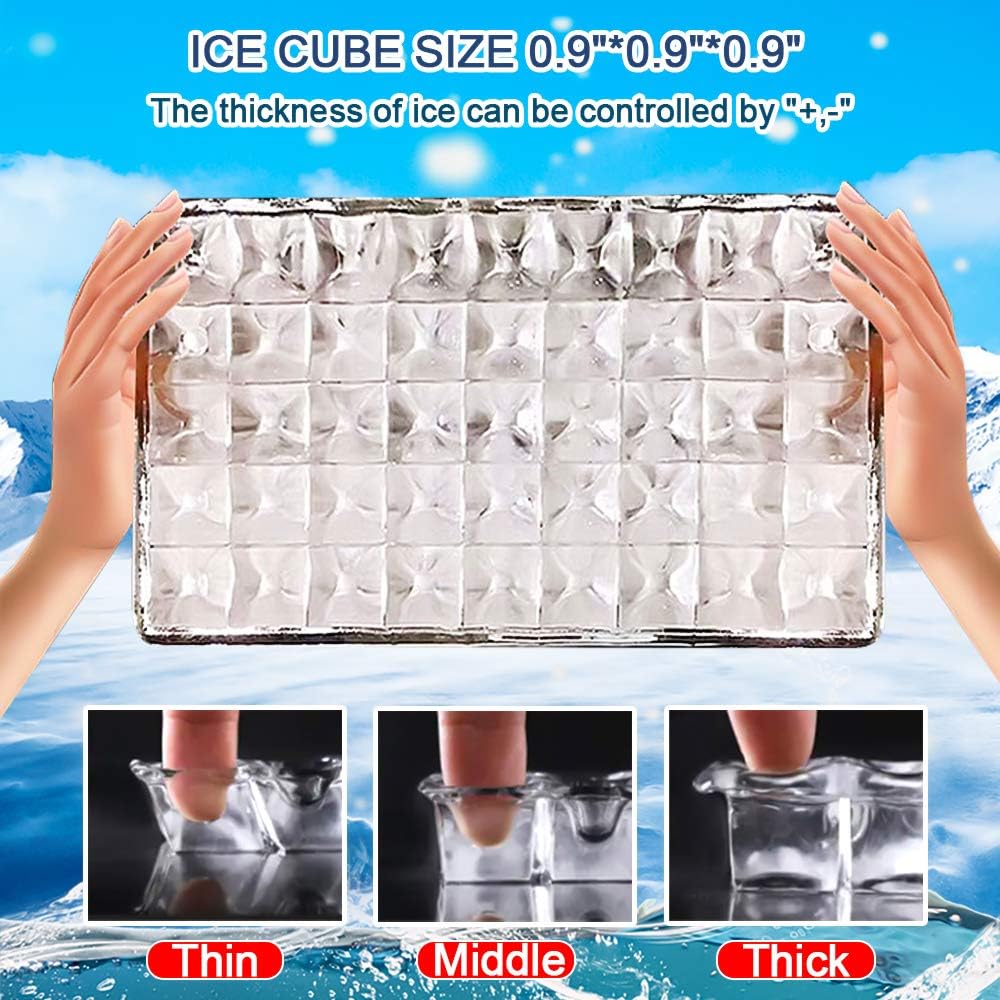
Image: Illustration showing the standard ice cube size and how thickness can be adjusted to thin, middle, or thick.
Control Panel Functions:
The control panel allows for various settings and functions, including:
- Power On/Off: Initiates or stops ice production.
- Ice Thickness Adjustment: Buttons to increase or decrease ice cube thickness.
- Reservation Function: Allows scheduling of shutdown and startup times.
- One-Button Cleaning: Activates an automatic cleaning cycle.
- NANO Blue Light: For illumination and sterilization within the ice bin.
Maintenance and Cleaning
Regular cleaning and maintenance ensure hygienic ice production and extend the lifespan of your machine.
Daily Cleaning:
- Use the ice shovel to remove ice from the storage bin.
- Wipe down the interior of the ice bin with a clean cloth and mild, food-safe detergent. Rinse thoroughly.
- Clean the exterior of the machine with a soft cloth.
Monthly Cleaning:
- Unplug the machine from the power outlet.
- Drain any remaining water from the water tank and reservoir.
- Activate the "One-Button Cleaning" function. Follow the instructions on the display or in the specific manual for this feature.
- For manual deep cleaning, use a solution of water and white vinegar or a commercial ice machine cleaner to clean the water tank, ice tray, and evaporator. Rinse multiple times with clean water.
- Clean the water filter. Replace if necessary (typically every 3-6 months depending on water quality).
- Clean the air filter/condenser fins on the side/back of the machine using a soft brush or vacuum cleaner to ensure proper airflow.
Storage:
If the machine will not be used for an extended period, unplug it, drain all water, clean thoroughly, and leave the lid slightly ajar to prevent odors and mold growth.
Troubleshooting
| Problem | Possible Cause | Solution |
|---|---|---|
| Machine does not turn on | No power supply; Power cord loose; Circuit breaker tripped | Check power outlet; Ensure cord is securely plugged in; Reset circuit breaker |
| No ice production | No water supply; Water filter clogged; Low refrigerant; Ambient temperature too high | Check water connection; Replace water filter; Contact qualified technician for refrigerant issues; Ensure proper ventilation and room temperature |
| Ice cubes are too thin/thick | Ice thickness setting incorrect | Adjust ice thickness using the control panel buttons |
| Machine is noisy | Machine not level; Fan obstruction; Compressor issue | Adjust leveling feet; Clear obstructions from fan; Contact qualified technician |
| Water leakage | Drain pipe clogged or improperly connected; Water inlet connection loose | Check and clear drain pipe; Tighten water inlet connection |
Specifications
| Feature | Specification |
|---|---|
| Brand | Zokop |
| Model Name | BY-70PF (Commercial Ice Maker) |
| Material | Stainless Steel |
| Power Supply | 120V / 60Hz |
| Ice Making Power | 495W |
| Ice Making Capacity | Up to 110 lbs (50 kg) / 24H |
| Ice Storage Capacity | 24 lbs |
| Ice Making Cycle | 11-18 minutes |
| Ice Shape | Cube (0.9" x 0.9" x 0.9") |
| Refrigerant | R134a |
| Foaming Agent | C5H10 |
| Climate Type | SN/N/ST/T |
| Unit Dimensions (L x W x H) | 14" x 17" x 30" (36 x 43 x 76 cm) |
| Weight | 63.5 lbs (28.8 kg) |
| Room Temperature Range | 50-100°F (10-38°C) |
| Ambient Humidity | ≤90% |
Warranty and Support
For warranty information and technical support, please refer to the warranty card included with your product or contact Zokop customer service.
Please have your model number (BY-70PF) and purchase date available when contacting support.
Documents and downloads
Ask a question about this manual
Ask about setup, troubleshooting, compatibility, parts, safety, or missing instructions. Manuals+ will review the question and use this page’s manual context to help answer it.