
Introduction
The Magicshine RAY 2600 Bike Headlight is a high-performance lighting solution designed for various cycling activities, including mountain biking and road cycling. It features a maximum output of 2600 lumens, dual flood and spot beams, and smart sensor technology for adaptive illumination. This manual provides essential information for the safe and effective use of your RAY 2600 headlight.

Image: Magicshine RAY 2600 Bicycle Light in use, highlighting its powerful illumination for night cycling.
What's in the Box
Please check the contents of your package to ensure all items are present:
- 1x RAY 2600 Bike Light with Integrated Battery
- 1x Handlebar Mount (Compatible with Garmin)
- 5x Silicone Straps for Handlebars (Ø25.4mm to Ø35mm & Aero Bars)
- 1x Mount Adapter for Garmin devices (compatible with GoPro)
- 1x Type-C Charging Cable
- 1x Hex Key
- 1x Wired Remote Control
- 1x User Manual

Image: All components included with the Magicshine RAY 2600 Bike Headlight.
Setup
Mounting the Headlight
Attach the appropriate silicone strap to the handlebar mount. Securely fasten the mount to your bicycle's handlebar. The RAY 2600 features a Garmin-style twist-lock mechanism for easy attachment and removal from the mount.

Image: The Magicshine RAY 2600 headlight securely attached to a bicycle handlebar.
Unlocking the Device
Before first use, the RAY 2600 is in a locked state to prevent accidental activation. To unlock, press and hold the power button for 5 seconds until the indicator light turns a constant red. If the button flashes red, the light is still locked.
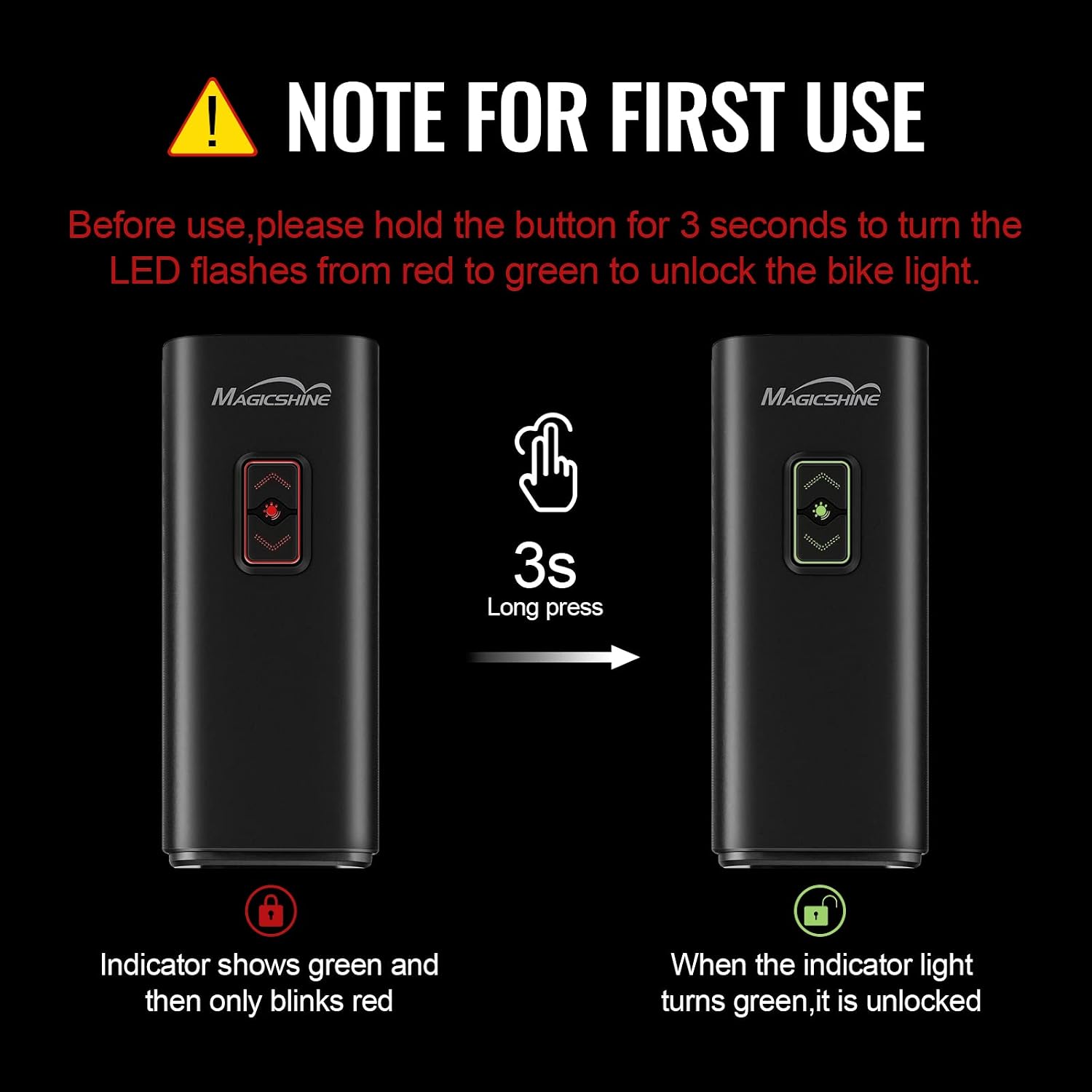
Image: Visual guide for unlocking the RAY 2600 headlight.
Operating Instructions
Power On/Off
- To Power On: Press and hold the power button for approximately 1 second.
- To Power Off: Press and hold the power button for approximately 1 second.
Brightness Control (Normal Mode)
The RAY 2600 features dedicated up/down buttons for brightness control, eliminating the need to cycle through all modes. In Normal Mode, press the UP button to increase brightness and the DOWN button to decrease brightness.

Image: Demonstrating the up/down buttons for brightness adjustment.
Mode Selection (Smart vs. Regular)
When the light is OFF, press both the UP and DOWN buttons simultaneously to enter mode selection. The buttons will turn BLUE. Press UP to select Smart Mode (indicated by a steady blue light) or press DOWN to select Regular Mode (indicated by a flashing blue light). Press both buttons simultaneously again to confirm your selection.
Wired Remote Control
A wired remote control can be plugged into the Type-C charging port for quick access to light controls without removing your hands from the handlebars.
Video: Demonstration of the Magicshine RAY 2600 Wired Remote Control operation.
This video illustrates how to use the wired remote control to operate the RAY 2600 headlight, including turning it on/off and adjusting brightness levels.
Video: General operation demonstration of the Magicshine RAY 2600 headlight.
This video provides a comprehensive overview of the RAY 2600's operational features, including power control and mode switching.
Smart Features
Light Sensor
In Smart Mode, the light output automatically adjusts based on ambient light conditions. During daylight, the light maintains a 50-lumen output for visibility. Upon entering a dark environment (e.g., a tunnel or at night), the brightness automatically increases to provide full illumination.
Vibration Sensor
The integrated vibration sensor detects movement. If no vibration is detected for 3 minutes, the light will enter sleep mode to conserve battery. Any subsequent movement will reactivate the light.

Image: Smart Battery Indicator on the RAY 2600, showing battery status via LED colors.
Charging & Battery
Charging the Headlight
The RAY 2600 is USB Type-C rechargeable. Connect the provided Type-C charging cable to the light's charging port and a suitable USB power source. The battery indicator will show charging status.
Reverse Charging (Power Bank Function)
The 6700mAh battery can also function as a power bank, capable of reverse charging your mobile devices via the Type-C port.

Image: The RAY 2600 acting as an emergency power bank for a smartphone.
Battery Runtime
The 6.7Ah capacity battery provides approximately 1.5 hours of runtime at full 2600 lumen brightness and up to 22 hours in low brightness mode.
Maintenance
- Cleaning: Wipe the light body and lens with a soft, damp cloth. Avoid using harsh chemicals or abrasive materials.
- Storage: Store the light in a cool, dry place when not in use. For long-term storage, ensure the battery is partially charged (around 50%) and recharge every 3-6 months to maintain battery health.
- Water Resistance: The RAY 2600 has an IPX6 waterproof rating, meaning it is protected against high-pressure water jets. It can withstand rain and splashes but should not be submerged in water.

Image: The durable aluminum housing and IPX6 waterproof design of the RAY 2600.
Troubleshooting
- Light Not Turning On: Ensure the light is unlocked (hold power button for 5 seconds until constant red indicator). Check battery level and recharge if necessary.
- Light Turns Off Unexpectedly: In Smart Mode, the vibration sensor will put the light into sleep mode after 3 minutes of no movement. Movement will reactivate it. If this occurs in Regular Mode, check battery level.
- Remote Not Responding: Ensure the remote is securely plugged into the Type-C port. Check the light's battery level.
Specifications
| Feature | Specification |
|---|---|
| Brand | Magicshine |
| Model | RAY 2600 |
| Material | Aluminum |
| Power Source | Battery Powered |
| Max Light Output | 2600 Lumens |
| Water Resistance Rating | IPX6 |
| Mounting Type | Handlebar Mount |
| Number of Settings | 6 |
| Battery Capacity | 6700mAh |
| Charging Port | USB Type-C (supports reverse charging) |

Image: Key specifications and features of the RAY 2600 headlight.
Warranty and Support
For after-sales support, please contact Magicshine directly at: amazon@magicshine.com.
You can also download the Magicshine APP for additional features and support via the iOS/Android App Store.


