Introduction
Thank you for choosing the AKORD B-20 Corner Computer Desk. This manual provides detailed instructions for the assembly, operation, maintenance, and troubleshooting of your new desk. Please read this manual thoroughly before beginning assembly or use to ensure safe and correct installation and to maximize the lifespan of your product.
The AKORD B-20 Corner Computer Desk is a compact and functional furniture piece featuring three drawers, two open shelves, and a cabinet with a hinged door. It is constructed from durable laminated board with a meticulous finish. The drawers operate smoothly on metal slides, and the cabinet door is secured with metal hinges. This desk offers a versatile design, allowing you to choose a configuration where the shelves and drawers are positioned on either the left or right side during assembly.
Safety Information
- Caution: This desk requires assembly. Please follow the provided assembly instructions carefully.
- The desk is compact and weighs approximately 51 kg (112 lbs). It is recommended that two people assemble this product.
- Ensure the desk is stable and securely assembled before placing any items on it or using it to prevent accidents.
- Do not stand or sit on the desk.
- Keep small parts and assembly hardware out of reach of children to prevent choking hazards.
- Use only the provided hardware for assembly. Substituting parts may compromise the desk's stability and safety.
- Place the desk on a level surface to prevent wobbling.
Package Contents
Before beginning assembly, please verify that all components listed below are present and undamaged. If any parts are missing or damaged, please contact customer support.
- All laminated board panels for the desk structure, drawers, shelves, and door.
- 3 sets of metal drawer slides.
- Metal hinges for the cabinet door.
- Assembly hardware kit (screws, dowels, cam locks, etc.).
- Detailed assembly instructions (this manual).

Image: Overview of the AKORD B-20 Corner Computer Desk, showcasing its three drawers, two open shelves, and a cabinet.
Setup and Assembly
The AKORD B-20 desk is designed for straightforward assembly. It is highly recommended to have two people for assembly due to the size and weight of some components. Please follow the step-by-step instructions provided in the included assembly guide.
- Prepare the Area: Clear a spacious, clean, and level area for assembly. Lay down a blanket or cardboard to protect the desk components and your floor.
- Identify Components: Unpack all parts and identify them using the diagrams in the separate assembly guide. Note that the desk allows for the drawer and shelf unit to be assembled on either the left or right side. Decide your preferred configuration before starting.
- Assemble the Main Frame: Follow the instructions to connect the main desk panels using the provided hardware. Ensure all connections are tight but do not overtighten.
- Install Drawer Slides: Attach the metal drawer slides to the desk frame and the drawer boxes as per the instructions. Ensure they are level and aligned for smooth operation.
- Assemble Drawers: Construct the three drawer boxes and insert them into the installed slides.
- Assemble Cabinet: Construct the cabinet section and attach the door using the metal hinges. Adjust hinges for proper door alignment.
- Final Checks: Once assembled, gently move the desk to its final position. Check all connections for tightness and ensure the desk is stable.

Image: Detail of the metal drawer slides, ensuring smooth and durable drawer operation.
Operating Instructions
The AKORD B-20 Corner Computer Desk is designed for daily use in a home or office environment. Its features are straightforward to operate.
- Drawers: The three drawers are equipped with metal slides for smooth opening and closing. To open, gently pull the drawer front. To close, push until it is fully seated. Avoid slamming drawers to prevent damage to the slides and contents.
- Shelves: The two open shelves provide easy access storage for books, documents, or decorative items. Ensure items placed on shelves do not exceed the shelf's depth or height, and distribute weight evenly.
- Cabinet with Door: The cabinet offers concealed storage. To open, gently pull the door. To close, push until it latches. Avoid placing excessively heavy items inside the cabinet to prevent strain on the hinges.
- Weight Capacity: The desk is designed to support standard computer equipment and office supplies. Avoid placing items exceeding 51 kg (112 lbs) total weight on the desk surface. Distribute weight evenly across the desk.
Maintenance
Proper care and maintenance will ensure the longevity and appearance of your AKORD B-20 Corner Computer Desk.
- Cleaning: The desk features an easy-to-clean, anti-dirt surface. Wipe regularly with a soft, dry cloth or a slightly damp cloth. For stubborn dirt, use a mild furniture cleaner. Avoid abrasive cleaners, solvents, or harsh chemicals, as these can damage the laminated surface.
- Spills: Immediately wipe up any spills with a dry cloth to prevent liquid absorption and potential damage to the material.
- Hardware: Periodically check all screws, bolts, and connections to ensure they remain tight. Retighten if necessary, but do not overtighten.
- Sunlight Exposure: Avoid prolonged exposure to direct sunlight, which can cause fading or discoloration of the desk surface.
- Heat and Moisture: Do not place hot items directly on the desk surface. Use coasters or protective pads. Avoid placing the desk in areas with high humidity.
Troubleshooting
If you encounter any issues with your AKORD B-20 Corner Computer Desk, refer to the following common problems and solutions.
| Problem | Possible Cause | Solution |
|---|---|---|
| Desk is wobbly. | Uneven floor; loose connections. | Ensure the desk is on a level surface. Check and tighten all assembly screws and bolts. |
| Drawers do not slide smoothly. | Drawer slides are misaligned or dirty; hardware is loose. | Check that drawer slides are correctly installed and aligned. Clean slides if necessary. Ensure all screws securing the slides are tight. |
| Cabinet door does not close properly. | Hinges are misaligned or loose. | Adjust the cabinet door hinges as per the assembly guide. Tighten hinge screws. |
| Surface damage (scratches, discoloration). | Impact, abrasive cleaning, direct sunlight. | Use protective pads for items. Clean with soft cloth and mild cleaner. Avoid direct sunlight. Minor scratches may be touched up with furniture repair kits. |
If the problem persists or is not listed here, please contact AKORD customer support for further assistance.
Specifications
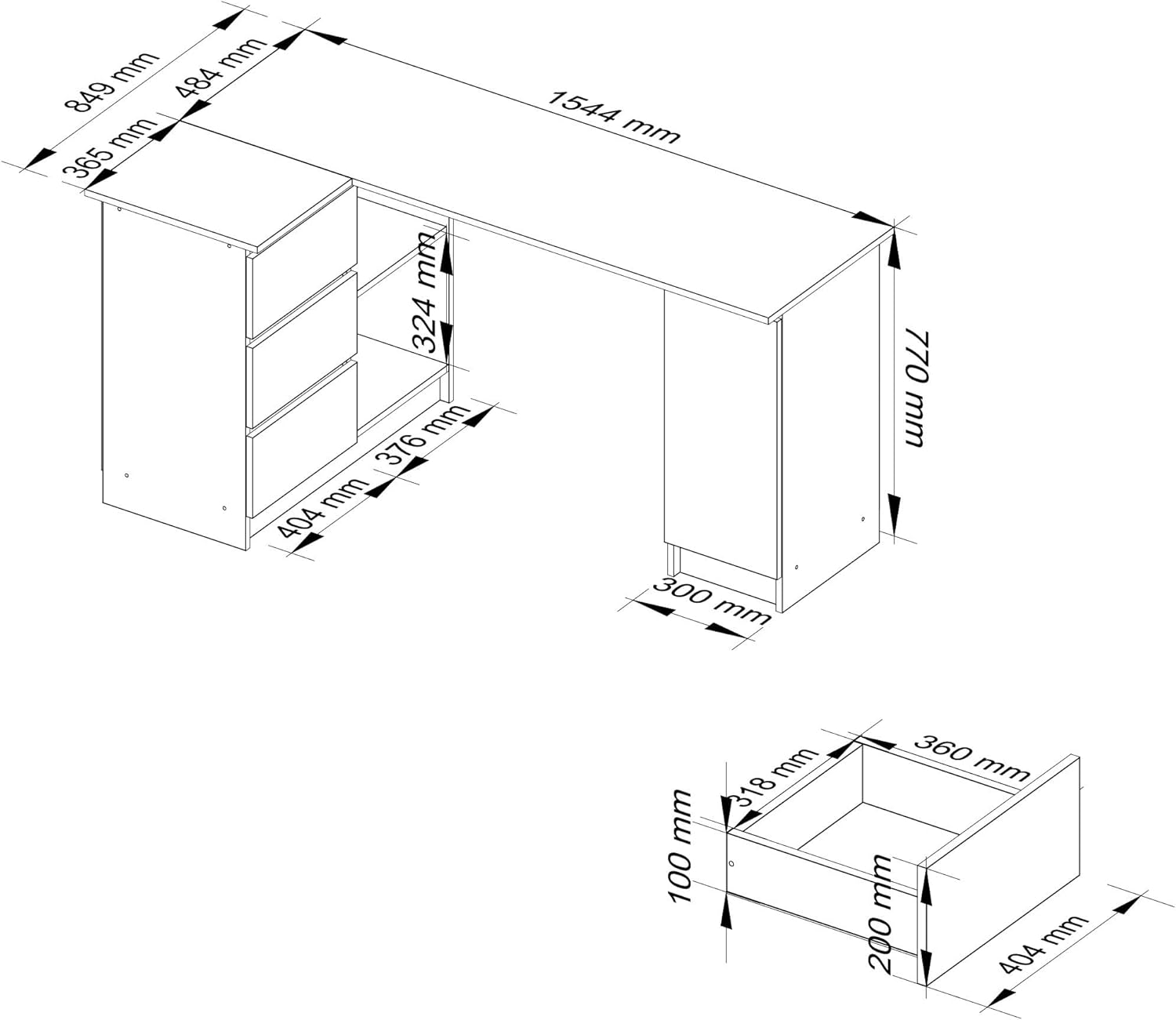
Image: Dimensional diagram of the AKORD B-20 Corner Computer Desk.
| Feature | Detail |
|---|---|
| Brand | AKORD |
| Model Number | IP0PBIUBIA004 |
| Product Dimensions (L x D x H) | 155 x 85 x 77 cm (61 x 33.5 x 30.3 inches) |
| Item Weight | 51 Kilograms (112 lbs) |
| Material | Laminated Board |
| Color | White |
| Desk Design | Computer Desk |
| Shape | L-Shape |
| Storage Features | 3 Drawers, 2 Open Shelves, 1 Cabinet with Door |
| Drawer Mechanism | Metal Slides |
| Edge Finish | ABS Plastic (abrasion-resistant) |
Warranty Information
AKORD products are manufactured to high-quality standards. This product comes with a standard manufacturer's warranty against defects in materials and workmanship. The specific terms and duration of the warranty may vary by region and retailer. Please retain your proof of purchase for warranty claims.
The warranty typically covers manufacturing defects but does not cover damage resulting from improper assembly, misuse, neglect, accidents, normal wear and tear, or unauthorized modifications. For detailed warranty information, please refer to the documentation provided at the time of purchase or contact AKORD customer support.
Customer Support
If you have any questions about your AKORD B-20 Corner Computer Desk, require assistance with assembly, or need to report missing/damaged parts, please contact our customer support team.
- Online Support: Visit the official AKORD website for FAQs, assembly videos (if available), and contact forms.
- Email: [Insert Customer Support Email Here, if available]
- Phone: [Insert Customer Support Phone Number Here, if available]
- When contacting support, please have your product model number (B-20 or IP0PBIUBIA004) and proof of purchase readily available.


