
Dragonhawk DFDCXC
Dragonhawk Wireless Complete Tattoo Kit Instruction Manual
Model: DFDCXC
1. Product Overview
The Dragonhawk Wireless Complete Tattoo Kit provides a comprehensive solution for tattoo artists, from beginners to professionals. This kit features a lightweight, ergonomic tattoo pen with a custom motor and a smart B2 cordless battery, designed for extended, comfortable use. It includes all essential accessories to begin tattooing.

Image 1.1: The complete Dragonhawk Wireless Tattoo Kit, including the tattoo machine, B2 cordless battery, cartridge needles, ink, and other accessories.
Key Features:
- Wireless Operation: Enjoy freedom of movement with the cordless B2 battery.
- Custom Mast Motor: Engineered for powerful, quiet operation with minimal vibration.
- Ergonomic Design: Lightweight (120g) and comfortable for prolonged sessions.
- Smart Battery: B2 battery with Mastlabs cognitive technology automatically recognizes different motors.
- Universal Compatibility: Tattoo pen works with all standard cartridge needles.
2. Safety Information
Read all instructions carefully before using the Dragonhawk Wireless Tattoo Kit. Improper use can lead to injury or damage to the equipment. This product is intended for professional use or under professional supervision. Always prioritize hygiene and safety.
General Safety Guidelines:
- Sterilization: Ensure all equipment that comes into contact with skin is properly sterilized or disposable.
- Personal Protective Equipment (PPE): Always wear sterile gloves and other appropriate PPE during tattooing procedures.
- Bloodborne Pathogens: Be aware of and follow all local regulations and guidelines regarding bloodborne pathogens.
- Power Source: Use only the provided or recommended charging accessories for the B2 battery.
- Storage: Store the kit in a clean, dry, and secure location, out of reach of children.
- Disposal: Dispose of used needles and other biohazardous materials in approved sharps containers.
3. Package Contents
Verify that all items listed below are present in your Dragonhawk Wireless Complete Tattoo Kit:
- 1 x Dragonhawk Tattoo Machine (Pen)
- 1 x B2 Cordless Battery
- 20 x Tattoo Cartridge Needles (various configurations)
- 1 x 5ml Black Tattoo Ink
- 1 x Charging Cable for B2 Battery
- Other essential tattoo accessories (e.g., ink caps, grip tape, practice skin)

Image 3.1: A close-up view of Dragonhawk cartridge needles, which are included in the kit.
4. Setup Instructions
Follow these steps to set up your Dragonhawk Wireless Tattoo Kit for use:
4.1. Charging the B2 Battery
- Connect the charging cable to the B2 cordless battery.
- Plug the other end of the charging cable into a suitable USB power adapter (not included) or a USB port.
- Allow the battery to charge fully before first use. A full charge typically takes a few hours. The battery display will indicate charging status.
- For optimal performance, it is recommended to charge the battery for at least 30 minutes before initial use.

Image 4.1: The lightweight B2 battery, weighing only 53 grams, ready for attachment to the tattoo pen.
4.2. Assembling the Tattoo Pen
- Ensure the tattoo pen is clean and disinfected.
- Carefully twist the B2 cordless battery onto the top of the tattoo pen until securely attached.
- Select the desired cartridge needle. Ensure it is sterile and undamaged.
- Insert the cartridge needle into the front of the tattoo pen, twisting slightly until it locks into place.
- Adjust the needle depth by rotating the grip of the tattoo pen.

Image 4.2: A diagram illustrating the main components of the Dragonhawk tattoo pen, including the Mast Classic Tattoo Machine and the B2 battery, highlighting its easy-using design and Mast Technology Motor.
5. Operating Instructions
Once assembled and charged, your Dragonhawk Wireless Tattoo Kit is ready for operation.
5.1. Powering On/Off
- To power on the machine, press and hold the power button on the B2 battery for a few seconds. The display will illuminate.
- To power off, press and hold the power button again until the display turns off.
5.2. Adjusting Voltage
- Use the '+' and '-' buttons on the B2 battery to increase or decrease the voltage.
- The current voltage setting will be displayed on the screen.
- Recommended operating voltage is typically between 6-9V, but may vary based on needle type, skin, and desired effect.
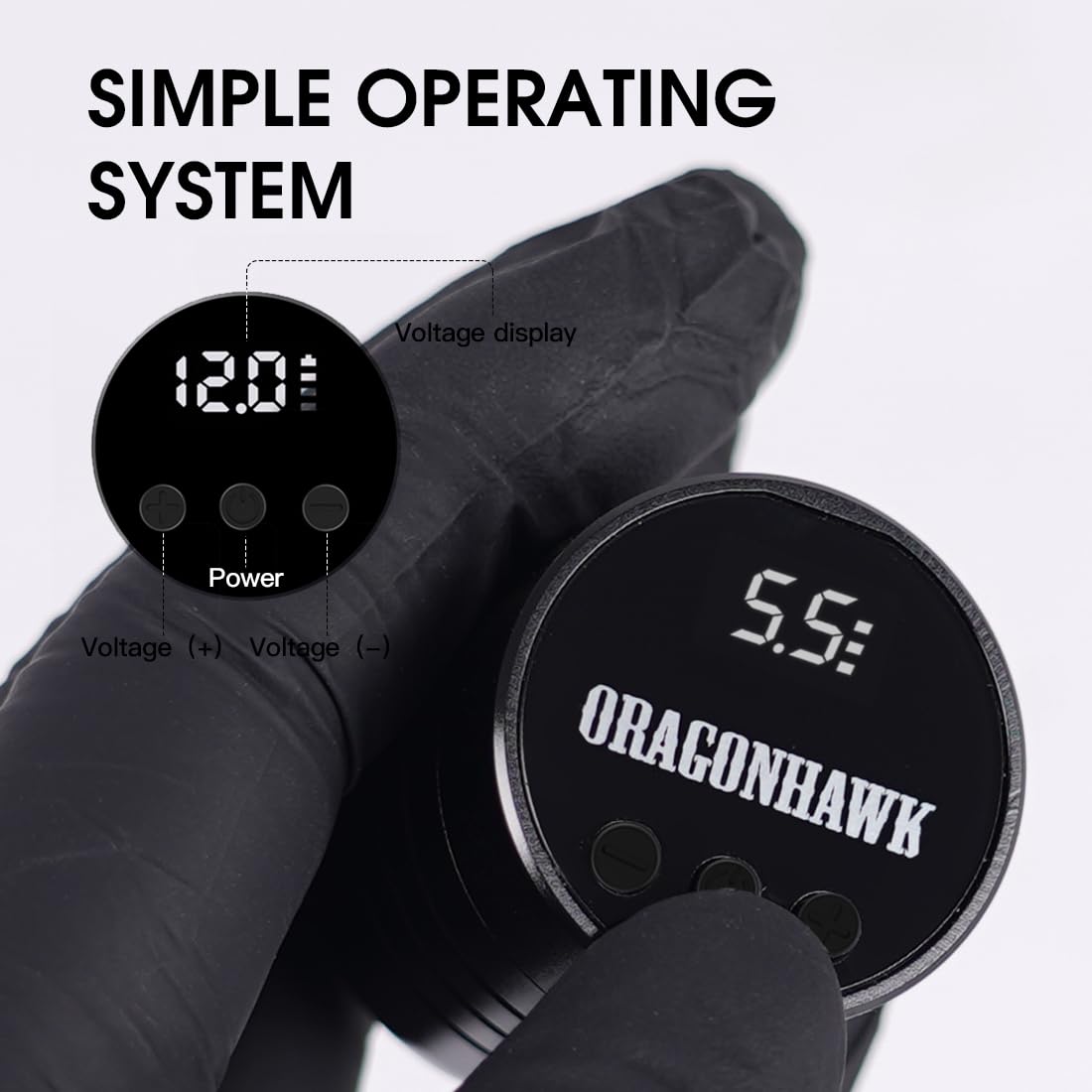
Image 5.1: The B2 battery's simple operating system display, showing voltage adjustment buttons and power indicator.
5.3. Tattooing Techniques
This kit is versatile and suitable for various tattooing techniques:
- Lining: Use appropriate voltage and needle depth for crisp lines.
- Shading: Adjust voltage and hand speed for smooth gradients.
- Color Packing: Ensure consistent saturation by adjusting voltage and technique.
- Blending: Achieve seamless transitions between colors.
- Scalp Micropigmentation (SMP): The precision of the pen makes it suitable for detailed SMP work.
6. Maintenance
Proper maintenance ensures the longevity and optimal performance of your Dragonhawk tattoo kit.
6.1. Cleaning the Tattoo Pen
- After each use, disconnect the battery and remove the cartridge needle.
- Wipe down the exterior of the tattoo pen with a disinfectant wipe or a cloth dampened with an approved cleaning solution.
- Do not immerse the tattoo pen or battery in liquid.
- Ensure no ink or debris enters the motor housing.
6.2. Battery Care
- Avoid overcharging or completely draining the battery.
- Store the battery in a cool, dry place when not in use.
- If storing for an extended period, charge the battery to approximately 50% capacity.
6.3. Storage
- Store all components of the kit in a clean, dry, and organized manner.
- Keep cartridge needles in their sterile packaging until ready for use.
7. Troubleshooting
If you encounter issues with your Dragonhawk Wireless Tattoo Kit, refer to the following common problems and solutions:
| Problem | Possible Cause | Solution |
|---|---|---|
| Machine does not turn on. | Battery is not charged or not properly attached. | Ensure the B2 battery is fully charged and securely twisted onto the pen. Press and hold the power button. |
| Machine stops working during use. | Battery is depleted. | Recharge the B2 battery. Ensure it was fully charged before use. |
| Needle depth cannot be adjusted. | Grip mechanism is stuck or damaged. | Gently try to rotate the grip. If it remains stuck, contact customer support. |
| Machine vibrates excessively or makes unusual noise. | Cartridge needle not properly seated or damaged. Internal motor issue. | Remove and re-insert the cartridge needle. Try a new needle. If the problem persists, contact customer support. |
8. Specifications
- Product Dimensions: 0.98 x 0.98 x 0.98 inches
- Item Weight: 1.65 Pounds (total kit)
- Tattoo Pen Length: 11.7 cm
- Tattoo Pen Weight: 120 g
- Motor: Custom motor
- Operating Voltage: 6-9 V
- Battery Type: B2 Cordless Battery
- Battery Capacity: 1300mAh (estimated, based on similar products)
- Model Number: DFDCXC

Image 8.1: The Dragonhawk tattoo pen, highlighting its custom Mast motor designed for powerful and quiet operation.
9. Warranty and Support
Dragonhawk is committed to providing professional-grade tattoo equipment and excellent customer service.
9.1. Warranty Information
This product is covered by Dragonhawk's standard warranty. For specific warranty terms and conditions, please refer to the documentation included with your purchase or contact Dragonhawk customer support.
9.2. Customer Support
For any inquiries, issues with your order, or technical assistance, please reach out through Amazon's messaging system. Dragonhawk's dedicated customer service team is available to assist you.
You can also visit Youtube.com/@Dragonhawkofficial for video tutorials, setup guides, and professional tips on machine maintenance and technique breakdowns.
Related documentsDFDCXC


Ask a question about this manual
Ask about setup, troubleshooting, compatibility, parts, safety, or missing instructions. Manuals+ will review the question and use this page’s manual context to help answer it.