
Introduction
This manual provides instructions for the safe and effective operation of your Adastra H25B Portable PA System. Please read this manual thoroughly before use and retain it for future reference. The H25B is a compact and portable public address system featuring a built-in rechargeable battery, wireless headset microphone, USB media player, FM radio, and Bluetooth connectivity, designed for various indoor and outdoor applications such as teaching, training, conferences, promotions, and guided tours.
Safety Information
- Read all instructions before operating the unit.
- Do not expose the unit to rain or moisture to prevent fire or electric shock.
- Ensure the power adapter is compatible with your local power supply.
- Do not open the casing; refer all servicing to qualified personnel.
- Avoid placing the unit near heat sources or in direct sunlight.
- Keep the unit away from strong magnetic fields.
- Clean only with a dry cloth.
Package Contents
Verify that all components are present upon unpacking:
- 1 x Adastra H25B Portable PA Unit
- 1 x VHF Wireless Transmitter
- 1 x Headset Microphone
- 1 x Power Adapter/Charger
- 2 x AA Batteries (for transmitter)
- 1 x Shoulder Strap
Product Overview

Image: The Adastra H25B Portable PA unit shown with its wireless transmitter and headset microphone. The PA unit features a speaker grille, control panel, and a carry handle.
Main Unit Controls and Ports
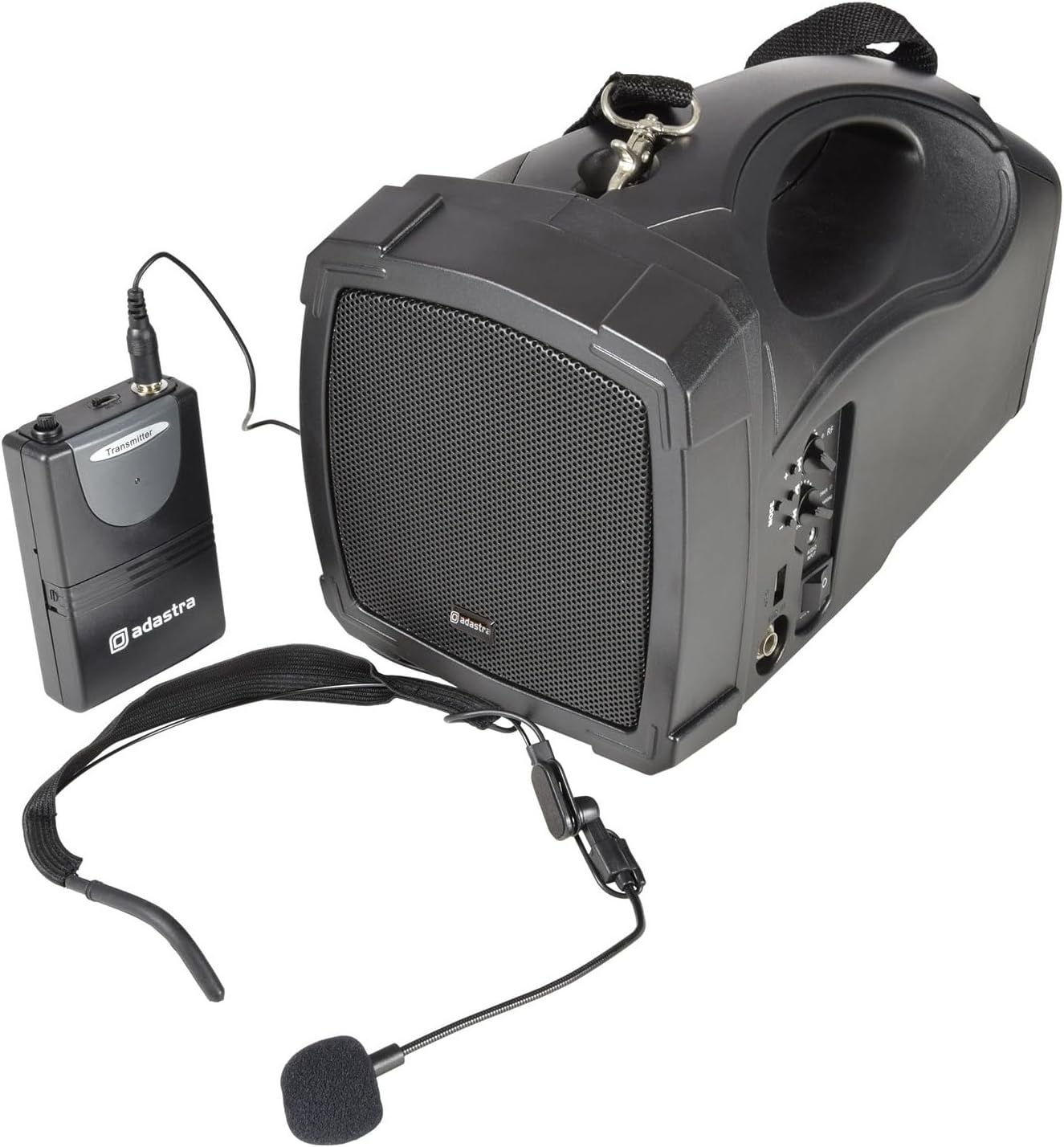
Image: A detailed view of the control panel on the Adastra H25B PA unit, showing knobs for volume and tone, buttons for mode selection, USB port, and power switch.
- Volume Control: Adjusts the overall output volume.
- Tone Control: Adjusts the treble/bass balance.
- Mode Button: Switches between Bluetooth, USB, and FM radio modes.
- USB Port: For connecting USB drives for media playback.
- Power/Charging Indicator: Shows power status and charging activity.
- ON/OFF Switch: Powers the unit on or off.
- Audio Input Jack: For wired microphone or auxiliary input.
Wireless Transmitter and Headset Microphone

Image: The compact Adastra VHF wireless transmitter unit, typically worn on a belt, with its input jack for the headset microphone.

Image: The Adastra headset microphone, designed for hands-free operation, featuring an adjustable boom and foam windscreen.
- Transmitter Input: Connects to the headset microphone.
- Power Switch (Transmitter): Turns the wireless transmitter on/off.
- Battery Compartment (Transmitter): Holds 2 x AA batteries.
Setup
1. Charging the PA Unit
- Connect the provided power adapter to the DC IN port on the PA unit.
- Plug the adapter into a suitable mains power outlet.
- The POWER/CHARGING indicator will illuminate to show charging status.
- Allow approximately 4-6 hours for a full charge before first use. The unit can be operated while charging.
2. Installing Batteries in the Wireless Transmitter
- Open the battery compartment on the VHF wireless transmitter.
- Insert 2 x AA batteries, ensuring correct polarity (+/-).
- Close the battery compartment securely.
3. Connecting the Headset Microphone
- Plug the 3.5mm jack of the headset microphone into the microphone input port on the VHF wireless transmitter.
- Position the headset microphone comfortably on your head, ensuring the microphone is near your mouth.
4. Powering On
- Ensure the VOLUME knob on the PA unit is set to a low level.
- Flip the ON/OFF switch on the PA unit to the 'ON' position. The power indicator will light up.
- Flip the power switch on the VHF wireless transmitter to the 'ON' position. The RF indicator on the PA unit should light up, indicating a successful connection.
Operating
1. Using the Wireless Microphone
- With both the PA unit and transmitter powered on, speak into the headset microphone.
- Slowly increase the VOLUME knob on the PA unit to your desired level.
- Adjust the TONE knob to achieve the preferred sound quality.
2. Bluetooth Connectivity
- Press the MODE button on the PA unit until 'Bluetooth' mode is selected (indicated on the display, if present, or by an audible prompt).
- On your smartphone or other Bluetooth-enabled device, search for available Bluetooth devices.
- Select 'Adastra H25B' (or similar name) from the list to pair.
- Once paired, you can play audio from your device through the PA system.
3. USB Media Playback
- Insert a USB flash drive containing MP3 audio files into the USB port on the PA unit.
- Press the MODE button until 'USB' mode is selected.
- The unit will automatically begin playing audio files from the USB drive. Use the playback controls (if available) to navigate tracks.
4. FM Radio Tuning
- Press the MODE button until 'FM Radio' mode is selected.
- The unit will automatically scan and store available FM radio stations.
- Use the playback controls (if available) to switch between stored stations.
5. Using the Shoulder Strap

Image: A person demonstrating how to carry the Adastra H25B PA unit using the included shoulder strap, allowing for hands-free portability.
Attach the provided shoulder strap to the designated attachment points on the PA unit for convenient portability during use.
Maintenance
Cleaning
- Wipe the exterior of the unit with a soft, dry cloth.
- Do not use abrasive cleaners, waxes, or solvents.
Battery Care
- To prolong battery life, fully charge the internal battery before first use and after each use.
- If the unit will not be used for an extended period, charge it every 3 months to maintain battery health.
- Remove AA batteries from the wireless transmitter if it will not be used for a long time to prevent leakage.
Troubleshooting
| Problem | Possible Cause | Solution |
|---|---|---|
| No sound from PA unit. | Unit is off; Volume too low; Wireless transmitter off; Transmitter batteries dead; Incorrect mode selected. | Ensure PA unit and transmitter are on; Increase volume; Check transmitter batteries; Select correct input mode (e.g., Bluetooth, USB, FM). |
| Wireless microphone not working. | Transmitter off; Transmitter batteries dead; Microphone not plugged in correctly; Out of range. | Turn on transmitter; Replace transmitter batteries; Ensure microphone is securely connected; Move closer to the PA unit. |
| Bluetooth device won't pair. | PA unit not in Bluetooth mode; Device too far; Bluetooth already paired to another device. | Switch PA unit to Bluetooth mode; Ensure device is within range (approx. 10m); Disconnect from other devices and try again. |
| USB playback not working. | USB drive not inserted correctly; Files not in MP3 format; USB drive corrupted. | Reinsert USB drive; Ensure files are MP3; Try a different USB drive. |
| Poor sound quality / crackling. | Low battery; Interference; Volume too high (distortion). | Charge PA unit and replace transmitter batteries; Move away from other electronic devices; Reduce volume. |
Specifications
| Feature | Specification |
|---|---|
| Output Power | 25 Watts |
| Connectivity Technology | Wireless, USB, Bluetooth |
| Audio Input | Bluetooth, USB, Microphone (VHF wireless) |
| Power Source | Battery Powered (built-in rechargeable) |
| Item Dimensions (L x W x H) | 41.5 x 19 x 22.5 cm |
| Item Weight | 2.92 Kilograms |
| Mounting Type | Tabletop Mount |
| Compatible Devices | Laptop, Smartphone |
| Number of Channels | 1 |
| Part Number | 952.412UK |
Warranty and Support
Warranty
This product is covered by a standard manufacturer's warranty. Please refer to the warranty card included with your purchase or contact your retailer for specific terms and conditions.
Support
For technical assistance, troubleshooting beyond this manual, or warranty claims, please contact your retailer or visit the official Adastra website for support resources and contact information.


