
1. Safety Information
Please read all safety instructions before using the product to ensure safe operation and prevent damage.
- Keep the product away from water and moisture.
- Do not attempt to disassemble or modify the product. This may void the warranty and cause damage.
- Use only the provided or recommended accessories.
- Store the product in a cool, dry place when not in use.
2. Package Contents
Verify that all items are present in the package:
- KIWI design K2 Comfort Head Strap for Oculus/Meta Quest 2
- User Manual (this document)
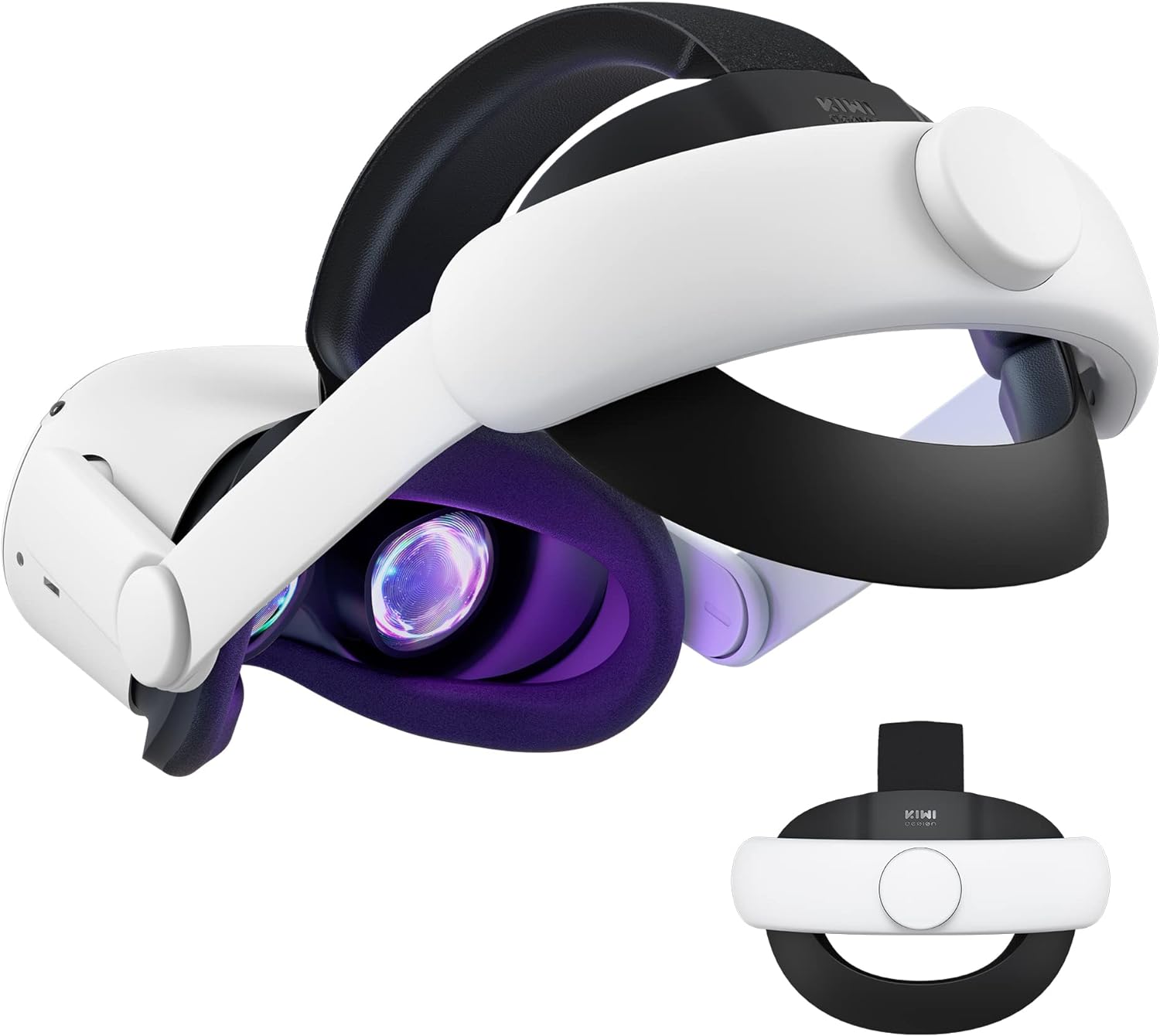
Image: The KIWI design K2 Comfort Head Strap, showing its main components and overall design.
3. Setup Instructions
Follow these steps to attach the KIWI design K2 Comfort Head Strap to your Oculus/Meta Quest 2 headset:
- Prepare your Quest 2 headset: Gently remove the original head strap from your Oculus/Meta Quest 2 headset.
- Identify Left (L) and Right (R) sides: Locate the 'L' and 'R' signs on the KIWI design K2 Comfort Head Strap. These indicate the correct orientation for attachment.

Image: Step-by-step diagram illustrating the attachment of the head strap to the Quest 2 headset, highlighting the L/R indicators.
- Attach the side straps: Align the left side of the Comfort Head Strap with the left arm of the Quest 2 headset. Push firmly until you hear a "snap" sound, indicating a secure connection. Repeat for the right side.
Video: A demonstration of attaching the KIWI design head strap to the Quest 2 headset, showing the secure connection process.
- Adjust the top strap: Secure the top strap over the top of the Quest 2 headset. Ensure it is centered and provides even support.
4. Operating Instructions
The KIWI design K2 Comfort Head Strap is designed for ease of use and enhanced comfort during VR sessions.
4.1 Adjusting for Fit
- Head Circumference Adjustment: Use the adjustment knob located at the back of the head strap to tighten or loosen the fit around your head. Turn clockwise to tighten and counter-clockwise to loosen. The strap supports head circumferences from 17.7 to 29.5 inches.

Image: Visual representation of the head strap's adjustable range, accommodating various head sizes.
- 52° Flippable Hinge: The head strap features a 52° adjustable hinge, allowing you to easily flip up the VR headset without fully removing the strap. This is useful for checking surroundings or for glasses wearers.

Image: A user demonstrating the convenient flip-up function of the headset with the KIWI design head strap.
4.2 Enhanced Comfort Features
- Upgraded Cushions: The widened 46mm top strap pad and thickened 16mm head cushion reduce pressure and improve comfort during extended use. The soft PU leather surface is designed for easy cleaning.

Image: Close-up view of the head strap's cushions, highlighting their thickness and PU leather material for comfort.
- Improved Side Straps: The side straps are constructed from an upgraded polymer material, tested to withstand over 10,000 bends, ensuring durability and preventing breakage during active use.

Image: A view of the robust side straps, emphasizing their flexibility and resistance to bending.
5. Maintenance
Proper maintenance ensures the longevity and hygiene of your head strap:
- Cleaning Cushions: The PU leather cushions can be easily cleaned by wiping them with a wet towel and a microfiber cloth. This should be done regularly, especially after prolonged use.
- Storage: When not in use, the head strap can be stored in the official Quest 2 carrying case or most other cases on the market.Note: Detach the back bracket of the head strap before storing it in the official elite strap carrying case to ensure proper fit and prevent damage.

Image: Illustration of detaching the back bracket for compact storage in a carrying case.
6. Troubleshooting
If you encounter any issues, refer to the following common solutions:
- Head strap feels loose: Ensure the adjustment knob at the back is tightened sufficiently. Adjust until a snug but comfortable fit is achieved.
- Difficulty attaching/detaching: Ensure you are aligning the L/R indicators correctly and applying firm, even pressure until you hear a click. To detach, gently pull the side arms away from the headset.
- Discomfort during use: Re-adjust the top strap and the back knob to redistribute pressure. Ensure the cushions are properly positioned.
7. Specifications
| Feature | Detail |
|---|---|
| Product Dimensions | 8.66 x 2.36 x 8.66 inches |
| Item Weight | 12.3 ounces |
| Model Number | Q31-2.1 |
| Brand | KIWI design |
| Compatible Devices | Oculus/Meta Quest 2 |
| Special Features | 52° Flippable hinge, All-round cushion wrapped, Enlarged head support, Robust side straps |
| Head Circumference Range | 17.7-29.5 inches |
| Cushion Material | Soft PU Leather |
8. Warranty and Support
For warranty information or technical support, please visit the official KIWI design website or contact their customer service directly. Refer to the packaging for specific contact details.
Note: This product is not for Meta Quest 3/3S.


