
1. Introduction
Thank you for choosing the SWAREY S500 Portable Solar Power Station. This device is designed to provide reliable power for various electronic devices, both indoors and outdoors. With a 518Wh capacity and 500W (1000W peak) pure sine wave AC output, it offers versatile charging options for camping, RV trips, emergency backup, and more. Please read this manual thoroughly before use to ensure safe and optimal operation.

Figure 1: SWAREY S500 Portable Solar Power Station. This image displays the main unit with its integrated handle, front display panel, and various output ports including AC, DC, and USB.
2. Safety Instructions
- Do not disassemble, repair, or modify the unit. Incorrect reassembly may cause fire or injury.
- Do not expose the unit to fire or high temperatures.
- Do not use or store the unit in a bathroom or in an area exposed to water or rain.
- Do not use the unit if it is damaged or has been dropped.
- Keep out of reach of children.
- Ensure proper ventilation during use to prevent overheating.
- Use only original or certified accessories.
3. Product Overview
3.1 Package Contents
The SWAREY S500 package includes the following items:
- SWAREY S500 Portable Solar Power Station
- Travel Carrying Bag
- User Manual
- Power Adapter
- Power Cord
- Car Charger
- MC4 to DC Cable (for solar panel connection)

Figure 2: Included components with the SWAREY S500. This image shows the power station, its carrying bag, the user manual, AC power adapter and cord, car charger, and MC4 to DC solar charging cable.
3.2 Ports and Features
The SWAREY S500 is equipped with multiple output and input ports to accommodate various devices and charging methods:
- AC Output: 220-240V, 50Hz, 500W (1000W peak) Pure Sine Wave.
- DC Output: 2 x 12V⎓10A (120W MAX).
- USB Output: 2 x 5V⎓2.4A.
- QC3.0 Output: 5V⎓3A / 9V⎓2A / 12V⎓1.5A (18W).
- Type-C (PD65W) Output: 5V/3A, 9V/3A, 12V/3A, 15V/3A, 20V/3.25A.
- Car Charger Output: 12V⎓10A.
- DC Input: 19V⎓3.42A (65W) for AC adapter.
- Solar Panel Input: MPPT 15-36V/5A.
- Car Charger Input: 12V⎓5A.
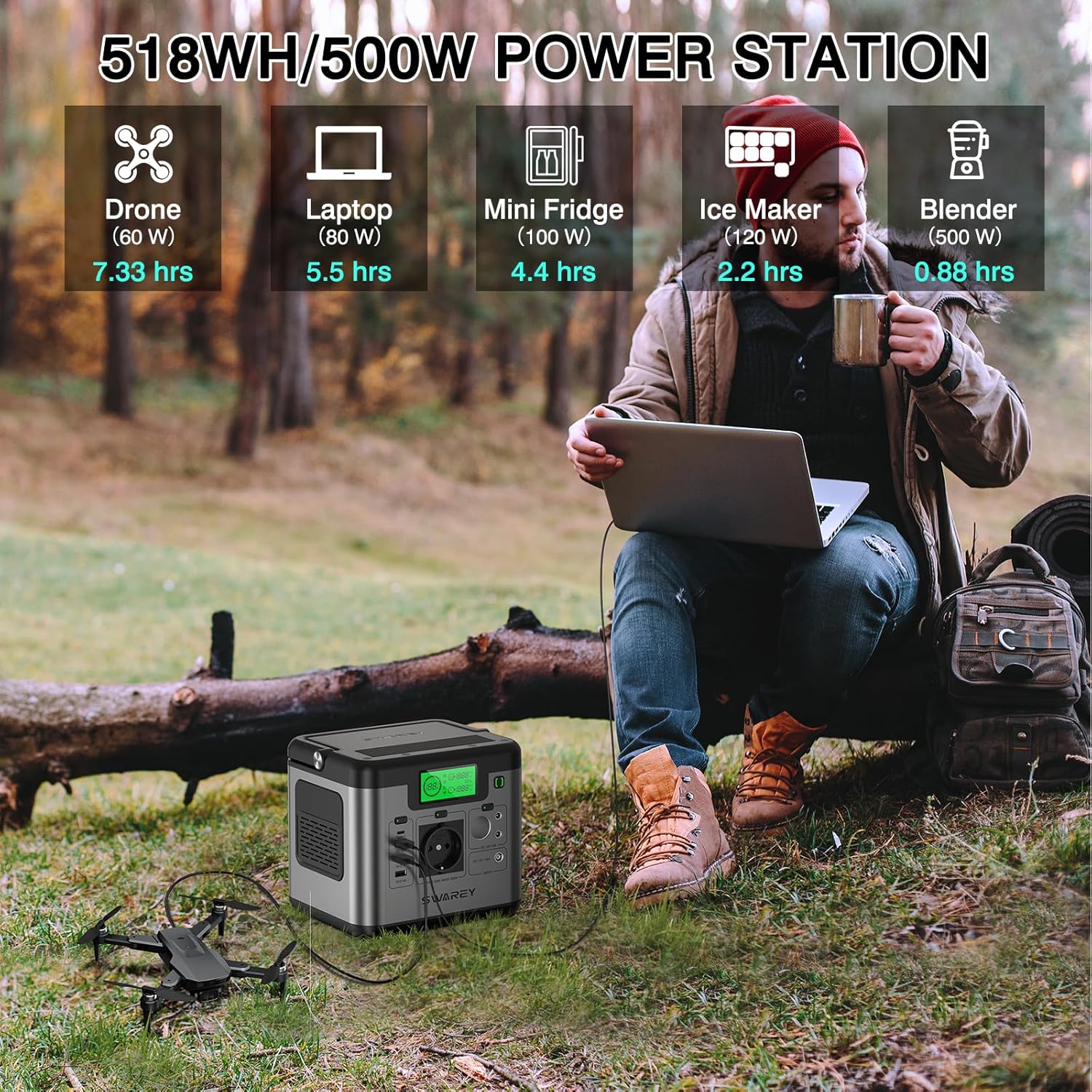
Figure 3: Detailed diagram of SWAREY S500 input and output ports. This image highlights the location and type of each port, including USB, AC, DC, and charging inputs.
4. Setup and Charging
4.1 Initial Setup
Before first use, it is recommended to fully charge the SWAREY S500. Ensure the unit is placed on a stable, flat surface away from direct sunlight or heat sources.
4.2 Charging Methods
The SWAREY S500 offers three convenient ways to recharge:
- AC Wall Outlet: Connect the provided AC power adapter and power cord to the DC input port on the S500 and then to a standard wall outlet. The display will indicate charging status.
- Car Charger: Use the included car charger cable to connect the S500 to your vehicle's 12V cigarette lighter socket. This method is ideal for charging while traveling.
- Solar Panel: Connect a compatible solar panel (15-36V/5A, 100W recommended, not included) to the DC input port using the provided MC4 to DC cable. The built-in MPPT charge controller optimizes solar charging efficiency.

Figure 4: Visual representation of the three charging methods for the SWAREY S500. This image shows the unit being charged via a wall outlet, a car charger, and a solar panel.
5. Operating the S500
5.1 Powering On/Off
To turn on the SWAREY S500, press and hold the main power button for a few seconds until the display illuminates. To turn it off, press and hold the main power button again.
5.2 Using Output Ports
Once the unit is powered on, you can activate specific output groups (AC, DC, USB) by pressing their respective power buttons. The display will show the active outputs and power consumption.
- AC Output: Connect devices requiring 220-240V AC power. Ensure the total power consumption does not exceed 500W.
- DC Output: Connect 12V DC devices.
- USB/QC3.0/Type-C Output: Connect smartphones, tablets, laptops, and other USB-powered devices.
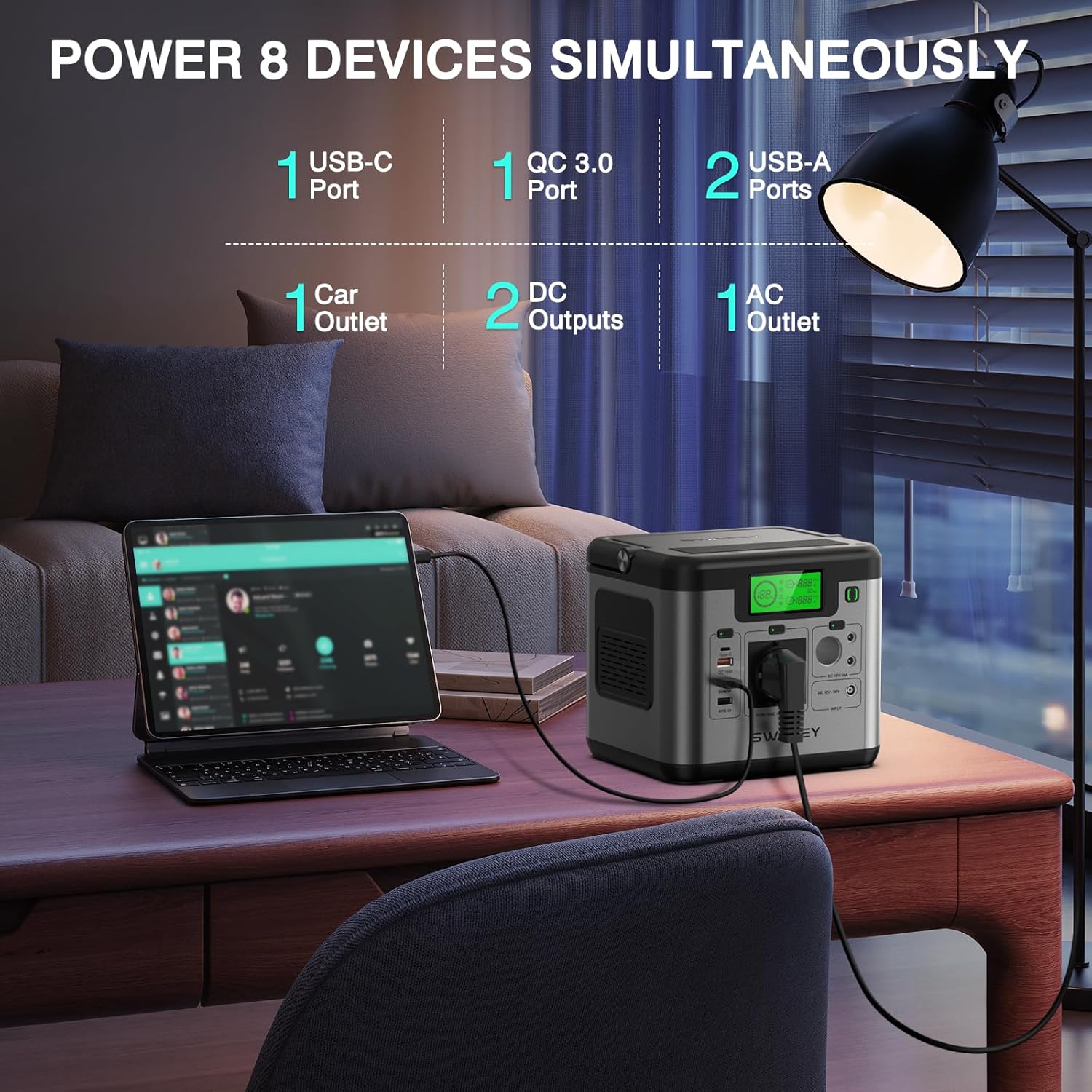
Figure 5: SWAREY S500 simultaneously powering multiple devices. This image shows the power station connected to a laptop and other gadgets on an outdoor table.
5.3 Display Information
The LCD display provides real-time information about the power station's status:
- Battery Level: Percentage of remaining battery charge.
- Input Power: Current power (in Watts) being drawn for charging.
- Output Power: Current power (in Watts) being supplied to connected devices.
- Status Indicators: Icons for AC, DC, USB active outputs, and warning indicators.
5.4 Example Usage Scenarios
The SWAREY S500 is versatile for various applications:
- Outdoor Activities: Power laptops, drones, mini-fridges, and other electronics during camping or outdoor events.
- Emergency Backup: Provide essential power during outages for lights, communication devices, and medical equipment like CPAP machines.
- Work/Study: Keep your devices charged when away from wall outlets.

Figure 6: Estimated run times for various devices powered by the SWAREY S500. This image shows the power station connected to a drone, laptop, mini fridge, ice maker, and blender, with approximate hours of operation for each.

Figure 7: SWAREY S500 used to power a CPAP machine, highlighting its utility for essential medical devices during power outages or off-grid situations.
6. Maintenance
6.1 Storage
Store the SWAREY S500 in a cool, dry place, away from direct sunlight and extreme temperatures. For long-term storage, it is recommended to charge the unit to 50-80% every 3-6 months to prolong battery life.
6.2 Cleaning
Wipe the unit with a dry, soft cloth. Do not use abrasive cleaners or immerse the unit in water.
7. Troubleshooting
- Unit not turning on: Ensure the battery is charged. If not, connect to a power source.
- No output from ports: Verify that the specific output group (AC, DC, USB) is activated by pressing its power button. Check if the device connected is within the power station's output limits.
- Slow charging: Ensure the charging adapter/solar panel is correctly connected and functioning. For solar charging, ensure the panel is in direct sunlight and properly angled.
- Overload protection: If the unit shuts down due to overload, disconnect some devices and restart the unit.
8. Specifications
| Feature | Specification |
|---|---|
| Model Number | S500 |
| Battery Capacity | 518Wh (3.6V/144Ah, 21.6V/24Ah) |
| AC Output | 220-240V, 50Hz, 500W (1000W Peak) Pure Sine Wave |
| DC Output | 2 x 12V⎓10A (120W MAX) |
| USB Output | 2 x 5V⎓2.4A |
| QC3.0 Output | 5V⎓3A / 9V⎓2A / 12V⎓1.5A (18W) |
| Type-C (PD65W) Output | 5V/3A, 9V/3A, 12V/3A, 15V/3A, 20V/3.25A |
| DC Input (AC Adapter) | 19V⎓3.42A (65W) |
| Solar Panel Input | MPPT 15-36V/5A |
| Car Charger Input | 12V⎓5A |
| Dimensions | 19 x 16 x 17 cm |
| Weight | 4 kg |
| Special Features | Portable, Battery Management System (BMS) |
9. Warranty and Support
SWAREY provides a warranty for this product against defects in materials and workmanship under normal use. The specific warranty period may vary by region and retailer. Please retain your proof of purchase for warranty claims.
For technical support, troubleshooting assistance, or warranty inquiries, please contact SWAREY customer service through the retailer where you purchased the product or visit the official SWAREY website for contact information.

