
Introduction
The Bose QuietComfort 45 headphones offer a premium audio experience with world-class noise cancellation, designed for comfort and superior sound quality. Featuring lightweight materials and proprietary technology, these headphones deliver deep, clear sound with adjustable EQ for personalized listening. They are engineered for extended wear with plush synthetic leather and minimal clamping force, making them ideal for long listening sessions. Advanced Acoustic Noise Cancelling technology provides exceptional quiet, while Aware Mode allows you to hear your surroundings when needed. With long battery life and intuitive controls, the QuietComfort 45 headphones are built for seamless integration into your daily life.
What's in the Box
- Bose QuietComfort 45 Headphones
- USB-C Charging Cable
- Audio Cable (2.5 mm to 3.5 mm)
- Protective Carrying Case

The headphones are designed to fold compactly into their included protective case for easy storage and transport.
Setup
Initial Pairing
- Slide the Power/Bluetooth switch on the right earcup to the Bluetooth symbol and hold until the indicator light blinks blue.
- On your device, enable Bluetooth and select "Bose QC45" from the list of available devices.
- Once connected, the indicator light will glow solid blue.
Bose Music App
For the best experience, download the Bose Music app. The app provides guided setup, allows you to personalize settings, manage Bluetooth connections, adjust noise cancellation levels, and keep your headphones' software up to date.

The Bose QuietComfort 45 headphones feature a sleek design and comfortable over-ear fit.
Operating the Headphones
Controls
The Bose QuietComfort 45 headphones feature intuitive physical buttons for easy control:
- Power/Bluetooth Switch: Located on the right earcup, used for powering on/off and initiating Bluetooth pairing.
- Volume Buttons (+/-): Located on the right earcup, used to adjust audio volume.
- Multi-function Button: Located between the volume buttons, used for play/pause, skipping tracks, and answering/ending calls.
- Mode Button: Located on the left earcup, used to switch between Quiet Mode (full noise cancellation) and Aware Mode.
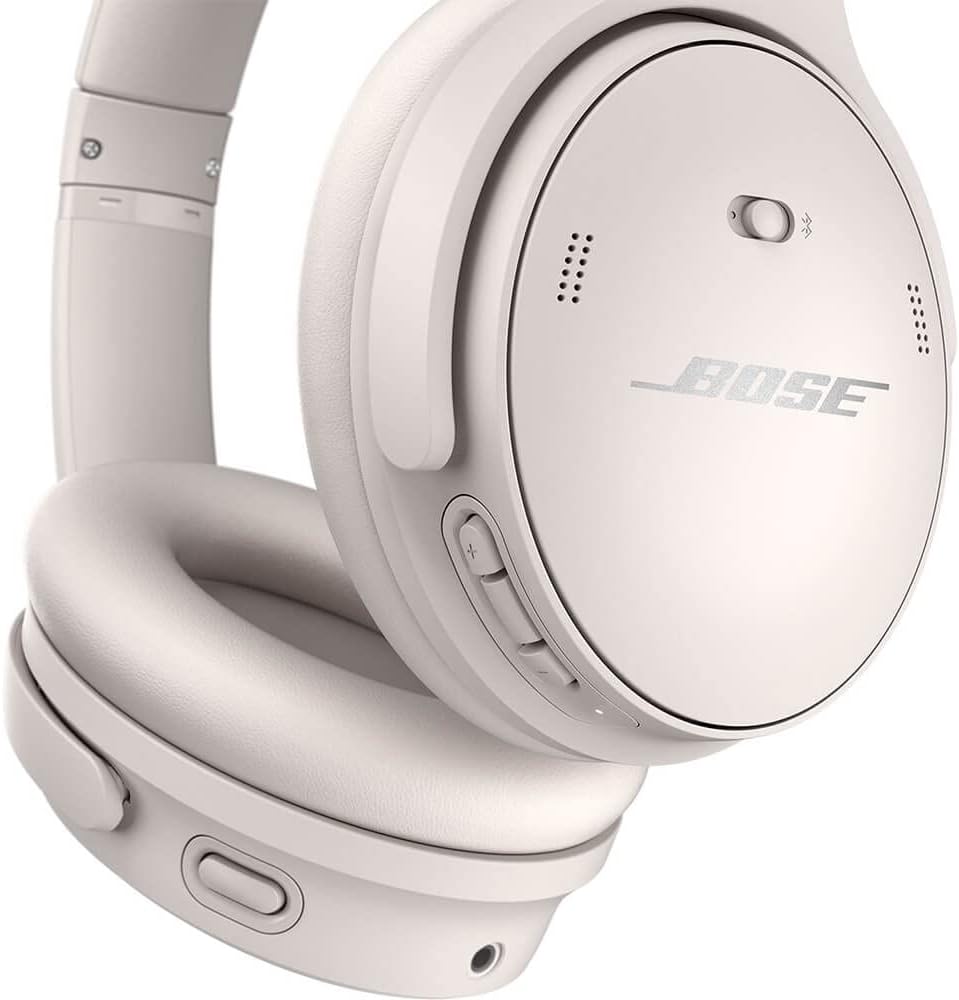
Physical buttons on the right earcup provide tactile control over volume and playback.
Noise Cancellation and Aware Mode
The headphones offer two primary listening modes:
- Quiet Mode: Activates world-class noise cancellation, effectively reducing ambient sounds for an immersive listening experience. Ideal for travel or noisy environments.
- Aware Mode: Allows you to hear your music and your surroundings simultaneously. This mode is useful for staying aware of your environment, such as when walking in a city or needing to hear announcements.
Toggle between these modes using the dedicated Mode button on the left earcup.

The left earcup features the mode button for switching between noise cancellation and Aware Mode.
Audio Features
- TriPort Acoustic Architecture: Delivers deep and full sound.
- Volume-optimized Active EQ: Maintains balanced audio performance at any volume level, ensuring consistent bass and clear sound.
- Adjustable EQ: Customize bass, mid-range, and treble levels via the Bose Music app to suit your personal preferences.
Battery and Charging
- The headphones provide up to 24 hours of audio playback on a single charge.
- A quick 15-minute charge via the USB-C cable offers up to 3 hours of listening time.
- For extended listening, you can use the included audio cable to listen in wired mode, even if the battery is depleted.

The headphones are designed for portability, making them easy to take on the go.
Care and Maintenance
- Clean the earcups and headband with a soft, dry cloth.
- Avoid exposing the headphones to extreme temperatures or humidity.
- Store the headphones in their protective carrying case when not in use to prevent damage.
- The headphones are water-resistant, but not waterproof. Avoid submerging them in water.
Troubleshooting
No Power
- Ensure the headphones are charged. Connect them to a power source using the USB-C cable.
Bluetooth Connectivity Issues
- Ensure Bluetooth is enabled on your device and the headphones are in pairing mode.
- Move your device closer to the headphones (within 30 feet).
- Clear the Bluetooth device list on your headphones and device, then attempt to re-pair.
Sound Quality Issues
- Check the audio source and ensure the volume is appropriately set on both the headphones and your device.
- Adjust the EQ settings in the Bose Music app.
- Ensure earcups are properly sealed around your ears for optimal sound and noise cancellation.
Specifications
| Model Name | QuietComfort 45 Headphones |
| Model Number | 866724-0200 |
| Color | White Smoke |
| Connectivity Technology | Wireless, Bluetooth 5.1 |
| Noise Control | Active Noise Cancellation (Quiet Mode, Aware Mode) |
| Battery Life | Up to 24 hours (continuous playback) |
| Charging Port | USB-C |
| Material | Leather, Plastic |
| Item Weight | 0.98 Pounds (approx. 445 grams) |
| Ear Placement | Over Ear |
Warranty and Support
For detailed warranty information and customer support, please refer to the official Bose website or the Bose Music app. You can also find additional resources and FAQs there.
User Guide (PDF): Download User Guide
User Manual (PDF): Download User Manual


