
1. Introduction
Thank you for choosing the Millennium Lighting Delvona 8-Light Chandelier, Model 4388-MB. This manual provides essential information for the safe installation, operation, and maintenance of your new lighting fixture. Please read these instructions thoroughly before beginning installation and retain them for future reference.
This chandelier features a matte black finish and is designed for indoor use in dry locations. It accommodates eight incandescent bulbs (E12 base, 60 watts maximum each, bulbs sold separately).

Image 1.1: The Millennium Lighting Delvona 8-Light Chandelier in Matte Black. This image displays the full fixture, including the ceiling canopy, chain, central rod, and eight curved arms each holding an E12 bulb socket.
2. Safety Information
WARNING: Risk of electric shock. Disconnect power at the fuse box or circuit breaker before installation or servicing. Consult a qualified electrician if you are unsure about electrical wiring.
- Professional Installation Recommended: Due to the nature of electrical work and fixture assembly, professional installation by a licensed electrician is strongly recommended.
- This fixture is UL Listed and meets CSA standards, ensuring compliance with safety regulations.
- Rated for dry locations only. Do not install in areas exposed to moisture or water.
- Ensure all electrical connections are secure and comply with local codes and ordinances.
- Do not exceed the maximum wattage of 60 watts per bulb. Use E12 base incandescent bulbs.
- Proposition 65 Warning: This product may contain chemicals known to the State of California to cause cancer and birth defects or other reproductive harm. For more information, visit www.P65Warnings.ca.gov.
3. Package Contents
Carefully unpack all components and inspect for any damage. Keep all packaging materials until you are satisfied with the product. The package should contain the following:
- Chandelier Frame (with 8 light arms)
- Ceiling Canopy
- Mounting Hardware (crossbar, screws, wire nuts)
- Chain
- Central Rod/Stem
- Instruction Manual
Note: Light bulbs are not included and must be purchased separately.
4. Specifications
| Feature | Specification |
|---|---|
| Model Number | 4388-MB |
| Brand | Millennium Lighting |
| Collection | Delvona |
| Finish Color | Matte Black |
| Material | Metal |
| Dimensions (Width x Length x Height) | 37.88 x 37.88 x 20.38 inches |
| Item Weight | 11.48 Pounds |
| Number of Lights | 8 |
| Lamping Type | Incandescent |
| Bulb Base | E12 (Candelabra) |
| Max Wattage per Bulb | 60 Watts |
| Voltage | 120 Volts |
| Moisture Rating | Damp Rated (UL Listed for Dry Location) |
| Assembly Required | Yes |
| UPC | 842639033543 |
5. Setup and Installation
IMPORTANT: Ensure power is disconnected at the circuit breaker before starting installation. Professional installation is highly recommended.
5.1 Tools Required (Not Included)
- Phillips Head Screwdriver
- Flat Head Screwdriver
- Wire Strippers
- Pliers
- Electrical Tape
- Ladder
5.2 Installation Steps
- Turn off Power: Locate the circuit breaker controlling the light fixture and turn it OFF.
- Prepare Mounting Location: If replacing an existing fixture, carefully remove it. Ensure the junction box is securely mounted and capable of supporting the chandelier's weight (approximately 11.48 lbs).
- Attach Mounting Crossbar: Secure the mounting crossbar to the junction box using the provided screws.
- Assemble Chandelier: Connect the central rod to the main body of the chandelier. Attach the desired length of chain to the central rod and the ceiling canopy loop.
- Wire Connections: Carefully connect the fixture's wires to the house wiring. Typically, connect the black wire from the fixture to the black (hot) wire from the junction box, the white wire from the fixture to the white (neutral) wire from the junction box, and the bare copper or green ground wire from the fixture to the ground wire from the junction box. Secure connections with wire nuts and electrical tape.
- Mount Canopy: Carefully lift the chandelier and tuck the wires into the junction box. Secure the ceiling canopy to the mounting crossbar using the provided screws.
- Install Bulbs: Refer to Section 6.1 for bulb installation.
- Restore Power: Once installation is complete and all connections are secure, turn the power back ON at the circuit breaker.
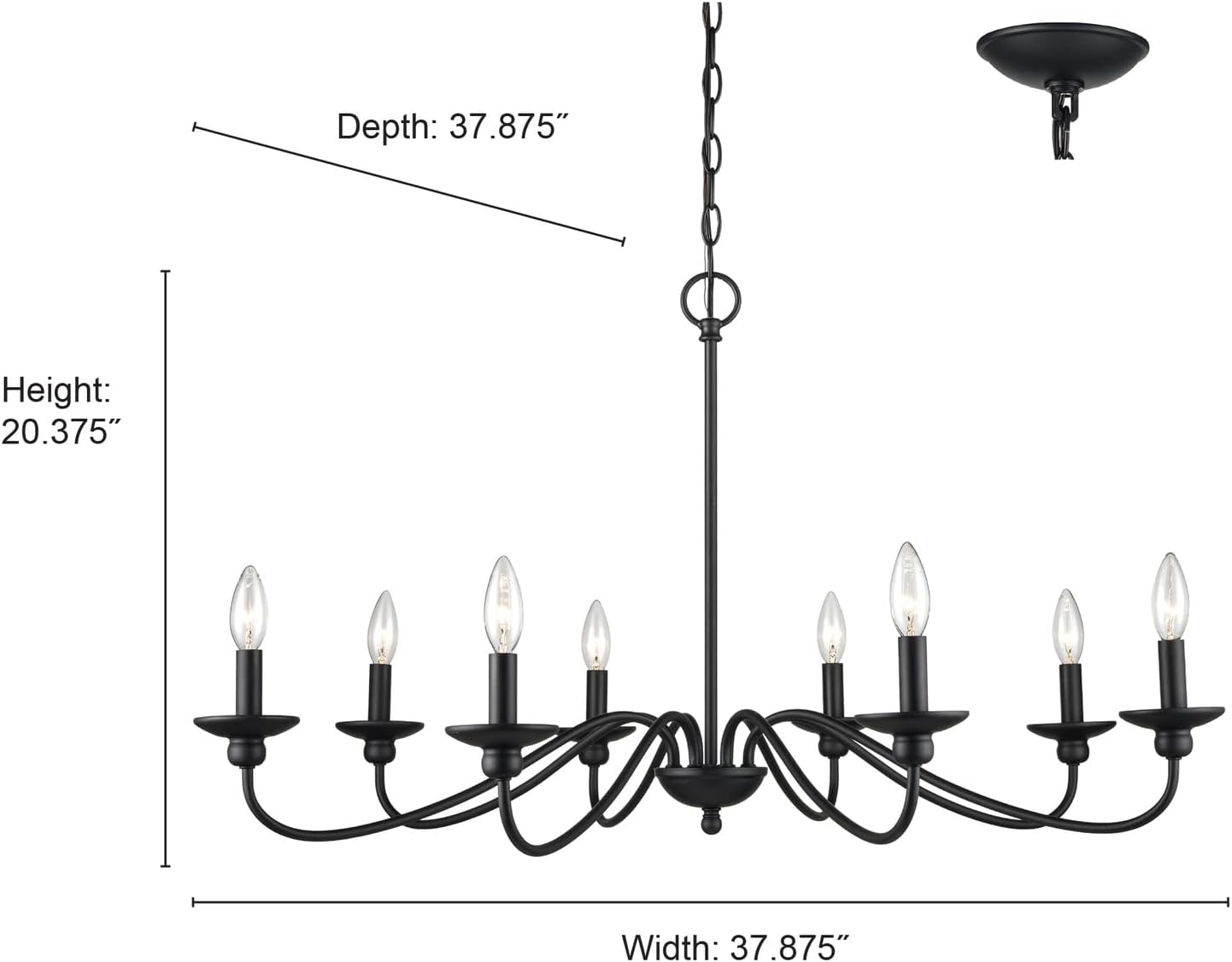
Image 5.1: Diagram showing the dimensions of the Millennium Lighting Delvona Chandelier. The width is 37.875 inches, depth is 37.875 inches, and the height of the fixture body is 20.375 inches. This image helps in planning the installation space.
6. Operating Instructions
6.1 Bulb Installation
Ensure power is OFF before installing or replacing bulbs.
- Carefully screw eight (8) E12 (candelabra base) incandescent bulbs into the sockets.
- Do not exceed 60 watts per bulb.
- Restore power at the circuit breaker.

Image 6.1: A close-up view of one of the chandelier's light arms, showing the matte black finish and an installed E12 incandescent bulb. This illustrates the bulb type and how it sits in the fixture.
6.2 Powering On/Off
The chandelier is controlled by a standard wall switch (push button type) connected to the fixture's electrical circuit. Flip the wall switch to turn the lights on or off.
6.3 Dimmer Compatibility
This fixture is compatible with standard wall dimmers. Ensure that the dimmer switch is rated for incandescent loads and is installed according to its manufacturer's instructions.
7. Maintenance
7.1 Cleaning
Always turn off the power and allow the fixture to cool before cleaning.
- Wipe the fixture with a soft, dry cloth.
- Do not use abrasive cleaners, solvents, or polishes as they may damage the finish.
7.2 Bulb Replacement
Ensure power is OFF and bulbs are cool before replacing.
- Unscrew the old bulb counter-clockwise.
- Screw in a new E12 base incandescent bulb (max 60 watts) clockwise until snug.
- Do not overtighten.
8. Troubleshooting
| Problem | Possible Cause | Solution |
|---|---|---|
| Light does not turn on | No power to the fixture Loose wire connection Faulty bulb Faulty wall switch | Check circuit breaker and wall switch. Verify all wire connections are secure (ensure power is off). Replace bulb. Test or replace wall switch. |
| Lights flicker | Loose wire connection Incorrect dimmer switch Faulty bulb | Check wire connections (ensure power is off). Ensure dimmer is compatible with incandescent bulbs. Replace bulb. |
| Bulbs burn out quickly | Incorrect wattage bulb Voltage fluctuations | Ensure bulbs do not exceed 60 watts. Consult an electrician to check household voltage. |
9. Warranty and Support
This Millennium Lighting fixture comes with a 1-Year Limited Manufacturer's Warranty from the date of purchase. This warranty covers defects in materials and workmanship under normal use.
For warranty claims, technical support, or replacement parts, please contact Millennium Lighting customer service. Keep your proof of purchase for warranty validation.
Contact Information: Please refer to the Millennium Lighting official website or your retailer for current contact details.
10. Legal Disclaimer
Millennium Lighting is not responsible for any damages or injuries resulting from improper installation, misuse, or modification of this product. It is the user's responsibility to ensure that the installation and use of this product comply with all local electrical and building codes.
Please check your local laws and regulations before purchasing and installing this product.


