
Phonak Roger NeckLoop Receiver Type 03
Phonak Roger NeckLoop Receiver Type 03 User Manual
Enhancing your listening experience with clear, direct audio.
1. Product Overview
The Phonak Roger NeckLoop Receiver Type 03 is an advanced audio transmission device designed to enhance listening experiences for individuals using compatible hearing aids. This improved receiver directly replaces the existing Phonak Roger MyLink, offering seamless compatibility with devices that worked with its predecessor.
The Type 03 is specifically engineered for use with adult products, including adult hearing aids. It facilitates direct audio transmission from various sources, ensuring clear and crisp sound delivery directly to your compatible hearing devices.
The Roger NeckLoop Receiver is a versatile tool for improving communication in diverse environments, from personal conversations to professional settings like conferences and lectures.
2. Key Features
- LED Battery Level Indicator: Provides a visual cue for the device's remaining battery life, allowing you to know when to recharge.
- Detachable Neck Loop Sockets: The neck loop can be easily removed or replaced, offering flexibility and convenience.
- Volume Control Buttons: Ergonomically designed buttons allow for easy volume adjustment, suitable for both right-handed and left-handed users.
- USB-C Charger and Audio Jack: Features a modern USB-C port for efficient charging and a dedicated audio jack for direct audio input from various devices.
3. Setup and Connection
3.1. Pairing with Hearing Aids
To begin using your Roger NeckLoop Receiver, you must first pair it with your compatible hearing aids. Refer to your hearing aid's user manual for specific pairing instructions. Generally, this involves placing both devices in pairing mode and allowing them to establish a connection.
3.2. Connecting to Roger Microphones
The Roger NeckLoop Receiver is designed to work seamlessly with Phonak Roger microphones (sold separately). Once your receiver is paired with your hearing aids, it will automatically receive audio signals from any Roger microphone within range that is also paired to your system. This allows for direct audio streaming from the microphone to your hearing aids.
3.3. Connecting to USB Audio Sources
For direct audio streaming from a computer or laptop, use the included USB cable. Connect one end of the USB cable to the USB-C port on your Roger NeckLoop Receiver and the other end to a USB port on your PC or laptop. The device will then function as an audio output for your computer, streaming sound directly to your paired hearing aids.
This feature is particularly useful for online meetings, lectures, or multimedia consumption, providing clear audio without the need for external speakers or headphones.
4. Operating Instructions
4.1. Power On/Off
Locate the On/Off button on the device. Press and hold the button for a few seconds until the LED indicator illuminates (for power on) or turns off (for power off). The LED will indicate the device's status.

Figure 1: Detailed view of the Roger NeckLoop Receiver's controls and indicators.
4.2. Adjusting Volume
Use the dedicated volume control buttons located on the side of the device to adjust the audio output level. Press the '+' button to increase volume and the '-' button to decrease volume. Adjust to a comfortable listening level.
4.3. Using the Neck Loop
Place the neck loop around your neck. Ensure the receiver unit is positioned comfortably. The neck loop transmits the audio signal wirelessly to your hearing aids via telecoil (T-coil) technology. Ensure your hearing aids are set to the T-coil program for optimal performance.

Figure 2: The Phonak Roger NeckLoop Receiver with its neck loop.
5. Maintenance and Care
5.1. Cleaning
To maintain optimal performance and hygiene, regularly clean your Roger NeckLoop Receiver. Use a soft, dry cloth to wipe the surface of the device. Do not use abrasive cleaners, solvents, or immerse the device in water. Ensure the USB-C port and audio jack are free from dust and debris.
5.2. Charging the Battery
When the LED battery indicator shows low battery, connect the included USB-C cable to the device and a power source (e.g., a computer USB port or a USB wall adapter). A full charge typically takes a few hours. Avoid overcharging the device for extended periods.
5.3. Storage
Store the device in a cool, dry place away from direct sunlight, extreme temperatures, and humidity. When not in use for extended periods, ensure the device is fully charged before storage and recharge it periodically to maintain battery health.
6. Troubleshooting
6.1. No Sound or Low Volume
- Check Battery: Ensure the Roger NeckLoop Receiver is sufficiently charged.
- Check Pairing: Verify that the receiver is correctly paired with your hearing aids and the audio source (Roger microphone or computer).
- Adjust Volume: Increase the volume on both the Roger NeckLoop Receiver and your hearing aids.
- Hearing Aid Program: Ensure your hearing aids are set to the T-coil (telecoil) program.
- Cable Connection: If using USB audio, ensure the USB cable is securely connected at both ends.
6.2. Device Not Turning On
- Charge Battery: The battery may be completely depleted. Connect the device to a charger and allow it to charge for at least 30 minutes before attempting to power it on again.
- Power Button: Ensure you are pressing and holding the power button for the correct duration.
6.3. Intermittent Audio
- Proximity: Ensure the Roger NeckLoop Receiver is within close proximity to your hearing aids and the audio source.
- Interference: Move away from potential sources of electromagnetic interference (e.g., large electronic devices, strong magnetic fields).
7. Specifications
| Attribute | Detail |
|---|---|
| Brand | Phonak |
| Model | Roger NeckLoop Receiver Type 03 |
| Units | 1 unit |
| ASIN | B098B9ZX66 |
| Date First Available | May 27, 2022 |
| Manufacturer | Phonak |

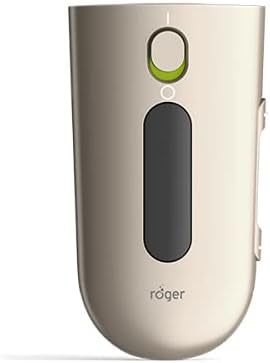
Figure 3: Additional views of the Roger NeckLoop Receiver.
8. Warranty and Support
For information regarding the product warranty, please refer to the warranty card included with your purchase or visit the official Phonak website. Warranty terms and conditions may vary by region.
For technical support, troubleshooting assistance beyond this manual, or service inquiries, please contact Phonak customer support directly. Contact details can typically be found on the Phonak website or in the product packaging.
Related documentsRoger NeckLoop Receiver Type 03


Ask a question about this manual
Ask about setup, troubleshooting, compatibility, parts, safety, or missing instructions. Manuals+ will review the question and use this page’s manual context to help answer it.