1. Introduction
The BRIMAX USB Powered S14 LED String Lights are designed for versatile indoor and outdoor illumination. These lights feature 10 durable, shatterproof LED bulbs that emit a warm white light (2700K), creating a comfortable ambiance. The string lights are USB-powered, offering flexibility for various power sources, and include a touch switch for easy on/off control and dimming functionality.

Image 1.1: BRIMAX USB Powered S14 LED String Lights
2. Product Components
The BRIMAX USB Powered S14 LED String Lights package includes the following items:
- 1 x 24.6ft LED String Light with 10 S14 Bulbs
- 1 x Integrated USB Power Cable with Touch Control Switch
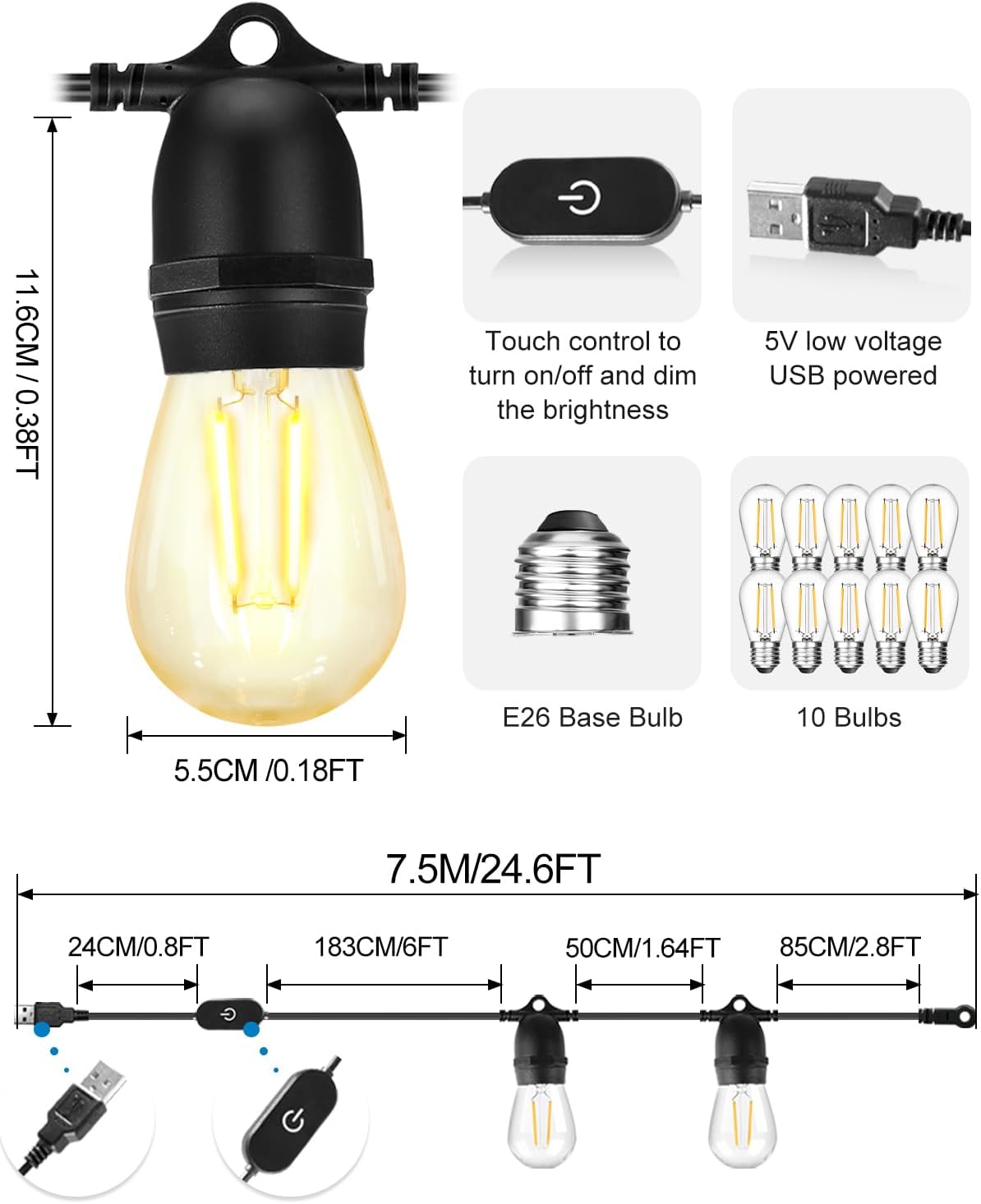
Image 2.1: Product components and dimensions
3. Setup Instructions
Follow these steps to set up your BRIMAX USB Powered S14 LED String Lights:
- Unpack: Carefully remove the string lights and all components from the packaging.
- Inspect: Check all bulbs and the cable for any visible damage. Do not use if any damage is found.
- Plan Placement: Determine the desired location for your string lights. Ensure the length (24.6ft) is suitable for the area. The lights are suitable for indoor and outdoor use.
- Mounting: Use appropriate hooks, clips, or ties (not included) to securely hang the string lights. Each bulb socket has a small loop for easy hanging.
- Connect Power: Plug the USB connector into a compatible 5V DC USB power source. Compatible sources include:
- USB Wall Charger
- Power Bank
- Laptop USB Port
- USB Socket
- Car Power Supply

Image 3.1: Compatible USB power sources
Video 3.1: Demonstration of USB String Lights for Home Lighting, showing connection to various USB power sources and the warm white light output.
4. Operating Instructions
The BRIMAX USB Powered S14 LED String Lights feature an inline touch control switch for easy operation:
- Power On/Off: Short touch the power button on the inline switch to turn the lights on or off.
- Dimming: Long press the power button on the inline switch to adjust the brightness. The lights will cycle through dimming levels from 1% to 100%. Release the button at your desired brightness.

Image 4.1: Dimmable brightness levels (1% to 100%) controlled by the touch switch.
Video 4.1: Demonstration of USB Powered LED String Lights for Camping Lighting, highlighting their portability and ease of use in an outdoor setting.
5. Maintenance
To ensure the longevity and optimal performance of your BRIMAX LED String Lights, follow these maintenance guidelines:
- Cleaning: Disconnect the power before cleaning. Wipe the bulbs and cable with a soft, damp cloth. Avoid using harsh chemicals or abrasive cleaners.
- Storage: When not in use for extended periods, store the lights in a cool, dry place, away from direct sunlight and extreme temperatures. Coil the string neatly to prevent tangling.
- Bulb Replacement: The S14 LED bulbs are replaceable. If a bulb needs replacement, ensure the power is disconnected. Unscrew the old bulb and screw in a new E26 base, DC 5V, 2W LED, 2700K warm white S14 bulb.
- Weather Resistance: These lights are waterproof and shatterproof, designed to withstand various weather conditions. However, for extreme weather events, temporary removal or additional protection is recommended.

Image 5.1: Replaceable S14 LED bulbs with specifications.
6. Troubleshooting
If you encounter issues with your string lights, refer to the following troubleshooting guide:
| Problem | Possible Cause | Solution |
|---|---|---|
| Lights do not turn on. | No power to the USB port, loose connection, faulty bulb. | Ensure the USB power source is active. Check the USB connection. Replace any non-functioning bulbs. |
| Lights are not dimming. | Incorrect operation of the touch switch. | Long press the touch switch button to activate dimming. Release when desired brightness is reached. |
| Individual bulb not working. | Damaged or expired bulb. | Replace the faulty bulb with a new E26 base, DC 5V, 2W LED, 2700K warm white S14 bulb. |
7. Specifications
- Model Number: LM-SL-S14-USB-75
- Brand: BRIMAX
- Length: 24.6 Feet (7.5 Meters)
- Number of Light Sources: 10
- Bulb Type: S14 LED
- Bulb Base: E26
- Wattage (per bulb): 1 Watt
- Total Wattage: 10 Watts
- Power Source: DC 5 Volts (USB)
- Light Color: Warm White
- Color Temperature: 2700 Kelvin
- Luminous Flux: 900 Lumen
- White Brightness: 1000 Lumens
- Special Features: Dimmable, Shatterproof, Waterproof
- Control Method: Touch Control
- Indoor/Outdoor Usage: Indoor, Outdoor
- Material: Metal, Plastic
- Item Weight: 1.52 Pounds
8. Safety Information
Please read and follow these safety precautions to prevent injury or damage:
- Ensure the power source is 5V DC USB compatible. Using an incompatible power source may damage the product or pose a safety risk.
- Do not attempt to modify or disassemble the string lights or bulbs.
- Keep out of reach of children.
- Avoid submerging the USB connector in water. While the bulbs and string are waterproof, the USB connection point should be protected from excessive moisture.
- Do not hang the lights on electrical wires or other conductive materials.
- Always disconnect power before performing any maintenance or bulb replacement.
- Do not connect multiple strings together if not explicitly designed for daisy-chaining, as this model is USB powered and not designed for direct connection to other strings.
9. Warranty and Support
For warranty information or technical support, please contact BRIMAX customer service through the retailer where the product was purchased or visit the official BRIMAX website. Please have your model number (LM-SL-S14-USB-75) and purchase details ready.


