Introduction
This manual provides detailed instructions for the safe and efficient use of your Panasonic 13.5Kg Top Loading Washing Machine, Model NA-F135A5. Please read this manual thoroughly before operating the appliance and keep it for future reference. This washing machine is designed for household use to clean various types of laundry.
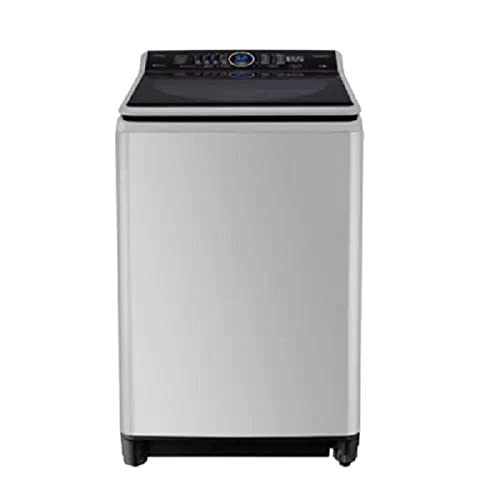
Figure 1: Panasonic 13.5Kg Top Loading Washing Machine NA-F135A5. This image shows the washing machine from the front, highlighting its silver finish and top-loading design.
Safety Information
Always follow basic safety precautions when using electrical appliances to reduce the risk of fire, electric shock, and injury to persons. Keep this manual for future reference.
- Ensure the power supply matches the rating label on the machine.
- Do not operate the machine with a damaged power cord or plug.
- Keep children and pets away from the appliance during operation.
- Do not wash items that are soiled with flammable substances.
- Unplug the machine before cleaning or performing any maintenance.
- Do not open the lid during a wash cycle, especially during spinning.
Setup and Installation
1. Unpacking
Carefully remove all packaging materials, including the base packaging and any protective films. Ensure all accessories are present.
2. Location
Place the washing machine on a firm, level surface. Avoid direct sunlight or areas with high humidity. Ensure there is adequate space around the machine for ventilation and access.
- Minimum clearance: 10 cm from walls.
- Ensure the floor can support the machine's weight when full of water and laundry.
3. Leveling the Machine
Proper leveling is crucial to prevent excessive vibration and noise during operation. Adjust the leveling feet at the bottom of the machine until it is stable and level. Use a spirit level to verify.
4. Water Connection
Connect the cold water inlet hose to the water tap and the corresponding inlet valve on the back of the washing machine. Ensure all connections are tight to prevent leaks. Open the water tap fully.
5. Drainage Connection
Position the drain hose correctly. It can be hooked over the edge of a sink or connected to a standpipe. Ensure the drain hose is not kinked or blocked and is at an appropriate height (between 60 cm and 90 cm from the floor).
6. Power Connection
Plug the power cord into a grounded electrical outlet. Ensure the outlet meets the machine's power requirements.
Operating Instructions
1. Loading Laundry
Open the lid and place laundry loosely into the drum. Do not overload the machine; ensure there is enough space for clothes to move freely. For best results, sort laundry by fabric type, color, and soil level.
2. Adding Detergent and Softener
Add the appropriate amount of detergent to the detergent dispenser. If using fabric softener, add it to the designated compartment. Refer to detergent packaging for recommended quantities.
3. Selecting a Wash Program
Turn on the machine by pressing the Power button. Use the program selector dial or buttons to choose the desired wash program (e.g., Normal, Heavy, Delicate, Quick Wash). The "Heavy" cycle option is available for robust cleaning.
4. Adjusting Settings (Optional)
Depending on the model, you may be able to adjust water level, wash time, rinse cycles, or spin speed. Consult the control panel for available options.
5. Starting the Wash Cycle
Press the Start/Pause button to begin the wash cycle. The machine will automatically fill with water, wash, rinse, and spin.
6. End of Cycle
Once the cycle is complete, the machine will signal with a sound. Open the lid and remove your laundry promptly to prevent wrinkles and odors. Turn off the machine and close the water tap.
Maintenance and Cleaning
Regular maintenance ensures optimal performance and extends the lifespan of your washing machine. Always unplug the machine before cleaning.
1. Cleaning the Exterior
Wipe the exterior surfaces with a soft, damp cloth. Do not use abrasive cleaners or solvents.
2. Cleaning the Drum
Periodically run a self-clean cycle or an empty hot wash cycle with a washing machine cleaner to remove detergent residue and odors.
3. Cleaning the Detergent Dispenser
Remove the detergent dispenser drawer and rinse it under running water to clear any residue. Clean the housing with a brush if necessary.
4. Cleaning the Lint Filter
Your washing machine is equipped with lint filters designed to catch lint and small debris. Locate the lint filter(s) (usually inside the drum or near the top rim). Remove, clean thoroughly under running water, and reinsert. Clean after every few washes or when visibly full.
5. Water Inlet Filter
Periodically check the filter screens at the water inlet valve on the back of the machine. If clogged, turn off the water supply, disconnect the hoses, and clean the filters with a brush.
Troubleshooting
Before contacting service, please check the following common issues:
| Problem | Possible Cause | Solution |
|---|---|---|
| Machine does not start | Power cord unplugged; Lid not closed properly; Power outage; Fuse blown. | Check power connection; Ensure lid is fully closed; Check household circuit breaker. |
| Water not filling | Water tap closed; Water inlet hose kinked; Water inlet filter clogged. | Open water tap; Straighten hose; Clean inlet filter. |
| Water not draining | Drain hose kinked or blocked; Drain pump filter clogged. | Straighten or clear drain hose; Clean drain pump filter (if accessible). |
| Excessive vibration/noise | Machine not level; Laundry unbalanced; Shipping bolts not removed. | Adjust leveling feet; Redistribute laundry; Ensure shipping bolts are removed (if applicable). |
| Lint on clothes | Lint filter clogged or not installed correctly. | Clean and properly install the lint filter. |
Specifications
| Feature | Detail |
|---|---|
| Brand | Panasonic |
| Model Number | NA-F135A5 |
| Capacity | 13.5 Kilograms |
| Product Dimensions (W x D x H) | 60 x 58 x 125 cm |
| Item Weight | 13.5 Kilograms |
| Access Type | Top Load |
| Cycle Options | Heavy |
| Annual Energy Consumption | 456 Kilowatt Hours |
| Controller Type | Go Control |
| Included Components | Washing Machine Unit |
Warranty and Support
This Panasonic washing machine comes with a manufacturer's warranty. Please refer to the warranty card included with your purchase for specific terms, conditions, and duration. Keep your proof of purchase for warranty claims.
For technical assistance, spare parts, or service inquiries, please contact Panasonic customer support. Contact details can typically be found on the Panasonic official website or on your warranty documentation.


