
1. Introduction
This manual provides detailed instructions for the IRIVER EQwear-Q150 Wireless Keyboard and Optical Mouse Set. Please read this manual carefully before use to ensure proper operation and to maximize the product's lifespan. This set offers a comfortable and efficient wireless experience for your computer.
2. Package Contents
Verify that all items are present in the package:
- IRIVER EQwear-Q150 Wireless Keyboard
- IRIVER EQwear-Q150 Wireless Optical Mouse
- 2.4GHz USB Receiver
- User Manual (this document)
3. Setup
Follow these steps to set up your IRIVER EQwear-Q150 Wireless Keyboard and Mouse Set:
- Install Batteries: Open the battery compartments on both the keyboard and the mouse. Insert the required batteries (not included) according to the polarity indicators.
- Locate USB Receiver: The 2.4GHz USB receiver is typically stored within the mouse for convenience during transport. Gently remove it from its slot.
- Connect USB Receiver: Plug the 2.4GHz USB receiver into an available USB port on your computer. Your operating system should automatically detect and install the necessary drivers.

Figure 3.1: Connecting the 2.4GHz USB receiver to a laptop.

Figure 3.2: The USB receiver is conveniently stored within the mouse.
The keyboard and mouse are pre-paired with the receiver. Once the receiver is connected, the devices should be ready for use.
4. Operating Instructions
4.1 Keyboard Usage
The IRIVER EQwear-Q150 keyboard is designed for comfortable and accurate typing:
- Ergonomic Design: Features an ergonomic design for reduced hand fatigue during extended use.
- U-shaped Buttons: The unique U-shaped keycaps enhance typing accuracy and prevent typos.
- Durable Laser Printing: Keys are laser-printed and coated to prevent characters from fading over time.
- Water Resistance: Equipped with four drainage holes on the underside to protect against accidental spills of water, coffee, or other liquids.
- Adjustable Tilt: The keyboard includes adjustable tilt legs and anti-slip rubber pads for customized typing angles and stability.

Figure 4.1: User typing on the ergonomically designed keyboard.

Figure 4.2: Detailed view of keyboard features: U-shaped keys for accuracy, adjustable feet for comfort, and drainage holes for spill protection.
4.2 Mouse Usage
The IRIVER EQwear-Q150 optical mouse provides precise control:
- High Precision: Features a 1600 DPI optical sensor for fast and accurate operation across various tasks, including general work, gaming, and graphic design.
- Backward Button: An additional 'Backward' button is conveniently located near the thumb for easy page navigation.
- Lightweight Design: Weighing only 62g, the mouse is comfortable for prolonged use.
- Durability: Tested for over 3 million clicks, ensuring long-lasting performance.

Figure 4.3: The optical mouse with its convenient backward navigation button.
4.3 Wireless Connection
The 2.4GHz wireless technology ensures a stable and wide-ranging connection:
- Stable Connection: Provides a reliable 2.4GHz wireless connection for both keyboard and mouse simultaneously.
- Extended Range: Enjoy a maximum operating distance of up to 10 meters (33 feet) with 360-degree coverage, allowing flexible placement.
Figure 4.4: Illustration of the 360-degree, 10-meter wireless operating range.
4.4 Multimedia Hotkeys
The keyboard features dedicated multimedia hotkeys for quick access to various functions. Press the Fn key in combination with the corresponding function key:
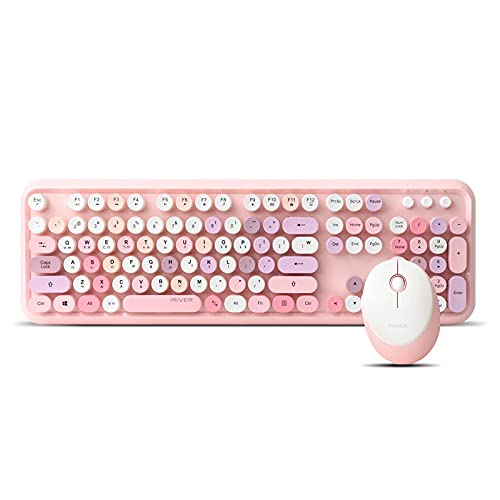
Figure 4.5: Keyboard layout with multimedia hotkeys.
| Hotkey Combination | Function |
|---|---|
| FN + ESC | Media Player |
| FN + F1 | Play/Pause |
| FN + F2 | Previous Track |
| FN + F3 | Next Track |
| FN + F4 | Volume Up |
| FN + F5 | Volume Down |
| FN + F6 | Mute |
| FN + F7 | Web Home |
| FN + F8 | Search |
| FN + F9 | My Favorite |
| FN + F10 | |
| FN + F11 | Keyboard Lock |
| FN + F12 | My Computer |
5. Maintenance
Proper maintenance ensures the longevity and performance of your device:
- Cleaning: Use a soft, dry cloth to clean the keyboard and mouse. For stubborn dirt, slightly dampen the cloth with water or a mild cleaning solution. Avoid harsh chemicals or abrasive materials.
- Spill Management: In case of liquid spills on the keyboard, immediately disconnect it from the computer, turn it upside down to drain, and allow it to dry completely before reuse. The drainage holes are designed to assist with this.
- Battery Replacement: Replace batteries promptly when performance degrades. Dispose of old batteries responsibly according to local regulations.
- Storage: When not in use for extended periods, store the keyboard and mouse in a cool, dry place. Remove batteries if storing for several months to prevent leakage.
6. Troubleshooting
If you encounter issues with your IRIVER EQwear-Q150 set, refer to the following common solutions:
- No Response from Keyboard/Mouse:
- Check if the batteries are correctly inserted and have sufficient charge. Replace if necessary.
- Ensure the 2.4GHz USB receiver is securely plugged into a working USB port on your computer. Try a different USB port.
- Restart your computer.
- Lagging or Intermittent Connection:
- Move the keyboard and mouse closer to the USB receiver.
- Ensure there are no large metal objects or other wireless devices (e.g., Wi-Fi routers, cordless phones) operating too close to the receiver, which might cause interference.
- Check battery levels and replace if low.
- Mouse Cursor Jumps or is Inaccurate:
- Clean the optical sensor on the underside of the mouse.
- Use the mouse on a clean, non-reflective surface or a mouse pad.
- Keys Not Responding:
- Ensure the keyboard is not in 'Keyboard Lock' mode (check FN+F11).
- If specific keys are not working, gently clean around them to remove any debris.
7. Specifications
Detailed specifications for the IRIVER EQwear-Q150 Wireless Keyboard and Mouse Set:
Figure 7.1: Product overview with key features and specifications.
Keyboard Specifications:
- Key Count: 106 keys
- Layout: QWERTY (Korean language support)
- Dimensions: 452.4 x 143.9 x 35.8 mm
- Weight: 780g
- Key Type: Membrane
- Features: Ergonomic design, U-shaped buttons, Laser printing, Water-resistant (drainage holes), Adjustable tilt, Anti-slip pads
Mouse Specifications:
- DPI: 1600 DPI Optical
- Buttons: 4 buttons (including Backward button)
- Dimensions: 101.2 x 75 x 33.6 mm
- Weight: 62g
- Durability: 3 million click test
General Specifications:
- Connectivity: 2.4GHz Wireless
- Wireless Range: Up to 10 meters (360-degree)
- OS Compatibility: Windows (Vista, 7, 8, 10), Mac OS X 10.5 or later, Linux kernel 2.6 or later, Chrome OS
- Encryption: AES 128-bit
- UPC: 639015008413
8. Warranty Information
The IRIVER EQwear-Q150 Wireless Keyboard and Mouse Set comes with a limited warranty. Please refer to the warranty card included with your product for specific terms, conditions, and duration of coverage. For warranty claims or inquiries, retain your proof of purchase.
9. Support
For further assistance, technical support, or product-related questions, please contact IRIVER customer service or visit the official IRIVER website. Contact details can typically be found on the product packaging or the official brand website.