
Introduction
This manual provides detailed instructions for the installation, operation, and maintenance of your Ontel Beyond Bright Motion Activated Wired LED Flood Light. Please read this manual thoroughly before installation and retain it for future reference. This product is designed to provide ultra-bright, motion-activated illumination for outdoor areas such as porches, decks, yards, and garages.
Safety Guidelines
Adherence to these safety guidelines is crucial for proper operation and to prevent injury or damage.
- Electrical Safety: Installation must be performed by a qualified electrician or in accordance with all local electrical codes. Ensure power is disconnected at the circuit breaker before installation or servicing.
- Mounting: Mount the fixture securely to a stable surface. Do not install on unstable or vibrating structures.
- Outdoor Use: This product is designed for outdoor, weather-resistant use. Ensure all connections are properly sealed to prevent water intrusion.
- Light Source: Do not stare directly into the LED light source when illuminated, as this may cause eye strain or damage.
- Temperature: Do not operate the light in temperatures outside its specified operating range.
Package Contents
Verify that all components are present before beginning installation:
- Ontel Beyond Bright Wired LED Flood Light (1 unit)
- Instruction Manual (1 unit)
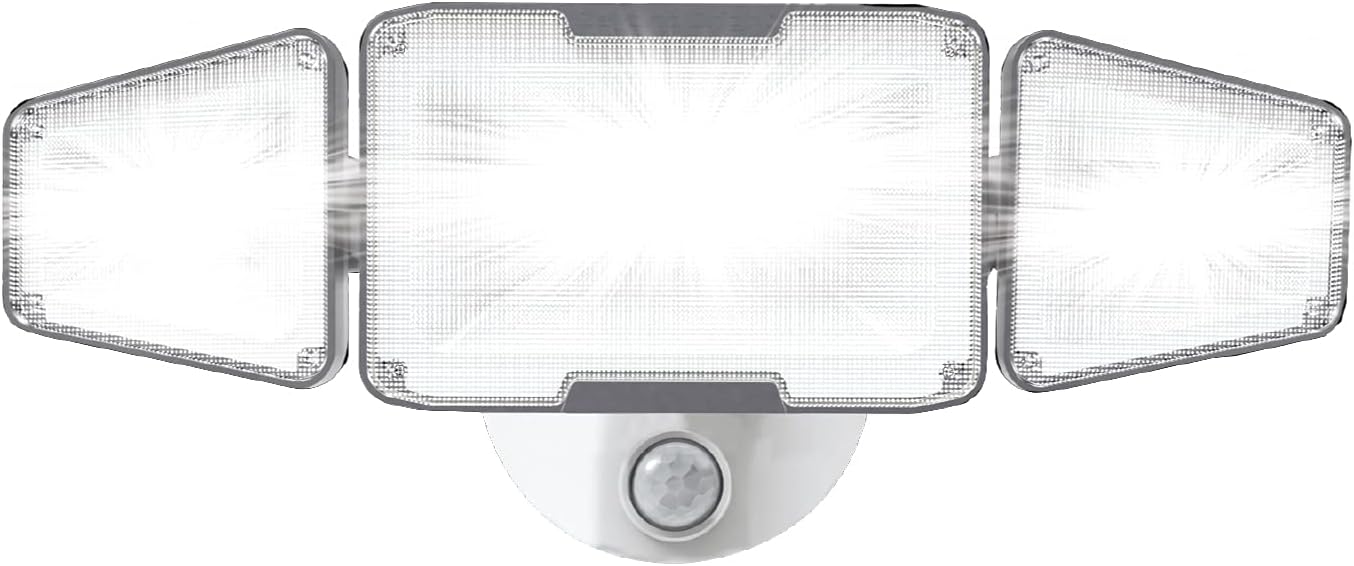
Image: The Ontel Beyond Bright Wired LED Flood Light, featuring three adjustable light heads and a central motion sensor.
Product Features
- Ultra-Bright Illumination: Provides 4000 lumens of ultra-bright, white LED light.
- Motion Activated: Automatically turns on when motion is detected, enhancing security and convenience.
- Adjustable Heads: Features three independently adjustable light heads to direct illumination precisely where needed.
- Weather-Resistant Design: Constructed for outdoor use, capable of withstanding various weather conditions.
- Energy Efficient: Operates efficiently with a wattage of approximately 45 watts.
Setup and Installation
Before You Begin
- Ensure the power supply to the installation area is turned off at the circuit breaker.
- Gather necessary tools: screwdriver, wire strippers, electrical tape, mounting hardware (if not included or if existing hardware is unsuitable).
- Select a suitable outdoor location for semi-flush mounting, ensuring it is within reach of the wired power source.
Mounting the Light
- Carefully remove the existing fixture (if applicable) and disconnect its wiring.
- Attach the mounting bracket (if separate) to the junction box using the provided screws.
- Connect the electrical wires: typically, black to black (live), white to white (neutral), and green/bare copper to green/bare copper (ground). Secure connections with wire nuts and electrical tape.
- Carefully tuck the wires into the junction box.
- Align the flood light fixture with the mounting bracket and secure it in place with the provided screws.
- Restore power at the circuit breaker.

Image: The flood light installed on the exterior of a house, providing broad illumination to the surrounding area.

Image: The flood light mounted above a garage, effectively lighting the entrance and driveway.
Operation
Motion Sensor Functionality
The flood light is equipped with a motion sensor that detects movement within its range. When motion is detected, the light will automatically activate. The duration the light remains on after motion ceases may be adjustable (refer to specific product settings if a remote control is included). The motion sensor is designed to provide security and convenience by illuminating areas only when needed.
Adjusting Light Heads
Each of the three LED light heads can be manually adjusted to direct the light beam. Loosen the adjustment screws (if present), position the light heads to cover your desired area, and then tighten the screws to secure them. This allows for customized lighting coverage.

Image: The flood light activating in response to motion, providing bright illumination for security purposes.
Care and Maintenance
- Cleaning: Periodically clean the light fixture and motion sensor lens with a soft, damp cloth to remove dirt and debris. Do not use abrasive cleaners or solvents.
- Inspection: Regularly inspect the wiring and mounting for any signs of wear, damage, or loose connections. Address any issues promptly.
- Weather Protection: While weather-resistant, extreme weather conditions may require additional protection or temporary removal if possible.
- LED Longevity: The integrated LED lights are designed for long-term use and are not user-replaceable.
Troubleshooting
If you encounter issues with your flood light, refer to the following table for common problems and solutions.
| Problem | Possible Cause | Solution |
|---|---|---|
| Light does not turn on. | No power, faulty wiring, sensor obstruction, sensor malfunction. | Check circuit breaker. Verify wiring connections. Clear any obstructions from the sensor. Contact customer support if issues persist. |
| Light stays on continuously. | Continuous motion detected, sensor sensitivity too high, wiring error. | Ensure no constant motion in sensor range. Adjust sensor sensitivity (if applicable). Recheck wiring. |
| Light flashes or flickers. | Unstable power supply, loose connection, internal fault. | Check power supply stability. Inspect and tighten all wiring connections. If problem persists, discontinue use and contact customer support. |
| Motion sensor range is too short/long. | Sensor positioning, environmental factors, sensitivity setting. | Adjust the angle of the motion sensor. Clear any foliage or objects that might interfere. Adjust sensitivity settings (if available via remote). |
Product Specifications
| Feature | Specification |
|---|---|
| Brand | Ontel |
| Model Number | BEBRF-MC4 |
| UPC | 735541088216 |
| Power Source | Corded Electric |
| Light Source Type | LED |
| Brightness | 4000 Lumens |
| Wattage | 44.99 watts |
| Voltage | 120 Volts (DC) |
| Number of Light Sources | 3 |
| Special Feature | Motion Sensor |
| Control Method | Remote Control |
| Installation Type | Semi Flush Mount |
| Indoor/Outdoor Usage | Outdoor |
| Water Resistance Level | Water Resistant |
| Product Dimensions | 9.5"L x 7.5"W x 5.7"H |
| Item Weight | 1.69 Pounds |
| Material | Plastic |
| Finish Type | Powder Coated |
| Color | White |
Warranty and Customer Support
The provided product information indicates that specific warranty details are not available ("Na."). For any warranty inquiries, technical support, or assistance with your Ontel Beyond Bright Motion Activated Wired LED Flood Light, please contact the manufacturer directly through their official website or customer service channels. Retain your purchase receipt for any potential claims.