Introduction
This manual provides detailed instructions for the setup, operation, and maintenance of your Depusheng MX8 Professional 8-Channel Audio Mixer. Please read this manual thoroughly before using the device to ensure proper function and to prevent damage. Keep this manual for future reference.
Safety Information
- Power Supply: Use only the specified power adapter. Ensure the voltage matches your local power supply.
- Water and Moisture: Do not expose the mixer to water, rain, or excessive moisture. Avoid placing liquid-filled objects on the unit.
- Ventilation: Ensure adequate ventilation around the unit. Do not block ventilation openings.
- Heat: Keep the unit away from heat sources such as radiators, heat registers, stoves, or other heat-producing appliances.
- Servicing: Do not attempt to service this unit yourself. Refer all servicing to qualified service personnel.
- Phantom Power: When using condenser microphones, ensure +48V phantom power is activated. Turn off phantom power before connecting or disconnecting microphones to prevent damage.
Package Contents
Upon opening the package, verify that all items are present and in good condition:
- Depusheng MX8 Audio Mixer Unit
- Power Adapter
- User Manual
Product Overview and Controls
Familiarize yourself with the layout and functions of the Depusheng MX8 mixer.
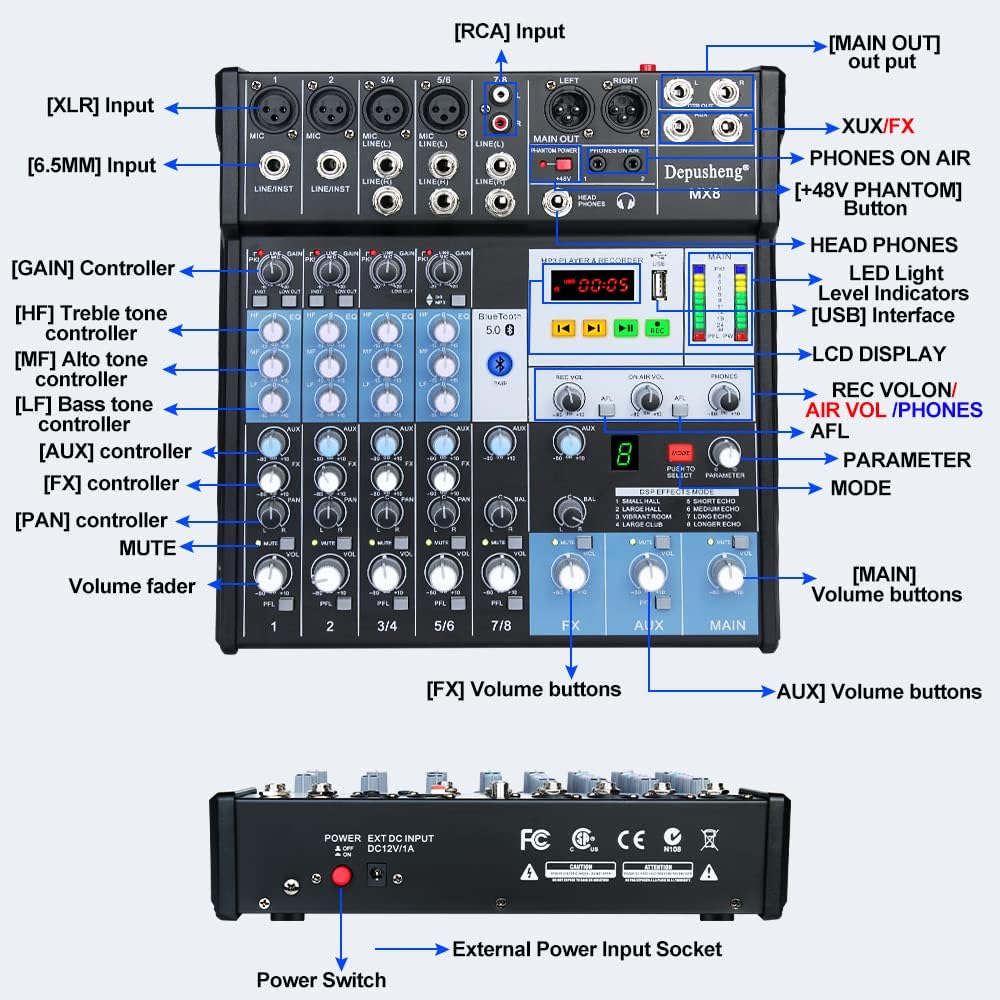
Figure 1: Front panel overview of the Depusheng MX8 mixer, showing various input/output jacks, control knobs, faders, and the MP3 player/recorder section.
The mixer features multiple input channels, equalization controls, DSP effects, Bluetooth connectivity, and USB playback/recording capabilities. Key components include:
- Input Interfaces: XLR, 6.5mm (1/4 inch) Line/Instrument, RCA.
- Output Interfaces: Main Out (XLR, 6.5mm), Control Room Out, Aux Out, FX Send, Headphone Out.
- Channel Controls: GAIN, High (HF), Mid (MF), Low (LF) tone controllers, AUX, FX, PAN, MUTE, Volume fader.
- MP3 Player & Recorder: USB interface, LCD display, control buttons, LED indicator lights.
- DSP Effects: Mode selection and parameter adjustment for 8 built-in effects.
- Phantom Power: +48V button for condenser microphones.
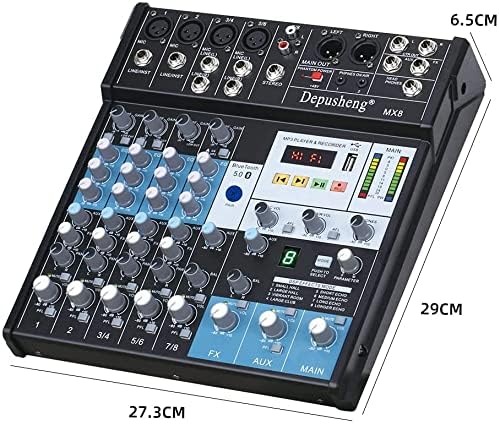
Figure 2: Dimensions of the Depusheng MX8 Audio Mixer.
Setup
Follow these steps to set up your Depusheng MX8 mixer.
1. Power Connection
Connect the provided power adapter to the 'DC12V/1A' input socket on the rear of the mixer. Plug the adapter into a suitable power outlet. Use the power switch located next to the power input to turn the unit on or off.
2. Microphone Connections
- Dynamic Microphones: Connect dynamic microphones using XLR cables to the MIC inputs or 6.5mm (1/4 inch) TS/TRS cables to the LINE/INST inputs.
- Condenser Microphones: Connect condenser microphones using XLR cables to the MIC inputs. Press the +48V PHANTOM button to supply power to the microphone. Ensure the button is off before connecting or disconnecting.
3. Headphone Connection
Connect your monitor headphones to the HEAD PHONES output jack using a 6.5mm (1/4 inch) TRS connector. Adjust the headphone volume using the dedicated PHONES knob.
4. Amplifier or Mobile Speaker Connection
Connect the MAIN OUT (XLR or 6.5mm) of the mixer to the input of your amplifier or powered speakers. Adjust the main output volume using the MAIN volume fader.
5. Computer Connection
Connect the mixer to your computer using a USB cable. The mixer functions as a USB soundcard, allowing for audio input and output with your computer.

Figure 3: Connection diagram illustrating various devices connected to the Depusheng MX8 mixer.
Operation
1. Equalization (EQ) Adjustment
Each channel features a 3-band equalizer to shape the tone of your audio source. Adjust the knobs for High (HF), Mid (MF), and Low (LF) frequencies to achieve your desired sound.

Figure 4: Three-stage equalization controls for adjusting high, mid, and low frequencies.
2. DSP Effects
The mixer includes 8 Digital Signal Processing (DSP) reverb effects. Use the MODE button to cycle through the effects (Small Hall, Large Hall, Vibrant Room, Large Club, Short Echo, Medium Echo, Long Echo, Longer Echo). Adjust the PARAMETER knob to fine-tune the selected effect.

Figure 5: DSP effects section with 8 reverb options.
3. Bluetooth Connection
To connect a Bluetooth device:
- Ensure the mixer is powered on.
- Activate Bluetooth on your mobile device.
- Search for available devices and select "Depusheng-MX8" to pair.
- Once connected, you can stream audio wirelessly from your device to the mixer.
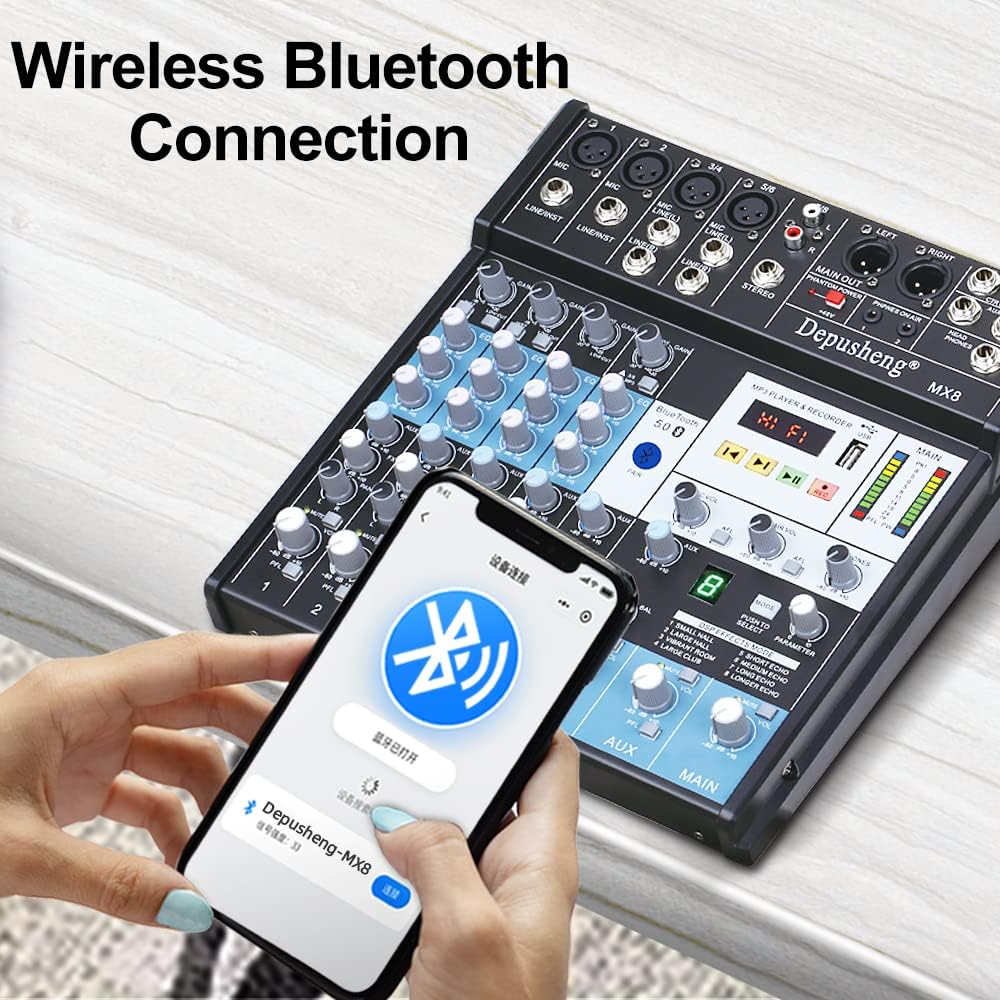
Figure 6: Establishing a wireless Bluetooth connection with the mixer.
4. USB Playback and Recording
The mixer supports USB playback and recording functions:
- USB Playback: Insert a USB flash drive containing audio files into the USB port. Use the MP3 player controls (play, pause, skip) to navigate and play music.
- USB Recording: Press the REC button on the MP3 player/recorder section to start recording audio directly to a connected USB flash drive.
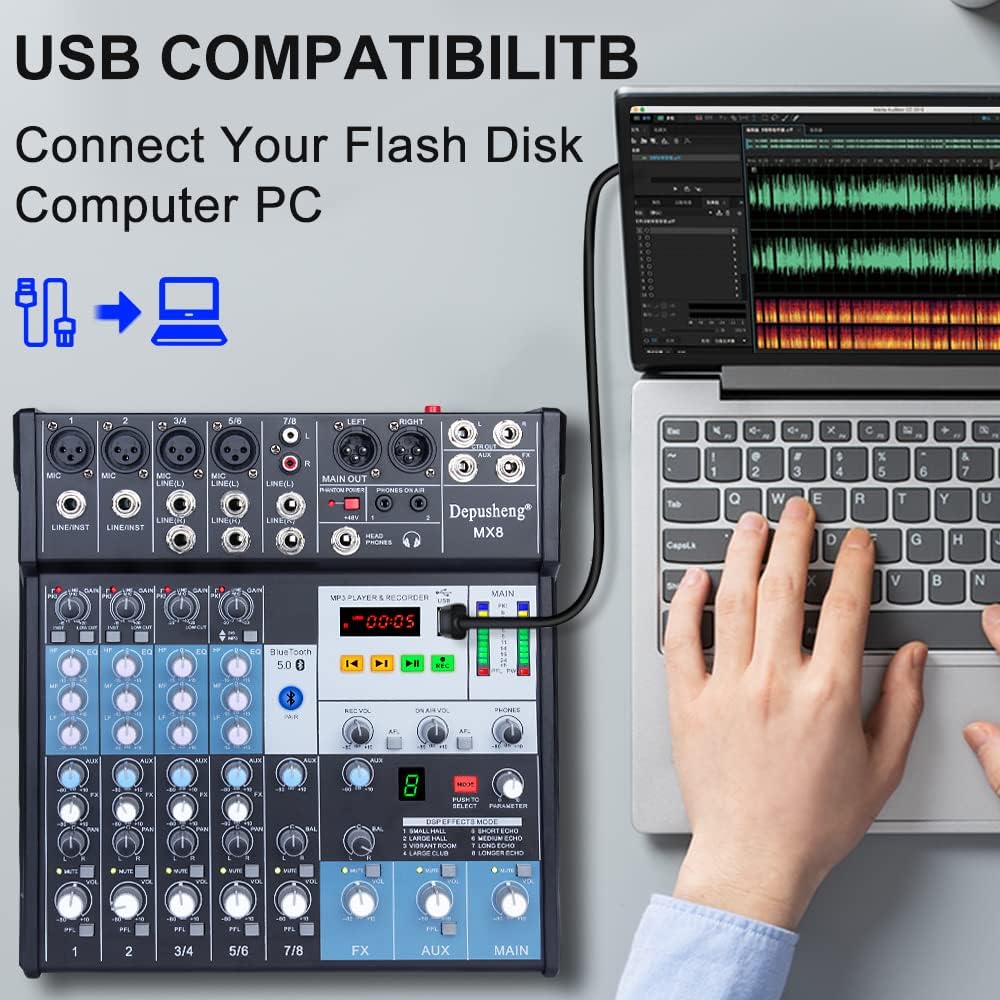
Figure 7: Connecting a USB flash drive to the mixer for playback or recording.
5. Computer Recording
To record audio to your computer:
- Connect the mixer to your computer via USB.
- Open your preferred Digital Audio Workstation (DAW) or recording software on your computer.
- Select the mixer as your audio input device within the software settings.
- Adjust input levels on the mixer and in your software, then begin recording.
Video 1: Demonstrates various setup and operation aspects of the Depusheng MX8 mixer, including connecting microphones (0:08-0:22), adjusting EQ (0:23-0:26), connecting headphones (0:31-0:38), connecting to an amplifier/speakers (0:39-0:46), selecting DSP effects (0:47-0:53), Bluetooth pairing (0:54-1:06), USB playback (1:08-1:16), and computer recording (1:27-1:31).
Maintenance
To ensure the longevity and optimal performance of your Depusheng MX8 mixer, follow these maintenance guidelines:
- Cleaning: Use a soft, dry cloth to clean the exterior of the unit. Do not use abrasive cleaners, solvents, or waxes.
- Storage: When not in use, store the mixer in a cool, dry place, away from direct sunlight and extreme temperatures.
- Dust Protection: Cover the mixer with a dust cover when not in use to prevent dust accumulation in faders and knobs.
Troubleshooting
If you encounter issues with your Depusheng MX8 mixer, refer to the following common problems and solutions:
| Problem | Possible Cause | Solution |
|---|---|---|
| No power | Power adapter not connected or faulty; power switch off. | Check power connections; ensure power switch is on; try a different outlet. |
| No sound output | Incorrect cable connections; main volume fader down; amplifier/speakers off or muted. | Verify all audio cable connections; increase main volume; check amplifier/speaker status. |
| Microphone not working | Microphone not connected properly; GAIN knob too low; +48V phantom power off for condenser mics. | Check microphone connection; increase GAIN; activate +48V for condenser mics. |
| Bluetooth connection issues | Device not in pairing mode; mixer not discoverable; interference. | Ensure mixer is in Bluetooth mode; restart both devices; move closer to the mixer. |
| USB playback not working | USB drive not formatted correctly; unsupported file format; faulty USB drive. | Ensure USB is FAT32 formatted; use supported audio formats (e.g., MP3); try another USB drive. |
Specifications
- Number of Channels: 8
- Connectivity Technology: Bluetooth, USB
- Power Source: Corded Electric
- Item Weight: 5.41 pounds (2.46 Kilograms)
- Package Dimensions: 15.08 x 12.28 x 3.82 inches
- DSP Effects: 8 built-in reverb effects
- Phantom Power: +48V
Warranty and Support
For warranty information or technical support, please refer to the documentation included with your purchase or contact Depusheng customer service. Keep your proof of purchase for any warranty claims.


