1. Introduction
This manual provides instructions for the Miuzei MC39-C-UF Aluminum Passive Cooling Case, designed specifically for the Raspberry Pi 4 Model B (compatible with 8GB, 4GB, 2GB, and 1GB versions). This case offers robust protection and efficient passive cooling for your Raspberry Pi, ensuring stable operation without the need for active fans, resulting in a completely silent system.
The case is constructed from high-accuracy CNC aluminum alloy, featuring a double-layered, ribbed design that maximizes surface area for heat dissipation. Integrated heat conductors directly contact the Raspberry Pi's chips to transfer heat effectively to the aluminum housing.
2. Package Contents
Please verify that all the following items are included in your package:
- 1 x Miuzei Raspberry Pi 4B Aluminum Case (Top and Bottom sections)
- 8 x Thermal Pads (4 for primary use, 4 for backup)
- 1 x Copper Heatsink (pre-installed or separate, depending on model revision)
- 4 x Screws with Nuts
- 1 x Hex Wrench (for screws)

Image: Exploded view of the Miuzei MC39-C-UF case components, showing the aluminum top and bottom, thermal pads, screws, and a Raspberry Pi board.
3. Setup and Installation
Follow these steps to install your Raspberry Pi 4 into the Miuzei aluminum case:
- Prepare Raspberry Pi: Ensure your Raspberry Pi 4 Model B is powered off and disconnected from all peripherals.
- Apply Thermal Pads: Carefully peel off the protective films from both sides of the thermal pads. Place the appropriate sized thermal pads onto the main heat-generating chips of your Raspberry Pi (CPU, RAM, USB controller, Ethernet controller). Refer to the internal view image for guidance on placement.
- Position Raspberry Pi: Gently place the Raspberry Pi board into the bottom section of the aluminum case, ensuring that the thermal pads align with the internal heat conductors of the case. The ports of the Raspberry Pi should align with the cutouts in the case.
- Attach Top Case: Place the top section of the aluminum case over the Raspberry Pi, ensuring that the internal heat conductors make firm contact with the thermal pads on the Raspberry Pi's chips.
- Secure with Screws: Align the screw holes on the top and bottom case sections. Insert the four screws and secure them with the nuts using the provided hex wrench. Do not overtighten.

Image: Internal view illustrating the placement of the Raspberry Pi 4 within the case, highlighting the contact points for passive cooling.

Image: The fully assembled Miuzei MC39-C-UF aluminum case, showcasing its compact design and accessible ports.
4. Operating the Case
The Miuzei MC39-C-UF case is designed for passive cooling, meaning it operates silently without any moving parts. Once your Raspberry Pi is installed, the aluminum case acts as a large heatsink, efficiently dissipating heat generated by the Pi's components into the surrounding air.
All essential ports and connectors of the Raspberry Pi 4 remain accessible through precisely cut openings in the case. These include:
- USB-C Power Supply port
- Micro HDMI Ports (x2)
- AV Output (3.5mm jack)
- USB 2.0 Ports (x2)
- USB 3.0 Ports (x2)
- Ethernet Port
- GPIO Pin Header access
- Camera Slot
- TF Card Slot
- Visible Indicator Lights

Image: Labeled side view of the case, indicating the location of the USB-C power, Micro HDMI, AV, USB 2.0, USB 3.0, and Ethernet ports.

Image: Labeled side view of the case, indicating the location of the GPIO pins, Camera Slot, TF Card Slot, and Visible Indicator Light.
5. Maintenance
The Miuzei aluminum case requires minimal maintenance. To ensure optimal heat dissipation and appearance:
- Cleaning: Periodically wipe the exterior of the case with a soft, dry cloth to remove dust. For stubborn marks, a slightly damp cloth can be used, followed by immediate drying. Avoid abrasive cleaners or solvents.
- Thermal Contact: Ensure the case remains securely fastened. If you notice a significant increase in Raspberry Pi temperature, verify that the thermal pads are correctly positioned and making good contact with both the Pi's chips and the case's heat conductors.
6. Troubleshooting
If you encounter issues with your Miuzei MC39-C-UF case, consider the following:
- Overheating: While designed for efficient cooling, if your Raspberry Pi still experiences high temperatures, ensure the thermal pads are correctly applied and making full contact. Verify that the case screws are tightened sufficiently to ensure good thermal transfer. Avoid placing the case in enclosed spaces without adequate airflow.
- Port Alignment: If a port is difficult to access or a connector does not fit, check that the Raspberry Pi board is seated correctly within the case and that the case sections are properly aligned before tightening the screws.
- Physical Damage: Inspect the case for any physical damage that might impede its function or thermal performance.
For persistent issues not covered here, please refer to the support section.
7. Specifications
| Feature | Detail |
|---|---|
| Brand | Miuzei |
| Model | MC39-C-UF |
| Compatible Devices | Raspberry Pi 4 Model B (8GB/4GB/2GB/1GB) |
| Material | High-accuracy CNC Aluminum Alloy |
| Cooling Method | Passive Heatsink (no fan required) |
| Special Features | Double-layered, ribbed design for enhanced heat dissipation, integrated heat conductors |
| Product Dimensions | 12 x 8 x 4 cm |
| Item Weight | 170 g |
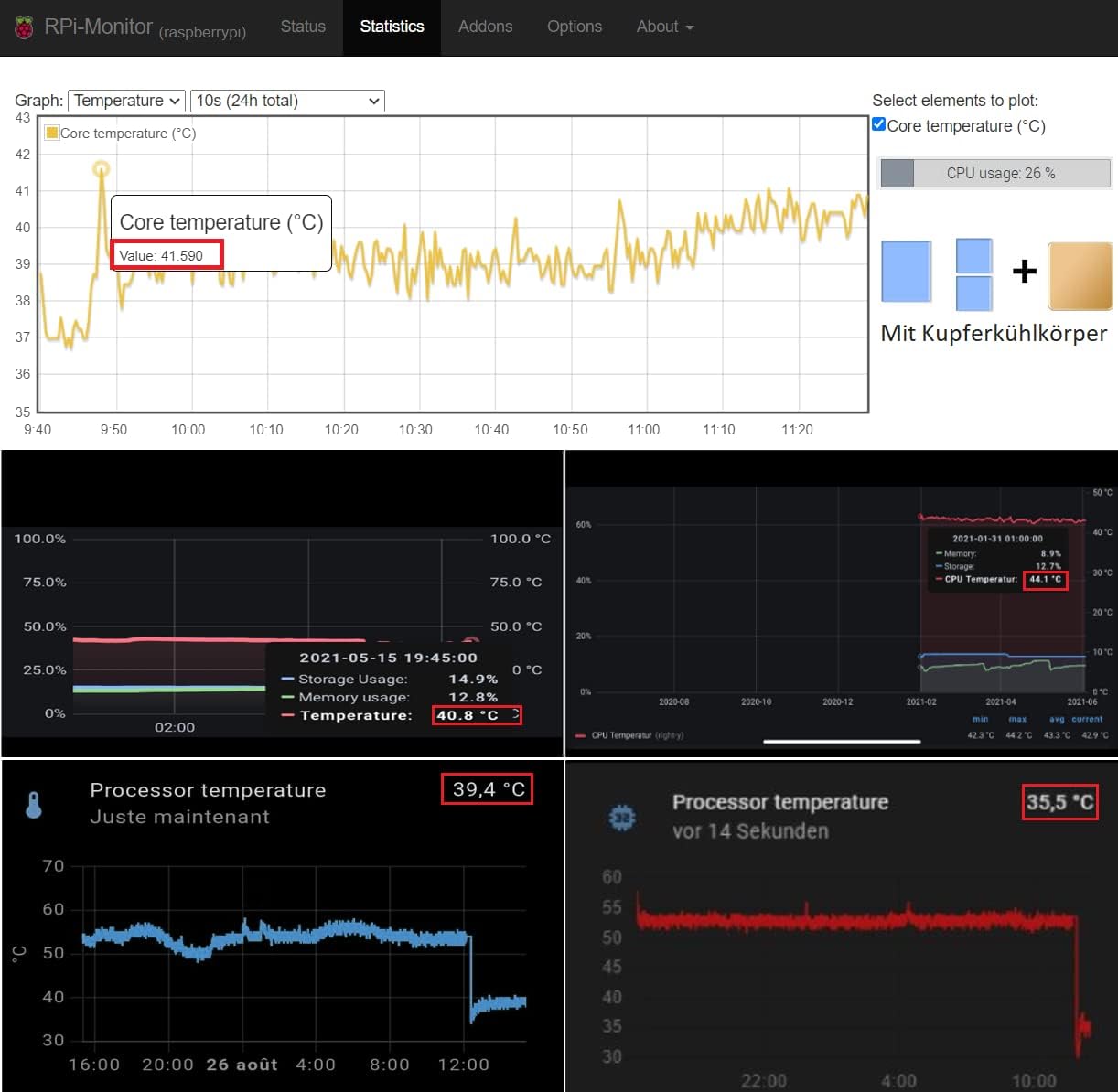
Image: Example temperature graphs illustrating the effectiveness of passive cooling solutions in reducing Raspberry Pi core temperatures.
8. Warranty and Support
For warranty information or technical support regarding your Miuzei MC39-C-UF Aluminum Passive Cooling Case, please refer to the documentation provided with your purchase or contact Miuzei customer service through their official website or the retailer where the product was purchased. Please have your model number (MC39-C-UF) and purchase details ready when contacting support.


