1. Introduction
The Nobsound VU56 PRO is an advanced LED music spectrum display and audio adapter designed to provide a visual representation of your audio signals. Featuring 56 bits per channel for a total of 112-bit stereo display, it offers ultra-high resolution, allowing you to observe real-time music level status with precision. This device also functions as an audio converter/splitter, supporting RCA and 3.5mm AUX inputs and outputs. It is equipped with a full-function remote control for convenient operation and is powered by a 5V USB connection.

Figure 1: Nobsound VU56 PRO LED Sound Level Meter, front view.
2. Safety Information
- Do not expose the device to water or excessive moisture.
- Avoid placing the device near heat sources or in direct sunlight.
- Use only the specified 5V USB power supply.
- Do not attempt to disassemble or repair the device yourself. Refer to qualified personnel for service.
- Keep out of reach of children.
3. Package Contents
Please check the package contents upon unboxing:
- 1 x Nobsound VU56 PRO Sound Level Meter
- 1 x 3.5mm AUX Cable
- 1 x USB Cable
- 1 x Remote Control (CR2025 battery not included)
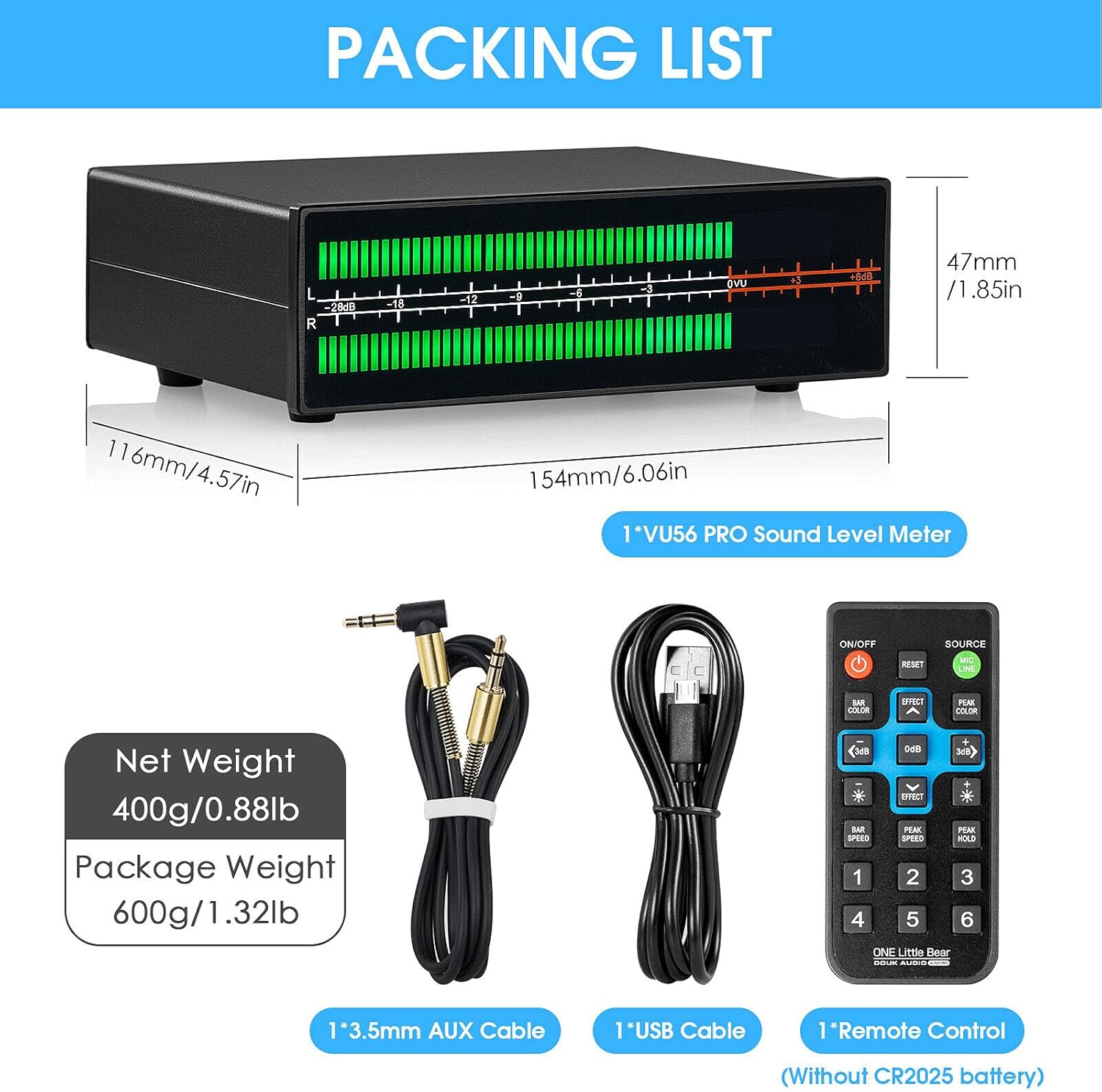
Figure 2: Included accessories and dimensions of the VU56 PRO.
4. Product Overview
4.1 Front Panel
The front panel features the 112-bit LED display, showing the sound level for left (L) and right (R) channels. The scale indicates decibel (dB) values, with 0VU representing 0.775Vrms in VU mode or 1.5Vpp in PPM mode.

Figure 3: Front panel display with dB scale.

Figure 4: Explanation of dB values and display effects on the panel.
4.2 Rear Panel
The rear panel provides all necessary connection ports and control buttons:
- LINE 1 IN/OUT (RCA): Gold-plated RCA input and output for audio signals.
- LINE 2 IN/OUT (3.5mm AUX): Gold-plated 3.5mm AUX input and output for audio signals.
- MODE/ON OFF/LINE Switch: Button to switch display effects, power on/off (long press 3S), and switch between LINE input and MIC pick-up.
- MIC Pick-up Hole: Built-in microphone for sound level detection without direct audio input.
- USB 5V IN: Power input port for the device.

Figure 5: Rear panel layout showing input/output connections and controls.
5. Setup
Follow these steps to set up your VU56 PRO:
- Connect Audio Input: Connect your audio source (e.g., CD player, MP3 player, computer, phone) to either the RCA (LINE 1 IN) or 3.5mm AUX (LINE 2 IN) input ports on the rear panel. Note that LINE 1 and LINE 2 inputs are connected in parallel; only one input is needed.
- Connect Audio Output (Optional): If using the VU56 PRO as an audio converter/splitter, connect the RCA (LINE 1 OUT) or 3.5mm AUX (LINE 2 OUT) output ports to your amplifier or active speakers.
- Power Connection: Connect the provided USB cable to the USB 5V IN port on the rear panel and plug the other end into a 5V USB power source (e.g., computer USB port, USB wall adapter).
- Power On: Long press the MODE/ON OFF/LINE button for 3 seconds to power on the device.

Figure 6: The VU56 PRO integrated into a typical desktop audio setup.
6. Operating Instructions
6.1 Display Modes
The VU56 PRO supports two main display modes:
- PPM (Peak Programme Meter) Mode: 0dB = 1.5Vpp. This mode is generally recommended for non-professional users for a more dynamic display effect.
- VU (Volume Unit) Mode: 0dB = 0.775Vrms. This mode provides a more accurate representation of average signal levels.
Switch between these modes using the remote control or the physical button on the device.

Figure 7: Visual comparison of PPM and VU display modes.
6.2 Color and Display Effects
The color of the main bar and peak LED can be switched between green and red. The device also supports 8 kinds of display effects to customize the visual experience. These settings can be adjusted via the remote control.

Figure 8: Examples of the 8 different display effects available.
6.3 Remote Control Functions
The included remote control allows for easy adjustment of all settings from a distance. All settings are saved even after the device is powered off. Key functions include:
- Power On/Off
- Reset settings
- Switch display effects
- Change bar color (green/red)
- Change peak color (green/red)
- Adjust sensitivity/gain
- Switch between LINE input and MIC pick-up
Figure 9: The remote control for the VU56 PRO, showing various function buttons.
6.4 Audio Adapter Functionality
Beyond its visualizer capabilities, the VU56 PRO can serve as an audio converter or splitter. Its gold-plated RCA and 3.5mm AUX inputs and outputs ensure tight connections and minimize sound transmission loss, providing both visual and auditory enhancement to your setup.

Figure 10: The VU56 PRO functioning as an audio adapter within an audio system.
7. Maintenance
- Cleaning: Use a soft, dry cloth to clean the exterior of the device. Do not use liquid cleaners or aerosols.
- Storage: When not in use for extended periods, store the device in a cool, dry place away from direct sunlight.
- Connections: Periodically check all cable connections to ensure they are secure and free from dust.
8. Troubleshooting
| Problem | Possible Cause | Solution |
|---|---|---|
| Device does not power on. | No power supply or faulty USB cable. | Ensure USB cable is securely connected to a 5V power source. Try a different USB cable or power adapter. Long press the power button for 3 seconds. |
| LED display does not react to music. | No audio input, incorrect input selected, or low audio volume. | Check audio cables are correctly connected to IN ports. Ensure the audio source is playing and its volume is sufficient. Press the MODE/ON OFF/LINE button to switch between LINE input and MIC pick-up modes. |
| Display seems inaccurate or erratic. | Input signal too strong/weak, or incorrect display mode. | Adjust the input volume from your audio source. Try switching between PPM and VU display modes. Use the remote control to adjust sensitivity/gain if available. |
9. Specifications
| Feature | Specification |
|---|---|
| Brand | Nobsound |
| Model | VU56 PRO |
| Display Type | LED Music Spectrum Visualizer |
| Display Resolution | 56 bits per channel, 112-bit stereo |
| Display Modes | PPM (0dB=1.5Vpp), VU (0dB=0.775Vrms) |
| Input Interface | RCA, 3.5mm AUX, MIC pick-up |
| Output Interface | RCA, 3.5mm AUX |
| Power Supply | USB 5V (DC) |
| Material | Aluminium |
| Dimensions (L x W x H) | 154mm x 116mm x 47mm (6.06in x 4.57in x 1.85in) |
| Net Weight | 400g (0.88lb) |
| Channels | 2 |
10. Warranty and Support
Nobsound products typically come with a standard manufacturer's warranty. For specific warranty details, technical support, or service inquiries, please refer to the documentation included with your purchase or visit the official Nobsound website. Please retain your proof of purchase for warranty claims.
For further assistance, you may contact Nobsound customer support through their official channels.