Introduction
This manual provides essential instructions for the safe operation, maintenance, and troubleshooting of your Shop-Vac 1.5 Gallon 2.0 Peak HP All Around EZ Wet/Dry Vacuum. Please read this manual thoroughly before using the appliance and retain it for future reference.
Important Safety Instructions
When using an electrical appliance, basic precautions should always be followed, including the following:
- Read all instructions before using this vacuum cleaner.
- Do not leave appliance when plugged in. Unplug from outlet when not in use and before servicing.
- Do not use outdoors or on wet surfaces.
- Do not allow to be used as a toy. Close attention is necessary when used by or near children.
- Use only as described in this manual. Use only manufacturer's recommended attachments.
- Do not use with damaged cord or plug. If appliance is not working as it should, has been dropped, damaged, left outdoors, or dropped into water, return it to a service center.
- Do not pull or carry by cord, use cord as a handle, close a door on cord, or pull cord around sharp edges or corners. Do not run appliance over cord. Keep cord away from heated surfaces.
- Do not unplug by pulling on cord. To unplug, grasp the plug, not the cord.
- Do not handle plug or appliance with wet hands.
- Do not put any object into openings. Do not use with any opening blocked; keep free of dust, lint, hair, and anything that may reduce air flow.
- Keep hair, loose clothing, fingers, and all parts of body away from openings and moving parts.
- Do not pick up anything that is burning or smoking, such as cigarettes, matches, or hot ashes.
- Do not use to pick up flammable or combustible liquids, such as gasoline, or use in areas where they may be present.
- Do not use without filters in place.
- Turn off all controls before unplugging.
- Use extra care when cleaning on stairs.
Package Contents
Verify that all items listed below are included in your package:
- Shop-Vac 1.5 Gallon 2.0 Peak HP All Around EZ Wet/Dry Vacuum Unit
- 7' x 1-1/4" Secure Fit Hose
- (2) Extension Wands
- (1) Dual Surface Selector Nozzle
- (1) Gulper Nozzle
- (1) Crevice Tool
- (1) Round Brush
- (1) Wall Bracket
- (1) Filter Bag
- (1) Foam Sleeve
- (2) Filter Papers

Image: The Shop-Vac 1.5 Gallon All Around EZ Wet/Dry Vacuum shown with its complete set of accessories, including the hose, extension wands, various nozzles, brushes, wall bracket, and filters.
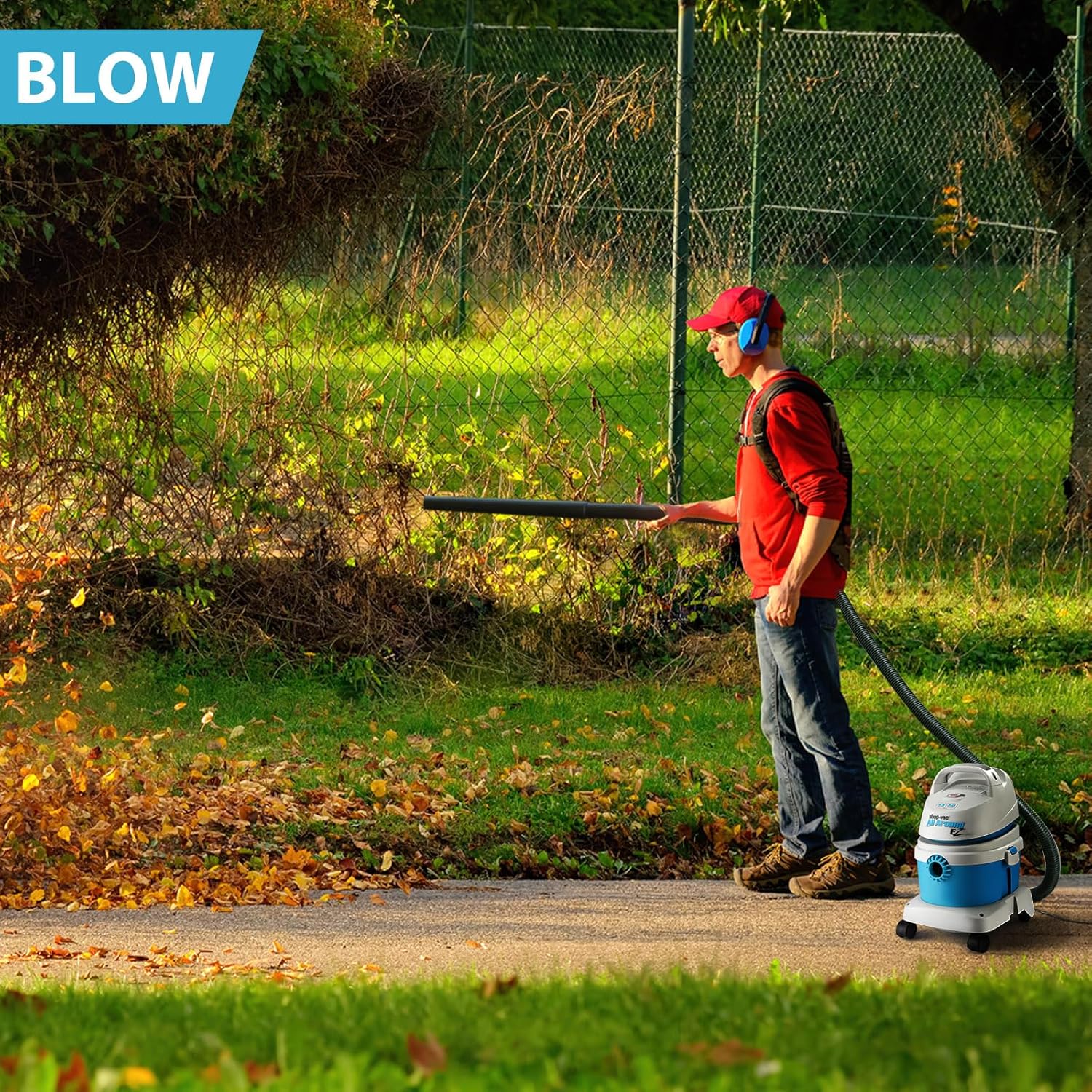
Image: A visual representation of the "What's in the Box?" contents, detailing each accessory such as the crevice tool, multi-purpose floor nozzle, gulper nozzle, round brush, 7 ft LockOn hose, extension wands, wall mount bracket, filter paper with ring, foam sleeve, and filter bag.
Product Features
The Shop-Vac 1.5 Gallon 2.0 Peak HP All Around EZ Wet/Dry Vacuum is designed for versatile cleaning tasks. Key features include:
- Portable & Compact Design: Equipped with a carry handle and casters for easy mobility.
- 3-in-1 Functionality: Capable of wet vacuuming, dry vacuuming, and blowing.
- Powerful Motor: Features a 2.0 Peak HP motor for effective cleaning.
- Built-In Blower Port: Allows for quick conversion to a blower for clearing debris.
- Extended Reach: An 18 ft power cord and 7 ft hose provide over 25 ft of cleaning reach.
- Wall-Mountable: Includes a wall bracket for convenient and space-saving storage.

Image: A detailed diagram highlighting the main components of the vacuum: 1) Carry Handle, 2) ON/OFF Switch, 3) 2 HP Motor, 4) Vacuum Port, 5) Caster, 6) Blower Port, 7) Latches, and 8) Collection Tank.
Setup
1. Filter Installation
Proper filter installation is crucial for optimal performance and to prevent damage to the motor. Always ensure the correct filter is installed for your cleaning task (wet or dry).
For Dry Pickup:
- Ensure the foam sleeve is removed.
- Slide the filter bag collar firmly onto the inlet deflector until it stops.
- Position the filter bag so it is fully contained within the tank.
- For fine dust, an additional filter paper with ring can be installed over the filter cage.
For Wet Pickup:
- Remove the filter bag and any filter paper.
- Carefully slide the foam sleeve down over the filter cage, ensuring it completely covers the cage.
2. Hose and Accessory Connection
- Insert the large end of the hose into the vacuum port on the front of the tank until it clicks securely into place.
- Attach desired cleaning accessories (extension wands, nozzles, brushes) to the smaller end of the hose. Ensure connections are snug to maintain suction.
Video: An official Shop-Vac video demonstrating the features and setup of the 1.5 Gallon 2.0 Peak HP All Around EZ Wet/Dry Vacuum, including filter installation and accessory attachment.
Operating Instructions
Before operating, ensure the vacuum is properly assembled and the correct filter is installed for your task.
1. Dry Vacuuming
- Ensure a dry filter (filter bag and/or filter paper) is securely installed.
- Plug the power cord into a suitable electrical outlet.
- Turn the ON/OFF switch to the "ON" position.
- Use appropriate attachments for carpets, hard floors, or crevices to pick up dry debris.
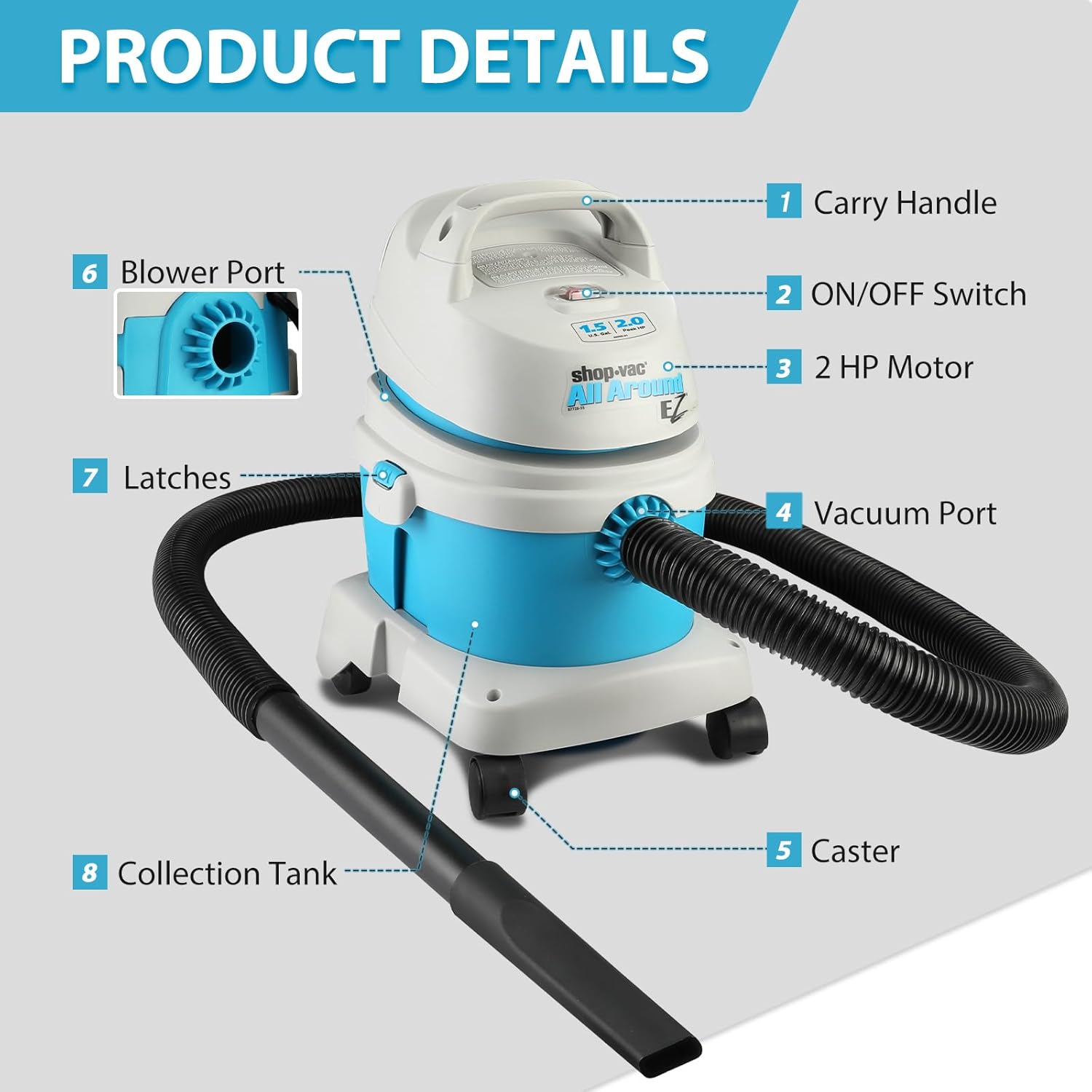
Image: A user demonstrating dry vacuuming on a carpeted floor using the Shop-Vac All Around EZ, effectively cleaning up spilled dirt from a plant.
2. Wet Vacuuming
- Ensure the foam sleeve is installed for wet pickup and any dry filters are removed.
- Plug the power cord into a suitable electrical outlet.
- Turn the ON/OFF switch to the "ON" position.
- Use the gulper nozzle or other suitable attachment to pick up liquids. The vacuum will automatically shut off when the tank is full.
- To empty the tank, turn off the vacuum, unplug it, unlatch the motor head, and carefully pour out the liquid.

Image: A user performing wet vacuuming in a kitchen, using the Shop-Vac All Around EZ to clean up a liquid spill from a countertop.
3. Blowing Function
- Remove the hose from the vacuum port.
- Insert the large end of the hose into the blower port located on the rear of the motor head until it clicks securely.
- Plug the power cord into an electrical outlet and turn the ON/OFF switch to "ON".
- Use the blowing function to clear leaves, debris, or dust from surfaces.
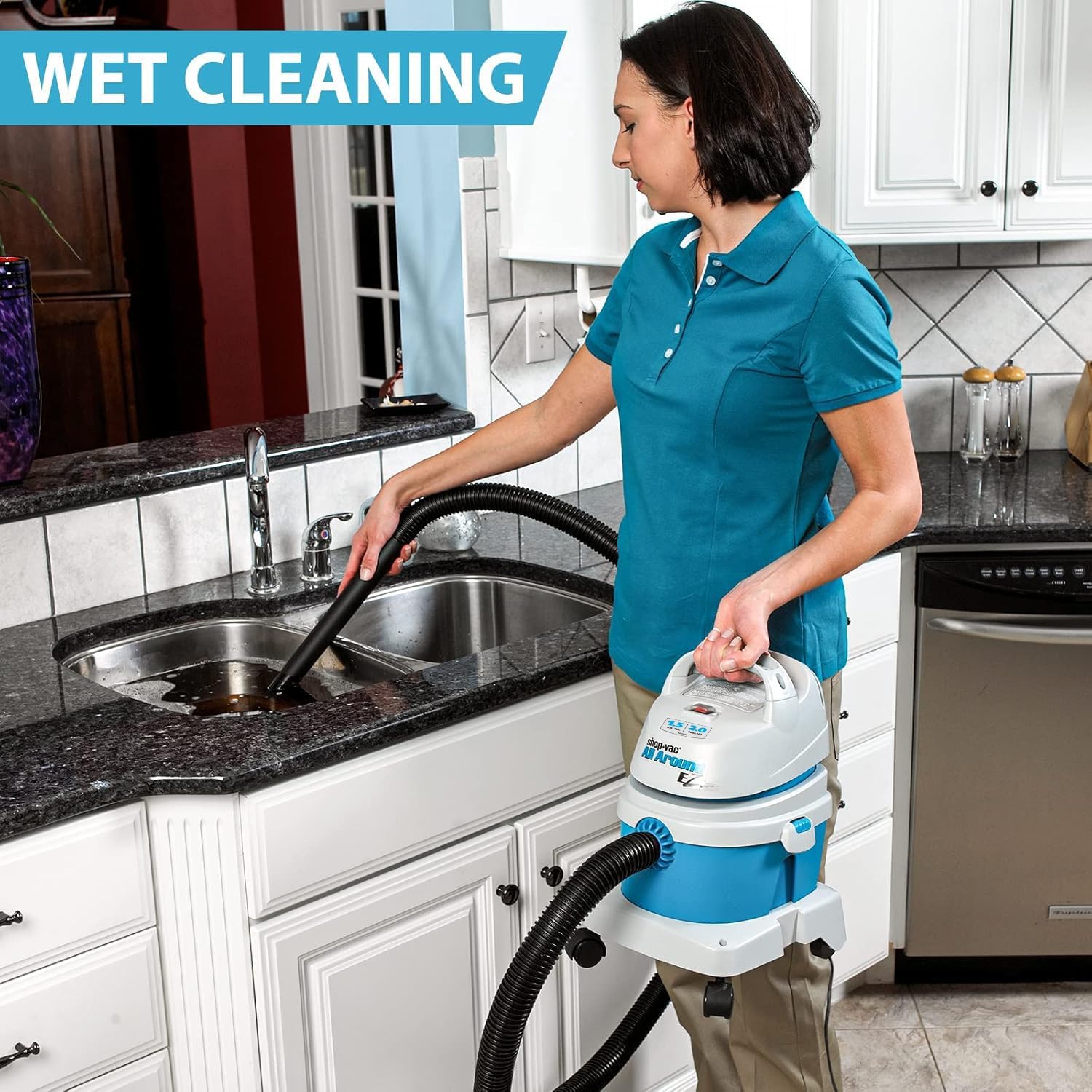
Image: A user utilizing the Shop-Vac All Around EZ in its blower mode to clear a pile of leaves from an outdoor paved area.
Video: An official Shop-Vac video showcasing the 3-in-1 functionality (wet, dry, blow) of the Shop-Vac All Around EZ, demonstrating its versatility for various cleaning tasks.
Maintenance
Regular maintenance ensures the longevity and optimal performance of your vacuum cleaner.
1. Filter Cleaning and Replacement
- Filter Bag: Replace the filter bag when it is full or when suction power decreases significantly. Do not wash filter bags.
- Foam Sleeve: For wet pickup, the foam sleeve can be rinsed with water and allowed to air dry completely before reinstallation.
- Filter Paper: Replace filter paper when it becomes dirty or damaged.
2. Tank Cleaning
Empty the collection tank regularly, especially after wet pickup. Rinse the tank with water and mild detergent if necessary. Allow it to dry completely before reassembling the vacuum.
3. Hose and Accessory Cleaning
Inspect the hose and accessories for blockages or debris. Clear any obstructions to maintain proper airflow and suction.
Storage
The Shop-Vac All Around EZ is designed for convenient storage, including a wall-mount option.
Wall Mount Installation:
- Select a suitable location on a sturdy wall, ensuring it is clear of electrical wiring or plumbing.
- Use the provided wall bracket as a template to mark drilling locations.
- Drill pilot holes and secure the wall bracket using appropriate fasteners (not included, choose based on wall type).
- Hang the vacuum onto the installed wall bracket. The hose and accessories can be wrapped around the unit or stored separately.

Image: The Shop-Vac All Around EZ vacuum conveniently stored on a wall mount, demonstrating its space-saving design, positioned next to a washing machine.
Troubleshooting
Refer to the table below for common issues and their solutions.
| Problem | Possible Cause | Solution |
|---|---|---|
| Vacuum will not start. | No power to outlet; Faulty power cord/plug; ON/OFF switch is off. | Check power outlet; Inspect cord/plug for damage; Ensure switch is in "ON" position. |
| Loss of suction. | Clogged hose/accessories; Full filter bag/dirty foam sleeve; Improperly sealed motor head. | Clear obstructions; Clean or replace filters; Ensure motor head latches are secure. |
| Water coming from exhaust. | Tank is full during wet pickup; Foam sleeve not installed or damaged. | Empty tank; Install or replace foam sleeve. |
| Dust escaping from exhaust. | Dry filter not installed or damaged; Filter bag is full. | Install or replace dry filter; Replace filter bag. |
Specifications
| Feature | Detail |
|---|---|
| Brand | Shop-Vac |
| Model Number | SV2021022 |
| Capacity | 1.5 Gallons |
| Motor Horsepower | 2.0 Peak HP |
| Wattage | 1800 watts |
| Hose Length | 7 Feet (1-1/4" diameter) |
| Power Cord Length | 18 Feet |
| Product Dimensions | 13.6"L x 12.6"W x 20.25"H |
| Item Weight | 10.93 pounds |
| Filter Type | Foam, Filter Bag, Filter Paper |
| Special Feature | Wet/Dry, Wheels, Blower Port, Wall Mountable |
| Indoor/Outdoor Usage | Indoor |
Warranty and Support
For warranty information, technical support, or to purchase replacement parts and accessories, please visit the official Shop-Vac website or contact their customer service department. Keep your purchase receipt as proof of purchase for warranty claims.
Official Shop-Vac Store: Shop-Vac on Amazon


