1. Introduction
This manual provides essential information for the safe and effective operation of your FOXSUR 6V/12V 2Amp Automatic Battery Charger. This intelligent charger is designed to charge and maintain various types of lead-acid batteries, including Calcium, GEL, AGM, Wet, and EFB batteries. It features microprocessor control for optimal charging and multiple protection mechanisms to ensure safety and prolong battery life.
The charger automatically detects battery voltage (6V or 12V) and provides a 2 Amp charging current. Its integrated LCD display provides real-time information on charging status, voltage, current, and battery condition.

Image 1.1: The FOXSUR charger displaying its auto-voltage detection capability for 6V and 12V batteries, with a 2 Amp output.
2. Safety Information
Read all safety warnings and instructions before using this product. Failure to follow these instructions may result in electric shock, fire, or serious injury.
- Battery Type: This charger is designed exclusively for lead-acid batteries (Calcium, GEL, AGM, Wet, EFB). DO NOT charge lithium batteries.
- Connection/Disconnection: Always turn off the power source before connecting or disconnecting the charger to the battery.
- Ventilation: Ensure adequate ventilation when charging. Batteries can produce explosive gases.
- Eye Protection: Wear appropriate eye protection when working with batteries.
- Flammable Materials: Keep the charger and battery away from flammable materials.
- Water Exposure: Do not expose the charger to rain or excessive moisture.
- Damaged Equipment: Do not operate the charger if it has been dropped, damaged, or is not functioning correctly.
- Children: Keep the charger out of reach of children.

Image 2.1: The FOXSUR charger highlighting its built-in safety features, including over-current, over-voltage, reverse polarity, short-circuit, and over-heat protection.
3. Setup
3.1 Package Contents
Verify that your package contains the following items:
- 1 x FOXSUR Car Battery Charger
- 1 x User Manual (this document)

Image 3.1: The FOXSUR battery charger shown with its retail packaging and included accessories.
3.2 Connecting the Charger
- Ensure the charger is unplugged from the AC power outlet.
- Connect the RED positive (+) clamp to the positive (+) terminal of the battery.
- Connect the BLACK negative (-) clamp to the negative (-) terminal of the battery.
- Once the clamps are securely attached, plug the charger's AC power cord into a standard wall outlet (100-240V AC).

Image 3.2: The FOXSUR battery charger showing its power plug and the red and black battery clamps for connection.
4. Operating Instructions
4.1 Automatic Charging Process
The FOXSUR charger is fully automatic with a 3-stage charging process. Once connected to a battery and plugged into power, it will automatically detect the battery type (6V or 12V) and begin charging.
- Stage 1: Desulfation (if needed): Applies a high-frequency pulse charge to break down lead sulfate crystals that may have built up on discharged batteries.
- Stage 2: Bulk Charge: Charges the battery at its maximum rate (2 Amps) until it reaches approximately 80% capacity.
- Stage 3: Float Charge: Once the battery is fully charged, the charger switches to a lower voltage to maintain the battery at 100% capacity without overcharging. This allows the charger to be left connected indefinitely.
4.2 LCD Display Information
The backlit LCD display provides real-time feedback:
- Voltage (V): Displays the current battery voltage.
- Current (A): Shows the charging current in Amperes.
- Charging Status: An animated battery icon indicates the charging progress.
- Battery Full: Displays 'FUL' when the battery is fully charged.
- Error (ERO): Indicates a fault condition (e.g., reverse polarity, short circuit).
- Repair Mode (PUL): Indicates the pulse repair function is active.
- End Repair (End): Indicates the pulse repair cycle is complete.
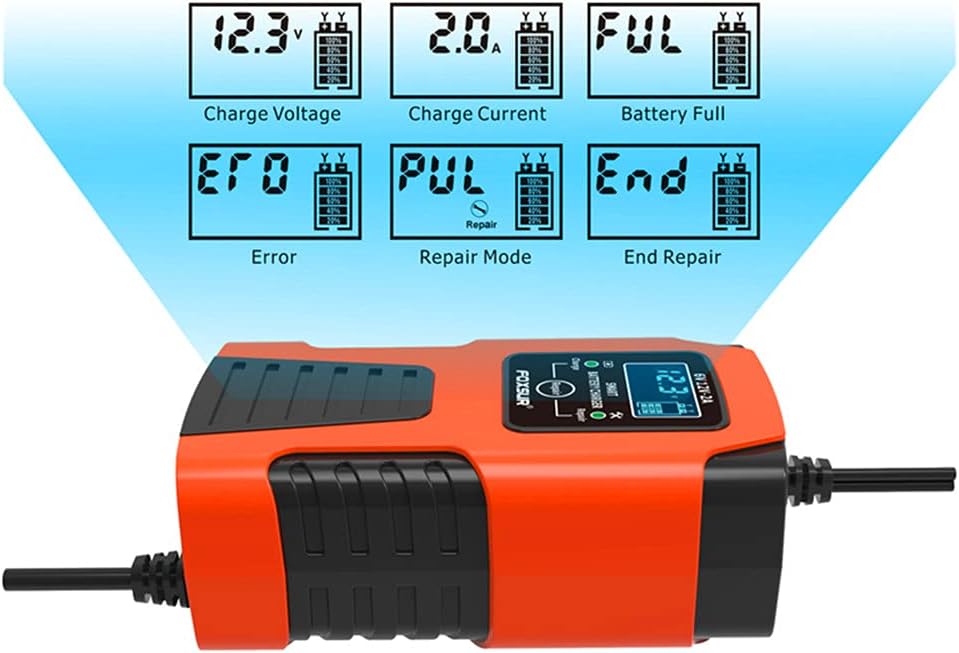
Image 4.1: Examples of the FOXSUR charger's LCD display showing charge voltage, charge current, battery full status, error messages, and repair mode indicators.
4.3 Pulse Repair Function
This charger includes a pulse repair function designed to help restore sulfated or slightly discharged batteries and extend their lifespan. The charger will automatically engage this mode if it detects a suitable condition. Note that this function cannot activate completely dead batteries or repair severely damaged batteries to a new condition.
5. Maintenance
Proper maintenance ensures the longevity and safe operation of your battery charger.
- Cleaning: Disconnect the charger from power and the battery. Wipe the exterior with a soft, dry cloth. Do not use harsh chemicals or abrasives.
- Cable and Clamp Inspection: Regularly inspect the charging cables and clamps for any signs of damage, fraying, or corrosion. Replace if necessary.
- Storage: Store the charger in a cool, dry place when not in use. Avoid extreme temperatures and direct sunlight.
6. Troubleshooting
If you encounter issues with your FOXSUR battery charger, refer to the following common problems and solutions:
| Problem | Possible Cause | Solution |
|---|---|---|
| Charger does not turn on or display anything. | No AC power; loose connection; faulty outlet. | Check AC power connection. Ensure outlet is functional. Verify charger is properly plugged in. |
| Display shows 'ERO' (Error). | Reverse polarity; short circuit; battery voltage too low/high; incorrect battery type. | Disconnect and re-connect clamps ensuring correct polarity (+ to +, - to -). Check for short circuits. Ensure battery is a compatible lead-acid type and within the 4Ah-40Ah range. |
| Charger not charging or charging slowly. | Battery severely discharged/damaged; poor connection; charger fault. | Ensure clamps have good contact. Note that the charger cannot activate completely dead batteries or repair severely damaged ones. If the issue persists, contact support. |
| Charger feels warm during operation. | Normal operation; poor ventilation. | Some warmth is normal. Ensure the charger has adequate ventilation and is not covered. If it becomes excessively hot, disconnect immediately and contact support. |
If the problem persists after attempting these solutions, please contact FOXSUR customer support.
7. Specifications
| Feature | Specification |
|---|---|
| Input Voltage | 100-240V AC, 50-60Hz |
| Rated Output | 6V 2A / 12V 2A |
| Minimum Start Voltage | 7.0V |
| Battery Range | 4Ah - 40Ah |
| Thermal Protection | 65°C +/- 5°C |
| Cooling | Natural Cooling |
| Battery Types | Most types of lead-acid batteries including Calcium, GEL, AGM, Wet, EFB, etc. |
| Product Dimensions | 5.12 x 2.95 x 1.97 inches (13 x 7.5 x 5 cm) |
| Item Weight | 9.9 ounces (0.28 kg) |
8. Warranty and Support
8.1 Warranty Information
For detailed warranty information regarding your FOXSUR 6V/12V 2Amp Automatic Battery Charger, please refer to the product packaging or the official FOXSUR website. Warranty terms and conditions may vary by region and retailer.
8.2 Customer Support
If you have any questions, require technical assistance, or need to report an issue with your product, please contact FOXSUR customer service through their official website or the contact information provided with your purchase.


