
Introduction
The Benro MeFOTO Roadtrip PRO Travel Tripod is a versatile and portable solution for photographers and videographers. This tripod offers a 6-in-1 functionality, transforming into a monopod, boom pole, selfie stick, high hat, and tabletop tripod. Designed for ease of use and durability, it features carbon fiber legs, twist leg locks, and an innovative quick-release plate that accommodates both cameras and smartphones. This manual provides instructions for setting up, operating, and maintaining your tripod to ensure optimal performance.
Product Overview
The Benro MeFOTO Roadtrip PRO is engineered for travel, offering a compact folded size and lightweight design without compromising stability. Its robust construction and multi-functional capabilities make it suitable for various shooting environments and creative applications.

Figure 1: Benro MeFOTO Roadtrip PRO Travel Tripod (Pacific Blue) in its fully extended tripod configuration.

Figure 2: The tripod in its reverse-folded, compact state, highlighting the integrated ball head.

Figure 3: A close-up view of the tripod's folded legs and durable metal twist locks.
Setup
- Unfolding the Tripod: Release the leg locks and extend the legs. The tripod features a reverse-folding design for compact storage.
- Adjusting Leg Angles: Each leg can be independently locked into place at three different angles, allowing for stable setup on uneven terrain or in cramped spaces.
- Extending Leg Sections: Use the durable metal twist locks to extend or retract the 4 leg sections to achieve your desired height. The anti-rotation legs ensure a fast and fumble-free setup.
- Attaching the Quick Release Plate: The Q-series triple-action ball head includes a quick-release plate (PMM70) with a 3-way screw and universal 1/4"-20 thread. Attach this plate to your camera's tripod mount.
- Mounting Your Camera/Phone: Secure the camera (with the attached QR plate) onto the ball head. For smartphones, simply mount the plate 90 degrees to reveal the spring-loaded phone clip. Ensure the set screw is backed out before clipping in your phone to prevent scratching.

Figure 4: The tripod set up with a camera, demonstrating its stability and adjustable height.
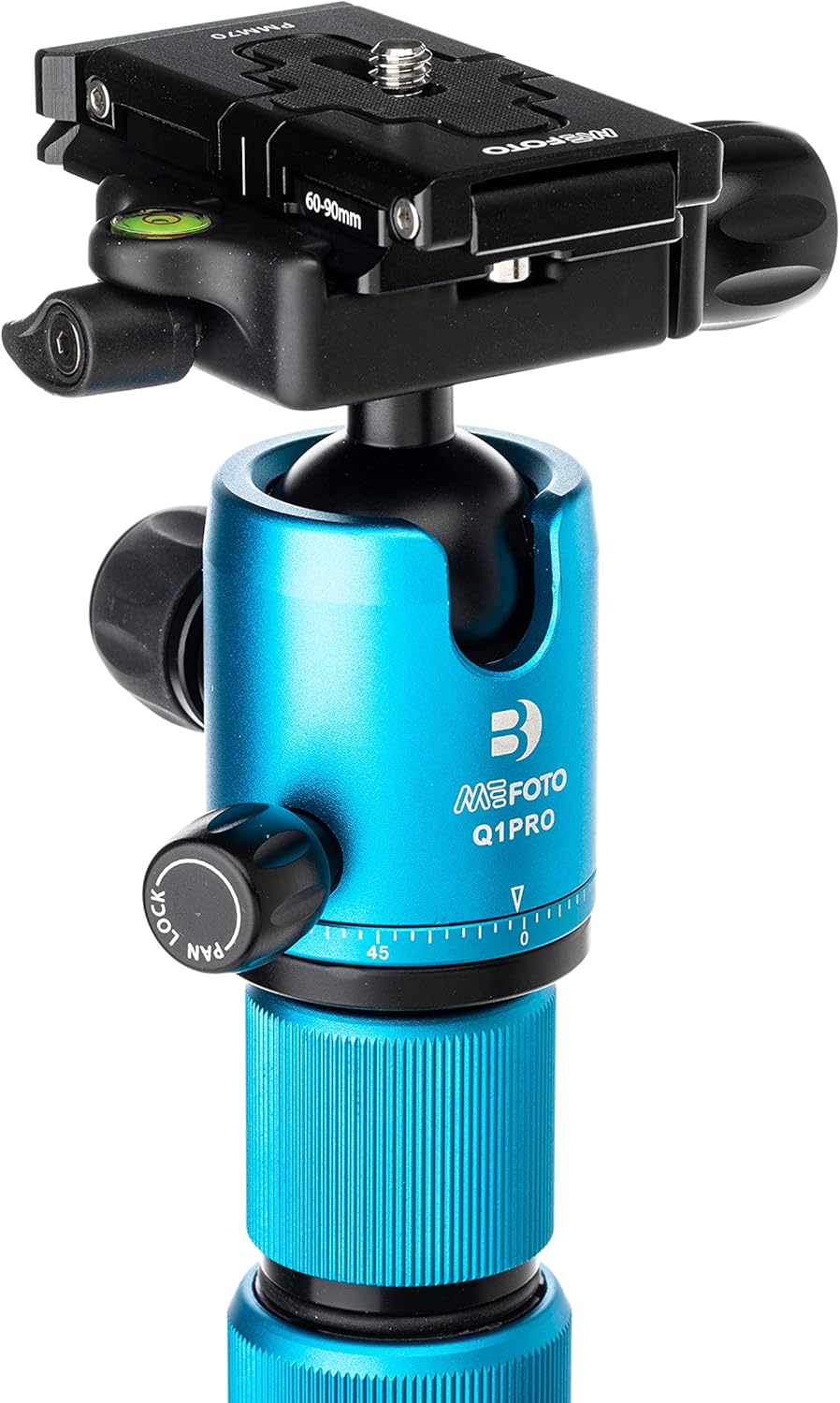
Figure 5: Detailed view of the Q1PRO ball head, showing the quick-release plate and adjustment knobs.
Operating
Ball Head Adjustments
- The Q-series triple-action ball head features separate adjustments for pan and ball lock.
- An additional pan lock on the QR plate allows for more accurate panoramic shooting.
- A bubble level is attached to the QR plate to prevent uneven shots.
- Easily switch between landscape and portrait shooting orientations by adjusting the ball head.
Monopod Conversion
To convert the tripod to a monopod, remove the center column and the padded leg. These two components combine to form a full-size monopod for added versatility.

Figure 6: The tripod configured as a monopod, offering increased mobility.

Figure 7: The padded rubber grip on the monopod provides comfortable handling, especially in varying temperatures.
Selfie Stick Conversion
The detachable leg tube and phone holder QR plate can be combined to create a quick selfie stick. This allows for easy capture of photography and social content with your smartphone.
Tabletop Tripod / High Hat Configuration
Within the center column, an internal small leg set is located. This can be used in conjunction with the center column, leg, and head to create multiple configurations. By attaching the head directly to the small leg set, you can use it as a tabletop tripod, or for live streaming, virtual meetings, or video chatting.
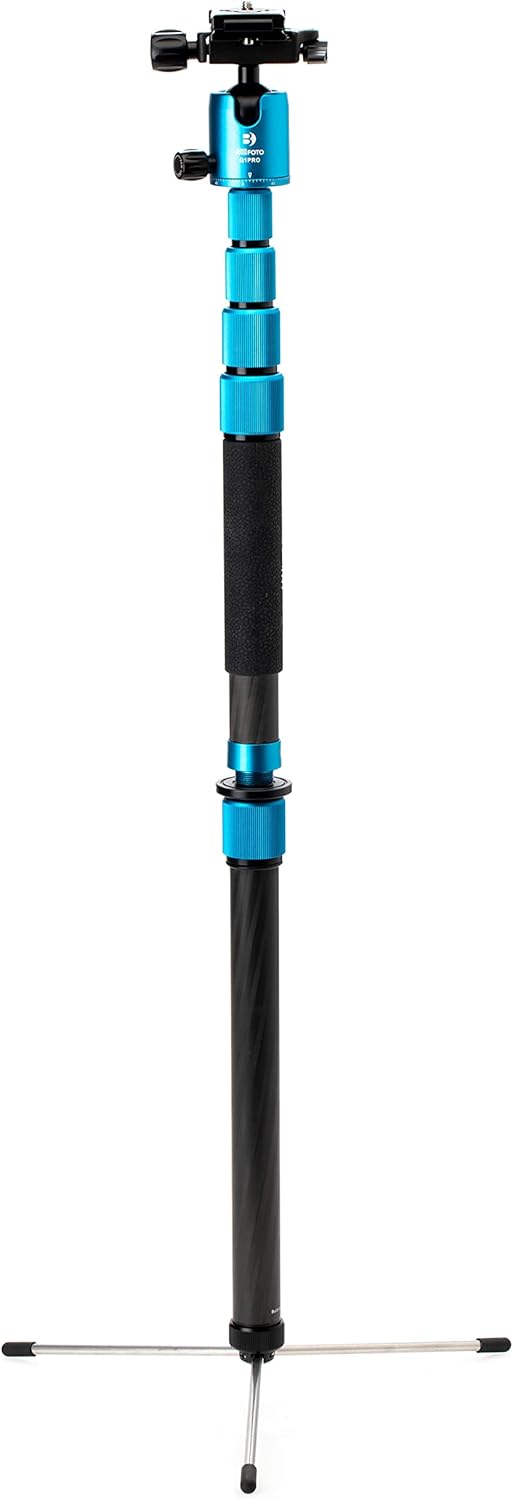
Figure 8: The tripod's small leg set used with the ball head to form a compact tabletop tripod.
Internal Tools
- Adapter Stud: Within the tripod's removable feet, you will find a 3/8" to 1/4"-20 adapter stud.
- Screwdriver: An accompanying straight screwdriver is provided to use with the stud or to attach the included phone clip/camera plate to the tripod leg to create a selfie stick.
- Allen Key: A 4mm Allen key is included to adjust the tension of the leg tube pivot.
Additional Stability
The rubber feet can be unthreaded and replaced with the included spiked feet for enhanced stability on soft ground or outdoors. The center column also features a hook for attaching a weight to further increase stability.
Official Product Video
Video 1: Official Benro MeFOTO Pro Tripods overview, demonstrating various features and configurations including monopod, selfie stick, and ball head adjustments.
Maintenance
To ensure the longevity and optimal performance of your Benro MeFOTO Roadtrip PRO Travel Tripod, follow these general maintenance guidelines:
- Cleaning: After use, especially in dusty, sandy, or wet conditions, wipe down all parts of the tripod with a clean, damp cloth. For stubborn dirt, a mild soap solution can be used, followed by thorough drying.
- Lubrication: Periodically check the movement of the leg locks and ball head. If they feel stiff, a small amount of silicone-based lubricant can be applied to moving parts, avoiding excessive application.
- Storage: Store the tripod in its included carrying case in a dry, cool place away from direct sunlight and extreme temperatures.
- Inspection: Regularly inspect all screws, bolts, and moving parts for any signs of loosening or wear. Tighten as necessary using the provided tools.
Specific maintenance details are not explicitly provided in the product information. For detailed maintenance procedures, please refer to the manufacturer's official website or contact their customer support.
Troubleshooting
This section addresses common issues you might encounter with your Benro MeFOTO Roadtrip PRO Travel Tripod.
- Legs not locking securely: Ensure the twist locks are fully tightened. Check for any debris or sand inside the leg sections that might prevent proper locking. Clean the leg sections if necessary.
- Ball head movement is stiff or loose: Adjust the tension knobs on the ball head. If stiff, a small amount of silicone lubricant might help. If it consistently loosens, ensure the camera plate is securely attached and the ball lock is fully engaged.
- Quick release plate sliding off: Ensure the quick release clamp is fully tightened. The Q1PRO ball head features two stop screws on the bottom of the QR plate to prevent accidental sliding; ensure these are properly engaged.
- Phone clip not holding phone securely: Ensure the spring-loaded clip is fully extended and gripping the phone firmly. Double-check that the set screw is backed out to allow the clip to fully engage without scratching the phone.
For issues not covered here, or if problems persist, please refer to the manufacturer's official website for further troubleshooting guides or contact their customer support.
Specifications
| Feature | Detail |
|---|---|
| Product Dimensions | 3.15 x 3.15 x 15.16 inches |
| Item Weight | 3.01 pounds (1.37 Kilograms) |
| ASIN | B097Z1QP55 |
| Item Model Number | BMRTPROCBLU |
| Brand | Benro |
| Color | Blue |
| Compatible Devices | Camera |
| Special Features | Lightweight, Portable, Compact, Flexible |
| Material | Carbon Fiber |
| Weight Limit | 17.6 Pounds |
| Maximum Height | 155 Centimeters |
| Tripod Head Type | Ball Heads |
| Date First Available | June 25, 2021 |
| Manufacturer | BENRO |

Figure 9: Product dimensions of the Benro MeFOTO Roadtrip PRO Travel Tripod.
Warranty and Support
Specific warranty terms and detailed support information are not explicitly provided in the product data. For comprehensive warranty details, product registration, and customer support, please visit the official Benro website or contact their authorized service centers. Keep your purchase receipt as proof of purchase for any warranty claims.