
Balboa Water Group G7412
Balboa Heater G7412 User Manual
FloThru, BWG BP, 4.0kW, 230v, w/Plug-n-Click
1. Product Overview
This manual provides comprehensive instructions for the installation, operation, and maintenance of the Balboa Heater, model G7412. This FloThru heater is designed for use with BWG BP systems, featuring a 4.0kW heating element and operating at 230 volts, equipped with a convenient Plug-n-Click connection system.
Key features include:
- Heater, FloThru, BWG BP, 4.0kW, 230v, w/ Plug-n-Click
- Model: G7412
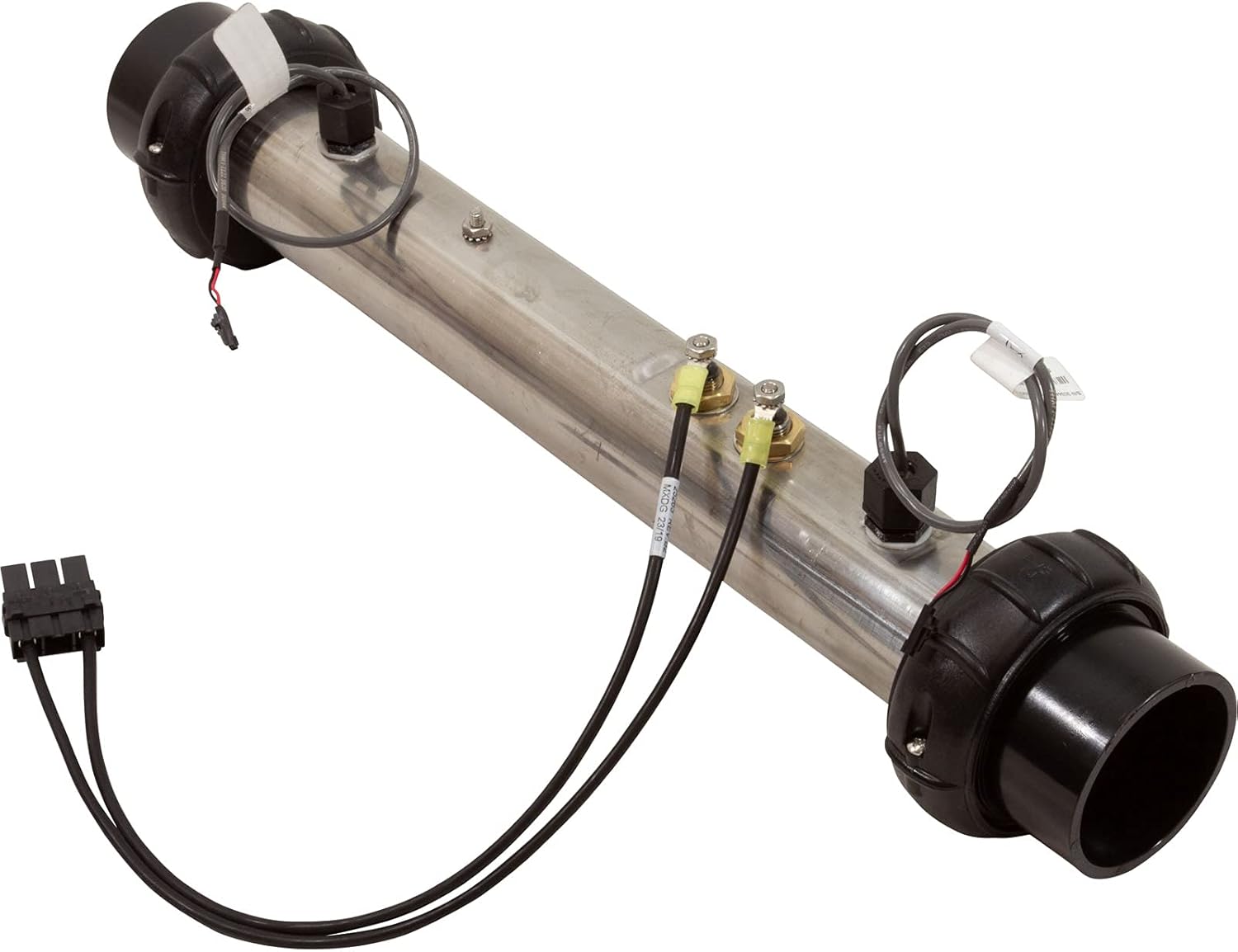
Figure 1.1: Front view of the Balboa FloThru Heater G7412. This image shows the main body of the heater, which is a cylindrical metal tube, with black plastic unions on both ends and electrical connections on the top surface.
2. Safety Information
Please read and understand all safety instructions before installing or operating this heater. Failure to follow these instructions could result in electric shock, fire, serious injury, or death.
- Electrical Safety: This unit operates at 230 volts. All electrical work must be performed by a qualified electrician in accordance with all local and national electrical codes.
- Water and Electricity: Never attempt to service the heater while it is connected to power or if there is water present around electrical components.
- Proper Grounding: Ensure the heater is properly grounded to prevent electrical shock.
- Temperature Control: Do not bypass or tamper with temperature sensors or safety limits.
- Installation Environment: Install the heater in a dry, well-ventilated area, away from flammable materials.
- Children and Pets: Keep children and pets away from the heater and its connections.
3. Package Contents
Verify that all components are present and undamaged upon unpacking. If any items are missing or damaged, contact your supplier immediately.
- 1 x Balboa FloThru Heater, Model G7412 (4.0kW, 230v, with Plug-n-Click)

Figure 3.1: Top view of the Balboa FloThru Heater G7412. This image highlights the electrical connections and the product label with model information and warnings.
4. Setup and Installation
Installation of this heater should only be performed by a qualified technician. Improper installation can lead to equipment damage, personal injury, or void the warranty.
- Power Disconnection: Ensure all power to the spa or system is disconnected at the main breaker before beginning installation.
- Drain System: Drain the spa or system completely to prevent water spillage during heater replacement.
- Remove Old Heater: Carefully disconnect the existing heater from the plumbing and electrical connections. Note the orientation and connection points for the new heater.
- Positioning: Install the new G7412 heater in the same orientation as the old unit. Ensure the flow direction matches the system requirements.
- Plumbing Connection: Connect the heater to the plumbing using the black plastic unions on both ends. Ensure a watertight seal. Do not overtighten the nuts to prevent damage to the epoxy seal.
- Electrical Connection (Plug-n-Click): Utilize the Plug-n-Click connection system to securely attach the heater's electrical cables to the control pack. Ensure all connections are firm and correctly seated. The heater is designed for 230V systems.
- Sensor Connection: Connect the integrated sensors to the appropriate ports on the control pack. These sensors are crucial for proper operation and safety.
- Refill System: Once all connections are secure, refill the spa or system with water, ensuring there are no leaks.
- Bleed Air: Bleed all air from the system before restoring power. Air pockets can cause the heater to overheat or malfunction.
- Power Restoration: Restore power to the system and check for proper operation.

Figure 4.1: Side view of the Balboa FloThru Heater G7412, showing the warning label. The label provides important safety information regarding installation and maintenance, including instructions on tightening nuts to prevent damage to the epoxy seal.

Figure 4.2: Another side view of the Balboa FloThru Heater G7412, illustrating the overall length and the placement of the electrical connections and unions.
5. Operating Instructions
The Balboa G7412 heater operates in conjunction with a compatible Balboa BP series control system. Once properly installed and powered, the heater will activate automatically as required by the control system to maintain the desired water temperature.
- Temperature Setting: Adjust the desired water temperature using the controls on your Balboa BP system's topside panel.
- Flow Requirement: Ensure adequate water flow through the heater. The heater is equipped with flow sensors that will prevent operation if flow is insufficient, protecting the heating element from damage.
- Indicator Lights: Refer to your Balboa BP control system manual for specific indicator lights related to heater operation and status.
6. Maintenance
Regular maintenance helps ensure the longevity and efficient operation of your Balboa heater.
- Power Disconnection: Always disconnect power to the system before performing any maintenance.
- Inspect Connections: Periodically inspect all electrical and plumbing connections for signs of wear, corrosion, or leaks. Tighten connections as necessary, but do not overtighten.
- Clean Heater Tube: If accessible and safe to do so, inspect the inside of the heater tube for scale buildup. In areas with hard water, descaling may be necessary. Consult a professional for descaling procedures.
- Sensor Check: Ensure temperature sensors are clean and properly seated.
- Water Quality: Maintain proper water chemistry in your spa or system to prevent scale buildup and corrosion, which can damage the heater element.
7. Troubleshooting
This section provides basic troubleshooting steps. For complex issues, consult a qualified technician or Balboa Water Group support.
| Problem | Possible Cause | Solution |
|---|---|---|
| Heater not heating | No power to the system; Insufficient water flow; Tripped high-limit switch; Faulty element or sensor. | Check main breaker; Ensure pumps are running and filters are clean; Reset high-limit switch (if applicable); Contact a technician for element/sensor diagnosis. |
| Error code on control panel | Specific system fault (e.g., flow error, sensor error). | Refer to your Balboa BP control system manual for specific error code definitions and troubleshooting steps. |
| Water not reaching set temperature | Low ambient temperature; System running in economy mode; Heater element degradation. | Allow more time for heating; Check system mode settings; Contact a technician for element inspection. |
8. Specifications
| Feature | Detail |
|---|---|
| Model Number | G7412 |
| Brand | Balboa Water Group |
| Type | FloThru Heater |
| Power Output | 4.0 kW |
| Voltage | 230 Volts |
| Connection Type | Plug-n-Click |
| Product Dimensions | 4.8"W x 20.3"H |
| Item Weight | 3.8 pounds |
| Color | Black (unions) |
| Efficiency | High Efficiency |
| Mounting Type | Wall (typical for spa packs) |
| UPC | 731946792413 |
9. Warranty and Support
For warranty information and technical support, please contact Balboa Water Group directly or refer to their official website. Keep your purchase receipt as proof of purchase for warranty claims.
Manufacturer: Balboa Water Group
For the most up-to-date contact information and support resources, please visit the official Balboa Water Group website or contact your authorized dealer.
Related documentsG7412

Ask a question about this manual
Ask about setup, troubleshooting, compatibility, parts, safety, or missing instructions. Manuals+ will review the question and use this page’s manual context to help answer it.