
Introduction
Thank you for choosing the Continu.us R230D2 Master TV Remote. This remote control is specifically designed to provide comprehensive control over RCA and Continu.us brand televisions, including access to commercial menus. Its intuitive layout ensures ease of use for all essential TV functions.

Figure 1: Front view of the R230D2 Master TV Remote, showing all buttons.
Setup
Before using your new remote, you will need to install batteries.
Battery Installation
- Locate the battery compartment on the back of the remote control.
- Slide the battery compartment cover downwards and lift it off.
- Insert two (2) AA batteries, ensuring the positive (+) and negative (-) terminals align with the markings inside the compartment.
- Replace the battery compartment cover by sliding it back into place until it clicks securely.

Figure 2: Back view of the R230D2 Master TV Remote, illustrating the battery compartment.
Initial Use
The R230D2 Master TV Remote is pre-programmed for RCA and Continu.us televisions and typically requires no code entry or complex synchronization. Simply point the remote at your television and press the POWER button. If the TV responds, the remote is ready for use.
Operating Instructions
This section details the functions of the buttons on your R230D2 remote control.
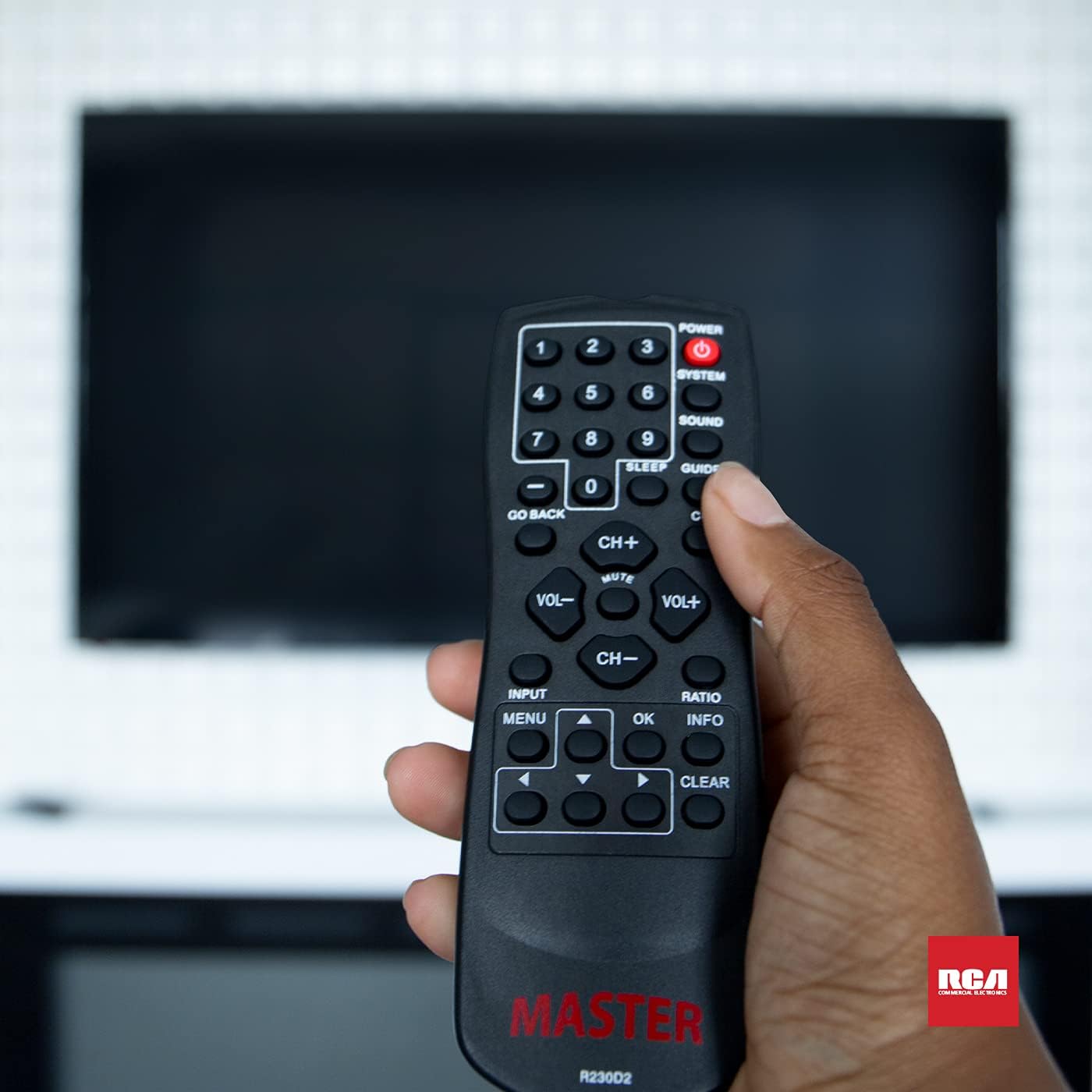
Figure 3: Using the R230D2 Master TV Remote with a television.
- POWER: Turns the television on or off.
- SYSTEM: Accesses system-specific functions or menus.
- SOUND: Adjusts sound modes or settings.
- GUIDE: Displays the electronic program guide (EPG).
- SLEEP: Sets a timer for the TV to automatically turn off.
- CC (Closed Caption): Toggles closed captions on or off.
- GO BACK: Returns to the previous channel or menu screen.
- Number Buttons (0-9): Directly input channel numbers.
- CH+ / CH-: Changes channels up or down.
- VOL+ / VOL-: Increases or decreases volume.
- MUTE: Mutes or unmutes the television sound.
- INPUT: Selects the input source (e.g., HDMI 1, AV).
- MENU: Opens the television's main menu.
- OK: Confirms a selection or enters a submenu.
- INFO: Displays information about the current program or input.
- RATIO: Adjusts the screen aspect ratio.
- CLEAR: Clears input or exits certain functions.
- Navigation Arrows (Up, Down, Left, Right): Navigates through menus and options.
Accessing Commercial Menus
The R230D2 remote is designed to access commercial menus on compatible RCA and Continu.us televisions. The specific button or sequence to access these menus may vary by TV model. Typically, this function is integrated within the SYSTEM or MENU buttons, or a combination thereof. Refer to your television's specific user manual for detailed instructions on accessing its commercial menu features.
Maintenance
To ensure the longevity and optimal performance of your remote control, follow these simple maintenance guidelines:
- Cleaning: Wipe the remote with a soft, dry cloth. For stubborn dirt, slightly dampen the cloth with water or a mild, non-abrasive cleaner. Do not use harsh chemicals or immerse the remote in liquid.
- Battery Replacement: Replace batteries when the remote's response becomes sluggish or stops working. Always replace both batteries at the same time with new AA batteries. Do not mix old and new batteries, or different types of batteries.
- Storage: Store the remote in a cool, dry place away from direct sunlight, extreme temperatures, and high humidity.
- Avoid Drops: Protect the remote from physical impact, as drops can damage internal components.
Troubleshooting
If you encounter issues with your R230D2 remote, try the following solutions:
- Remote Not Responding:
- Check if the batteries are inserted correctly with the correct polarity.
- Replace the batteries with fresh ones.
- Ensure there are no obstructions between the remote and the TV's infrared sensor.
- Make sure you are within the effective range of the TV's IR receiver.
- TV Not Turning On/Off:
- Confirm the TV is plugged into a working power outlet.
- Try turning the TV on/off using its physical power button.
- Specific Functions Not Working:
- Some functions may require the TV's menu to be open or a specific input selected.
- Ensure the remote is pointed directly at the TV.
- Remote Still Not Working:
- If the remote was recently dropped or exposed to moisture, internal damage may have occurred.
- Contact customer support for further assistance.
Specifications
| Feature | Detail |
|---|---|
| Brand | Continu.us |
| Model Number | R230D2 |
| Compatible Devices | RCA and Continu.us Televisions |
| Connectivity Technology | Infrared |
| Power Source | 2 AA Batteries (not included) |
| Item Weight | 1.76 ounces |
| Product Dimensions | 6 x 2 x 1 inches |
| Max Number of Supported Devices | 1 |
Warranty and Support
Continu.us products are designed and tested to high standards. We pride ourselves on offering excellent customer support.
Customer Support
If you require assistance with your R230D2 Master TV Remote, our support and technical team are available to help. Please reach out via phone or email for any pressing issues or questions.
For the most up-to-date contact information, please visit the official Continu.us website or refer to the product packaging.
Warranty Information
Specific warranty details for the R230D2 remote are typically provided with the product packaging or can be found on the Continu.us official website. Please retain your proof of purchase for warranty claims.