
Introduction
This manual provides instructions for the RemotesReplaced compatible remote control, designed as an electronic replacement for the original Goodmans LD1570FVT remote. It offers all the same functionalities as the original.
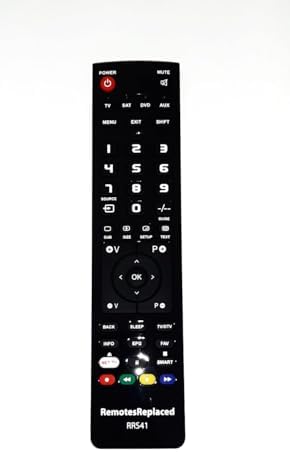
Figure 1: Front view of the RemotesReplaced compatible remote control. This image displays the full layout of buttons including power, mute, number pad, navigation, and special function keys.
Setup
The RemotesReplaced compatible remote control requires no setup codes. Simply install the batteries to begin operation.
Battery Installation
- Locate the battery compartment on the back of the remote control.
- Slide the battery compartment cover downwards or outwards to open it.
- Insert two (2) AAA batteries, ensuring the positive (+) and negative (-) terminals align correctly with the markings inside the compartment.
- Replace the battery compartment cover by sliding it back into place until it clicks securely.

Figure 2: Back view of the remote control, illustrating the location of the battery compartment.
Operating Instructions
This remote control is designed to replicate the functions of your original Goodmans LD1570FVT remote. Point the remote directly at the device's infrared receiver for optimal performance.
Basic Functions
- Power Button (POWER): Turns the device on or off.
- Mute Button (MUTE): Mutes or unmutes the audio.
- Number Pad (0-9): Directly selects channels or inputs numerical values.
- Volume Up/Down (V+ / V-): Adjusts the volume level.
- Channel Up/Down (P+ / P-): Changes the channel.
- Navigation Buttons (Up, Down, Left, Right, OK): Navigates through menus and confirms selections.
- Back Button (BACK): Returns to the previous screen or menu.
- Menu Button (MENU): Accesses the main menu of the device.
- Exit Button (EXIT): Exits the current menu or function.
Special Functions
- Source Button (SOURCE): Selects input sources (e.g., TV, SAT, DVD, AUX).
- Info Button (INFO): Displays program information.
- EPG Button (EPG): Accesses the Electronic Program Guide.
- FAV Button (FAV): Accesses favorite channels.
- NET TV Button (NET TV): Direct access to network TV features.
- SMART Button (SMART): Accesses Smart TV functions.
- Color Buttons (Red, Green, Yellow, Blue): Used for specific functions within menus or applications, as indicated on screen.

Figure 3: Close-up view of the remote control's button layout, highlighting various function keys.
Maintenance
Battery Replacement
Replace batteries when the remote control becomes unresponsive or its range decreases. Always replace both batteries simultaneously with new AAA batteries.
Cleaning
To clean the remote control, gently wipe its surface with a soft, dry cloth. Do not use liquid cleaners or abrasive materials, as these can damage the remote.
Storage
Store the remote control in a cool, dry place away from direct sunlight and extreme temperatures. If storing for an extended period, remove the batteries to prevent leakage.
Troubleshooting
| Problem | Possible Cause | Solution |
|---|---|---|
| Remote not responding. | Dead or incorrectly inserted batteries. | Check battery polarity. Replace with new AAA batteries. |
| Limited range or intermittent response. | Weak batteries or obstruction between remote and device. | Replace batteries. Ensure clear line of sight to the device's IR receiver. |
| Specific button not working. | Button stuck or internal issue. | Gently press the button multiple times. If issue persists, contact support. |
Specifications
- Brand: RemotesReplaced
- Model Number: LD1570FVT
- Compatible With: Goodmans LD1570FVT
- Battery Type: 2 x AAA batteries (not included)
- Item Weight: Approximately 120 Grams
- Manufacturer: Linkwebb
Warranty Information
This RemotesReplaced compatible remote control comes with a 1-year warranty from the date of purchase. This warranty covers manufacturing defects and ensures the remote performs as described. Please retain your proof of purchase for warranty claims.
Support
RemotesReplaced has specialized in remote controls for nearly 20 years, continuously expanding its database of compatible remotes. For further assistance or inquiries, please refer to the seller's contact information provided at the point of purchase.