1. Product Overview
The binbok JoyPad Controller is a wireless replacement controller designed for the Nintendo Switch and Switch OLED consoles. It offers enhanced gaming features including adjustable LED lighting, a programmable back map button, turbo functionality, dual vibration, and 6-axis motion control. This manual provides instructions for setup, operation, and maintenance of your controller.

Image 1.1: binbok JoyPad Controller (Green & Blue) in combined mode.

Image 1.2: Ergonomic design of the binbok JoyPad controllers.
2. Package Contents
- 1x Left binbok JoyPad Controller
- 1x Right binbok JoyPad Controller
- 1x USB-C Charging Cable
- 1x User Manual
3. Setup
3.1 Charging the Controllers
Before first use, ensure the controllers are fully charged. Each controller has a built-in 500 mAh battery.
- Connect the USB-C charging cable to the charging port on each controller.
- Connect the other end of the cable to a USB power source (e.g., Nintendo Switch dock, computer USB port, or USB wall adapter).
- The LED indicators on the controllers will show charging status. A full charge typically takes 2-3 hours.
- Once fully charged, the controllers provide approximately 8-10 hours of playtime.

Image 3.1: Battery specifications and charging information.
3.2 Pairing with Nintendo Switch
The binbok JoyPad controllers can be used in handheld mode (attached to the console) or wireless mode.
3.2.1 Handheld Mode
- Slide the Left JoyPad controller down the left rail of the Nintendo Switch console until it clicks into place.
- Slide the Right JoyPad controller down the right rail of the Nintendo Switch console until it clicks into place.
- The console will automatically recognize the controllers.
3.2.2 Wireless Mode
- From the Nintendo Switch HOME Menu, select "Controllers" > "Change Grip/Order".
- On each binbok JoyPad controller, press and hold the SYNC button (small round button on the side rail) for a few seconds until the player indicator lights begin to flash.
- Once paired, the player indicator lights will remain solid, and the controllers will be recognized by the Switch.
- To wake up the Switch wirelessly, press the HOME button on the Right JoyPad. If only one controller connects, you may need to manually connect the other in the controller settings.
4. Operating Instructions
4.1 LED Lighting Modes
The binbok JoyPad controllers feature adjustable LED lights with 8 different colors and 3 lighting modes.
- Single Color Mode: Displays a static color.
- Rainbow Light Mode: Cycles through multiple colors.
- Breathing Color Changing Mode: Colors fade in and out.
To change modes or brightness, refer to the specific button combinations in the included quick start guide or experiment with the LED button on the controller.

Image 4.1: Adjustable LED lighting features.
4.2 Turbo Function
The Turbo function allows for rapid, repeated button presses with a single hold. There are 3 adjustable Turbo levels.
- Press the Turbo button (T) and the desired action button (X, Y, A, B, L, R, ZL, ZR) simultaneously to activate Turbo for that button.
- Press the Turbo button and the action button again to adjust the Turbo speed (low, medium, high).
- Press the Turbo button and the action button a third time to deactivate Turbo for that button.
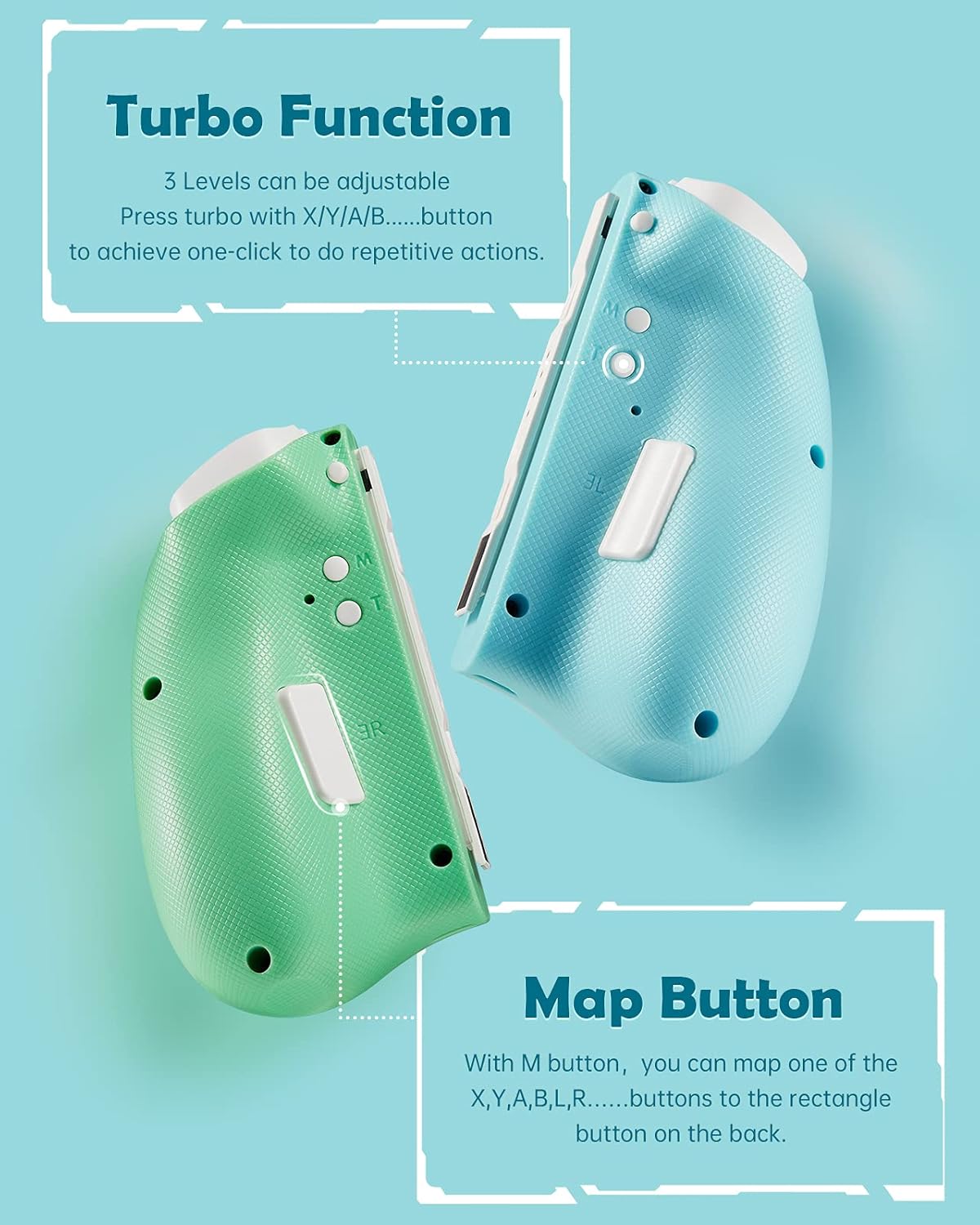
Image 4.2: Location of Turbo and Map buttons.
4.3 Back Map Button
Each controller features a programmable back button (M) that can be mapped to replicate other action buttons.
- Press and hold the M button and the desired action button (X, Y, A, B, L, R, ZL, ZR) simultaneously for a few seconds.
- The controller will vibrate to confirm the mapping. The M button will now perform the function of the mapped action button.
- To clear the mapping, press and hold the M button again until the controller vibrates.
4.4 Adjustable Dual Vibration
The controllers are equipped with dual vibration motors offering 3 adjustable levels of intensity for immersive feedback.
To adjust vibration intensity, press and hold the Turbo button and the Minus (-) button (on the Left JoyPad) or Plus (+) button (on the Right JoyPad) simultaneously. Repeat to cycle through the vibration levels (low, medium, high, off).

Image 4.3: Adjustable vibration levels.
4.5 Motion Control (6-Axis Gyro)
The built-in 6-axis gyroscope detects detailed movements, providing precise motion control in compatible games. This allows for intuitive control based on the physical orientation and movement of the controllers.

Image 4.4: 6-Axis Gyro motion control capabilities.
5. Maintenance
- Cleaning: Use a soft, dry cloth to clean the controllers. Avoid using liquids or abrasive cleaners.
- Storage: Store the controllers in a cool, dry place away from direct sunlight and extreme temperatures.
- Battery Care: To prolong battery life, avoid fully discharging the controllers frequently. Charge them regularly, even if not in use for extended periods.
- Avoid Drops: Protect the controllers from drops and impacts, which can damage internal components.
6. Troubleshooting
- Controllers not connecting:
- Ensure controllers are charged.
- Verify the pairing process (Section 3.2).
- Restart the Nintendo Switch console.
- Try re-syncing the controllers from the Switch HOME Menu > Controllers > Change Grip/Order.
- Input lag or unresponsive buttons:
- Ensure there are no obstructions or strong wireless interference between the controllers and the Switch.
- Check battery levels. Low battery can affect performance.
- Update your Nintendo Switch system software to the latest version.
- Joystick drift:
- Calibrate the joysticks from the Nintendo Switch system settings: HOME Menu > System Settings > Controllers and Sensors > Calibrate Control Sticks.
- If the issue persists, contact customer support.
- LED lights not working:
- Ensure the controllers are powered on and connected.
- Refer to Section 4.1 for instructions on changing LED modes and brightness.
7. Specifications
| Model Number | YS37 |
| Brand | binbok |
| Connectivity | Wireless |
| Battery Capacity | 500 mAh per controller (x2) |
| Charging Time | Approx. 2-3 hours |
| Play Time | Approx. 8-10 hours |
| Dimensions | 1 x 1 x 1 cm (each controller, approximate) |
| Weight | 226.8 g (total, approximate) |
| Features | Adjustable LED, Back Map Button, Turbo, Dual Vibration, 6-Axis Gyro |
8. Warranty and Support
binbok products are designed for quality and reliability. For warranty information, technical support, or any inquiries regarding your JoyPad Controller, please refer to the contact information provided with your product packaging or visit the official binbok website.
Please retain your proof of purchase for warranty claims.


