
Introduction
This manual provides comprehensive instructions for the safe and efficient use of your Tronsmart Apollo Air TWS Bluetooth Earphones. Please read this manual thoroughly before using the product and retain it for future reference.
Safety Information:
- Do not expose the earphones or charging case to extreme temperatures, humidity, or corrosive environments.
- Avoid dropping, impacting, or disassembling the device.
- Keep away from children and pets.
- Use only the provided or certified charging cables.
- Prolonged exposure to high volume levels may cause hearing damage.
Product Overview
Package Contents
- Tronsmart Apollo Air TWS Bluetooth Earphones (Left and Right)
- Charging Case
- USB Charging Cable
- Ear Tips (various sizes)
- User Manual (this document)
Component Identification
Familiarize yourself with the main components of your Tronsmart Apollo Air earphones and charging case.
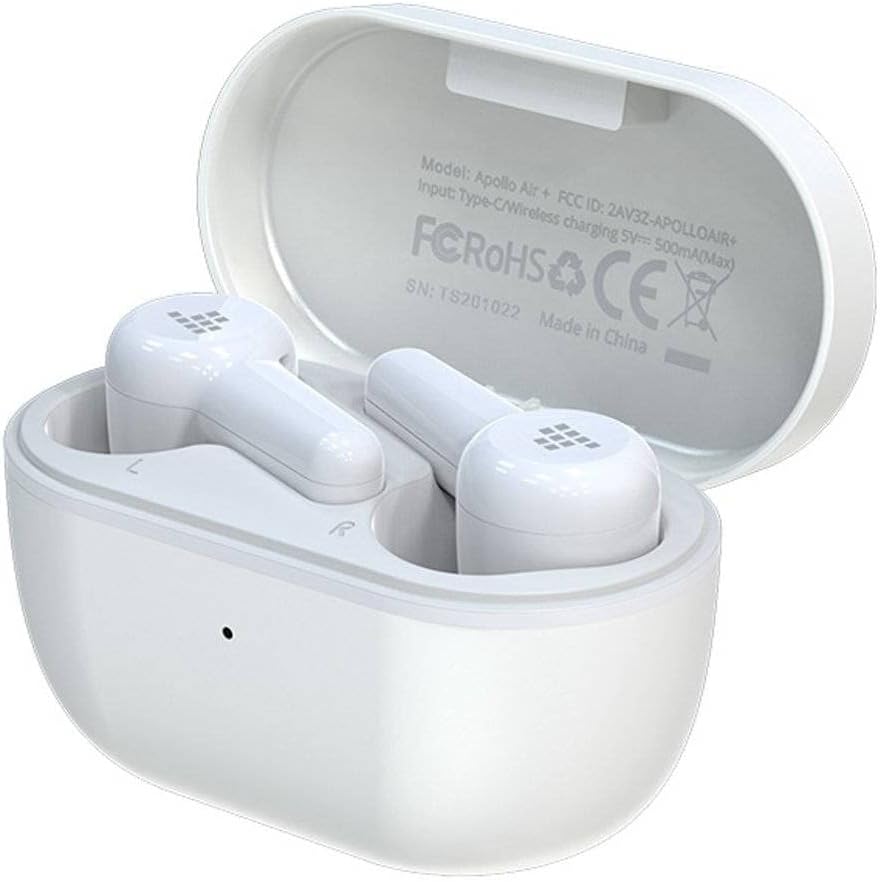
Image: Tronsmart Apollo Air TWS Earphones placed inside their open charging case. The case lid displays model information and certifications.

Image: Tronsmart Apollo Air TWS Earphones. One earbud is shown outside the charging case, highlighting its design and the charging contacts within the case.

Image: A close-up view of the two Tronsmart Apollo Air TWS Earbuds, showcasing their ergonomic shape, ear tips, and touch control areas.
Setup
Charging the Earphones and Case
- Charging the Case: Connect the provided USB charging cable to the charging port on the case and to a USB power adapter (not included) or a computer's USB port. The indicator light on the case will show charging status.
- Charging the Earphones: Place the earphones into the charging case. Ensure they are correctly seated in their respective slots (L for left, R for right). The earphones will automatically begin charging. The indicator lights on the earphones will show charging status.
- Fully charge the earphones and case before first use.
Bluetooth Pairing
- Initial Pairing: Open the charging case. The earphones will automatically enter pairing mode, indicated by flashing lights (refer to product for specific light patterns).
- On your device (smartphone, tablet, etc.), enable Bluetooth and search for available devices.
- Select "Tronsmart Apollo Air" from the list of found devices.
- Once connected, a voice prompt or indicator light will confirm successful pairing.
- Re-pairing: If the earphones do not connect automatically, ensure Bluetooth is enabled on your device and the earphones are charged. You may need to manually select "Tronsmart Apollo Air" from your device's Bluetooth menu.
Operating the Earphones
Power On/Off
- Power On: Open the charging case, or take the earphones out of the case. They will power on automatically.
- Power Off: Place the earphones back into the charging case and close the lid. They will power off automatically.
- Manual Power Off: (If supported) Long press the touch control area on both earbuds for approximately 5 seconds until the indicator light turns off.
Touch Controls (General)
The Tronsmart Apollo Air earphones feature touch-sensitive controls. Specific functions may vary slightly, but common operations include:
- Play/Pause: Single tap on either earbud.
- Next Track: Double tap on the right earbud.
- Previous Track: Double tap on the left earbud.
- Answer/End Call: Single tap on either earbud.
- Reject Call: Long press on either earbud for 2 seconds.
- Activate Voice Assistant: Triple tap on either earbud.
- Volume Control: (If supported) Long press on the right earbud to increase volume, long press on the left earbud to decrease volume.
Note: Refer to the quick start guide included in your package for precise touch control mappings if different from above.

Image: A smartphone screen showing an equalizer application with various sound presets (e.g., Default, Deep Bass, Hi-Fi, Rock, Vocal). The Tronsmart Apollo Air earphones and charging case are visible in the background, suggesting compatibility with audio customization apps.
Maintenance
Cleaning
- Gently wipe the earphones and charging case with a soft, dry, lint-free cloth.
- Do not use abrasive cleaners, alcohol, or chemical solvents.
- Remove ear tips and clean them separately with mild soap and water if necessary, ensuring they are completely dry before reattaching.
- Ensure charging contacts on both the earphones and case are clean and free of debris.
Storage
- When not in use, always store the earphones in their charging case to protect them and keep them charged.
- Store the device in a cool, dry place, away from direct sunlight and extreme temperatures.
Troubleshooting
If you encounter issues with your Tronsmart Apollo Air earphones, please refer to the following common solutions:
Earphones not pairing or connecting
- Ensure both earphones are charged and taken out of the charging case.
- Turn off and on Bluetooth on your device.
- Delete "Tronsmart Apollo Air" from your device's Bluetooth list and attempt to re-pair.
- Try resetting the earphones (refer to product-specific reset instructions if available, otherwise, place them back in the case, close, then reopen).
No sound or low volume
- Check the volume level on both your connected device and the earphones.
- Ensure the earphones are properly seated in your ears.
- Confirm the earphones are connected to the correct audio output on your device.
- Clean any debris from the earphone speaker grilles.
Charging issues
- Ensure the charging cable is securely connected to both the case and the power source.
- Verify the power source is functional.
- Clean the charging contacts on the earphones and inside the case.
- Try a different USB charging cable or power adapter.
Specifications
| Feature | Detail |
|---|---|
| Brand | Tronsmart |
| Model Name | Apollo Air |
| Item Model Number | 372452 |
| Connectivity | Bluetooth, Wireless |
| Color | White |
| Form Factor | In-Ear, Basic Case |
| Material | Rubber |
| Item Weight | 100 g |
| Product Dimensions | 10 x 5 x 3 cm |
| Water Resistance Level | Not Water Resistant |
| Compatible Phone Models | Please check description (Generally compatible with most Bluetooth-enabled devices) |

Image: Technical diagram illustrating the precise dimensions of the Tronsmart Apollo Air charging case and individual earbuds in millimeters and inches.
Warranty and Support
Tronsmart products are designed and manufactured to the highest quality standards. For detailed warranty information, please refer to the warranty card included with your purchase or visit the official Tronsmart website.
For technical support, troubleshooting assistance, or to inquire about replacement parts, please contact Tronsmart customer service through their official channels. Contact information can typically be found on the product packaging or the official Tronsmart website.


