
Silonn SLIM01B-1
Silonn Countertop Ice Maker User Manual
Model: SLIM01B-1 | Brand: Silonn
1. Important Safety Instructions
Please read all instructions carefully before operating your Silonn ice maker. Retain this manual for future reference.
- Ensure the ice maker is connected to a grounded power outlet with the correct voltage (120 Volts).
- Do not immerse the appliance, power cord, or plug in water or other liquids.
- Keep the ice maker away from heat sources and direct sunlight.
- Allow at least 6 inches of clearance around the appliance for proper ventilation.
- This appliance is designed for household use only.
- Always unplug the ice maker before cleaning or when not in use.
- Portable ice makers are designed to slow down the melting process, not entirely stop it. For long-term ice storage, transfer ice to a freezer.
2. Product Overview
The Silonn Countertop Ice Maker (Model SLIM01B-1) is a compact and efficient appliance designed to produce fresh ice cubes quickly for your home, office, bar, or party needs.

The Silonn Countertop Ice Maker, ready to produce ice for various beverages.

Key performance indicators: 24 ice cubes in 13 minutes, 45 lbs daily production, and a 2.6 lbs ice basket capacity.

Compact dimensions of the ice maker, suitable for countertop placement.
Key Features:
- Rapid Ice Production: Produces 24 ice cubes in as little as 13 minutes, with a daily output of up to 45 lbs.
- Dual Water Supply: Supports both manual water filling and an optional bottled water supply (5L/1.32Gal bucket, not included).
- Self-Cleaning Function: Features an automatic self-cleaning cycle that takes approximately 20 minutes.
- User-Friendly Control: Equipped with an LCD screen and simple controls for mode setting, timer, and ice thickness adjustment.
- Ice Thickness Control: Adjust ice cube thickness for various uses (11 min for thin, 15 min for medium, 20 min for thick).
- Smart Sensors: Automatically stops ice production when the ice basket is full (2.6 lbs capacity) and alarms when water runs out.
- Water Recycling: Melted ice water is collected at the base and recycled to make more ice.
3. Setup and First Use
3.1 Unpacking
- Carefully remove the ice maker from its packaging.
- Remove all packing materials, tapes, and labels.
- Check for any damage during transit. If damaged, do not operate and contact customer support.
3.2 Placement
- Place the ice maker on a stable, level surface.
- Ensure there is adequate ventilation (at least 6 inches) around the unit, especially at the back and sides.
- Avoid placing the unit near heat sources or in direct sunlight.
3.3 Initial Cleaning
Before first use, it is recommended to clean the ice maker. The self-cleaning function can be used for this purpose.
- Add water to the reservoir up to the MAX fill line.
- Press and hold the 'Timer/Clean' button for 5 seconds to activate the self-cleaning cycle.
- The cycle will run for approximately 20 minutes.
- Once complete, drain the water from the unit (refer to Maintenance section for draining instructions).
- Wipe the interior and exterior with a soft, damp cloth.
4. Operating Instructions
4.1 Adding Water

The ice maker supports both manual water filling and an external bottled water supply.
- Manual Fill: Open the top lid and pour potable water directly into the water reservoir up to the 'MAX' fill line. Do not overfill.
- Bottled Water Supply: Place a compatible 5L/1.32Gal water bottle (not included) onto the bottle base on top of the unit. Ensure it is securely seated.
4.2 Powering On/Off
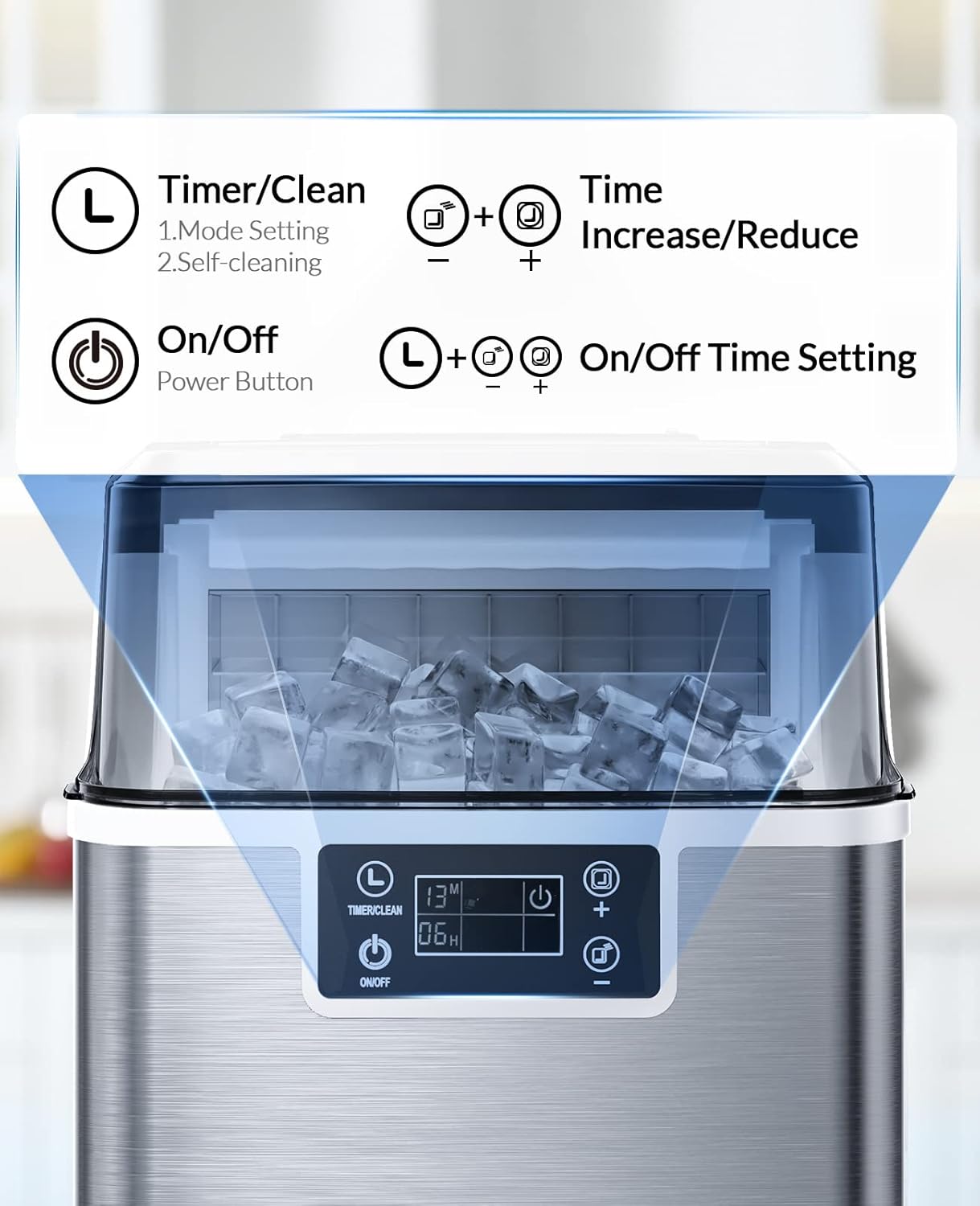
The control panel with buttons for Timer/Clean, On/Off, and time adjustment.
- Plug the power cord into a grounded electrical outlet.
- Press the 'On/Off' button to turn the ice maker on. The display will light up.
- Press the 'On/Off' button again to turn the ice maker off.
4.3 Adjusting Ice Thickness

Choose your preferred ice thickness based on the ice-making cycle time.
You can adjust the ice cube thickness by changing the ice-making cycle time:
- Thin Ice (approx. 11 min): Ideal for smoothies or quickly chilling drinks.
- Medium Ice (approx. 15 min): Standard size, good for retaining freshness.
- Thick Ice (approx. 20 min): Slower melting, perfect for cooling drinks over a longer period.
Use the '+' and '-' buttons to adjust the timer setting on the display, which corresponds to the ice thickness.
4.4 Ice Collection
- Once ice cubes are formed, they will drop into the ice basket.
- The ice maker will automatically stop when the ice basket is full.
- Use the provided ice scoop to remove ice from the basket.
- If ice melts in the basket, the water will be recycled back into the reservoir for new ice production.
5. Maintenance
5.1 Self-Cleaning Function

Follow these steps to activate the automatic self-cleaning cycle.
The self-cleaning function helps maintain hygiene and performance:
- Ensure the ice maker is empty of ice and water.
- Fill the water reservoir with clean water up to the MAX line.
- Press and hold the 'Timer/Clean' button for 5 seconds. The cleaning indicator will illuminate.
- The cleaning cycle will run for approximately 20 minutes.
- Once complete, drain all water from the unit.
5.2 Regular Cleaning
- Exterior: Wipe the exterior with a soft, damp cloth. Do not use abrasive cleaners or solvents.
- Interior: Periodically clean the water reservoir and ice basket with a mild detergent and warm water. Rinse thoroughly with clean water.
- Draining: To drain water, locate the drain plug at the bottom or back of the unit (refer to diagram in product packaging if available). Place a container underneath and remove the plug to drain. Reinsert the plug firmly after draining.
5.3 Storage
If the ice maker will not be used for an extended period:
- Perform a self-cleaning cycle and drain all water.
- Ensure the interior is completely dry to prevent mold or mildew.
- Store the unit in a cool, dry place, away from direct sunlight.
6. Troubleshooting
Before contacting customer support, please refer to the following common issues and solutions:
| Problem | Possible Cause | Solution |
|---|---|---|
| Ice maker not producing ice. | No water in reservoir; Water pump malfunction; Ambient temperature too high. | Add water; Check water pump for obstructions; Ensure unit is in a cool environment. |
| Ice cubes are too small or soft. | Water temperature too high; Cycle time too short; Poor ventilation. | Use colder water; Adjust timer for thicker ice; Ensure proper ventilation. |
| Ice melts quickly in the basket. | This is normal for portable ice makers; Ambient temperature. | Portable ice makers are not freezers. Transfer ice to a freezer for long-term storage. |
| "Add Water" indicator is on. | Water reservoir is empty or low. | Refill the water reservoir. |
| "Ice Full" indicator is on. | Ice basket is full. | Remove ice from the basket. |
7. Specifications
| Specification | Detail |
|---|---|
| Model Number | SLIM01B-1 |
| Brand | Silonn |
| Product Dimensions | 10 x 14 x 15 inches |
| Weight | 16 Pounds |
| Water Reservoir Capacity | 3 Liters |
| Voltage | 120 Volts |
| Daily Ice Production | Up to 45 lbs |
| Ice Basket Capacity | 2.6 lbs |
| Ice Production Cycle | 13-20 minutes per batch (24 cubes) |
| What's in the Box | Ice maker, Ice Scoop, Ice Basket |
8. Warranty and Support
Silonn products are manufactured to high-quality standards. For warranty information, please refer to the warranty card included with your purchase or visit the official Silonn website.
For technical support, troubleshooting assistance, or to inquire about replacement parts, please contact Silonn Customer Service. You can often find contact information on the product packaging or on the official Silonn brand store page:
Related documentsSLIM01B-1


Ask a question about this manual
Ask about setup, troubleshooting, compatibility, parts, safety, or missing instructions. Manuals+ will review the question and use this page’s manual context to help answer it.