
1. Setup
Before first use, please familiarize yourself with the components of your TIMEMORE Chestnut C2 MAX Manual Coffee Grinder.

Image 1: The TIMEMORE Chestnut C2 MAX Manual Coffee Grinder and its included accessories, such as the handle, cleaning brush, and canvas carrying bag.
1.1 Unboxing and Initial Inspection
Carefully remove all components from the packaging. Ensure all parts are present: the grinder body, the handle, a cleaning brush, and a canvas carrying bag. Inspect for any damage during transit.
1.2 Assembling the Handle
- Insert the hexagonal end of the handle into the hexagonal shaft on top of the grinder body.
- Ensure the handle is securely seated.
2. Operating Instructions
2.1 Adjusting Grind Size
The C2 MAX features a 36-click internal adjustable setting for precise grind size control. To adjust:
- Unscrew the bottom collection cup from the grinder body.
- Locate the adjustment dial at the bottom of the grinder body, around the burr.
- Turn the dial clockwise for a finer grind and counter-clockwise for a coarser grind. Each click represents a step in grind size.
- Refer to the recommended settings below for common brewing methods.
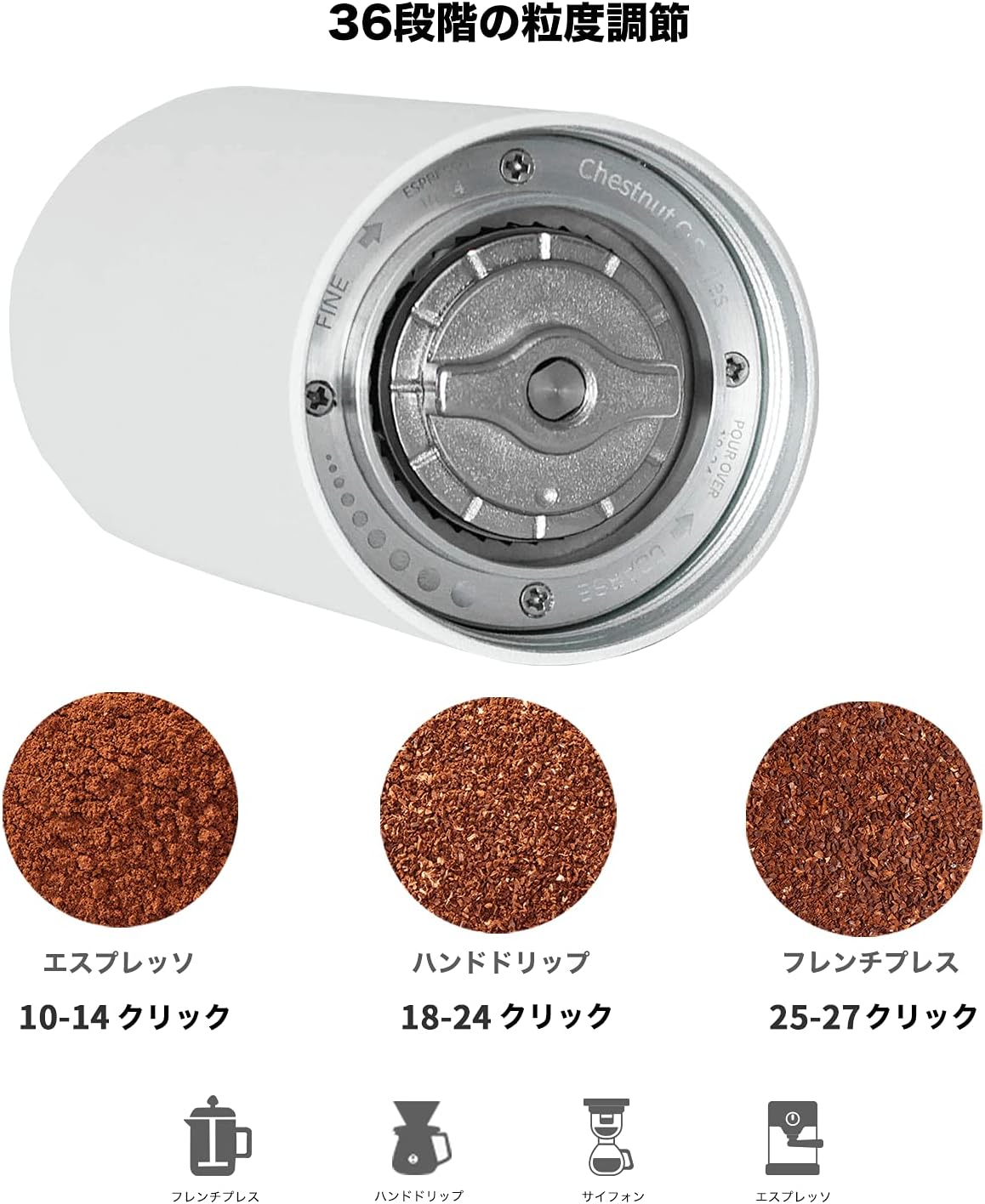
Image 2: The internal grind adjustment dial allows for precise control over coffee particle size. Turning clockwise results in a finer grind, while counter-clockwise yields a coarser grind.
2.2 Recommended Grind Settings
| Brewing Method | Recommended Clicks | Grind Consistency |
|---|---|---|
| Espresso | 10-14 clicks | Very Fine |
| Pour Over / Hand Drip | 18-24 clicks | Medium |
| French Press | 25-27 clicks | Coarse |

Image 3: Visual guide to different grind consistencies achievable with the C2 MAX, suitable for various brewing methods.
2.3 Loading Coffee Beans
The C2 MAX has an increased capacity of 30g. To load beans:
- Remove the handle.
- Open the top lid of the grinder.
- Pour your desired amount of whole coffee beans into the hopper. The maximum capacity is 30 grams.
- Replace the top lid and reattach the handle.

Image 4: A visual comparison highlighting the increased 30g capacity of the C2 MAX model compared to the standard C2.
2.4 Grinding Coffee
Once beans are loaded and grind size is set:
- Hold the grinder body firmly with one hand.
- Rotate the handle clockwise with the other hand to begin grinding. The stainless steel conical burrs are designed for labor-saving and smooth grinding.
- Continue grinding until all beans have passed through the burrs and collected in the bottom cup.
Video 1: This video demonstrates the process of using the TIMEMORE Chestnut C2 MAX Manual Coffee Grinder, from loading beans to grinding and preparing a pour-over coffee.
3. Maintenance
3.1 Cleaning the Grinder
Regular cleaning ensures optimal performance and flavor. Use the provided cleaning brush to remove coffee grounds.
- Disassemble the grinder by unscrewing the bottom collection cup and removing the handle.
- Carefully remove the inner burr and spring mechanism.
- Use the cleaning brush to remove any residual coffee grounds from the burrs, shaft, and internal components.
- Do not wash the grinder with water, as this can damage the burrs and internal mechanisms. Only brush clean.
- Reassemble the grinder by reversing the disassembly steps.

Image 5: An exploded diagram showing the individual components of the C2 MAX grinder, illustrating how to disassemble it for thorough cleaning.
3.2 General Care
- Store the grinder in a dry place.
- Avoid dropping the grinder, as this can misalign the burrs or damage the body.
- Use the canvas bag for protection when traveling.
4. Troubleshooting
4.1 Grinder Handle is Stuck or Difficult to Turn
- Check for jammed burrs: If the grinder is set to the finest setting (zero clicks), the burrs might be too close, causing them to jam. Adjust to a coarser setting (e.g., 5-6 clicks) before grinding.
- Foreign objects: Inspect the burr chamber for any foreign objects that might be obstructing the grinding mechanism.
- Excessive beans: Ensure you are not overfilling the hopper, which can put undue pressure on the burrs.
4.2 Inconsistent Grind Size
- Burr alignment: Ensure the burrs are properly aligned and secured. Refer to the cleaning section for disassembly and reassembly to check alignment.
- Cleaning: Accumulated coffee oils and fines can affect grind consistency. Perform a thorough cleaning of the burrs.
- Adjustment dial: Verify that the adjustment dial is securely clicked into your desired setting and has not shifted during grinding.
5. Specifications
| Feature | Detail |
|---|---|
| Brand | TIMEMORE |
| Model Number | 70TGD014AA001 |
| Color | Black |
| Material | Aluminum, Stainless Steel |
| Item Weight | 505 Grams (1.11 pounds) |
| Product Dimensions | 6.77 x 6.77 x 6.77 inches |
| Capacity | 30g |
| Burr Type | CNC Stainless Steel Conical Burr |
| Grind Settings | 36-click adjustable |
6. Warranty & Support
For warranty information and customer support, please refer to the documentation included in your product packaging or visit the official TIMEMORE website. Keep your purchase receipt as proof of purchase for any warranty claims.


