
Introduction
Thank you for choosing the Medic Therapeutics Ultra Silent UVC Portable HEPA H13 Air Purifier. This device is designed to improve indoor air quality by filtering airborne particles and utilizing UVC light for enhanced purification. Please read this manual thoroughly before operation to ensure proper use, maintenance, and safety.
Important Safety Instructions
- Read all instructions before using the appliance.
- Do not operate any appliance with a damaged cord or plug.
- Do not run cord under carpeting. Do not cover cord with throw rugs, runners, or similar coverings. Arrange cord away from traffic area and where it will not be tripped over.
- Do not use outdoors or on wet surfaces.
- Unplug from outlet when not in use and before cleaning.
- Do not allow children to play with the air purifier.
- Do not block air openings or place on a soft surface where openings may be blocked.
- Do not immerse the air purifier in water or other liquids.
- Only use Medic Therapeutics replacement filters.
- The UVC lamp is internal and not user-serviceable. Do not attempt to open the unit to access the UVC lamp.
Product Overview
Familiarize yourself with the components of your air purifier.
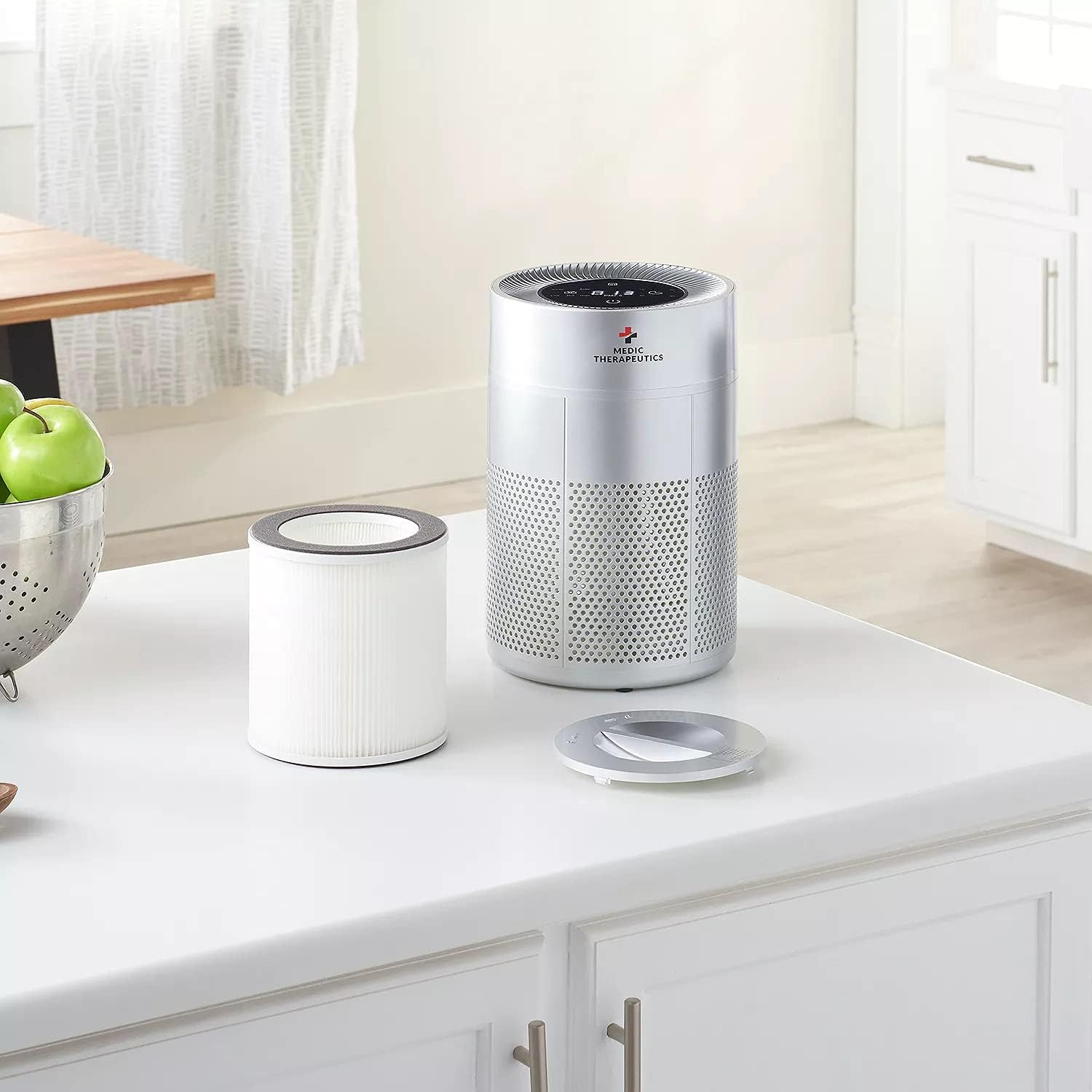
Figure 1: Top Control Panel. This image displays the top of the air purifier with its touch control panel, including buttons for power, fan speed, UVC, and timer functions.
- Control Panel: Touch-sensitive buttons for various functions.
- Air Inlet Grille: Located around the lower body of the unit, where air is drawn in.
- Air Outlet: Located at the top of the unit, where purified air is released.
- HEPA H13 & Activated Carbon Filter: Multi-layer filter system inside the unit.
- UVC Lamp: Internal component for enhanced purification.
- Power Cord Port: Located at the back or bottom of the unit.
Setup
- Unpack the Air Purifier: Carefully remove the air purifier from its packaging. Retain packaging for future storage or transport.
- Remove Filter Packaging:

Figure 2: Filter Access. This image shows the air purifier with its bottom cover removed and the filter cartridge taken out, ready for unwrapping.
- Turn the unit upside down.
- Twist the base cover counter-clockwise to unlock and remove it.
- Gently pull out the filter cartridge.
- Remove all plastic packaging from the filter.
- Insert the unwrapped filter back into the unit, ensuring it is seated correctly.
- Replace the base cover and twist clockwise to lock it securely.
- Position the Air Purifier: Place the air purifier on a firm, level surface. Ensure there is at least 6 inches (15 cm) of clear space around all sides for optimal airflow.
- Connect to Power: Plug the power adapter into the air purifier's power port, then plug the adapter into a standard electrical outlet.
Operating Instructions

Figure 3: Operating the Device. This image shows a user interacting with the touch control panel on the top of the air purifier.
- Power On/Off: Touch the Power button to turn the unit on or off. The unit will start in a default mode.
- Adjust Fan Speed: Touch the Fan Speed button to cycle through different fan speeds: Low, Mid, High, and Auto.
- Low: Quiet operation for continuous use.
- Mid: Balanced purification and noise level.
- High: Maximum purification for quick air cleaning.
- Auto: The purifier adjusts fan speed based on detected air quality (if applicable).
- UVC Function: Touch the UVC button to turn the UVC lamp on or off. The UVC lamp is designed to help reduce airborne pathogens.
- Sleep Mode: Touch the Sleep button to activate sleep mode. In this mode, the fan operates at its lowest speed, and display lights are dimmed for minimal disturbance.
- Timer Function: Touch the Timer button to set an operating duration (e.g., 2H, 4H, 8H). The unit will automatically turn off after the selected time.
Maintenance
Filter Replacement
The HEPA H13 and Activated Carbon filter should be replaced approximately every 6-8 months, or when the filter indicator light illuminates (if applicable), depending on usage and air quality. Always use genuine Medic Therapeutics replacement filters.
- Turn off and unplug the air purifier from the power outlet.
- Turn the unit upside down.
- Twist the base cover counter-clockwise to unlock and remove it.
- Carefully pull out the old filter cartridge.
- Dispose of the old filter responsibly.
- Unpack the new Medic Therapeutics replacement filter.
- Insert the new filter into the unit, ensuring it is seated correctly.
- Replace the base cover and twist clockwise to lock it securely.
- Plug in the air purifier and power it on. Reset the filter life indicator if your model has one (refer to specific model instructions if available).
Cleaning the Air Purifier
- Always unplug the unit before cleaning.
- Wipe the exterior surface of the air purifier with a soft, dry cloth.
- Do not use abrasive cleaners, waxes, or solvents.
- Do not allow water or any other liquid to enter the unit.
- The pre-filter layer of the main filter can be gently vacuumed to extend its life, but the HEPA and activated carbon layers are not washable.
Troubleshooting
| Problem | Possible Cause | Solution |
|---|---|---|
| Unit does not turn on. | Not plugged in; power outlet malfunction; filter not installed correctly. | Ensure power cord is securely plugged into both the unit and a working outlet. Check filter installation. |
| Reduced airflow or purification. | Clogged filter; blocked air inlets/outlets. | Check and replace the filter if necessary. Ensure no obstructions are blocking air vents. |
| Unusual noise. | Filter not seated correctly; foreign object inside. | Turn off and unplug the unit. Re-seat the filter. Check for any foreign objects. |
| UVC light not working. | UVC function is off; UVC lamp malfunction. | Ensure UVC function is activated via the control panel. If it still doesn't work, contact customer support. |
Specifications
- Model: MT-AIRPURIF-001-BLK
- Dimensions: 6.69 x 6.69 x 6.69 inches
- Weight: 5.4 Pounds (2.45 Kilograms)
- Filter Type: HEPA H13, Activated Carbon
- Special Features: Ultra Silent, UVC Purification, Portable Design
- Control Method: Touch Button Control
- Power Source: AC Power Adapter (details not specified, but implied by typical air purifier operation)
Warranty and Support
For warranty information or technical support, please refer to the warranty card included with your product or visit the official Medic Therapeutics website. Do not attempt to repair the unit yourself.
Contact Information: Please refer to your purchase documentation or the manufacturer's website for the most current customer service contact details.