
1. Introduction
This manual provides instructions for the RemotesReplaced replacement remote control, designed to be fully compatible with Telefunken TLCD32FHDU television models. This remote offers all the functionalities of your original remote control without requiring any complex setup.
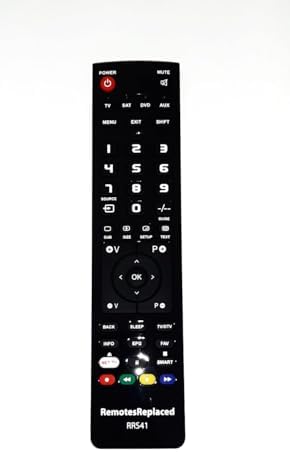
Image 1: Front view of the RemotesReplaced remote control. The remote is black with clearly labeled buttons for power, mute, numbers, navigation, and various TV functions.
2. Setup
2.1 Battery Installation
- Locate the battery compartment on the back of the remote control.
- Slide the battery compartment cover downwards or in the direction indicated by an arrow to open it.
- Insert two (2) AAA batteries, ensuring the positive (+) and negative (-) terminals align correctly with the markings inside the compartment.
- Replace the battery compartment cover by sliding it back into position until it clicks securely.
Note: No setup codes are required. Once batteries are installed, the remote is ready for immediate use with your Telefunken TLCD32FHDU television.

Image 2: Back view of the remote control, highlighting the battery compartment cover at the bottom.
3. Operating Instructions
This remote control provides access to all standard functions of your Telefunken TLCD32FHDU television. Below is a general guide to common button functions:

Image 3: Close-up of the remote's buttons, showing the layout of power, mute, input selection, number pad, navigation, and special function buttons.
- POWER (Red Button): Turns the television on or off.
- MUTE: Mutes or unmutes the television audio.
- TV/SAT/DVD/AUX: Selects different input sources. Press the corresponding button to switch between connected devices.
- Number Pad (0-9): Used to directly enter channel numbers or other numerical inputs.
- MENU: Accesses the television's main menu.
- EXIT: Exits the current menu or on-screen display.
- Navigation Buttons (Up, Down, Left, Right, OK): Used to navigate through menus and confirm selections. The OK button confirms your choice.
- VOL +/-: Adjusts the volume level.
- CH +/-: Changes the television channel.
- BACK: Returns to the previous screen or menu.
- INFO/EPG: Displays program information or the Electronic Program Guide.
- NET TV/SMART: Accesses smart TV features or internet applications, if supported by your television.
- Color Buttons (Red, Green, Yellow, Blue): These buttons perform specific functions within certain menus or applications, as indicated on your TV screen.
4. Maintenance
4.1 Cleaning
To clean the remote control, use a soft, dry cloth. Do not use liquid cleaners, abrasive pads, or chemical solvents, as these may damage the remote's surface or internal components.
4.2 Battery Replacement
Replace batteries when the remote's response becomes sluggish or stops functioning. Always replace both batteries simultaneously with new AAA batteries. Do not mix old and new batteries, or different types of batteries.
4.3 Storage
If the remote control will not be used for an extended period, remove the batteries to prevent leakage and potential damage to the device.
5. Troubleshooting
- Remote not responding:
- Ensure the batteries are correctly inserted with the correct polarity.
- Replace old batteries with new ones.
- Ensure there are no obstructions between the remote control and the television's infrared sensor.
- Point the remote directly at the television.
- Some functions not working:
- Verify that your television model is indeed Telefunken TLCD32FHDU. This remote is specifically designed for this model.
- Some advanced smart TV functions may require the original remote or specific TV settings.
6. Specifications
| Feature | Specification |
|---|---|
| Brand | RemotesReplaced |
| Model Number | TLCD32FHDU |
| Compatible With | Telefunken TLCD32FHDU Television |
| Battery Type | 2 x AAA batteries (not included) |
| Weight | 120 Grams |
| Manufacturer | Linkwebb |
7. Warranty and Support
This RemotesReplaced remote control comes with a 1-year warranty from the date of purchase.
For technical support, warranty claims, or any questions regarding your remote control, please contact RemotesReplaced directly through your purchase platform or their official website. Please have your purchase details and product model number (TLCD32FHDU) available when contacting support.