
1. Introduction
This manual provides comprehensive instructions for the RemotesReplaced compatible remote control, model EU68ST. This remote is designed to function identically to your original Teac/Teak EU68ST remote, offering all the same features and capabilities. It is a direct replacement, not a universal remote, ensuring seamless compatibility without the need for complex setup codes.
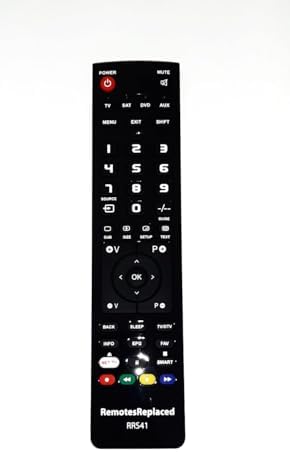
Image 1.1: Front view of the RemotesReplaced EU68ST compatible remote control. This image displays the full layout of the remote, including power, mute, input selection, number pad, navigation buttons, and media controls.
2. Setup: Battery Installation
Your RemotesReplaced EU68ST remote control requires two AAA batteries (not included). Follow these steps to install them:
- Locate the battery compartment on the back of the remote control.
- Slide the battery compartment cover downwards or outwards to open it.
- Insert two AAA batteries, ensuring the positive (+) and negative (-) terminals align correctly with the markings inside the compartment.
- Replace the battery compartment cover by sliding it back into place until it clicks securely.
No configuration codes are required. Once batteries are installed, the remote is ready for use.

Image 2.1: Bottom view of the remote control, highlighting the battery compartment.
3. Operating Instructions
This remote control provides full functionality for your Teac/Teak EU68ST device. Point the remote directly at your device and press the desired buttons.
Key Functions Overview:
| Button | Function |
|---|---|
| POWER | Turns the device on or off. |
| MUTE | Mutes or unmutes the audio. |
| TV, SAT, DVD, AUX | Selects the input source. |
| Number Pad (0-9) | Direct channel selection or numerical input. |
| VOL +/- | Adjusts the volume level. |
| CH +/- | Changes channels up or down. |
| OK / Navigation Arrows | Navigates menus and confirms selections. |
| MENU / EXIT | Accesses or exits the device's main menu. |
| INFO / EPG | Displays program information or Electronic Program Guide. |
| Media Controls (Play, Pause, Stop, Rewind, Fast Forward) | Controls media playback. |

Image 3.1: Top view of the remote control, showing the infrared emitter. Ensure this part is pointed towards your device for proper operation.
4. Maintenance
To ensure the longevity and optimal performance of your remote control, follow these simple maintenance guidelines:
- Cleaning: Use a soft, dry cloth to wipe the remote control. For stubborn dirt, slightly dampen the cloth with water or a mild, non-abrasive cleaner. Avoid using harsh chemicals or abrasive materials.
- Battery Replacement: Replace batteries promptly when the remote's performance degrades. Always replace both batteries at the same time with new ones of the same type (AAA).
- Storage: Store the remote in a cool, dry place away from direct sunlight and extreme temperatures.
- Avoid Drops: Protect the remote from physical impact, as drops can damage internal components.
5. Troubleshooting
If you encounter issues with your remote control, try the following troubleshooting steps:
- Remote Not Responding:
- Check if the batteries are inserted correctly with the correct polarity (+/-).
- Replace old batteries with new AAA batteries.
- Ensure there are no obstructions between the remote control and your device.
- Make sure you are pointing the remote directly at the device's infrared sensor.
- Limited Functionality:
- Verify that the remote control model (EU68ST) is indeed compatible with your specific Teac/Teak device model.
- Ensure the device itself is functioning correctly and responding to its original controls (if available).
If problems persist after trying these steps, please refer to the Warranty and Support section for further assistance.
6. Specifications
| Feature | Detail |
|---|---|
| Brand | RemotesReplaced |
| Model Number | EU68ST |
| Compatibility | Direct replacement for Teac/Teak EU68ST original remote |
| Batteries Required | 2 x AAA (not included) |
| Weight | 120 Grams |
| Manufacturer | Linkwebb |
7. Warranty and Support
This RemotesReplaced compatible remote control comes with a 1-year warranty from the date of purchase, covering manufacturing defects.
For technical support or warranty claims, please contact the seller, Remotes Replaced, directly through your purchase platform. Ensure you have your purchase details readily available.
RemotesReplaced has specialized in remote controls for nearly 20 years, providing reliable replacement solutions.