
1. Product Overview
The KIMAFUN KM-G150-T1R4 is a professional 2.4G wireless in-ear monitor (IEM) system designed for musicians, bands, and performers. It provides stable, high-fidelity audio monitoring with low latency, ensuring clear sound during rehearsals and live performances. The system includes one transmitter and four receivers, allowing for a 'one-to-many' setup.
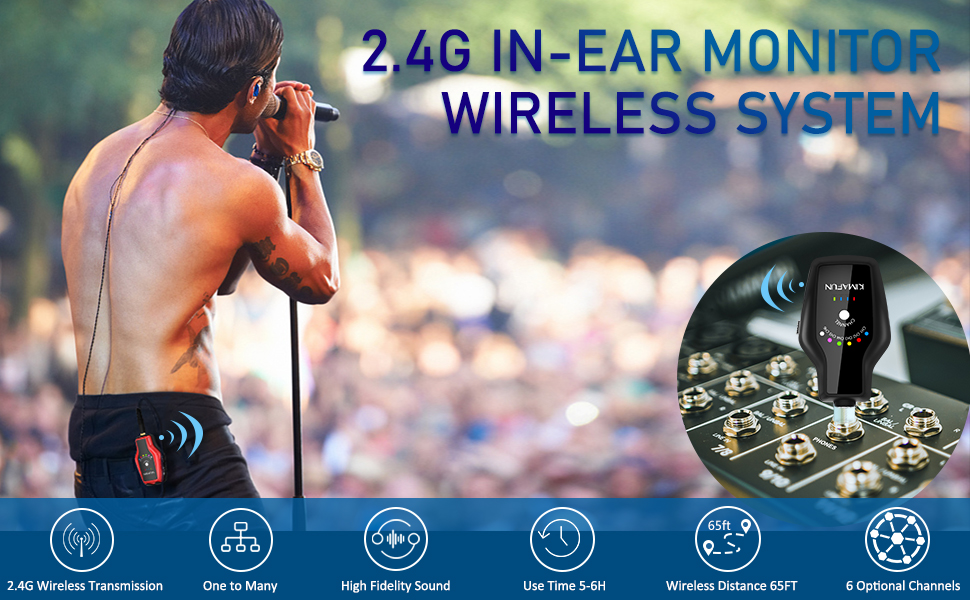
Image: A guitarist using the KIMAFUN 2.4G Wireless In-Ear Monitor System, with the transmitter connected to an amplifier and the receiver clipped to his belt.
2. Package Contents
Verify that all items listed below are included in your package:
- 1 × Transmitter
- 4 × Receiver
- 4 × Monitor Earphones
- 2 × 6.35mm Mono Adapter
- 1 × 6.35mm Stereo Adapter
- 1 × Transmitting Adapter Cable
- 2 × Receiving Adapter Cable
- 1 × Charging Cable (USB-C)
- 4 × 3 Pairs Eartips (S, M, L)
- 1 × Carrying Bag

Image: All components of the KIMAFUN KM-G150-T1R4 system laid out, including transmitter, receivers, earphones, various cables, adapters, eartips, and a carrying bag.
3. Setup Guide
3.1 Component Identification

Image: Labeled diagrams of the receiver and transmitter, highlighting features like the 1/8" earphone socket, channel indicator, channel switch button, power display, power on/off, volume buttons, Type-C charging port, and belt clip.
3.2 Connecting the Transmitter
- Connect the transmitter (black unit) to your audio source (e.g., mixer, guitar amplifier, PA system) using the appropriate 1/8" jack or 1/4" adapter.
- Ensure the audio source's output is set to a suitable level.
3.3 Connecting the Receivers and Earphones
- Plug the monitor earphones into the 1/8" earphone socket on each receiver (red units).
- Adjust the eartips for a comfortable and secure fit. The ergonomically shaped 45-degree angle earbuds provide excellent noise reduction.
- Clip the receivers to your belt or clothing for convenience.

Image: Connection diagrams for the transmitter to mixers, sound cards, and guitar amps, and receiver connection to speakers for monitoring.
4. Operating Instructions
4.1 Power On/Off
- Press and hold the Power On/Off button on both the transmitter and receivers to turn them on or off.
- The power display LEDs will indicate the battery level.
4.2 Channel Selection and Pairing
- The system features 6 built-in channels. To switch channels, press the Channel Switch Button on both the transmitter and receivers.
- Ensure the transmitter and all desired receivers are set to the same channel for proper pairing and audio transmission.
- One transmitter can connect to multiple receivers simultaneously, as long as they are on the same channel.

Image: A visual representation of the 'one to many' functionality, with a single transmitter sending audio to several receivers, each connected to a musician.
4.3 Volume Control
- Each receiver has independent volume control via the '+' and '-' buttons. Adjust the volume to your preferred listening level.
4.4 Wireless Range and Stability
- The 2.4G wireless transmission offers high signal stability and anti-interference capabilities.
- The wireless transmission distance can reach 50-65 feet (15-20 meters) in line of sight.

Image: A visual depiction of the system's range, with a transmitter and receiver maintaining connection over distances up to 65 feet.
5. Maintenance and Charging
5.1 Charging the Units
- Both the transmitter and receivers have built-in rechargeable lithium batteries.
- Use the provided USB-C charging cable to charge the units.
- A full charge takes approximately 2 hours and provides over 6 hours of continuous use.

Image: The transmitter and receiver units connected to a USB-C charging cable, illustrating the charging process and battery life.
5.2 Cleaning and Storage
- Wipe the units with a soft, dry cloth. Avoid using harsh chemicals or abrasive materials.
- Store the system in the provided carrying bag when not in use to protect it from dust and damage.
6. Troubleshooting
- No Audio: Ensure both transmitter and receivers are powered on and set to the same channel. Check all cable connections and audio source output levels.
- Interference/Static: Switch to a different channel on both the transmitter and receivers. Up to 3 sets of systems can be used simultaneously in the same area without interference. Avoid obstacles that may block the line of sight between units.
- Low Volume: Adjust the volume using the '+' button on the receiver. Check the output volume of your audio source.
- Short Battery Life: Ensure units are fully charged (2 hours for 6+ hours use). Battery performance may vary with usage and age.
7. Specifications
| Feature | Detail |
|---|---|
| Model Name | KIMAFUN KM-G150-T1R4 |
| Connectivity Technology | Wireless |
| Wireless Communication Technology | 2.4G Wireless |
| Number of Channels | 6 |
| Transmission Distance | 50-65 feet (15-20 meters) line of sight |
| Battery Life | 6 Hours |
| Charging Time | 2 Hours |
| Headphones Jack | 3.5 mm Jack |
| Material | ABS Plastic, Metal |
| Item Weight | 1.98 pounds (898 Grams) |
| Product Dimensions | 13 x 9 x 3 inches |
8. Official Product Videos
Kimafun KM-G150-3 Wireless and Battery Charged IEM System
Video: An overview of the Kimafun KM-G150-3 Wireless and Battery Charged IEM System, demonstrating its features and functionality.
KM-G150-3 Wireless IEM System
Video: A short demonstration highlighting key aspects of the KM-G150-3 Wireless IEM System.
9. Warranty and Support
For warranty information or technical support, please refer to the official KIMAFUN website or contact their customer service directly. Details can typically be found in the product packaging or on the brand's online store.