Product Overview
This remote control is designed to be fully compatible with Norwood split-type air conditioning units. It provides all essential functions for comfortable climate control within your home or office environment.

Image: Front view of the Norwood compatible air conditioner remote control, showing its display and buttons.
Package Contents
Please verify that all items are present in your package:
- 1 x Norwood Compatible Air Conditioner Remote Control
- 2 x AAA Batteries
- 1 x Adhesive Wall Mount Holder
- 1 x User Manual (this document)

Image: The remote control shown with the included AAA batteries and the adhesive wall mount holder.
Setup Guide
1. Battery Installation
- Locate the battery compartment on the back of the remote control.
- Slide open the battery compartment cover.
- Insert the two AAA batteries, ensuring correct polarity (+ and -) as indicated inside the compartment.
- Close the battery compartment cover securely.
2. Initial Configuration (Pairing)
This remote control requires a simple configuration process to pair with your Norwood air conditioning unit. This process must be performed while standing directly in front of your air conditioner.
- Ensure your air conditioner is powered on and in standby mode.
- Point the remote control directly at the air conditioner's receiver.
- Follow the specific pairing instructions provided in the included quick start guide or contact support for video assistance. The process is generally straightforward.
3. Using the Adhesive Holder
The included adhesive holder allows for convenient storage of your remote control. Choose a clean, flat surface near your air conditioner for optimal accessibility.
- Clean the desired surface thoroughly and ensure it is dry.
- Peel off the protective backing from the adhesive side of the holder.
- Press the holder firmly onto the surface for at least 30 seconds.
- Allow the adhesive to set for a few hours before placing the remote control in the holder.
Operating Instructions
This remote control replicates the full functionality of your original Norwood air conditioner remote. Below are the primary functions:
- Power On/Off: Use the ON/OFF button to turn the air conditioner on or off.
- LED Display: The remote features an LED screen displaying current settings such as temperature and mode.
- Temperature Regulation: Adjust the desired temperature using the TEMP UP/DOWN buttons.
- Mode Change (Cool/Heat): Cycle through operating modes (e.g., Cool, Heat, Fan, Dry, Auto) using the MODE button.
- Fan Speed Regulation: Adjust the fan speed (e.g., Low, Medium, High, Auto) using the WIND button.
- Air Direction (Swing): Control the vertical and horizontal air swing using the M.SWING and A.SWING buttons.
- Timer Programming: Set timed power on (TIME ON) or power off (TIME OFF) schedules.
- Clock Setting: Adjust the remote's internal clock using the CLOCK button.
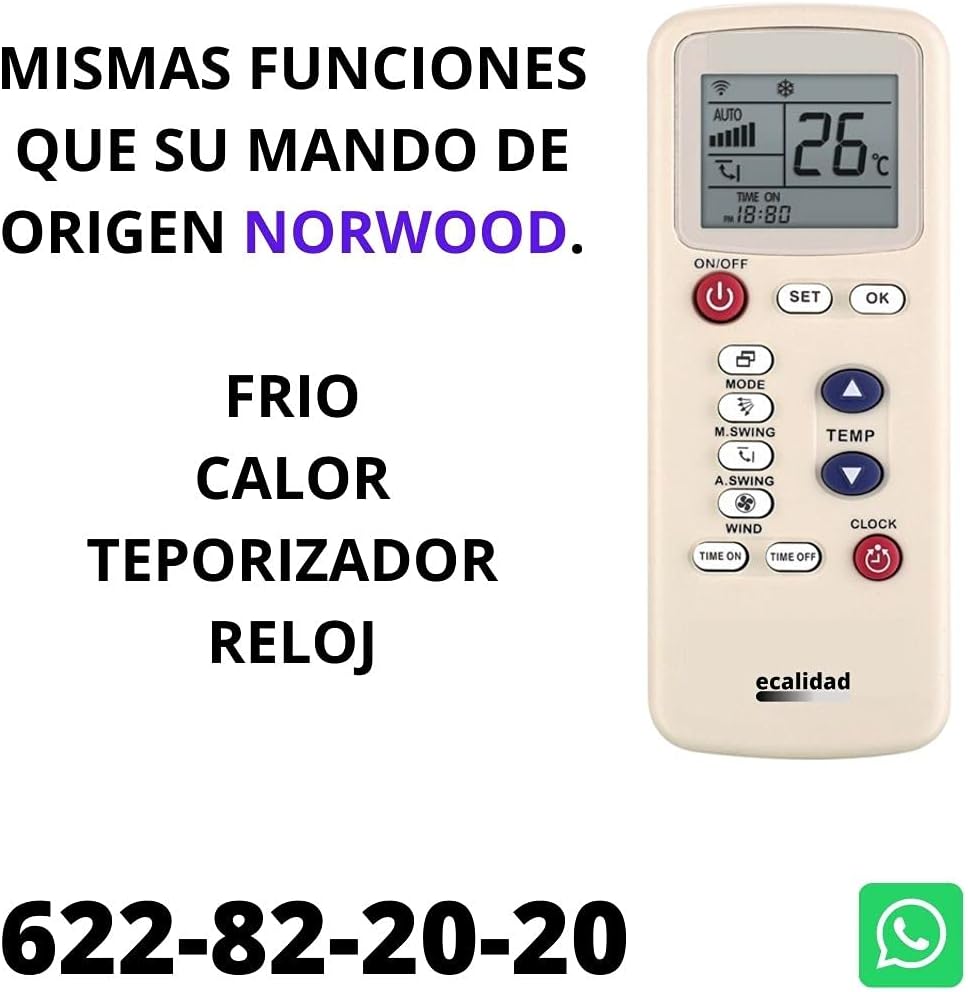
Image: The remote control highlighting buttons for temperature, mode, fan speed, and timer functions.
Important Compatibility Note: This remote is specifically designed for Norwood split-type air conditioners (wall-mounted units). It is NOT VALID for portable air conditioners or centralized ducted air conditioning systems.
Maintenance
To ensure the longevity and optimal performance of your remote control, please follow these maintenance guidelines:
- Cleaning: Wipe the remote control regularly with a soft, dry cloth. Do not use abrasive cleaners, solvents, or harsh chemicals.
- Battery Replacement: Replace both AAA batteries when the remote's performance degrades or the display becomes dim. Always replace with new batteries of the same type.
- Storage: If the remote control will not be used for an extended period, remove the batteries to prevent leakage and potential damage. Store in a cool, dry place.
- Avoid Moisture: Keep the remote control away from water, high humidity, and direct sunlight.
- Handle with Care: Avoid dropping the remote control or subjecting it to strong impacts.
Troubleshooting
If you encounter issues with your remote control, please refer to the following common problems and solutions:
| Problem | Possible Cause / Solution |
|---|---|
| Remote not responding |
|
| Functions not working correctly |
|
| Display is dim or blank |
|
If the problem persists after attempting these solutions, please contact our technical support for further assistance.
Specifications
| Feature | Detail |
|---|---|
| Brand | Mando Compatible |
| Model Number | m-FAGOR |
| Compatible Devices | Norwood Split-Type Air Conditioners |
| Connectivity Technology | Infrared |
| Maximum Range | 10 Meters |
| Battery Type | 2 x AAA (Alkaline, included) |
| Special Features | Digital Display |
| Product Dimensions | 24 x 8 x 2 cm |
| Product Weight | 100 g |
Warranty and Support
For any questions, technical assistance, or support regarding the setup and operation of your remote control, please contact our dedicated support team.
We offer support via WhatsApp to provide quick and efficient help, including video guidance for configuration.
- WhatsApp Support: +34 622 82 20 20

Image: Visual representation of WhatsApp support contact details.
Please retain your purchase receipt for warranty purposes.


