
LEDKIA LIGHTING 80988_163062
Contents
LEDKIA LIGHTING 1m Surface Mount Aluminum Profile with Translucent Cover for LED Strips - User Manual
Model: 80988_163062
1. Important Safety Information
Please read all instructions carefully before installation and use. Retain this manual for future reference.
- This product is designed for indoor use only. Do not expose to moisture or outdoor elements.
- Ensure the power supply to the LED strip is disconnected before installation or maintenance.
- Only use LED strips that are compatible with the profile's internal width (up to 10mm).
- Installation should be performed by a qualified professional if you are unsure about electrical connections.
- Do not exceed the maximum wattage rating of the LED strip used within the profile.
- Keep out of reach of children.
For detailed safety information, refer to the official safety document (PDF) provided by the manufacturer, if available.
2. Product Overview
The LEDKIA LIGHTING 1-meter Surface Mount Aluminum Profile is designed to house and protect LED strips, providing a clean, linear lighting solution for various interior applications. The aluminum construction ensures efficient heat dissipation for the LED strip, prolonging its lifespan, while the translucent cover diffuses the light for a uniform and aesthetically pleasing glow.
Key Features:
- Material: Durable Aluminum for optimal heat dissipation.
- Cover: Translucent diffuser for smooth light distribution.
- Compatibility: Accommodates LED strips up to 10mm wide.
- Installation: Designed for surface mounting.
- Components: Includes end caps and mounting clips for secure installation.

Image: The aluminum profile shown with mounting clips, ready for installation.
3. Setup and Installation
Follow these steps for proper installation of your aluminum LED profile:
- Prepare the Surface: Choose a clean, dry, and flat surface for mounting. Mark the desired installation line.
- Attach Mounting Clips: Position the mounting clips along the marked line, ensuring even spacing (typically 30-50 cm apart). Secure the clips to the surface using appropriate screws.
- Insert LED Strip: Carefully peel the adhesive backing from your compatible LED strip (up to 10mm wide) and press it firmly into the aluminum profile channel. Ensure the strip is straight and fully adhered.
- Connect LED Strip: Make all necessary electrical connections to your LED strip and power supply according to the LED strip manufacturer's instructions. Ensure power is off during this step.
- Attach Translucent Cover: Snap the translucent cover onto the aluminum profile. Start from one end and gently press along the length until it is securely in place.
- Install End Caps: Slide the end caps onto both ends of the profile. Some end caps may require a small screw for extra security (check included components).
- Mount the Profile: Once the LED strip, cover, and end caps are in place, firmly snap the assembled profile into the pre-installed mounting clips.
- Test: Restore power and test your LED lighting.

Image: The aluminum profile shown with its components: translucent cover, mounting clips, and end caps.

Image: An example of the aluminum profile installed as under-shelf lighting in a wardrobe, illuminating clothing.
4. Operating Instructions
Once installed, the LEDKIA LIGHTING Aluminum Profile functions as a housing and diffuser for your LED strip. The operation of the lighting system (on/off, dimming, color change) is controlled by the specific LED strip and power supply/controller you have connected to it. The profile itself does not have operational controls.
Ensure that the LED strip is properly seated within the profile and the translucent cover is securely attached to achieve optimal light diffusion and protection.
5. Maintenance
To ensure the longevity and optimal performance of your LEDKIA LIGHTING Aluminum Profile, follow these simple maintenance guidelines:
- Cleaning: Periodically wipe the exterior of the profile and the translucent cover with a soft, dry, or slightly damp cloth. Avoid abrasive cleaners or solvents, as these can damage the finish or the cover.
- Inspection: Regularly check the mounting clips and end caps to ensure they remain secure.
- Dust Removal: If dust accumulates inside the profile, carefully remove the translucent cover and gently clean the LED strip and interior with a soft, dry cloth or compressed air.
- Avoid Impact: Protect the profile from physical impact, which could deform the aluminum or crack the cover.
6. Troubleshooting
If you encounter issues with your LEDKIA LIGHTING Aluminum Profile, consider the following:
- LED Strip Not Fitting: Ensure your LED strip is no wider than 10mm. Do not force wider strips into the profile.
- Uneven Light Diffusion: Check that the translucent cover is fully and evenly snapped into place along the entire length of the profile. Ensure the LED strip is straight and properly adhered.
- Profile Not Secure: Verify that all mounting clips are properly installed and that the profile is firmly snapped into them. If necessary, add more clips for longer profiles.
- LED Strip Malfunction: If the LED strip is not lighting up or is flickering, this is typically an issue with the LED strip itself, its power supply, or connections, not the aluminum profile. Refer to the LED strip's manual for troubleshooting.
If problems persist, consult a qualified electrician or contact LEDKIA LIGHTING customer support.
7. Specifications
Detailed technical specifications for the LEDKIA LIGHTING Aluminum Profile (Model: 80988_163062):
| Feature | Detail |
|---|---|
| Model Number | 80988_163062 |
| Material | Aluminum |
| Finish Type | Painted |
| Cover Type | Translucent |
| Product Dimensions (Length x Total Width x Height) | 1000mm x 12mm x 7mm |
| Internal Width (for LED strip) | Up to 10mm |
| Item Weight | 1 Kilogram |
| Usage Environment | Indoor |
| Waterproof | No (Not waterproof) |
| Components Included | Mounting clips, End caps (LED strip not included) |
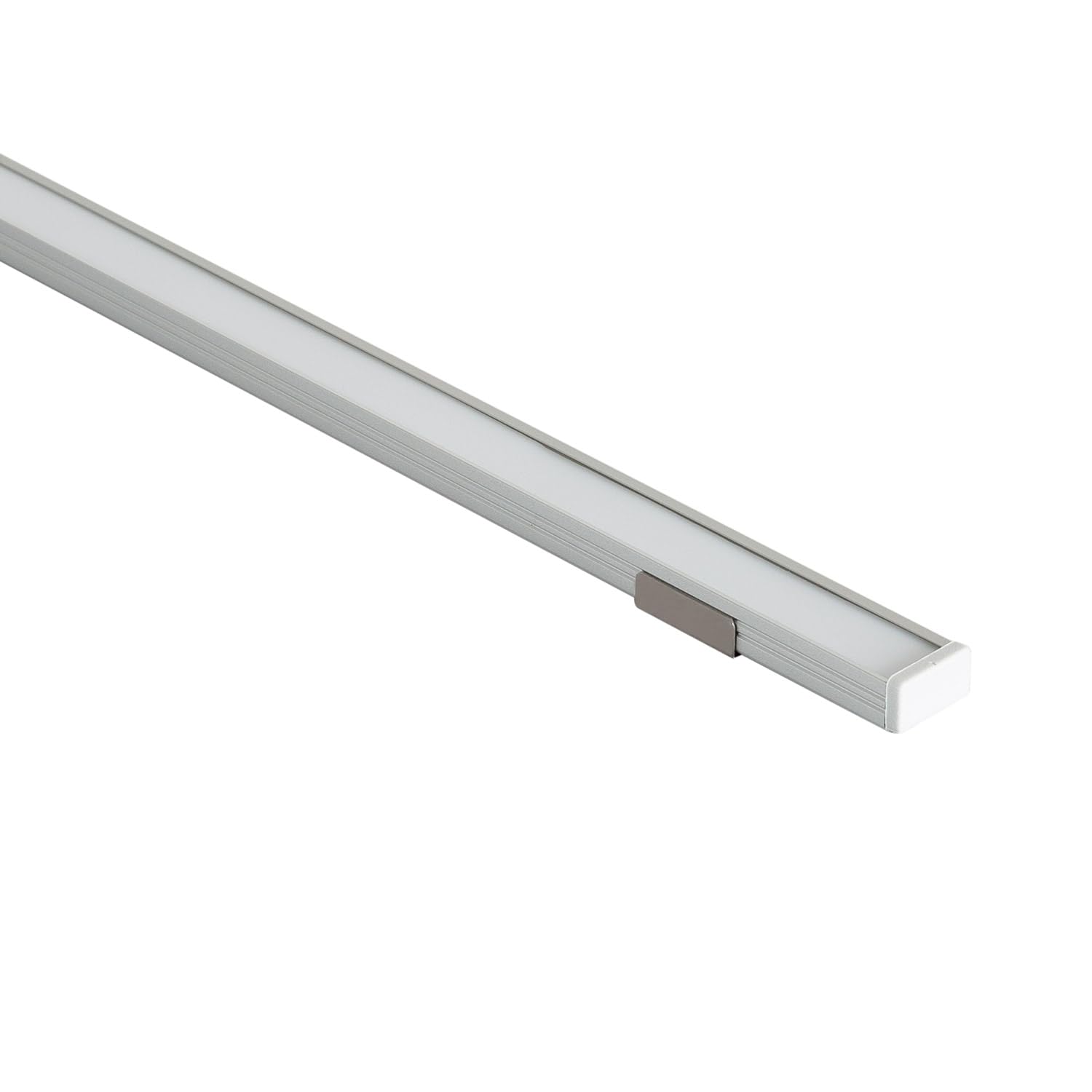
Image: Technical drawing showing the dimensions of the aluminum profile (7mm height, 12mm total width, 10mm internal width).
8. Warranty and Support
LEDKIA LIGHTING products are manufactured to high-quality standards. For information regarding warranty coverage, please refer to the terms and conditions provided at the time of purchase or visit the official LEDKIA LIGHTING website.
For technical support, product inquiries, or assistance with installation, please contact LEDKIA LIGHTING customer service. You can find contact information on the official brand website or through your point of purchase.
Visit the official LEDKIA LIGHTING Store for more products and information.
Documents and downloads
Ask a question about this manual
Ask about setup, troubleshooting, compatibility, parts, safety, or missing instructions. Manuals+ will review the question and use this page’s manual context to help answer it.