
Valeton GP-100VT
Valeton GP-100 Multi-Effects Processor User Manual
Model: GP-100VT | Brand: Valeton
1. Introduction
Thank you for purchasing the Valeton GP-100 Multi-Effects Processor. This device is a versatile and compact multi-effects unit designed for guitar and bass players, offering a wide range of amp models, IR cabinet simulations, and various effects. It features a powerful HD digital modeling system, a built-in looper, drum rhythms, and functions as a USB audio interface with OTG support for mobile devices. This manual provides detailed instructions for setup, operation, maintenance, and troubleshooting to help you get the most out of your GP-100.
2. Safety Information
Please read and understand all safety instructions before operating the Valeton GP-100. Retain this manual for future reference.
- Power Supply: Use only the specified power adapter. Incorrect voltage can damage the unit and void the warranty.
- Water and Moisture: Do not expose the unit to rain, moisture, or any liquids. Do not place objects filled with liquids on the unit.
- Heat Sources: Keep the unit away from heat sources such as radiators, heat registers, stoves, or other apparatus (including amplifiers) that produce heat.
- Ventilation: Ensure proper ventilation. Do not block any ventilation openings.
- Cleaning: Clean only with a dry cloth. Do not use liquid cleaners or aerosol cleaners.
- Servicing: Do not attempt to service this product yourself. Refer all servicing to qualified service personnel.
- Handling: Handle the unit with care. Avoid dropping or subjecting it to strong impacts.
- Electromagnetic Interference: This device may cause radio interference if not installed and used in accordance with the instructions.
3. Package Contents
Verify that all items are present in the package:
- Valeton GP-100 Multi-Effects Processor
- Power Adapter
- USB Cable
- User Manual (this document)
4. Product Overview
The Valeton GP-100 is a compact yet powerful multi-effects processor designed for a wide range of musical applications. Below is an overview of its physical components and connectivity options.

Figure 4.1: Front view of the Valeton GP-100 Multi-Effects Processor, showing the display, control knobs, and footswitches.
4.1 Front Panel Controls
- LCD Display: Shows current patch, effect parameters, and menu navigation.
- Navigation Knobs/Buttons: Used for selecting and adjusting parameters on the display.
- Expression Pedal: Assignable to various effects (e.g., volume, wah, pitch).
- Footswitches: For patch changes, effect on/off, looper control, and tuner activation.

Figure 4.2: Rear panel of the Valeton GP-100, illustrating various input and output ports.
4.2 Rear Panel Connections
- INPUT: 1/4" mono input for connecting your guitar or bass.
- L/R OUTPUT: 1/4" mono/stereo outputs for connecting to an amplifier, mixer, or audio interface.
- AUX IN: 1/8" stereo input for connecting external audio devices (e.g., MP3 player).
- PHONES: 1/8" stereo output for headphones.
- USB Port: For connecting to a computer for software editing, firmware updates, and USB audio interface functionality.
- DC IN: Power input for the included power adapter.
5. Setup
Follow these steps to set up your Valeton GP-100 for the first time.
- Power Connection: Connect the included power adapter to the DC IN port on the rear panel of the GP-100, then plug the adapter into a suitable power outlet.
- Instrument Connection: Connect your guitar or bass to the INPUT jack on the rear panel using a standard 1/4" instrument cable.
- Audio Output Connection:
- For mono output, connect the L/MONO OUTPUT jack to your amplifier or mixer.
- For stereo output, connect both L and R OUTPUT jacks to your stereo amplifier, mixer, or audio interface.
- For silent practice, connect headphones to the PHONES jack.
- External Audio (Optional): If you wish to play along with external audio, connect your device (e.g., smartphone, MP3 player) to the AUX IN jack using a 1/8" stereo cable.
- Computer Connection (Optional): To use the GP-100 as a USB audio interface or to edit patches with the software editor, connect the USB port on the GP-100 to your computer using the supplied USB cable.
- Power On: Once all connections are secure, the unit will power on automatically.
6. Operating Instructions
The Valeton GP-100 offers a wide array of features. This section covers basic operation and key functionalities.
6.1 Basic Navigation
- Patch Selection: Use the footswitches to cycle through different patches (presets).
- Parameter Adjustment: Use the control knobs below the display to adjust parameters of the selected effect or amp model. The display will show which parameter each knob controls.
- Menu Navigation: Press the main encoder knob to enter the menu. Rotate to scroll and press again to select. Use the back button (if present) to return to the previous screen.
6.2 Effects and Amp Modeling
The GP-100 features 140 built-in effects, 45 legendary amp models, and 40 IR cabinet simulations. You can customize your signal chain with up to 9 simultaneous effect blocks.
- Effect Blocks: Each patch consists of various effect blocks (e.g., COMP, OD/DIST, AMP, CAB, MOD, DLY, RVB). You can enable/disable and reorder these blocks.
- IR Loading: The unit supports 3rd party IR (Impulse Response) files, allowing you to expand your cabinet simulation options. Refer to the software editor section for details on loading custom IRs.
6.3 Looper Function
The GP-100 includes a 90-second looper for practice and performance.
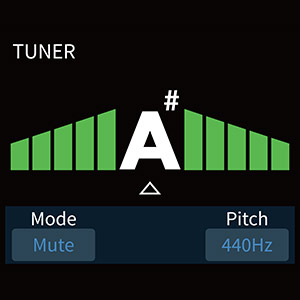
Figure 6.1: Looper interface on the GP-100 display.
- Activating Looper: Typically activated by holding a specific footswitch or through the menu.
- Recording: Press the footswitch once to start recording.
- Overdubbing: Press again to overdub.
- Playback: Press again to stop overdubbing and play the loop.
- Undo/Redo: Some models allow undoing the last overdub.
- Clear: Hold the footswitch to clear the loop.
6.4 Drum Rhythms
Practice with 100 built-in drum rhythms across various genres.
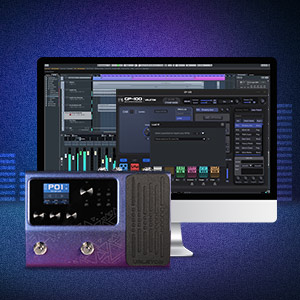
Figure 6.2: Drum machine interface on the GP-100 display.
- Selecting Rhythms: Navigate to the Drum section in the menu to choose a rhythm style and adjust BPM (Beats Per Minute) and volume.
- Start/Stop: Use the designated control or footswitch to start and stop the drum rhythm.
6.5 Tuner
The built-in tuner allows for accurate instrument tuning.
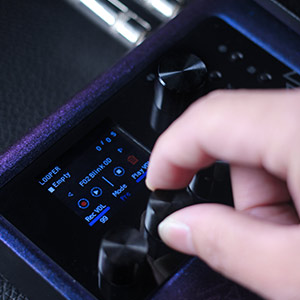
Figure 6.3: Tuner interface on the GP-100 display.
- Activating Tuner: Hold down a specific footswitch (refer to the quick start guide or on-screen prompts) to enter tuner mode. The output will typically be muted.
- Tuning: Play a single note on your instrument. The display will show the note and indicate if it's sharp, flat, or in tune.
- Exiting Tuner: Press the footswitch again to exit tuner mode and resume normal operation.
6.6 Software Editor
The Valeton GP-100 comes with free Mac/Windows software for sound editing and preset management, offering a more intuitive way to customize your tones.

Figure 6.4: Valeton GP-100 software editor interface.
- Installation: Download the latest software editor from the official Valeton website. Follow the installation instructions provided with the software.
- Connection: Connect your GP-100 to your computer via the USB cable. Launch the software editor. The software should automatically detect the device.
- Editing: Use the software to visually adjust effect parameters, reorder effect blocks, save/load patches, and manage IR files.
7. Maintenance
Proper care will ensure the longevity and optimal performance of your Valeton GP-100.
- Cleaning: Wipe the unit with a soft, dry cloth. Do not use abrasive cleaners, waxes, or solvents.
- Storage: When not in use for extended periods, store the unit in a dry, cool place, away from direct sunlight and extreme temperatures.
- Firmware Updates: Periodically check the official Valeton website for firmware updates. Updating the firmware can improve performance, add new features, and fix bugs. Follow the instructions provided with the firmware update carefully.
- Avoid Physical Shock: Protect the unit from drops and impacts, which can damage internal components.
8. Troubleshooting
If you encounter issues with your Valeton GP-100, refer to the following common problems and solutions.
| Problem | Possible Cause | Solution |
|---|---|---|
| No sound output. |
|
|
| Distorted or poor sound quality. |
|
|
| GP-100 not recognized by computer software. |
|
|
| Footswitches or expression pedal not responding. |
|
|
9. Specifications
Technical specifications for the Valeton GP-100 Multi-Effects Processor.
| Feature | Detail |
|---|---|
| Item Model Number | GP-100VT |
| Dimensions (L x W x H) | 12.1" x 6.7" x 2.7" (30.7 x 17 x 6.8 cm) |
| Item Weight | 16 ounces (approx. 0.45 kg) |
| Color | Violet |
| Hardware Interface | USB |
| Signal Format | Analog (internal digital processing) |
| Power Source | Corded Electric |
| Voltage | 9 Volts |
| Effects | 140 Built-in Guitar/Bass/Acoustic Effects |
| Amp Models | 45 Legendary Amp Models |
| IR Cabinet Simulations | 40 carefully selected IR Cabinet Simulations (20 User Slots for 3rd Party IRs) |
| Signal Processing | 24-bit 44.1kHz |
| Drum Rhythms | 100 Built-in Drum Rhythms |
| Looper | 90 Seconds Looper |
| Presets | 198 Presets |
| Simultaneous Effect Blocks | Maximum 9 Simultaneous Effect Blocks |
| USB Audio Interface | Stereo Audio Streaming, OTG function support |
| User Interface | Multi Language User Interface (Hardware) with Free Mac/Windows Software |
10. Warranty and Support
Valeton products are manufactured to the highest quality standards.
10.1 Warranty Information
The Valeton GP-100 comes with a limited warranty against defects in materials and workmanship. The specific terms and duration of the warranty may vary by region and retailer. Please retain your proof of purchase for warranty claims. For detailed warranty information, refer to the warranty card included with your product or visit the official Valeton website.
10.2 Customer Support
For technical assistance, troubleshooting beyond this manual, or service inquiries, please contact Valeton customer support. You can typically find contact information and frequently asked questions (FAQs) on the official Valeton website: www.valeton.net.
Related documentsGP-100VT


Ask a question about this manual
Ask about setup, troubleshooting, compatibility, parts, safety, or missing instructions. Manuals+ will review the question and use this page’s manual context to help answer it.