1. Introduction
The Belifu TENS EMS Unit is designed to provide pain management and muscle relaxation through Transcutaneous Electrical Nerve Stimulation (TENS) and Electrical Muscle Stimulation (EMS) technology. This device utilizes human body simulation technology, bioelectricity technology, and microcomputer intelligent control to simulate various massage methods such as cupping and acupuncture. It is intended for temporary relief of pain associated with sore and aching muscles in the shoulder, waist, back, neck, upper extremities (arm), and lower extremities (leg) due to strain from exercise or normal household and work activities. It is also intended for symptomatic relief of chronic, intractable pain and post-traumatic or post-surgical acute pain.
This unit features 4 independent channels, allowing for separate mode and intensity settings for each channel, and offers 24 pre-programmed massage modes with 30 intensity levels. Its compact, rechargeable design makes it convenient for use at home, in the office, or while traveling.

Figure 1: Applicable areas for the Belifu TENS EMS Unit.
2. Safety Information
Please read all instructions and warnings carefully before using this device. Keep this manual for future reference.
- Do not use this device if you have a pacemaker, implanted defibrillator, or other implanted metallic or electronic device.
- Do not use if you are pregnant.
- Do not use on broken skin, open wounds, or over cancerous lesions.
- Consult your physician before use if you have any medical conditions, including but not limited to epilepsy, heart disease, or recent surgery.
- Keep out of reach of children.
- Do not use while driving or operating heavy machinery.
- Discontinue use if you experience any adverse reactions such as skin irritation or discomfort.
3. Package Contents
Upon opening your Belifu TENS EMS Unit package, please ensure all items listed below are present:
- 1 x Belifu TENS EMS Unit Device
- 10 x Self-adhesive Reusable Electrode Pads (various sizes)
- 5 x Sets of Lead Wires
- 1 x USB Charging Cable
- 1 x Storage Bag
- 1 x User Manual
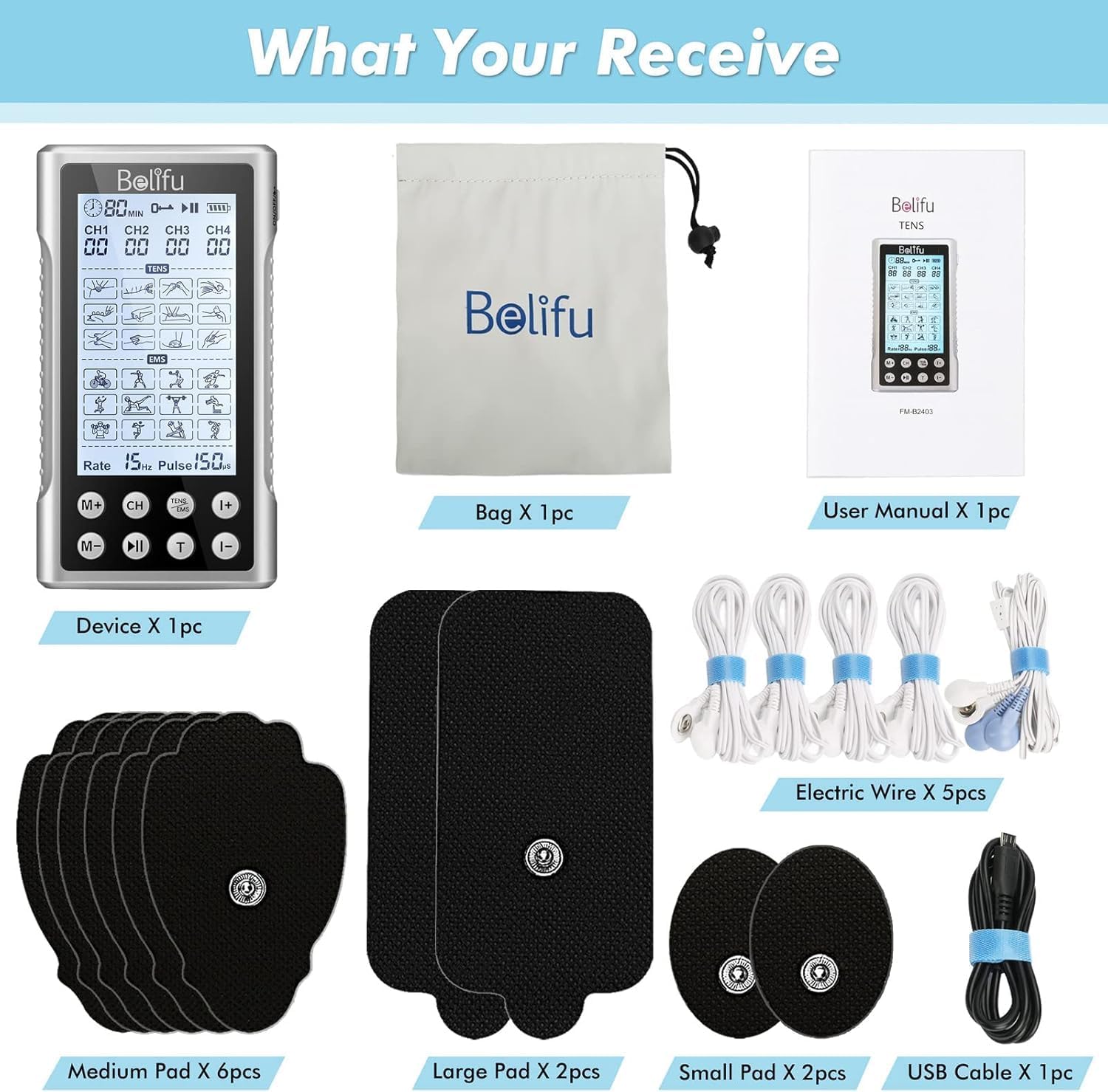
Figure 2: Contents of the Belifu TENS EMS Unit package.
4. Device Overview
Familiarize yourself with the components and controls of your Belifu TENS EMS Unit:
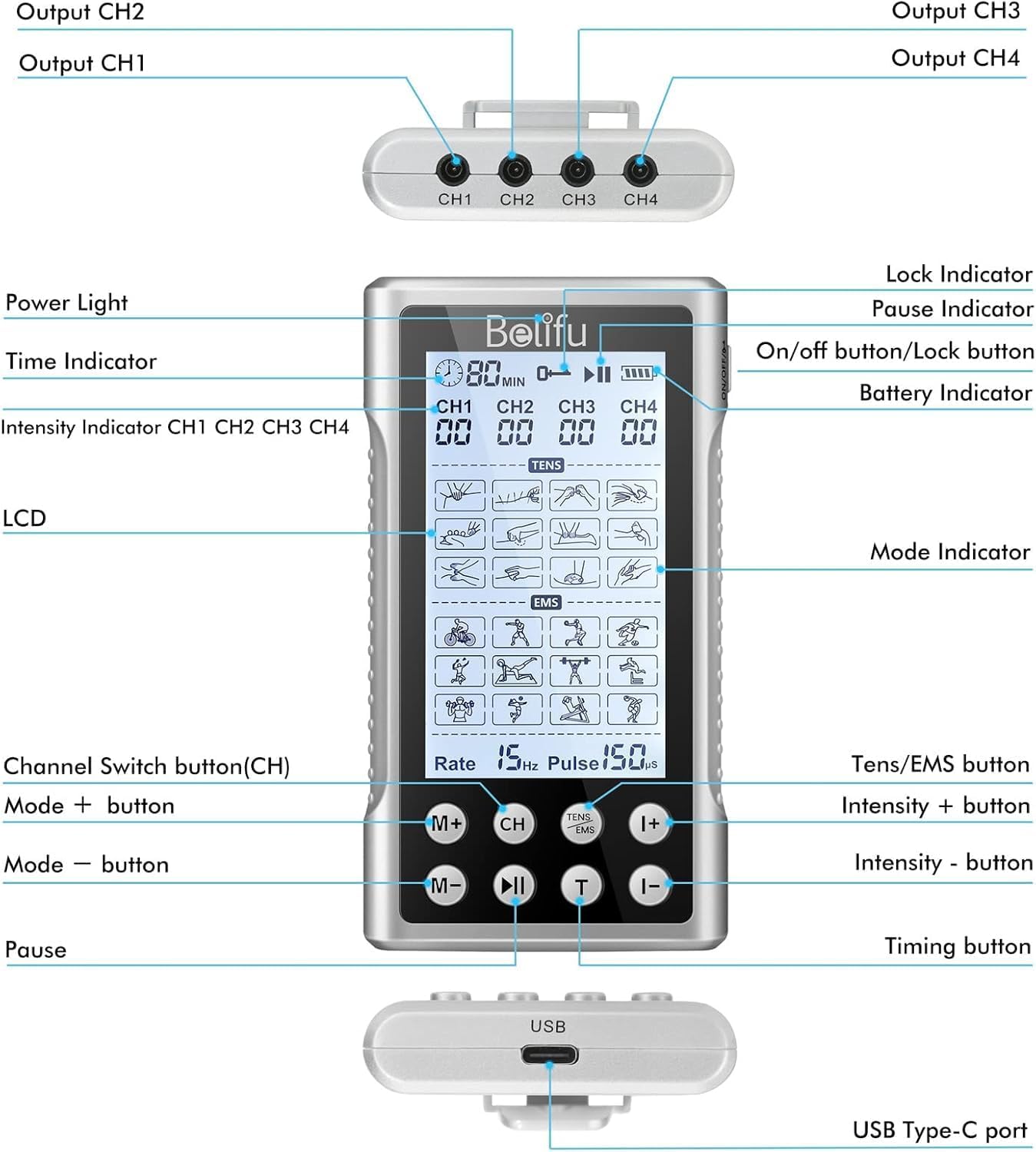
Figure 3: Belifu TENS EMS Unit device diagram with labeled components.
- Output CH1-CH4: Ports for connecting lead wires.
- On/Off/Lock Button: Powers the device on/off and locks/unlocks the screen.
- LCD Screen: Displays mode, intensity, time, and battery status.
- CH Button: Switches between channels (CH1, CH2, CH3, CH4) to adjust settings independently.
- M+/M- Buttons: Selects from 24 pre-programmed massage modes.
- T Button: Adjusts the treatment time.
- I+/I- Buttons: Increases or decreases intensity for the selected channel.
- TENS/EMS Button: Toggles between TENS and EMS therapy types.
- USB Type-C Port: For charging the internal lithium battery.
5. Setup and Initial Use
5.1 Charging the Device
Before first use, fully charge the device. Connect the USB charging cable to the USB Type-C port on the unit and to a compatible USB power source (e.g., wall charger, power bank, or laptop USB port). The battery indicator on the LCD screen will show charging status. A full charge provides continuous use for an extended period.
5.2 Connecting Electrode Pads
- Ensure the device is turned off.
- Connect the lead wires to the electrode pads by snapping them onto the metal studs.
- Plug the lead wires into the desired output channels (CH1, CH2, CH3, CH4) on the top of the device.
- Peel the protective film from the electrode pads.
5.3 Applying Electrode Pads
Clean and dry the skin area where the pads will be applied. Place the self-adhesive electrode pads firmly onto the skin. Ensure good contact for optimal performance. The device supports 2 to 16 pads simultaneously across its 4 independent channels.

Figure 4: Proper application of electrode pads for multi-channel use.
6. Operating Instructions
- Power On: Press and hold the On/Off button to turn on the device. The LCD screen will illuminate.
- Select Channel: Press the 'CH' button to select the channel you wish to adjust (CH1, CH2, CH3, or CH4). The selected channel will be highlighted on the screen.
- Choose Mode: Use the 'M+' or 'M-' buttons to cycle through the 24 pre-programmed massage modes. Each mode offers a different sensation (e.g., cupping, acupuncture, tapping).
- Set Time: Press the 'T' button to adjust the treatment duration. The time can typically be set from 10 to 60 minutes.
- Adjust Intensity: Use the 'I+' or 'I-' buttons to increase or decrease the intensity level for the selected channel. Start with a low intensity and gradually increase until a comfortable and effective sensation is achieved. There are 30 intensity levels.
- TENS/EMS Selection: Press the 'TENS/EMS' button to switch between TENS and EMS therapy types if desired.
- Pause Function: Press the 'Pause' button to temporarily stop the treatment. Press it again to resume.
- Lock Function: Press and hold the On/Off button briefly to lock the screen and prevent accidental changes during use. Repeat to unlock.
- Power Off: After your session, press and hold the On/Off button to turn off the device.
Video 1: Official Belifu video demonstrating the non-invasive pain relief capabilities of the TENS EMS unit.
7. Maintenance and Storage
- Cleaning the Device: Wipe the device with a soft, damp cloth. Do not use abrasive cleaners or immerse the device in water.
- Caring for Pads: After each use, place the electrode pads back onto their protective film. Store them in a cool, dry place. If the pads lose their adhesiveness, they may need to be replaced.
- Storage: Store the device and accessories in the provided storage bag to protect them from dust and damage. Keep away from extreme temperatures and direct sunlight.
8. Troubleshooting
- No Sensation: Ensure the device is powered on, pads are firmly attached to the skin, and lead wires are securely connected to both the pads and the device. Increase the intensity gradually. Check battery level.
- Pads Not Sticking: Clean the skin area thoroughly before applying pads. If pads are old, replace them with new ones.
- Device Not Charging: Ensure the USB cable is properly connected to both the device and the power source. Try a different USB cable or power source.
- Uneven Sensation Across Channels: Verify that the intensity levels for each channel are set correctly. Ensure all pads are making good contact with the skin.
9. Specifications
| Feature | Detail |
|---|---|
| Model Number | CWN1005 |
| Channels | 4 Independent Channels |
| Modes | 24 Pre-programmed Modes |
| Intensity Levels | 30 Levels |
| Battery | Rechargeable Lithium Polymer (included) |
| Charging Port | USB Type-C |
| Dimensions | 15.8 x 9.2 x 6.7 cm |
| Weight | 350 g |
10. Warranty and Support
For warranty information or technical support, please refer to the contact details provided in your product packaging or visit the official Belifu website. Keep your purchase receipt as proof of purchase for any warranty claims.