
1. Product Overview
The Taidacent RJ45 to RS485 Converter is an industrial-grade adapter designed to facilitate communication between devices using an RJ45 physical interface and an RS485 serial communication standard. This adapter provides a reliable and straightforward solution for converting RJ45 signals to RS485 terminal connections.
This specific model is configured for RS485 A to PIN1 and RS485 B to PIN2 on the RJ45 connector.

Figure 1: Taidacent RJ45 to RS485 Converter. This image shows the overall appearance of the converter, featuring an RJ45 plug on one end and a green screw terminal block on the other.
2. Setup and Connection
Proper connection of the RJ45 to RS485 converter is essential for correct functionality. This adapter translates specific RJ45 pins to the A and B terminals of the RS485 interface.
2.1 Pin Configuration (A Connects to PIN1, B Connects to PIN2)
For this specific model, the RS485 A terminal connects to PIN1 of the RJ45 connector, and the RS485 B terminal connects to PIN2 of the RJ45 connector.
- Connect your RS485 'A' line to the terminal labeled 'A' on the converter.
- Connect your RS485 'B' line to the terminal labeled 'B' on the converter.
- Insert the RJ45 plug into the corresponding RJ45 port on your device.
It is important to ensure correct polarity. While the device may function with reversed A/B connections in some RS485 implementations, it is best practice to maintain the specified A-to-A and B-to-B connections.

Figure 2: Mode of Connection Diagram. This diagram illustrates various RJ45 pin assignments for RS485 A and B connections, including the specific configuration for this model (A to PIN1, B to PIN2).
2.2 General Connection Procedure
- Identify RS485 Lines: Determine which wires from your RS485 device correspond to the 'A' (Data+) and 'B' (Data-) lines.
- Prepare Wires: Strip a small amount of insulation from the ends of your RS485 'A' and 'B' wires.
- Connect to Terminal Block: Loosen the screws on the green terminal block of the converter. Insert the 'A' wire into the terminal labeled 'A' and the 'B' wire into the terminal labeled 'B'. Tighten the screws securely to ensure good electrical contact.
- Insert RJ45: Plug the RJ45 end of the converter into the RJ45 port of your network device or controller.
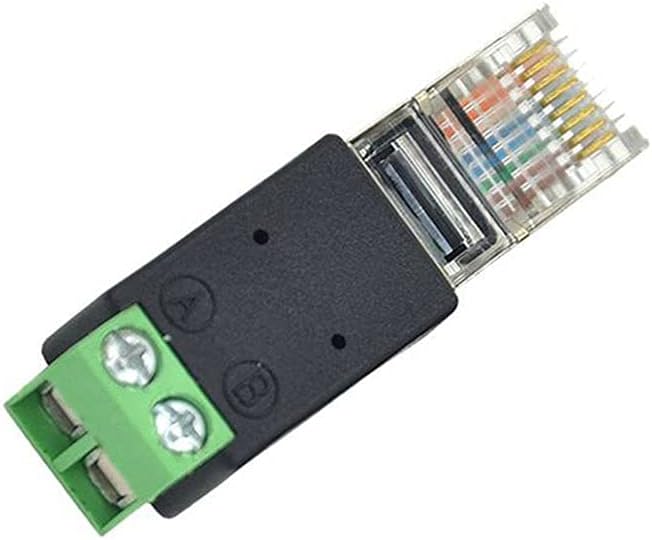
Figure 3: Top view of the converter. This image clearly shows the 'A' and 'B' labels next to the screw terminals, indicating where the RS485 data lines should be connected.

Figure 4: Angled view of the converter. This perspective highlights both the RJ45 connector and the screw terminal block, providing a comprehensive view of the adapter's physical interface.
3. Operation
The Taidacent RJ45 to RS485 Converter is a passive adapter and does not require external power or configuration beyond the physical wiring. Once correctly connected, it facilitates the data transmission between the RJ45 interface and the RS485 bus.
Ensure that the devices connected to both ends (RJ45 and RS485) are properly configured for communication parameters such as baud rate, data bits, parity, and stop bits, as these are handled by the communicating devices, not the adapter itself.
4. Maintenance
This converter is designed for industrial use and requires minimal maintenance. To ensure optimal performance and longevity:
- Keep the device clean and free from dust and debris.
- Avoid exposing the converter to extreme temperatures or humidity outside its specified operating range (-40℃ to 85℃).
- Periodically check screw terminals for tightness to ensure secure connections.
- Do not attempt to disassemble or modify the converter, as this may void any implied warranty and could damage the device.
5. Troubleshooting
If you encounter issues with the Taidacent RJ45 to RS485 Converter, consider the following troubleshooting steps:
- No Communication:
- Verify that the RS485 A and B lines are correctly connected to the corresponding terminals on the converter.
- Ensure the RJ45 plug is fully inserted into the port.
- Check the communication settings (baud rate, parity, data bits, stop bits) on both connected devices to ensure they match.
- Confirm that the RS485 network is properly terminated if required by your setup.
- Intermittent Communication:
- Inspect all wire connections for looseness or corrosion. Tighten screw terminals if necessary.
- Check for electromagnetic interference (EMI) if the converter is located near high-power electrical equipment.
- Ensure cable lengths are within RS485 specifications.
- Physical Damage:
- Visually inspect the converter for any signs of physical damage. If damaged, replace the unit.
6. Specifications
| Feature | Detail |
|---|---|
| Product Model | ZC-RJ45485adapter-210617 |
| Type | RJ45 to RS485 Terminal Adapter |
| Quality | Industrial Grade |
| RJ45 Pin Configuration (Current Model) | A connects to PIN1, B connects to PIN2 |
| Working Temperature | -40℃ to 85℃ (-40℉ to 185℉) |
| Connector Type | RJ45 |
| Color | Black (housing), Green (terminal block) |
| Item Weight | 1.76 ounces (approximately 50 grams) |
| Dimensions (Approximate) | 44mm (Length) x 13mm (Width) x 11mm (Height) |

Figure 5: Converter Dimensions. This image provides a visual representation of the converter's approximate length, width, and height.
7. Warranty and Support
For warranty information and technical support, please refer to the purchase documentation or contact Taidacent customer service directly. Keep your purchase receipt for any warranty claims.
For further assistance, you may visit the Taidacent Store on Amazon.