
Introduction
This manual provides essential information for the setup, operation, and maintenance of your Sauder Hammond Home Office Credenza Desk. Please read these instructions carefully to ensure proper use and longevity of your product.
The Sauder Hammond Credenza Desk is designed to enhance your home office with both display and storage capabilities. It features a durable top surface, multiple drawers with full extension slides, adjustable shelving behind doors, a pull-out printer shelf, and an integrated cord management system.

Image: The Sauder Hammond Home Office Credenza Desk, showcasing its Chalk Oak finish and overall design.
Safety Information
Adhering to safety guidelines is crucial for preventing injury and damage to the product. Please observe the following:
- Always use proper lifting techniques when moving the credenza. Due to its weight (approximately 93.7 pounds), it is recommended to have assistance.
- Secure the credenza to the wall to prevent tipping, especially if children or pets are present. Wall anchoring hardware may be required and is typically included or can be purchased separately.
- Keep fingers and other body parts away from drawers and shelves when opening and closing to avoid injury.
- Do not overload shelves or drawers beyond their recommended weight capacity. Distribute weight evenly.
- Ensure the credenza is placed on a level surface to prevent instability.
Setup and Assembly
While the product is listed as "Assembly Required: No" in some specifications, it is common for furniture items of this size to require some minor assembly or unpacking and positioning. Please follow these general guidelines:
- Unpacking: Carefully remove all components from the packaging. Inspect for any damage during transit. Retain packaging materials until assembly is complete.
- Component Identification: Verify all parts and hardware are present against the included parts list (if applicable).
- Feet Attachment (if necessary): If the feet are not pre-attached, securely fasten them to the base of the credenza using the provided hardware.
- Positioning: Place the credenza in its desired location, ensuring it is on a stable and level surface. Consider proximity to electrical outlets for devices.
- Wall Anchoring: For safety, especially in households with children, it is highly recommended to anchor the credenza to a wall to prevent tipping. Follow the instructions provided with any wall anchoring kit.

Image: A close-up view of the credenza's tapered solid wood foot, indicating potential attachment points.
Operating Instructions
The Sauder Hammond Credenza Desk offers various functional features for organization and convenience:
Drawers
- The credenza features three drawers equipped with full extension slides. This allows the drawers to open completely, providing full access to their contents.
- To open, gently pull the knob. To close, push firmly until the drawer is fully seated.
- Avoid forcing drawers if they feel stiff; check for obstructions.

Image: An open drawer revealing storage space for notebooks, pens, and other office essentials.
Adjustable Shelves
- Behind each door, there is an adjustable shelf. These shelves can be repositioned to accommodate items of various heights.
- To adjust, carefully remove the shelf and reposition the shelf pins to the desired height. Ensure all four pins are securely inserted before placing the shelf back.
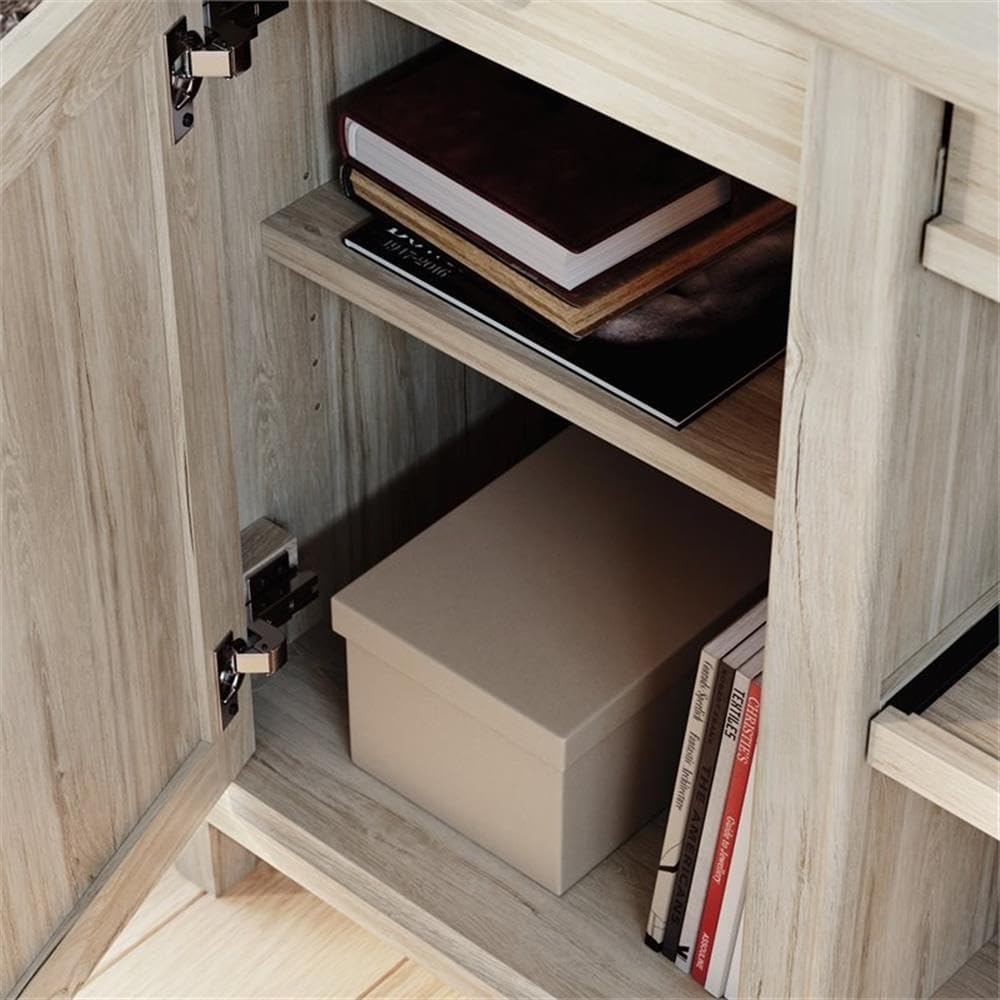
Image: An open cabinet door revealing an adjustable shelf, currently holding books and a storage box.
Pull-out Printer Shelf
- The central section includes a pull-out, adjustable printer shelf. This shelf provides convenient access to your printer.
- To use, gently pull the shelf forward. It can also be adjusted in height similar to the other adjustable shelves.

Image: The credenza in use, featuring a printer on its dedicated pull-out shelf and a laptop on the main surface.
Cord Management System
- The credenza desk is equipped with two desktop grommet holes. These are designed to help organize and conceal electrical cords from your devices.
- Feed power cords and data cables through these grommets to keep your workspace tidy and free from clutter.

Image: A close-up of one of the desktop grommet holes, demonstrating its function for cord organization.
Maintenance and Care
Proper care will help maintain the appearance and functionality of your credenza desk:
- Cleaning: Wipe surfaces with a soft, damp cloth. Avoid harsh chemicals, abrasive cleaners, or polishes that may damage the finish.
- Spills: Immediately wipe up any spills to prevent staining or water damage.
- Heat and Moisture: Protect the surface from direct heat and excessive moisture. Use coasters under beverages and heat pads under hot items.
- Sunlight: Avoid prolonged exposure to direct sunlight, which can cause fading or discoloration over time.
- Hardware: Periodically check and tighten any loose hardware, such as screws for knobs, hinges, or shelf pins, to ensure stability.
Troubleshooting
Here are solutions to common issues you might encounter:
- Wobbly Credenza: Ensure the credenza is on a level surface. Adjust any leveling feet if present, or place shims under the base if necessary. Verify all assembly hardware is tightened.
- Sticking Drawers: Check for any obstructions within the drawer or along the slides. Ensure the slides are clean and free of debris. If the slides are metal, a silicone-based lubricant can be applied sparingly.
- Doors Not Closing Properly: Check hinges for looseness and tighten if needed. Ensure nothing is obstructing the door's path.
- Missing Parts: If any parts were missing upon unpacking, contact Sauder customer support with your model number and purchase information.
Specifications
Key specifications for the Sauder Hammond Home Office Credenza Desk:
| Feature | Detail |
|---|---|
| Brand | Sauder |
| Model Number | 428247 |
| Color | Chalk Oak |
| Material | Engineered Wood (Top), Wood (Frame, Backing) |
| Dimensions (L x W x H) | 65.12 x 19.29 x 30 inches |
| Item Weight | 93.7 pounds |
| Number of Drawers | 3 (with full extension slides) |
| Number of Adjustable Shelves | 3 (one behind each door, one pull-out printer shelf) |
| Special Features | Adjustable shelves, Pull-out printer shelf, Cord management grommets |
| Assembly Required | No (Note: May require minor setup or attachment of feet) |
| Accommodates Hutch | Hutch 428248 |
Warranty Information
Specific warranty details for the Sauder Hammond Home Office Credenza Desk are typically provided with the product packaging or available directly from the manufacturer. Please refer to the documentation included with your purchase or visit the official Sauder website for the most current warranty policy and registration information.
It is recommended to retain your proof of purchase for warranty claims.
Customer Support
For further assistance, questions, or to report missing/damaged parts, please contact Sauder customer support:
- Manufacturer Website: www.sauder.com
- Refer to your product packaging for specific contact numbers or email addresses.
When contacting support, please have your model number (428247) and purchase date readily available.