
1. Introduction
The HOBOT-2S is an advanced automatic window cleaning robot designed to provide effortless and efficient cleaning for various glass surfaces. It features innovative ultrasonic water spray technology, AI smart route planning, and dual replaceable water tanks, ensuring thorough cleaning without leaving water stains. This manual provides detailed instructions for the safe and effective use of your HOBOT-2S.
2. Safety Information
Please read all safety instructions carefully before operating the HOBOT-2S to prevent injury or damage to the device.
- The robot operates with a power cord ONLY. Ensure the power cord is securely connected and not obstructed during operation.
- Always attach the safety rope to a secure anchor point before placing the robot on the window. The safety rope is 15 ft long.
- The embedded UPS (Un-interrupted Power System) provides temporary power in case of a power outage, preventing the robot from falling. However, it is not intended for prolonged operation without external power.
- Do NOT use the robot on frames with non-rectangular (rounded) edges, as this may affect suction and movement.
- The minimum surface cleaning area required is 15x15 inches for glass of any thickness.
- Keep hands, hair, and loose clothing away from moving parts.
- Do not use the robot on cracked or damaged glass surfaces.
- Ensure the cleaning cloths are properly attached and clean before each use to maintain optimal performance and prevent scratching.
3. Package Contents
Verify that all items are present in the package:
- HOBOT-2S Window Cleaning Robot
- Power Adapter and AC Power Cord
- Extension Cord (1 meter)
- Safety Rope
- Cleaning Cloths (multiple pairs)
- Remote Control
- User Manual
- Cleaning Solution Bottle
- Replaceable Water Tanks/Spraying Nozzles (pre-installed, with spares or replacement capability)
4. Product Overview
Familiarize yourself with the main components of your HOBOT-2S robot.
4.1 HOBOT-2S Front View
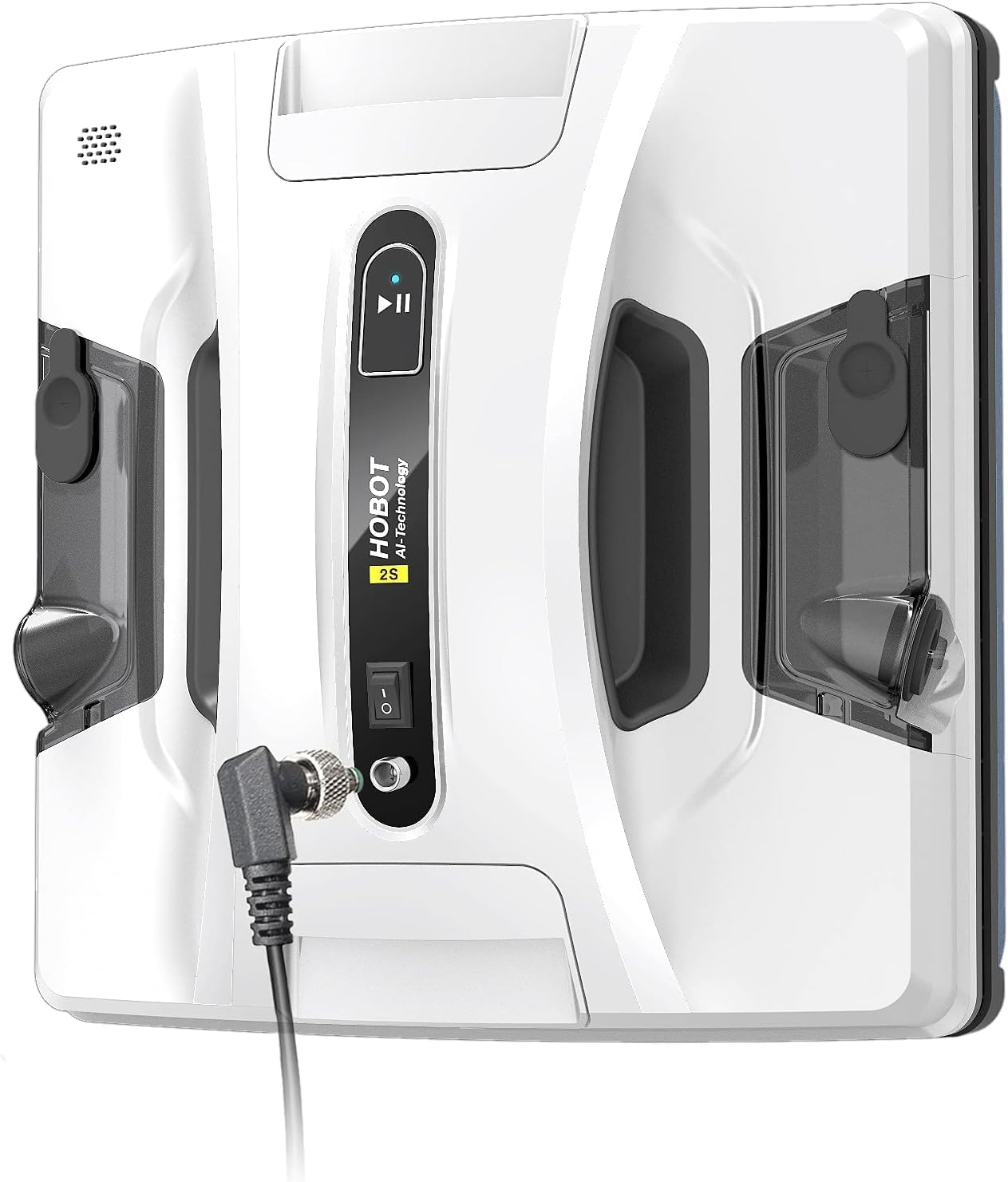
The front view of the HOBOT-2S, showing the power connection port, start/pause button, and the HOBOT logo.
4.2 HOBOT-2S Bottom View
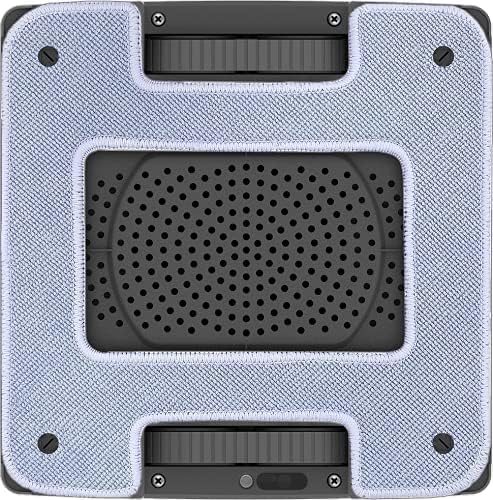
The bottom view of the HOBOT-2S, highlighting the two large cleaning pads and the central suction area.
4.3 Replaceable Water Tank/Nozzle

An illustration demonstrating the process of replacing the water tank or spraying nozzle, which can be done with a standard screwdriver.
5. Setup
5.1 Attaching Cleaning Cloths
Attach clean microfiber cleaning cloths to the bottom of the robot. Ensure they are securely fastened and cover the entire cleaning pad area.
5.2 Filling Water Tanks
Open the water tank caps and fill with distilled water or HOBOT-approved cleaning solution. Close the caps securely to prevent leakage.
5.3 Connecting Safety Rope
Securely tie the safety rope to a sturdy object indoors, such as a heavy piece of furniture or a window frame anchor. This is a critical safety measure.
5.4 Power Connection
Connect the power adapter to the robot and then plug it into a power outlet. The robot requires continuous power during operation.

The HOBOT-2S comes with a 5-meter long power cord, including an extension, allowing it to reach large areas.
6. Operating Instructions
6.1 Initial Placement
Place the HOBOT-2S firmly on the glass surface. Ensure the robot has full suction before releasing it.
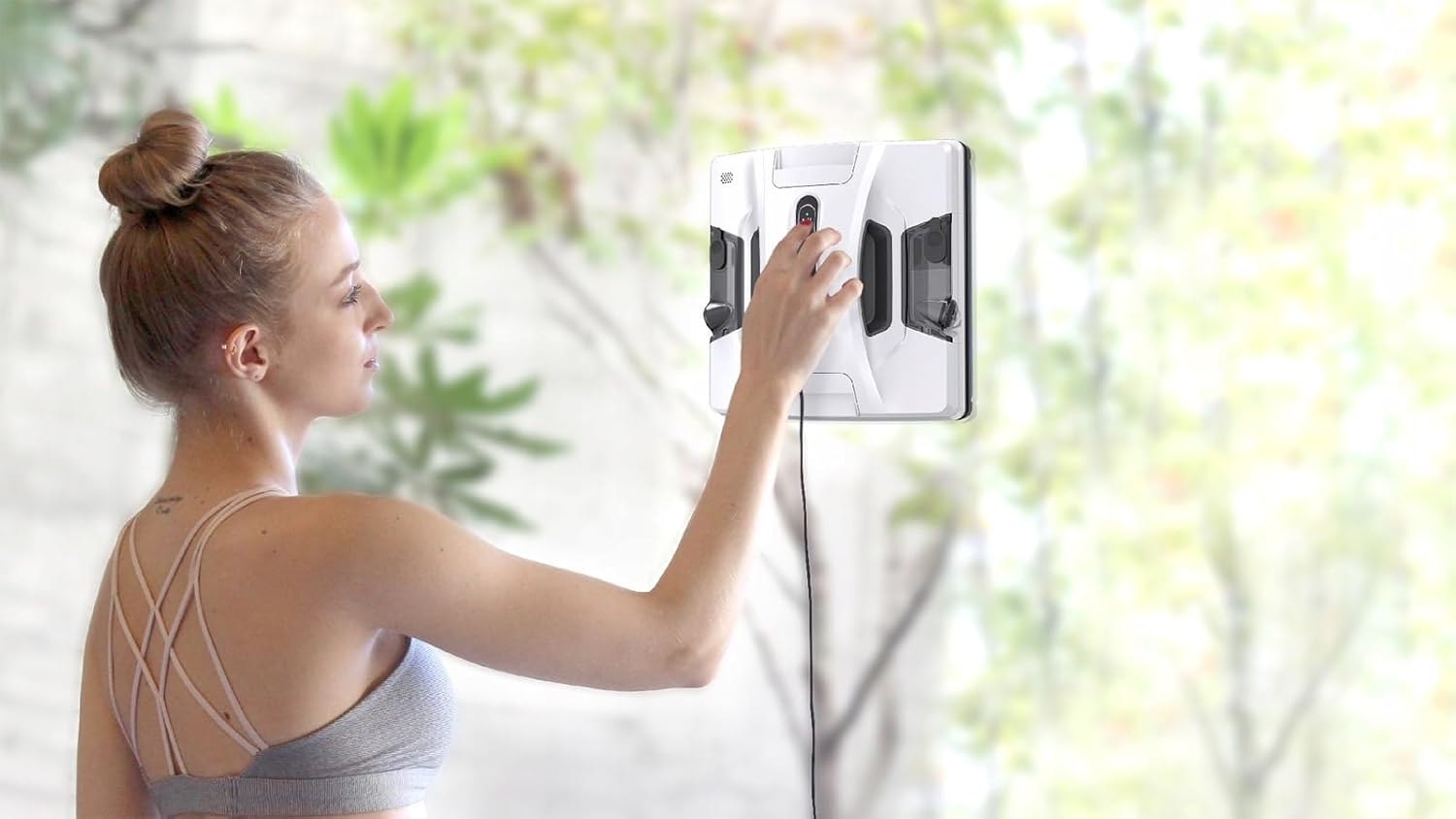
A user carefully placing the HOBOT-2S onto a window surface, ensuring proper suction.
6.2 Starting Cleaning
Press the start button on the robot, use the remote control, or initiate cleaning via the smartphone app. The robot will begin its cleaning cycle.
6.3 Cleaning Modes
The HOBOT-2S offers 3 programs for automatic cleaning of surfaces. These programs typically involve zigzag patterns in horizontal and vertical directions to ensure comprehensive coverage.
6.4 Ultrasonic Water Spray
The robot features an ultrasonic water spray system that nebulizes water into a fine mist (15µm particles) for effective cleaning without leaving streaks. This function can be controlled manually or automatically.

The HOBOT-2S actively spraying a fine mist from its ultrasonic nozzles during a cleaning cycle.

Visual representation of the dual ultrasonic spray technology, showing 15µm fine mist particles for efficient cleaning.
6.5 AI Smart Route Planning
The robot utilizes AI technology for smart route planning, navigating in a zigzag pattern to ensure thorough coverage of the cleaning area. It also features auto-edge detection for frameless windows.

The HOBOT-2S is capable of cleaning multiple surfaces due to its high volume centrifugal pump that overcomes small air leakages.
6.6 Smartphone App Control
Download the HOBOT APP to control the robot, receive notifications, and monitor task completion. The app provides a convenient interface for managing your cleaning tasks.
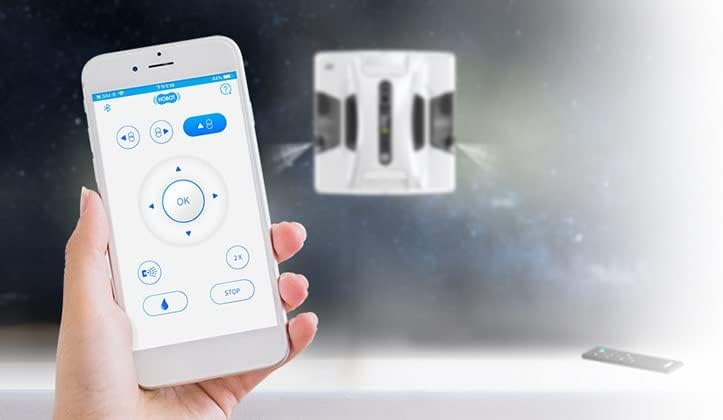
The HOBOT smartphone application allows for remote control and monitoring of the robot's cleaning process.
6.7 Voice Prompts
The HOBOT-2S provides voice prompts to update its progress and status, keeping you informed throughout the cleaning cycle.

The HOBOT-2S communicates its status and progress through clear voice prompts.
7. Maintenance
7.1 Cleaning and Replacing Cleaning Cloths
After each use, remove and clean the microfiber cloths. They can be hand-washed or machine-washed. Replace worn or damaged cloths to ensure effective cleaning.
7.2 Replacing Water Tanks/Nozzles
In case the ultrasonic spraying nozzle becomes clogged or the water tank is damaged, you can replace the entire water tank or spraying nozzle unit using a standard screwdriver. Refer to the diagram in Section 4.3 for guidance.
7.3 Firmware Updates (OTA)
Keep your HOBOT-2S updated with the latest features by regularly updating its firmware over-the-air (OTA) via the smartphone app. The app will also send cleaning reminders every 3 months.

The HOBOT app facilitates OTA firmware updates and provides cleaning reminders to maintain optimal performance.
8. Troubleshooting
If you encounter issues with your HOBOT-2S, refer to the table below for common problems and solutions.
| Problem | Possible Cause | Solution |
|---|---|---|
| Robot loses suction or falls. | Air leakage, dirty cleaning cloths, uneven surface, non-rectangular frame edges. | Ensure cleaning cloths are clean and properly attached. Check for any obstructions or unevenness on the glass. The edge-leakage sensor technology detects slight lifts; ensure proper contact. Do not use on rounded edges. |
| Streaks left on glass. | Dirty cleaning cloths, insufficient or incorrect cleaning solution, clogged spray nozzles. | Replace or clean cloths. Use distilled water or HOBOT-approved solution. Check and replace water tanks/nozzles if clogged. Run a dry cycle first on very dirty windows, then a wet cycle. |
| Robot not moving or stuck. | Power cord obstruction, insufficient suction, minimum area not met. | Ensure power cord is free. Verify strong suction. Confirm cleaning area is at least 15x15 inches. |
| Water leakage from tank. | Improperly sealed tank, damaged tank. | Ensure tank caps are tightly closed. If leakage persists, replace the water tank unit. |
| Robot does not go up. | Tread issue, suction problem. | Ensure cleaning cloths are clean and not hindering tread movement. Check for sufficient suction. Contact support if problem persists. |

The Edge-Leakage Sensor technology helps detect air leakage around window seals or frameless window edges, aiding in troubleshooting suction issues.
9. Specifications
| Feature | Detail |
|---|---|
| Manufacturer | HOBOT |
| Brand | HOBOT |
| Item Weight | 5.76 pounds |
| Product Dimensions | 19.69 x 19.69 x 11.02 inches |
| Item Model Number | Hobot2s |
| Batteries | 1 Lithium Polymer battery required (for UPS) |
| Color | White |
| Shape | Square |
| Power Source | Corded Electric (robot works with power cord ONLY) |
| First Available Date | June 16, 2021 |
10. Warranty and Support
For warranty information, technical support, or service inquiries, please refer to the warranty card included with your product or visit the official HOBOT website or your point of purchase. You may also find additional support and FAQs on the HOBOT Amazon store page.