
1. Introduction
This manual provides detailed instructions for the Armitron Sport Analog-Digital Bracelet Watch Model 20/5347. Please read this guide thoroughly to understand the features, setup, and operation of your watch. Proper use and maintenance will ensure optimal performance and longevity.
2. Product Overview
2.1 Key Features
- Curved mineral crystal lens for enhanced durability.
- Analog-digital display with a yellow semi-matte dial.
- Gunmetal gray luminous hands and silver-tone markers for visibility.
- Black printed minute track on the outer dial.
- Gunmetal gray adjustable link bracelet with a secure double push-button fold-over clasp.
- Water resistant to 165 feet (50 meters).
- Functions include stopwatch, countdown timer, world time (24 cities with DST), 3 alarms, hourly chime, and backlight.
2.2 Watch Components

Figure 1: Front View. This image displays the watch face, showing the analog hands, digital displays, and the four control buttons on the sides of the case.

Figure 2: Side View. This image shows the profile of the watch, highlighting the crown and the push-buttons on the right side of the watch case.
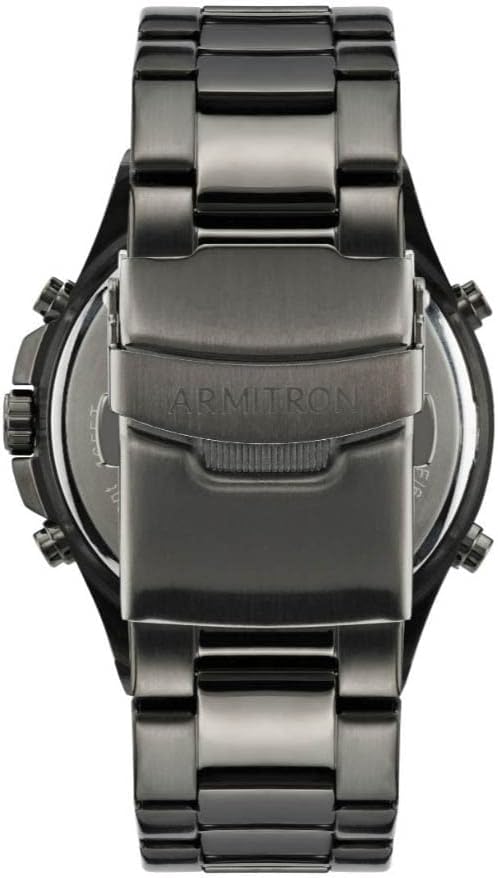
Figure 3: Back View. This image shows the stainless steel case back of the watch, which is secured with a snap-on design, and the bracelet clasp.

Figure 4: Bracelet Clasp. A close-up view of the double push-button fold-over clasp on the watch's gunmetal gray bracelet.
The watch features a crown for analog time adjustment and four push-buttons for digital functions: LIGHT (top left), MODE (bottom left), START (top right), and RESET (bottom right).
3. Setup
3.1 Initial Time Setting
Your watch has independent analog and digital time displays. Both need to be set separately.
3.1.1 Setting Analog Time
- Pull the crown out to the first position.
- Rotate the crown to move the hour and minute hands to the desired time.
- Push the crown back in to secure the analog time.
3.1.2 Setting Digital Time and Date
- Press the MODE button repeatedly until the time setting mode is displayed (usually indicated by flashing digits).
- Use the START button to advance the flashing digit (hours, minutes, seconds, month, day, year).
- Use the RESET button to select the digit to be adjusted.
- Press the MODE button again to exit the setting mode.
3.2 Bracelet Adjustment
The watch bracelet is adjustable by removing links. For proper fit and to avoid damage, it is recommended to have this procedure performed by a professional jeweler or watch repair service.
4. Operating Instructions
4.1 Navigating Modes
Press the MODE button to cycle through the various functions: Time/Date, Alarm 1, Alarm 2, Alarm 3, Stopwatch, Countdown Timer, and World Time.
4.2 Digital Time Display (12/24 Hour Format)
In Time mode, press the RESET button to toggle between 12-hour (AM/PM indicator) and 24-hour formats.
4.3 Alarm Function
The watch features three independent alarms. To set an alarm:
- Press MODE until you reach an Alarm mode (AL1, AL2, or AL3).
- Press and hold RESET until the alarm time digits flash.
- Use START to adjust the hours and minutes. Use RESET to switch between hours and minutes.
- Press MODE to confirm and exit.
- To activate/deactivate an alarm, press START while in the respective Alarm mode. An alarm icon will appear/disappear.
4.4 Hourly Chime
In Time mode, press the START button to toggle the hourly chime on or off. An icon will indicate if it is active.
4.5 Stopwatch
To use the stopwatch function:
- Press MODE until you reach the Stopwatch mode (STW).
- Press START to begin timing.
- Press START again to pause.
- Press RESET to clear the stopwatch to zero.
- Press START to resume from pause, or RESET to record lap times (if available on your model).
4.6 Countdown Timer
To set and use the countdown timer:
- Press MODE until you reach the Countdown Timer mode (TMR).
- Press and hold RESET until the timer digits flash.
- Use START to adjust the hours, minutes, and seconds. Use RESET to switch between digits.
- Press MODE to confirm the setting.
- Press START to begin the countdown.
- Press START again to pause, and RESET to reset the timer to its initial set value.
4.7 World Time
The watch can display the time for 24 major cities/time zones, including Daylight Saving Time (DST) designations.
- Press MODE until you reach the World Time mode (W.T.).
- Use START to cycle through the available city codes.
- Press RESET to toggle DST on or off for the selected city.
4.8 Backlight
Press the LIGHT button (top left) to illuminate the digital displays for a few seconds, improving visibility in low-light conditions.
5. Maintenance
5.1 Cleaning
Wipe the watch case and bracelet regularly with a soft, dry cloth. For water-resistant models, a slightly damp cloth can be used, followed by drying. Avoid using chemical cleaners or abrasive materials.
5.2 Battery Replacement
This watch uses two independent batteries, one for the analog movement and one for the digital display. When a battery needs replacement, it is recommended to have it done by a qualified watch technician to ensure proper sealing and water resistance.
5.3 Storage
When not in use, store your watch in a cool, dry place away from direct sunlight and extreme temperatures. Avoid exposing the watch to strong magnetic fields.
6. Troubleshooting
- Analog hands not moving: Check if the crown is pushed in completely. If the issue persists, the analog battery may need replacement.
- Digital display blank or dim: The digital battery may need replacement. Ensure the watch is not in a power-saving mode (if applicable).
- Digital display difficult to read in low light: This model features a negative digital display which can be challenging to read without the backlight in dim conditions. Use the LIGHT button for illumination.
- Water ingress: If moisture appears inside the watch, have it inspected immediately by a professional to prevent further damage.
- Buttons unresponsive: Ensure no debris is lodged around the buttons. If they remain unresponsive, professional service may be required.
For issues not covered here, please contact Armitron customer support or a certified watch repair center.
7. Specifications
| Feature | Specification |
|---|---|
| Model Number | 20/5347 |
| Movement | Japanese Quartz |
| Lens Material | Curved Mineral Crystal |
| Case Material | Gunmetal Gray Metal |
| Bracelet Material | Gunmetal Gray Adjustable Link Bracelet |
| Clasp Type | Double Push-Button Fold-Over Clasp |
| Water Resistance | 50 meters (165 feet) |
| Functions | Analog/Digital Time, Date, 3 Alarms, Stopwatch, Countdown Timer, World Time, Hourly Chime, Backlight |
| Approximate Dimensions | 10.6 x 8.2 x 6.9 cm (Package Size) |
| Approximate Weight | 330 g |
7.1 Water Resistance Chart

Figure 5: Water Resistance Chart. This chart illustrates the different levels of water resistance for watches and their corresponding suitable activities. The Armitron Sport 20/5347 is rated for 50M (165FT), suitable for short periods of recreational swimming.
Note: Water resistance ratings are for static pressure. Avoid operating buttons underwater, as this can compromise the seal.
8. Warranty and Support
Armitron watches are manufactured to high-quality standards. For information regarding warranty coverage, service, or replacement parts, please refer to the warranty card included with your purchase or visit the official Armitron website. Keep your proof of purchase for warranty claims.
For customer support, please contact Armitron directly through their official channels.

