1. Product Overview
The SABYDICAR Bladeless Tower Fan (Model WYFS18LF) is designed to provide efficient and safe air circulation for indoor environments. Featuring a bladeless design, it offers a continuous, smooth airflow without exposed moving parts, making it safe for households with children and pets. This fan includes multiple speed settings, an oscillation function, and a convenient remote control for ease of use.

Image 1: The SABYDICAR Bladeless Tower Fan (Model WYFS18LF) positioned in a modern living space, showcasing its sleek design.
Key Features:
- Bladeless Design: Provides a safe and continuous airflow without fast-rotating blades.
- 8 Speed Settings: Allows for precise control over airflow intensity.
- 80° Oscillation: Distributes air across a wide area for effective room cooling.
- 8-Hour Timer: Programmable timer for automatic shut-off, enhancing energy efficiency.
- Remote Control: Conveniently adjust settings from a distance.
- Easy to Clean: Smooth ABS material construction allows for simple wiping without disassembly.

Image 2: Visual representation of the fan's core features, including 8 speed levels, quiet operation, 8-hour timer, and 80-degree oscillation.
2. Safety Information
Please read all safety instructions carefully before using the appliance and keep this manual for future reference. Failure to follow these instructions may result in electric shock, fire, or serious injury.
- Always ensure the fan is placed on a stable, level surface to prevent tipping.
- Do not insert fingers or foreign objects into the air outlet or inlet.
- Keep the fan away from water or other liquids. Do not operate in wet or damp conditions.
- Unplug the fan from the power outlet before cleaning or performing any maintenance.
- Do not operate the fan with a damaged cord or plug. If the cord or plug is damaged, contact customer support.
- This appliance is for indoor use only. Do not use outdoors.
- Supervise children to ensure they do not play with the appliance.
- Do not block air openings or operate near curtains or other materials that could block airflow.
3. Setup
Follow these steps to set up your SABYDICAR Bladeless Tower Fan:
- Unpack: Carefully remove the fan and all accessories from the packaging.
- Inspect: Before initial use, inspect the fan for any signs of damage. Ensure all parts, including the fan unit, infrared remote control, and this instruction manual, are present and intact.
- Placement: Place the fan on a firm, level surface in the desired location, ensuring adequate space around the unit for optimal airflow.
- Power Connection: Plug the power cord into a standard 110V AC electrical outlet.
4. Operating Instructions
Your SABYDICAR Bladeless Tower Fan can be operated using the control panel on the unit or the included remote control.
Control Panel:
The control panel is located on the base of the fan. It typically includes buttons for Power, Speed, Oscillation, and Timer.
- Power Button: Press to turn the fan On or Off.
- Speed Button: Press to cycle through the 8 available speed settings.
- Oscillation Button: Press to activate or deactivate the 80° oscillation function.
- Timer Button: Press to set the automatic shut-off timer from 1 to 8 hours.
Remote Control:
The remote control allows for convenient operation from up to 5 meters away. Ensure the remote is pointed towards the fan's receiver.

Image 3: A hand demonstrating the use of the remote control with the bladeless tower fan, highlighting its convenience.
- Power (On/Off): Turns the fan on or off.
- Speed (+/-): Increases or decreases the fan speed (1-8 levels).
- Oscillation: Activates or deactivates the 80° oscillation.
- Timer: Sets the sleep timer for 1 to 8 hours.
- Mode (Cool/Heat): Switches between cooling and heating functions (if applicable to your model).

Image 4: A graphical representation of the fan's 80-degree wide-angle oscillation, showing its broad coverage.

Image 5: The fan operating with its 1-8 hour timer function, depicted with a person sleeping peacefully, indicating its suitability for nighttime use.
5. Maintenance
Regular maintenance ensures optimal performance and longevity of your fan.
- Cleaning: The fan's smooth ABS material allows for easy cleaning. Simply wipe the exterior gently with a soft, damp cloth. Do not use abrasive cleaners or solvents.
- Storage: When not in use for extended periods, unplug the fan and store it in a cool, dry place, preferably in its original packaging.
- No Disassembly: Do not attempt to disassemble the fan for cleaning or repair, as this may void the warranty and pose a safety risk.
6. Troubleshooting
If you encounter any issues with your fan, please refer to the following common problems and solutions:
| Problem | Possible Cause | Solution |
|---|---|---|
| Fan does not turn on. | Not plugged in; power outlet not working; power button not pressed. | Ensure the power cord is securely plugged in. Test the outlet with another device. Press the power button on the fan or remote. |
| Weak or no airflow. | Air inlet/outlet blocked; fan speed too low. | Check for obstructions around the air inlet and outlet. Increase the fan speed setting. |
| Remote control not working. | Batteries depleted; remote not pointed at receiver; obstruction. | Replace remote control batteries. Ensure the remote is pointed directly at the fan's display. Remove any obstructions between the remote and the fan. |
| Fan is making unusual noise. | Foreign object inside; unstable surface. | Unplug the fan and carefully check for any foreign objects. Ensure the fan is on a stable, level surface. If noise persists, discontinue use and contact support. |
If the problem persists after trying these solutions, please contact customer support.
7. Specifications
| Feature | Detail |
|---|---|
| Brand | SABYDICAR |
| Model Name | WYFS18LF |
| Power | 40W |
| Rated Voltage | 110V |
| Noise Level | ≤ 50dBA |
| Electric Wire Length | 1.5M |
| Timing Range | 1-8 Hours |
| Rotation Angle | 80° |
| Material | ABS Quality Material |
| Dimensions | 60cm × 15cm (Height × Diameter) |
| Weight | 2.3kg |
| Control Method | Remote, Manual Buttons |
| Special Features | Bladeless, Oscillating, Portable, Waterproof (exterior) |
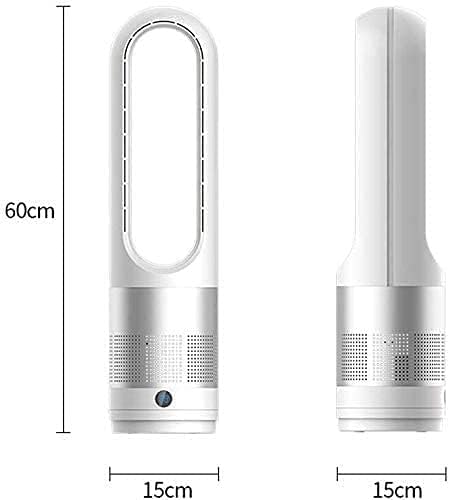
Image 6: Dimensional drawing of the fan, indicating a height of 60cm and a base diameter of 15cm.
8. Warranty and Customer Support
SABYDICAR is committed to providing excellent service. If you are not satisfied with the product or encounter any quality problems, please contact our customer support team in a timely manner.
For assistance, please refer to the contact information provided with your purchase or visit the official SABYDICAR website.