1. Introduction
This manual provides essential instructions for the proper setup, operation, and maintenance of your TREND Networks VDV II Series Coax Remote Units. These units are designed to extend the testing capabilities of VDV II Series cable testers, facilitating efficient verification and troubleshooting of coax cable installations.
The VDV II Series Coax Remote Units are an accessory for the VDV II Series cable testers, which are used to check the integrity of copper cables in various installations, including telephone, data network, and video/security cabling.
2. Product Overview
The TREND Networks VDV II Series Coax Remote Units (#1 - #12) consist of a set of twelve numbered remote identifiers specifically designed for coax cable testing. These remotes enable wire map testing and identification of cable faults when used with a compatible VDV II Series cable tester.

Figure 2.1: A set of 12 blue TREND Networks VDV II Series Coax Remote Units, numbered 01 through 12, arranged in two rows of six on a blue plastic holder.
2.1. Package Contents
- 12 x Coax Remote Units (numbered #1 to #12)
- Storage holder for remote units
Note: The VDV II Series cable tester is sold separately and is required for the operation of these remote units.
3. Setup
To prepare the Coax Remote Units for use, follow these steps:
- Identify Remote Units: Each remote unit is clearly numbered from #1 to #12. Select the appropriate remote unit for the cable run you intend to test.
- Connect to Cable: Connect one end of the coax cable to be tested to a VDV II Series cable tester (main unit).
- Attach Remote Unit: Connect the other end of the coax cable to one of the numbered Coax Remote Units. Ensure a secure connection.
- Strategic Placement: For efficiency, place the remote units at various outlet locations before returning to the central testing point (e.g., server room) to perform multiple tests sequentially. This eliminates the need to move back and forth for each individual test.
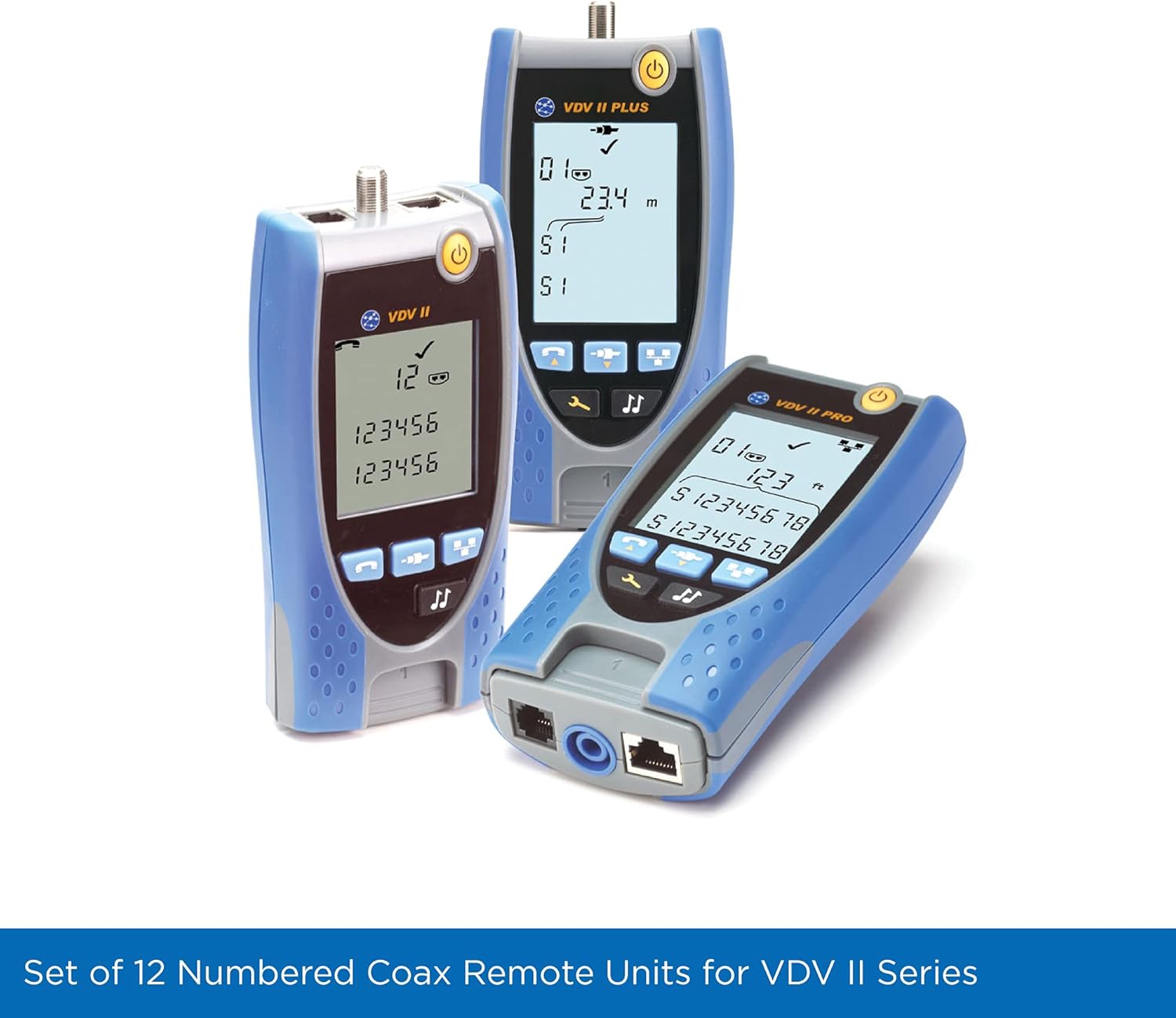
Figure 3.1: Various TREND Networks VDV II Series cable testers displayed alongside a set of coax remote units, illustrating their intended use together.
4. Operating Instructions
Once the Coax Remote Units are connected to the cables and the VDV II Series tester, you can proceed with testing:
- Power On Tester: Turn on your VDV II Series cable tester.
- Select Test Mode: Refer to your VDV II Series tester's manual to select the appropriate coax cable test mode, typically a wire map or continuity test.
- Initiate Test: Start the test sequence on the main VDV II Series tester.
- Read Results: The tester's screen will display the test results, including the identification number of the connected remote unit (e.g., #1, #2, etc.) and any detected wiring faults. This allows for immediate identification of the tested cable run.
- Interpret Wire Map: The tester will indicate if the cable has opens, shorts, or split pairs, and confirm correct wiring. The remote unit's number helps pinpoint the exact location of the cable being tested.
4.1. Benefits of Using Remote Units
- Increased Efficiency: By pre-connecting multiple remote units, you can perform tests from a single location without repeatedly moving between the tester and cable endpoints.
- Rapid Fault Detection: Real-time identification of cable problems simplifies troubleshooting and improves productivity.
- Clear Identification: The numbered remotes provide clear identification on the tester's screen, making it easy to match test results to specific cable runs.
5. Maintenance
Proper maintenance ensures the longevity and reliable performance of your Coax Remote Units.
- Cleaning: Use a soft, dry cloth to clean the remote units. Avoid abrasive cleaners or solvents that could damage the plastic housing or numbering.
- Storage: Store the remote units in their provided holder or a protective case when not in use. Keep them in a cool, dry environment, away from direct sunlight and extreme temperatures.
- Inspection: Periodically inspect the connectors for any signs of wear, corrosion, or damage. Ensure the numbering is clear and legible.
- Handling: Handle the units with care to prevent physical damage to the connectors or housing.
6. Troubleshooting
If you encounter issues while using the Coax Remote Units, consider the following:
- Remote Unit Not Detected:
- Ensure the coax cable is securely connected to both the VDV II Series tester and the remote unit.
- Verify that the cable itself is not faulty by testing it with a known good remote or directly.
- Check the VDV II Series tester's settings to ensure it is configured for coax testing.
- Incorrect Wire Map Reading:
- Confirm that the remote unit number displayed on the tester matches the physical remote unit connected to the cable being tested.
- Inspect the coax cable for any visible damage or improper termination.
- Ensure the VDV II Series tester is functioning correctly by performing a self-test or testing a known good cable.
- Physical Damage: If a remote unit appears physically damaged, it may not function correctly and should be replaced.
For further assistance, refer to the VDV II Series cable tester's instruction manual or contact TREND Networks support.
7. Specifications
| Feature | Detail |
|---|---|
| Brand | TREND Networks |
| Model Name | VDV II Series Coax Remote Units |
| Style | Kit of 12 x coax remote units |
| Color | Blue |
| Item Weight | 4.4 ounces |
| Package Dimensions | 5.59 x 2.36 x 0.79 inches |
| Compatibility | VDV II Series Cable Testers |
| Units Included | 12 (numbered #1 to #12) |
8. Warranty and Support
8.1. Product Warranty
TREND Networks products are manufactured to high standards and are typically covered by a manufacturer's warranty against defects in materials and workmanship. For specific warranty terms and conditions applicable to your VDV II Series Coax Remote Units, please refer to the documentation included with your original VDV II Series cable tester or visit the official TREND Networks website.
8.2. Technical Support
Should you require technical assistance, have questions about product functionality, or need to report an issue, please contact TREND Networks customer support. Contact information can typically be found on the official TREND Networks website or in the documentation provided with your VDV II Series cable tester.
Online Resources: For additional information, FAQs, and product updates, visit the official TREND Networks website: www.trend-networks.com


