
Introduction
This manual provides detailed instructions for the DALY Smart BMS Li-ion 20S 72V 40A with Programmable Bluetooth Module. This device is designed for lithium battery protection, offering precise monitoring and control capabilities.
The BMS supports up to 40A continuous discharge and 20A charge current, suitable for various high-current applications. It features a high-quality IC chip for accurate detection of over-charge, over-discharge, and voltage balancing. Key protections include over-discharge, over-current, over-voltage during charging, and low-temperature charging protection (down to -1°C). The integrated Bluetooth module allows for mobile app control and monitoring of battery status and parameter settings.
Video: Overview of DALY Smart BMS features and basic connection.
Setup and Installation
Proper installation is crucial for the safe and effective operation of your DALY Smart BMS. Please follow these steps carefully.
Package Contents
- SMART BMS (1 unit)
- Balance Wires (1 set)
- Bluetooth Module (for Mobile APP IOS & Android) (1 unit)
- UART Cable (for PC screen) (1 unit)
- English Version Wiring Manual (1 unit)
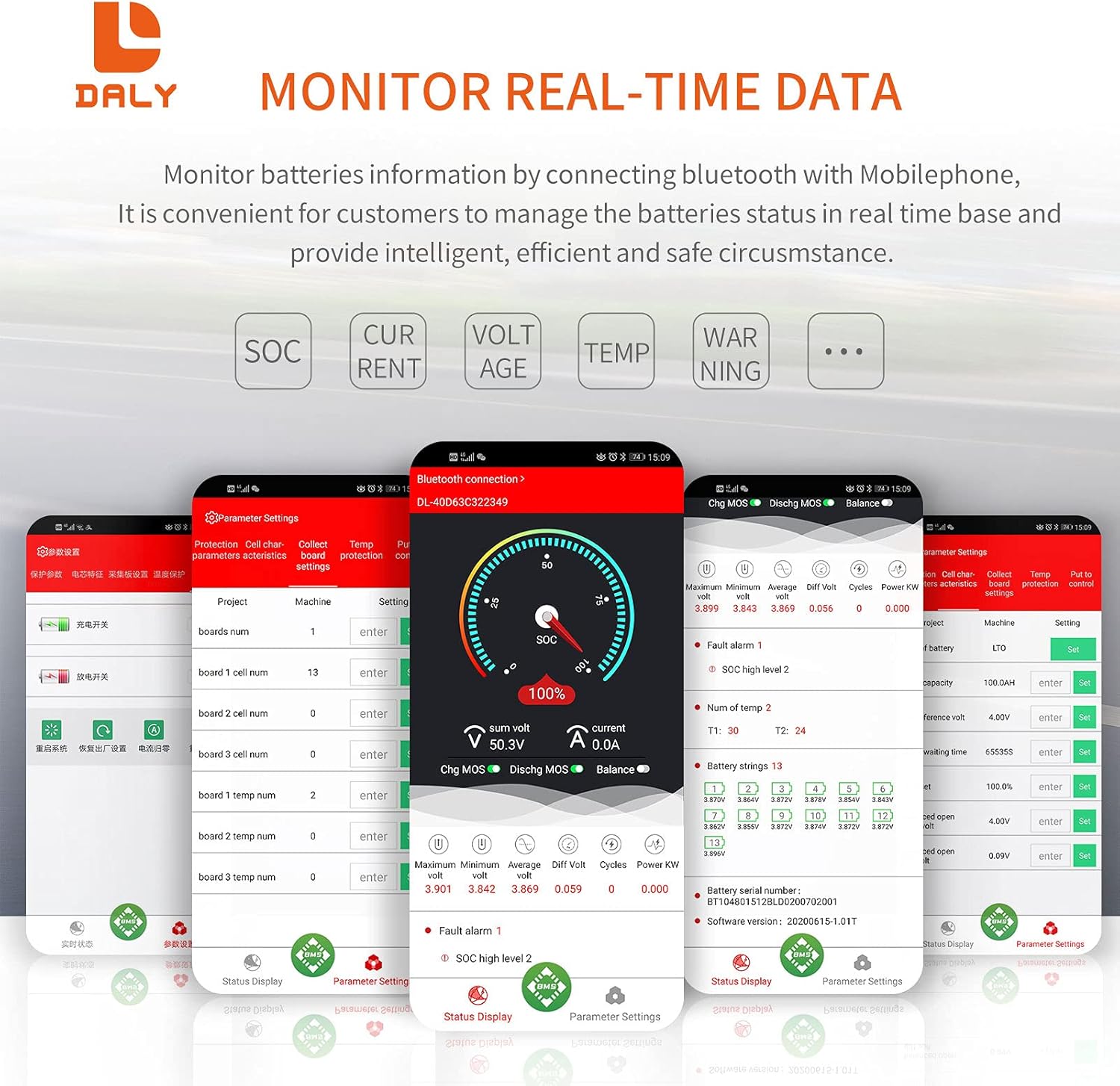
Image: Contents of the DALY Smart BMS package. Ensure all components are present before proceeding.
Wiring Instructions
- Preparation: Ensure all power sources are disconnected from the battery pack. Use appropriate safety gear. Soldering machine (suggested 662°F/350°C), scissors, double-sided tape, tin wire, and a multimeter are recommended tools.
- Balance Wires Connection: Connect the balance wires to the battery cells. It is critical to connect the balance wires to the battery pack before connecting the black wire (B-) and red wire (P-) to the BMS.
- BMS Connection: Connect the black wire (B-) from the battery pack to the B- terminal on the BMS. Connect the red wire (P-) from the battery pack to the P- terminal on the BMS.
- NTC and Bluetooth Module: Plug in the NTC (Negative Temperature Coefficient) sensor and the Bluetooth module into their respective ports on the BMS.
- Activation: Press the button on the Bluetooth module to activate the smart BMS.
- Initial Check: Use a multimeter to verify the internal resistance of the BMS. A reading of approximately 0Ω (multimeter deviation 0.1Ω) indicates proper conduction.

Image: Comprehensive wiring diagram illustrating how to connect the BMS to a battery pack, motor, and charger.
Important Safety Note: Please disconnect balance wires white end and BMS connection port before welding black and red balance wires on the battery pack. Keep the BMS red cooling surface side uncovered.
Mobile App and PC Software Setup
- Download App: Download the "Smart BMS" app from the Huawei or Apple App Store.
- Connect via Bluetooth: Open the Smart BMS app and connect to the corresponding Bluetooth device number.
- PC Software: For PC monitoring, connect the UART cable and open the host computer software.

Image: Mobile app interface for monitoring battery parameters via Bluetooth.
Operation
The DALY Smart BMS provides comprehensive monitoring and programmable protection features accessible via the mobile app or PC software.
Monitoring Battery Parameters
Once connected via Bluetooth or UART, you can monitor various real-time battery parameters:
- State of Charge (SOC)
- Current (Charge/Discharge)
- Voltage (Total and individual cell voltages)
- Temperature (NTC sensor readings)
- Warning/Alarm Status

Image: Mobile app interface showing detailed battery status and parameters.
Programmable Protection Functions
The BMS offers several programmable protection features to safeguard your battery pack:
- Over-charge Protection: Stops charging when battery voltage reaches a set limit.
- Over-discharge Protection: Stops discharging when battery voltage drops below a set limit.
- Over-current Protection: Stops charging or discharging if current exceeds programmed limits.
- Temperature Protection: Stops all current if battery temperature reaches critical limits (low temperature charging protection at -1°C).
- Short-circuit Protection: Prevents damage from short circuits.
- Voltage Balancing: Actively balances cell voltages for optimal battery health.
Initial Setup of Battery Capacity:
For the first power-on, the battery capacity must be set to the actual capacity of your battery pack. The initial password for parameter changes is 123456. Failure to set the correct capacity will result in inaccurate State of Charge (SOC) calculations.

Image: Visual representation of the 12 protection functions integrated into the DALY Smart BMS.
Maintenance
To ensure the longevity and optimal performance of your DALY Smart BMS and battery pack, consider the following maintenance guidelines:
- Regular Monitoring: Periodically check battery parameters via the mobile app or PC software to identify any anomalies early.
- Temperature Management: Ensure the BMS and battery pack operate within their specified temperature ranges. The BMS includes low-temperature charging protection at -1°C to prevent damage. Avoid operating or charging the battery below this temperature.
- Firmware Updates: Check the manufacturer's website or app for any available firmware updates to improve performance and address potential issues.
- Cleanliness: Keep the BMS free from dust and moisture. While the product description mentions "Waterproof" and "Dustproof" as features, maintaining a clean environment is always recommended.
- Connection Integrity: Periodically inspect all wiring connections for tightness and corrosion. Loose connections can lead to poor performance or safety hazards.
Troubleshooting
This section addresses common issues you might encounter with your DALY Smart BMS.
Common Issues and Solutions
| Problem | Possible Cause | Solution |
|---|---|---|
| BMS not activating / No power | Incorrect wiring; Bluetooth module not plugged in or activated; Battery voltage too low. | Verify all wiring connections according to the diagram. Ensure the Bluetooth module is securely plugged in and its button is pressed to activate the BMS. Check battery voltage. |
| Bluetooth connection issues | Bluetooth module not activated; App not installed correctly; Interference; Out of range. | Ensure the Bluetooth module is activated. Reinstall the "Smart BMS" app. Move closer to the BMS. Check for other Bluetooth devices causing interference. |
| Inaccurate SOC (State of Charge) reading | Incorrect battery capacity set in the app. | Access "Parameter Settings" in the app (password: 123456) and set the "rated capacity" to the actual capacity of your battery pack. |
| Over-charge/Over-discharge protection triggering prematurely | Protection parameters set too conservatively; Cell imbalance. | Review and adjust protection parameters in the app if necessary (consult battery manufacturer specifications). Allow the BMS to balance cells. |
| BMS heating excessively | High current draw; Inadequate ventilation; Faulty component. | Ensure the BMS is not operating beyond its rated current. Provide adequate airflow around the BMS. If heating persists, contact support. |
Specifications
Key technical specifications for the DALY Smart BMS Li-ion 20S 72V 40A.
| Feature | Detail |
|---|---|
| Product Type | Li-ion 20S 40A Common Port with Balance |
| Discharge Current | 40A (Continuous) |
| Charge Current | 20A |
| Over-discharge Voltage | 2.7V ± 0.1V (per string) |
| Overcharge Voltage | 4.25V ± 0.05V (per string) |
| Charge Voltage | 84V |
| Communications | UART, Bluetooth (Optional: CAN/RS485) |
| Product Dimensions | 5.04 x 2.6 x 0.71 inches (128 x 66 x 18 mm) |
| Item Weight | 12.8 ounces (~337g) |
| Output Wire | 16AWG |
| Balance Wires | 24AWG/350mm |
| Special Feature | Mobile App Control |
| Connectivity Technology | Bluetooth |
| Power Source | Battery Powered |
Image: Diagram showing the physical dimensions and key electrical specifications of the BMS.

Image: Exploded view of the BMS, highlighting its internal construction and components.
Warranty Information
Specific warranty details for the DALY Smart BMS Li-ion 20S 72V 40A are not provided in the available product data. For warranty terms and conditions, please refer to the manufacturer's official website or contact DALY customer support directly.
Support and Contact Information
For further assistance, technical support, or inquiries regarding your DALY Smart BMS, please use the following resources:
- Manufacturer: DALY
- Online Store: Visit the official DALY Store on Amazon for product information and updates.
- Wiring Manuals and Tutorials: Additional wiring manuals and tutorial videos may be available on the DALY website.


