
1. Introduction
This manual provides detailed instructions for the installation, operation, and maintenance of your DALY Smart BMS LiFePo4 4S 12V 200A with Programmable Bluetooth Module. This Battery Management System (BMS) is designed to protect and manage LiFePo4 battery packs, ensuring their safe and efficient operation. Please read this manual thoroughly before installation and use.
2. Safety Information
Always observe the following safety precautions to prevent injury or damage to the BMS and battery pack:
- Professional Installation Recommended: Installation should be performed by qualified personnel with experience in battery systems and electronics.
- Correct Polarity: Ensure all connections are made with correct polarity. Incorrect wiring can cause severe damage to the BMS and battery.
- Insulation: Properly insulate all exposed wires and terminals to prevent short circuits.
- Voltage Compatibility: Verify that the BMS voltage and cell count match your battery pack configuration (4S 12V LiFePo4).
- Avoid Water and Moisture: Do not expose the BMS to water, moisture, or corrosive environments.
- Temperature: Operate the BMS within its specified temperature range.
- Emergency Shutdown: Familiarize yourself with emergency shutdown procedures for your battery system.
3. Package Contents
Verify that all items are present in your package:
- DALY Smart BMS (200A FAN LiFePo4 4S 12V BT)
- Balance Wires
- Bluetooth Module (for Mobile APP IOS & Android)
- UART Cable (for PC screen connection)
- English Version Wiring Manual (this document)

Image: Contents of the DALY Smart BMS package.
4. Product Features
The DALY Smart BMS offers comprehensive protection and monitoring for your LiFePo4 battery pack:
- High Current Capability: Supports up to 200A continuous discharge and 100A charge current.
- Programmable Temperature Protection: Automatically stops current flow if battery temperature limits are exceeded.
- Programmable Over-charge/Over-discharge Protection: Prevents damage by stopping charging or discharging when voltage limits are reached.
- Programmable Over-current Protection: Safeguards against excessive current during charging and discharging.
- Voltage Balancing: High detection precision for voltage balancing across cells.
- SOC Calculation: Precise State of Charge (SOC) calculation with automatic learning function.
- Bluetooth Connectivity: Wireless monitoring and parameter setting via Android or iPhone mobile application.
- Common Port Design: Utilizes a single port for both charging and discharging.
- Integrated Cooling Fan: Ensures optimal operating temperature for high current applications.

Image: Overview of the 12 protection functions provided by the DALY Smart BMS.

Image: Internal component breakdown of the DALY Smart BMS.
5. Installation Guide
Careful wiring is critical for the correct and safe operation of the BMS. Follow these steps precisely:
5.1 Wiring Diagram

Image: Wiring diagram for the DALY Smart BMS.
5.2 Step-by-Step Wiring
- Prepare Tools: Ensure you have necessary tools such as a soldering machine (if needed, suggest using 662°F/350°C), scissors, double-sided tape, tin wire, and a multimeter.
- Connect Balance Wires: First, connect the balance wires to your battery pack. Ensure the balance wires are welded correctly.
- Connect BMS to Battery: Connect the main negative terminal (B-) of the battery pack to the B- terminal on the BMS. Connect the main positive terminal (B+) of the battery pack to the P+ terminal (if applicable, or ensure the charger/load positive connects directly to battery B+).
- Connect Balance Wire Harness: Plug the balance wire harness into the BMS connection port. Ensure the red balance wire is connected to the highest positive cell.
- Connect Load/Charger: Connect the negative terminal of your motor/load and charger to the P- terminal on the BMS. The positive terminals of the motor/load and charger connect directly to the battery pack's positive terminal (B+).
- Install Cooling Fan: Keep the red cooling surface of the BMS uncovered to allow for proper fan operation.
- Verify Wiring: Before proceeding, use a multimeter to measure the voltage between adjacent balance cables. This voltage should approximate the nominal voltage of a single cell string, confirming correct wiring.
- Activate BMS: Plug in the NTC (temperature sensor) and Bluetooth module. Press the activation button on the BMS to power it on.
Important Note: Disconnect balance wires and the BMS connection port before welding black and red balance wires on the battery pack.
Video: This video demonstrates the connection process for the DALY Smart BMS, including measuring cell voltages, connecting the balance wires, activating the BMS, and connecting to the mobile application.
6. Operation Guide
The DALY Smart BMS can be monitored and configured using a mobile application via Bluetooth or a PC software via UART.
6.1 Mobile App Installation and Connection
- Download App: Search for "Smart BMS" in the Huawei App Gallery or Apple App Store and download the application.
- Open App and Connect: Open the Smart BMS app on your mobile device. Ensure Bluetooth is enabled. The app will display available BMS devices. Select the corresponding device number to connect.
- View Parameters: Once connected, you can view real-time battery parameters such as total voltage, current, State of Charge (SOC), individual cell voltages, and temperature.
- Set Parameters: Navigate to the "Parameter Settings" section. For initial power-on, the battery capacity must be set to the actual capacity of your battery pack. The initial password for parameter modification is 123456. You can also adjust protection thresholds for over-charge, over-discharge, over-current, and temperature.

Image: DALY Smart BMS connected to a mobile application for monitoring and control.
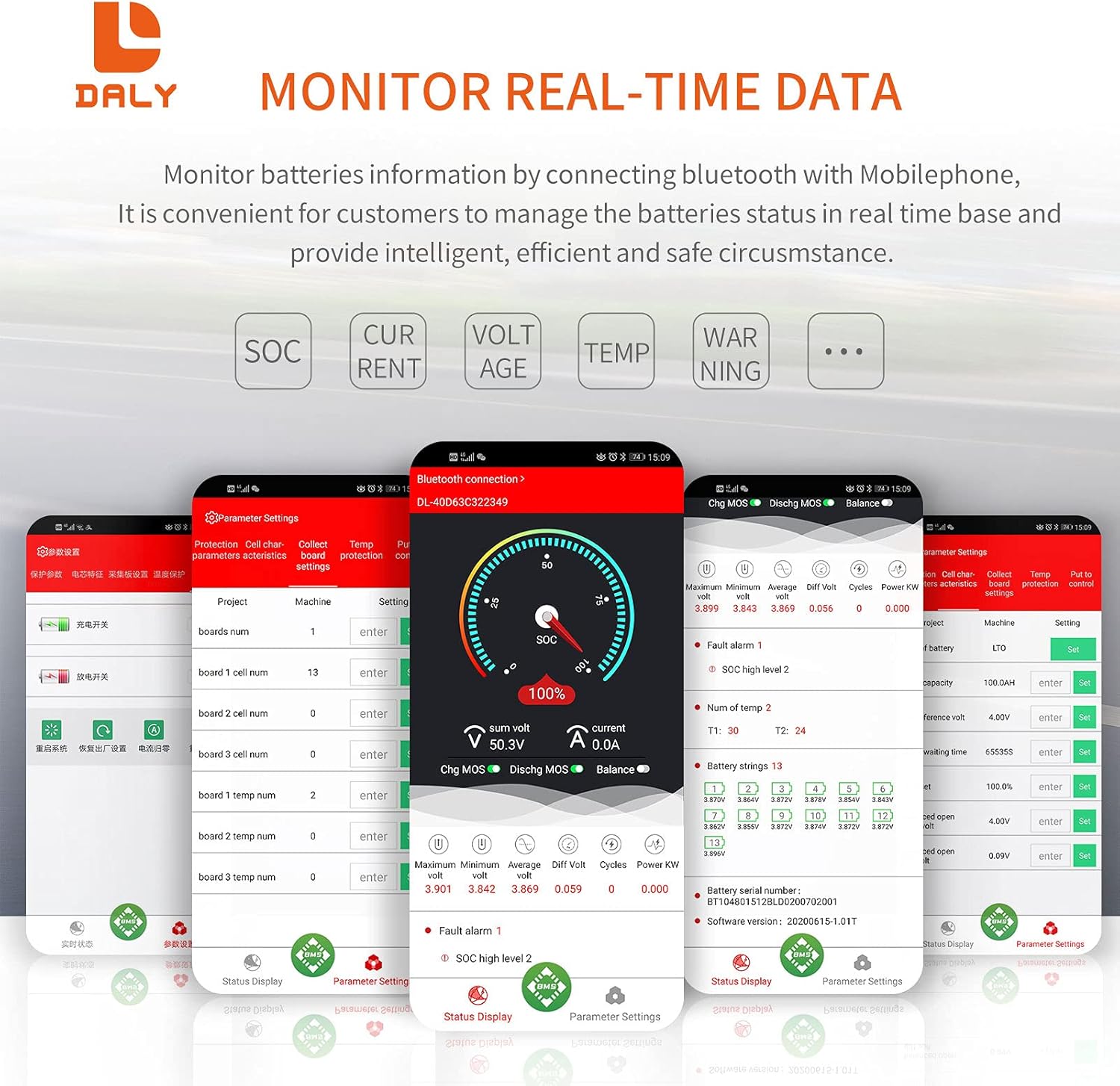
Image: Real-time data monitoring interface of the Smart BMS app.
6.2 PC Software Connection
Connect the UART cable from the BMS to your computer. Open the host computer software to view detailed battery information and adjust parameters. The PC software provides a comprehensive display of battery status and settings.
7. Maintenance
To ensure the longevity and optimal performance of your DALY Smart BMS and battery pack:
- Regular Inspection: Periodically check all wiring connections for tightness and signs of corrosion or damage.
- Cleanliness: Keep the BMS free from dust and debris, especially around the cooling fan.
- Software Updates: Check for available firmware updates for the BMS and app to ensure you have the latest features and bug fixes.
- Battery Health: Monitor battery cell voltages and temperatures regularly through the app to detect any anomalies early.
8. Troubleshooting
If you encounter issues with your DALY Smart BMS, consider the following common problems and solutions:
| Problem | Possible Cause | Solution |
|---|---|---|
| BMS not activating/no power | Incorrect wiring, low battery voltage, activation button not pressed. | Verify all wiring according to the diagram. Ensure battery voltage is above the minimum threshold. Press the activation button on the BMS. |
| Bluetooth connection issues | Bluetooth module not plugged in, module faulty, app issues, out of range. | Ensure Bluetooth module is securely connected. Restart the app and phone's Bluetooth. Move closer to the BMS. |
| Over-charge/Over-discharge protection triggered | Battery voltage exceeded/fell below set limits. | Check charger output voltage or load. Allow battery to return to safe voltage. Review and adjust protection parameters in the app if necessary (with caution). |
| Over-current protection triggered | Load drawing too much current, short circuit. | Reduce load or check for short circuits. Review and adjust over-current parameters in the app if necessary (with caution). |
| Cell voltage imbalance | Natural cell variation, prolonged disuse. | The BMS has an active balancing function. Ensure the battery is charged to full capacity to allow balancing to occur. If severe, manual balancing may be required by a professional. |
9. Specifications
Key technical specifications for the DALY Smart BMS LiFePo4 4S 12V 200A:
| Feature | Specification |
|---|---|
| Product Type | Smart BMS for LiFePo4 Battery |
| Cell Configuration | 4S (4 Series) |
| Nominal Voltage | 12V |
| Continuous Discharge Current | 200A |
| Continuous Charge Current | 100A |
| Over-discharge Current Protection | 300A ± 30A (Configurable) |
| Overcharge Current Protection | 300A ± 30A (Configurable) |
| Overcharge Voltage (per string) | 3.75V ± 0.05V (Configurable) |
| Over-discharge Voltage (per string) | 2.2V ± 0.1V (Configurable) |
| Charge Voltage | 14.6V (Configurable) |
| Communication | UART (Single Communication), Bluetooth |
| Output Wire Gauge | 6AWG |
| Balance Wires Gauge/Length | 24AWG / 350mm |
| Product Dimensions | 235mm x 130mm x 52mm (approx. 9.21 x 4.72 x 2.09 inches) |
| Item Weight | ~1844g (approx. 4.07 pounds) |
| Material | Copper |

Image: Fan specifications and physical dimensions of the BMS.
10. Warranty and Support
For warranty information, technical support, or service inquiries, please refer to the official DALY website or contact your point of purchase. Keep your purchase receipt as proof of purchase for warranty claims.