
SVBONY SV406
Contents
SVBONY SV406 HD 25-75x100 Angled Spotting Scope Instruction Manual
Model: SV406
Brand: SVBONY
1. Introduction
This manual provides comprehensive instructions for the proper setup, operation, and maintenance of your SVBONY SV406 HD 25-75x100 Angled Spotting Scope. Please read this manual thoroughly before using your device to ensure optimal performance and longevity.

Figure 1: SVBONY SV406 HD 25-75x100 Angled Spotting Scope.
2. What's Included
Your SVBONY SV406 Spotting Scope package includes the following components:
- 1x SVBONY SV406 Spotting Scope
- 1x Carrying Case
- 1x Lens Cover
- 1x Eyepiece Cover
- 1x Lens Cleaning Cloth
- 1x User Manual (this document)

Figure 2: Key components of the SVBONY SV406 Spotting Scope.
3. Product Features
- Dual Focus System: Allows for quick and precise focusing, enhancing clarity and detail.
- Large 100mm Objective Lens: Gathers ample light for bright, clear images, even in low-light conditions.
- 25-75x Magnification: Offers a versatile range of zoom for various observation distances.
- Twist-Up Eyecups: Provides comfortable viewing for users with or without eyeglasses.
- Waterproof and Fogproof Design: Ensures reliable performance in diverse weather conditions. Note: Do not submerge in water for extended periods.
- FMC (Fully Multi-Coated) Lenses: Enhances light transmission and color fidelity for sharp, vivid images.
- Retractable Sunshade: Integrated into the main barrel to reduce glare and improve viewing contrast.
4. Setup
4.1 Attaching to a Tripod
The SVBONY SV406 Spotting Scope features a standard threaded connection for tripod mounting, allowing for stable observation.
- Extend the tripod legs to a stable position.
- Remove the quick-release plate from the tripod head.
- Attach the quick-release plate to the tripod mounting foot on the spotting scope.
- Secure the spotting scope with the attached quick-release plate back onto the tripod head.
- Adjust the tripod height and angle as needed for comfortable viewing.

Figure 3: Spotting scope securely mounted on a tripod.
4.2 Attaching a Phone Adapter (Optional)
To capture photos or videos through your spotting scope, you can attach a compatible phone adapter.
- Place your smartphone into the phone adapter, ensuring it is securely held.
- Align the phone camera with the adapter's eyepiece opening.
- Carefully attach the phone adapter onto the eyepiece of the spotting scope.
- Adjust the adapter to ensure the phone camera is centered and aligned for a clear view.
Video 1: Demonstrates attaching a phone adapter to an SVBONY spotting scope (model SV28 PLUS shown, process is similar for SV406).
5. Operating Instructions
5.1 Adjusting Magnification
The SV406 offers variable magnification from 25x to 75x. Rotate the magnification ring on the eyepiece to select your desired zoom level.

Figure 4: The magnification ring allows adjustment from 25x to 75x.
5.2 Focusing the Image
The dual focus system allows for both coarse and fine adjustments to achieve a sharp image.
- Aim the spotting scope at your target.
- Adjust the magnification to the lowest setting (25x) for easier initial focusing.
- Use the coarse focus wheel (larger knob) to bring the image into approximate focus.
- Use the fine focus wheel (smaller knob) for precise adjustments until the image is perfectly sharp.
- If changing magnification, re-adjust focus as needed.

Figure 5: The dual focus system provides both coarse and fine adjustment for clarity.
Video 2: Demonstrates the focusing procedure for an SVBONY spotting scope.
5.3 Eyecup Adjustment
The twist-up eyecups can be adjusted for comfortable viewing, whether you wear eyeglasses or not.
- For Eyeglass Wearers: Keep the eyecup in its fully retracted (down) position.
- For Non-Eyeglass Wearers: Twist the eyecup upwards to the desired height to block stray light and achieve a full field of view.
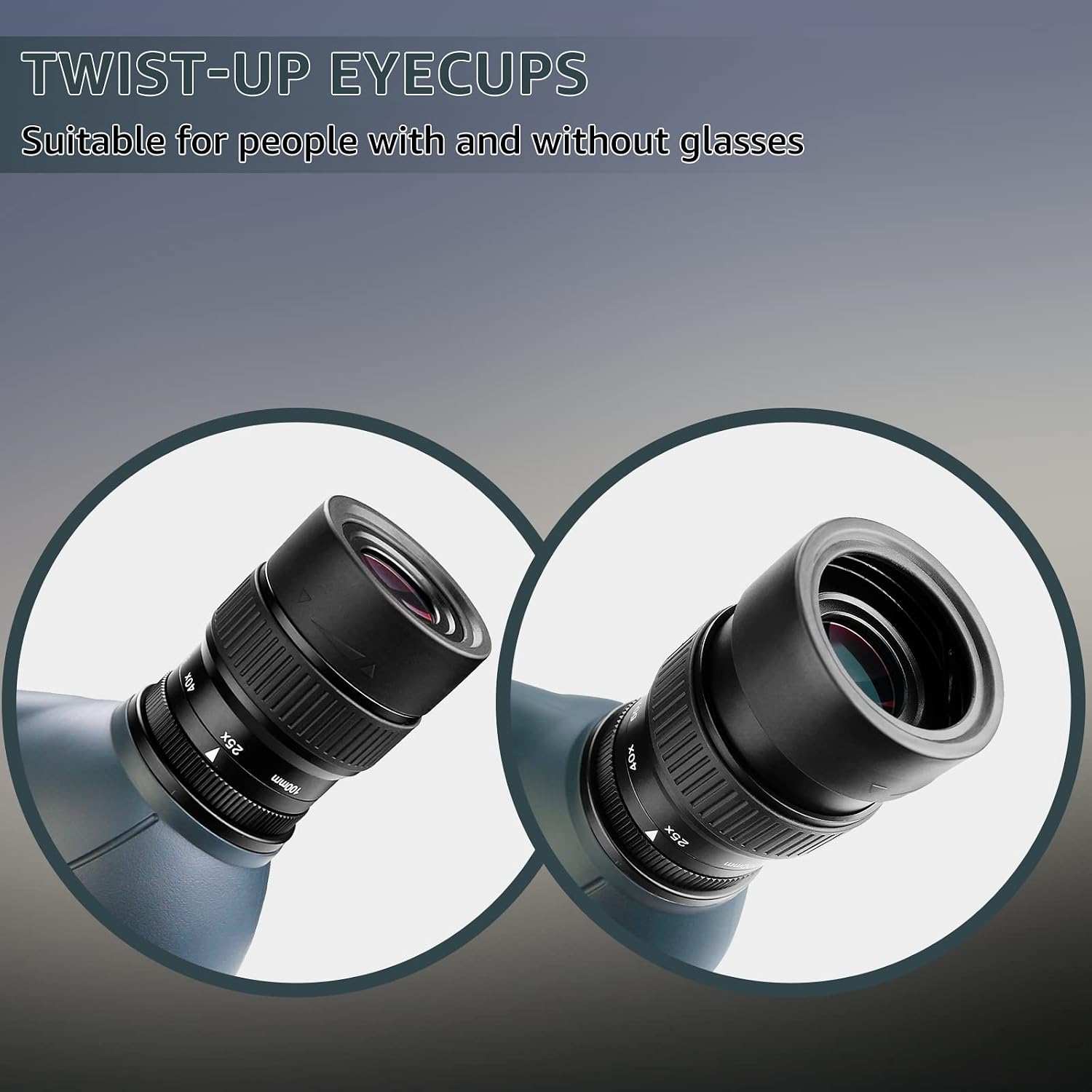
Figure 6: Twist-up eyecups for personalized viewing comfort.
5.4 Retractable Sunshade
Extend the sunshade by pulling it forward from the objective lens barrel to reduce glare in bright conditions.
6. Maintenance
- Cleaning Lenses: Use the provided lens cleaning cloth or a soft, lint-free cloth. For stubborn spots, use a small amount of lens cleaning fluid applied to the cloth, not directly to the lens.
- Body Cleaning: Wipe the body of the scope with a soft, damp cloth. Avoid harsh chemicals.
- Storage: Store the spotting scope in its carrying case in a cool, dry place when not in use. Ensure lens and eyepiece covers are in place.
- Waterproof/Fogproof Care: While waterproof and fogproof, avoid prolonged submersion in water. If exposed to rain, wipe dry promptly.
7. Troubleshooting
7.1 Image Appears Blurry or Unclear
- Focus Adjustment: Ensure both the coarse and fine focus wheels are properly adjusted for your viewing distance. Refer to Section 5.2.
- Eyecup Position: Verify the eyecup is correctly positioned for your use (up for non-eyeglass wearers, down for eyeglass wearers). Refer to Section 5.3.
- Lens Cleanliness: Check if the objective lens or eyepiece is dirty or smudged. Clean according to Section 6.
- Atmospheric Conditions: Heat haze or atmospheric distortion can affect image clarity, especially over long distances.
7.2 Chromatic Aberration (Color Fringing)
Some degree of chromatic aberration, appearing as color fringing around high-contrast objects, can occur in optical instruments. This is often more noticeable at higher magnifications. While the SV406 is designed to minimize this with FMC coatings, extreme conditions or specific targets may still show some effect. Adjusting magnification or focus slightly can sometimes reduce its appearance.
8. Specifications
| Feature | Specification |
|---|---|
| Model Number | FCAF9355C |
| Magnification | 25-75x |
| Objective Lens Diameter | 100 mm |
| Field of View (at 1000 yards) | 90-48 ft |
| Lens Coating | Fully Multi-Coated (FMC) |
| Waterproof/Fogproof | Yes |
| Eyecups | Twist-up |
| Focus System | Dual Focus |
| Material | Rubber |
| Product Dimensions | 50.5 x 15.5 x 15.3 cm |
| Item Weight | 2.75 kg |
9. Warranty and Support
For warranty information, technical support, or service inquiries, please refer to the contact details provided with your product packaging or visit the official SVBONY website. Keep your purchase receipt as proof of purchase for any warranty claims.
Ask a question about this manual
Ask about setup, troubleshooting, compatibility, parts, safety, or missing instructions. Manuals+ will review the question and use this page’s manual context to help answer it.